
alainassaf
Use of Remote Desktop Manager on multiple monitors
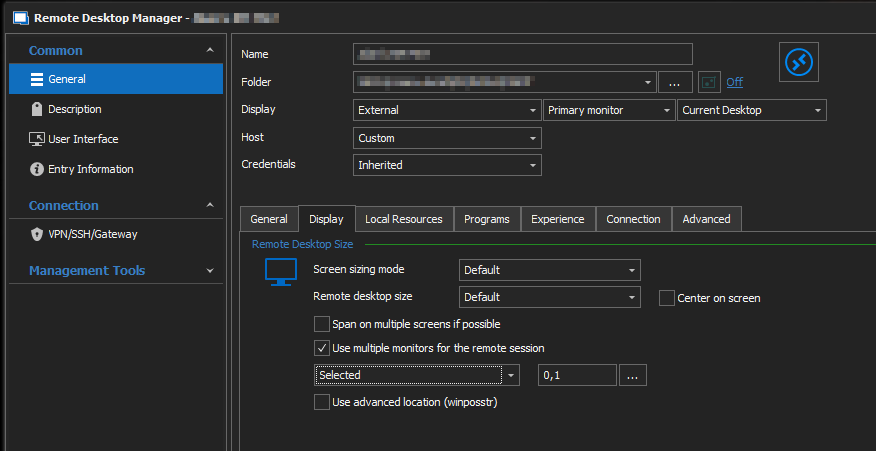
It appears everything fiskhill mentioned is available within the connection properties without having to edit the rdp file. This still opens externally in MSTSC, but at least it's configured in the same interface. I'm using this in version 2022.1.16.0.
XenServer Dashboard???
David,
I tried a single node with root credentials and nothing comes up. We're running XenServer 7.6.
Thanks,
Alain
XenServer Dashboard???
Etienne,
Thank you for your reply. I should have been more detailed in my question. How is it configured? I manage a large Citrix farm running on XenServer, but I've tried to configure this connection with my Pool Masters and it doesn't seem to do anything. No hosts/VM show up. Is there an additional component I need to make this work?
Thanks,
Alain
XenServer Dashboard???
There does not seem to be any information on what the XenServer Dashboard is. I cannot find anything in the online help, user manual, or forums. What is this supposed to be? It's not just a connection to a XenServer's webpage where you can download XenCenter is it?
Thanks,
Alain
VMWare Horizon Client
David,
When I use the above solution - "uncheck everything except for the Standalone checkbox", I get the attached error.
If I configure the connection to "Start in unattended mode" then everything connects, but it takes over the whole screen.
I've attached a screenshot from the RDM About tab.
Thanks,
Alain