Use of Remote Desktop Manager on multiple monitors

Greetings,
We are looking for a solution to allow us to full screen span our remote desktop connection to two out of three monitors in our environment. That gives us visibility on one monitor to the local machine we are on, and then two monitors to our virtual environment. Is this something we can do with Remote Desktop Manager?
My other question is we were wondering if there is a way to allow local pc notifications (such as outlook email notifications) to come in front of a full screen remote session?
Thank you in advance.
chad
All Comments (7)
Hello,
From what you describe, I presume you are on Windows 10?
For your first request, using only 2 monitors out of the 3 connected to your PC for a session is not possible. This is a technological limitation from Microsoft RDP. In External Mode, we open MSTSC.exe which is the native Remote Desktop Client of Windows.
For your second request, this also seems to be a limitation from MSTSC.exe. If I open a session in Full Screen Mode and receive an email, I do not see the notification from my local Desktop.
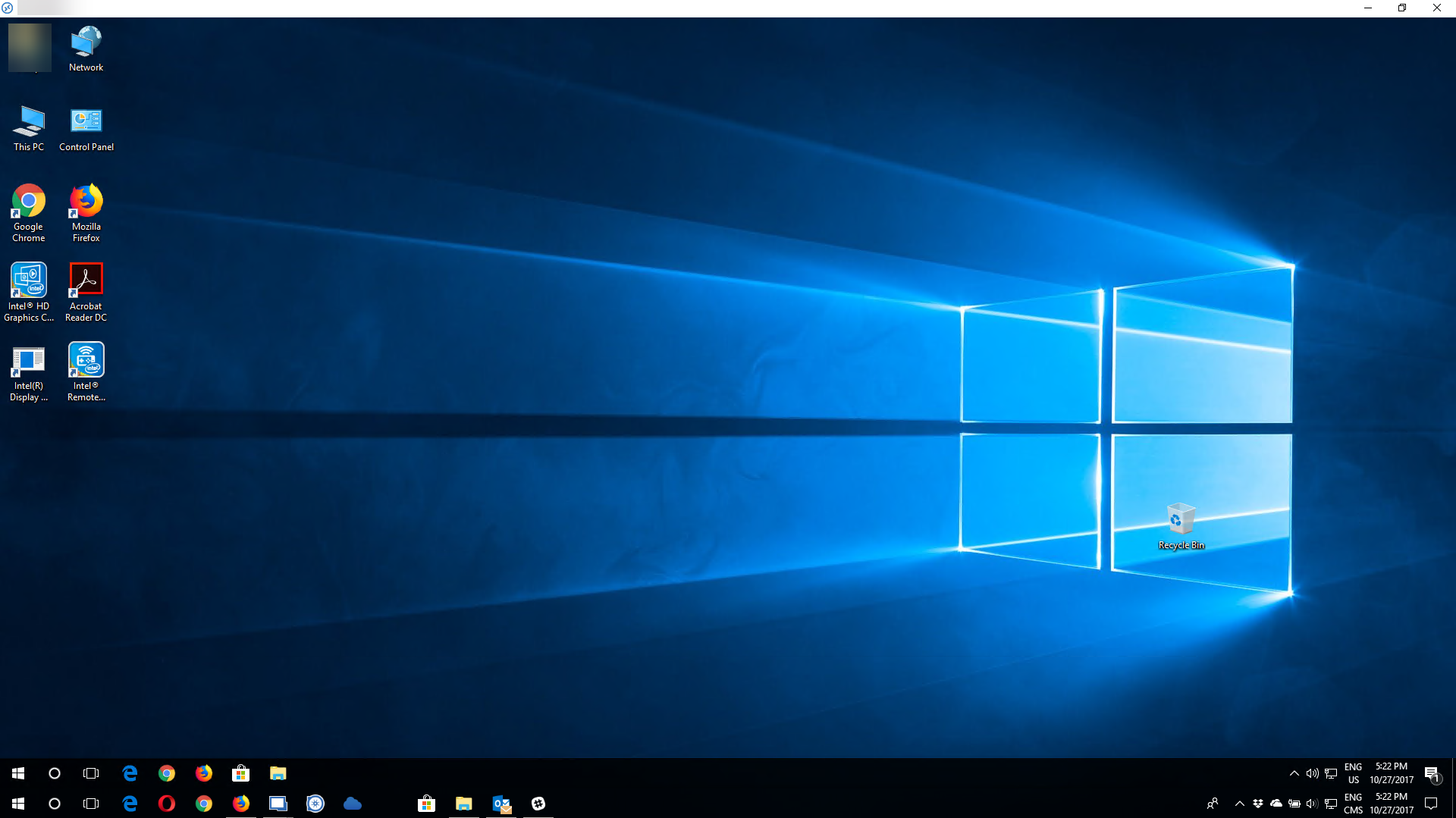
However, the only way that I found to have notifications from your local system when you are on a remote session is to use our Undocked mode but it's not quite Full Screen.
I have attached a screenshot for you to see what the Undocked mode would look like;
Please let me know if I misunderstood something.
Best regards,
Marc Beauséjour
2017-10-27_17-22-59.png
Is it an actual technical limitation of RDP though, as RDP can span two monitors now?
Running two separate RDM instances may actually work for me, but I would love to be able to open one program and have it open on two monitors (as I usually have my web browser open on one side for infrastructure related tasks) and my VM/work/RDP on the right.
Reviving this thread here. With mstsc, you can do mstsc /span and this has been possible for several years. I would like to do this in RDM as well.
https://community.spiceworks.com/topic/415808-remote-desktop-to-a-dual-monitor-workstation
Essentially, I would like to run my RDP session using RDM, but be able to span the RDP session on 2 monitors.
--------------------------------------------------------------------------------------------------------------------
I'm always using the latest beta RDM x64 version.
Local data source.
As far as I know it's not possible to do that with the RDP ActiveX
Regards
David Hervieux
OK, but can we at least use RDM to stretch the RDP session on 2 monitors? You can do this with the official Microsoft Remote Desktop app from the Microsoft Store. By stretching the RDP session across 2 monitors and keeping the resolution, we can then use Display Fusion or Splitview to make the RDP session have 2 virtual splits (i.e 2 virtual monitors). This will at least help me achieve having 1 virtual split per 1 physical monitor. I am currently using the Remote Desktop app to achieve this, but would much prefer to use RDM as my RDP handler.
--------------------------------------------------------------------------------------------------------------------
I'm always using the latest beta RDM x64 version.
Local data source.
If you wan to use only 2 of 3 monitors RDP accepts the setting selectedmonitors:s:0,1 which will run a muilti monitor RDP session showing the monitors on those 2 screens. You can see which screens are which by running the CMD MSTSC /l
You will have to select multi screen in the settings tab and then edit the RDP file using text editor and add the selectedmonitors:s:0,1 Using the monitor numbers that you want to use from the MSTSC /l cmd.
Here is an article that better explains it: https://www.nextofwindows.com/how-to-remote-desktop-in-full-screen-on-2-out-of-3-monitors
It appears everything fiskhill mentioned is available within the connection properties without having to edit the rdp file. This still opens externally in MSTSC, but at least it's configured in the same interface. I'm using this in version 2022.1.16.0.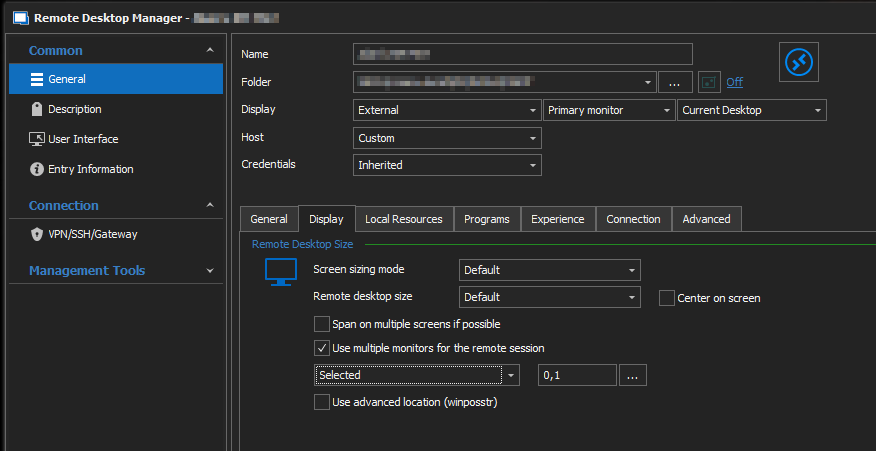
2022-03-04 14_05_15-Clipboard.png