
Frittenfett
Can't get MFA code on website login (RDM + DWL)
Hello,
I'm trying to add a new website to my RDM+DWL setup with activated MFA.
This website uses a three steps login: insert email -> next page -> insert password -> next page -> insert MFA -> logged in.
Username and password are working fine, since they are using the usual HTML form values and IDs. However, I'm struggling to add MFA as well.
The HTML form for this last step of the login process locks like this:
<form role="grid" class="next-form next-large sc-cHzrye kKMDjV">
    <div class="next-loading next-loading-inline sc-tAEdG joWiup">
        <div class="next-loading-wrap">
            <h3 class="sc-cZMLWB gmwOCX">Verify Virtual MFA Device</h3>
            <div role="alert" style="width: 100%;" class="next-message next-message-notice next-inline next-medium next-only-content"><i class="next-icon next-medium next-message-symbol next-message-symbol-icon"></i>
                <div class="next-message-content"><span class="sc-bdvvaa eRQARU">Your account has enabled virtual MFA verification. Please enter the security codes shown in the MFA application on your smart device.</span></div>
            </div>
            <div class="next-form-item next-large">
                <div class="next-form-item-label"><label>Username</label></div>
                <div class="next-form-item-control"><span class="sc-JkiRB hHABJO">my@email.address</span> </div>
            </div>
            <div class="next-form-item has-success next-large">
                <div class="next-form-item-label"><label required="">Security Code</label></div>
                <div class="next-form-item-control"><span class="next-input next-large"><input placeholder="Please enter the 6-digit security code" autocomplete="off" value="" data-spm-anchor-id="5176.3047821.0.i3.61504255Ka5LAb" style="background-image: url( [...]); background-repeat: no-repeat; background-position: calc(100% - 5px) 50%; background-size: 17px; cursor: auto;" height="100%"></span></div>
            </div>
            <div class="sc-dkQkSb gbobMG"><button style="min-width: 120px;" type="submit" disabled="" class="next-btn next-large next-btn-primary"><span class="next-btn-helper">Submit Verification</span></button></div>
        </div>
    </div>
</form>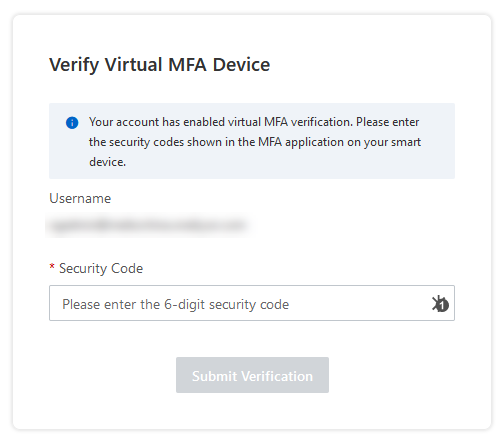
I'm not sure, how I could add this "input" to my RDM entry, so the MFA code gets filled in automatically.
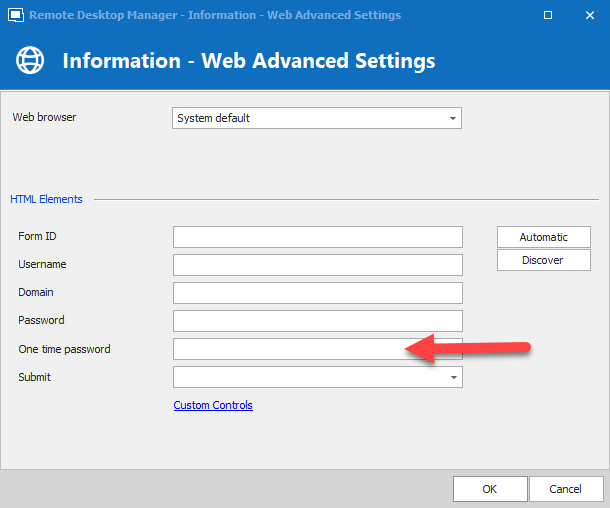
Is there anything I could add to this "one time password" element here?
"ssh tunnel" functionality for SCP / WinSCP
Hello,
WinSCP has a build in functionality for connecting though SSH tunnel:

It would be great, if we could use this in RDM as well. (Similar to your SSH session type)
Regards,
Frittenfett
RDM: Why several password entry types?
Hello,
I'm using RDM for storing credentials inside his database along with the corresponding host entries.
Simplified, my folder structure looks like this:
-- [root folder]
---- [host entries]
------ Host-1 - webinterface
------ Host-1 - SSH
------ Host-2 - RDP
---- [credentials]
------ user01
------ admin02
This way, I'm able to use credentials several times and configure every entry/folder with different ACLs, if needed. So far, so good :)
Unfortunately, RDM is differentiating between "webinterface credential" as an entry type, and "normal" credentials on the other hand.
So, using the example from above, let's say I would like to login to Host-1 by SSH. In this case, the entry would look something like this:

But this entry won't work to login to the webinterface as well. For this, I have to add a second entry from a different type:

Why are there two types of password entries?
It would be so much easier, if I could use the second entry for non-website-connections like SSH, RDP, ... as well. Otherwise, I have to keep adding two credential entries for every host ... and repeating this for every password rotation :-\
Thanks,
Frittenfett
Devolutions Web Login - keyboard shortcut
Hello,
I'm using "Devolutions Web Login" for Firefox in combination with RDM.
It's working fine so far, but the addon is often not realizing, that something has changed in RDM or on the website. So, for example:
An new password entry was added to RDM
A login form appeared on a website
In both cases I have to click on the icon in the menu bar and click on the "Refresh" button.
It would be a great improvement, if would be allowed to configure a keyboard shortcut inside of "Devolutions Web Login" settings for this action.
So instead of clicking on the Refresh-button, simple a use ALT+L for example.
Frittenfett
MySQL Workbench
Hello Jeff,
sorry for the confusion.
No, I wasn't talking about backend data source - this part is working fine using MSSQL. Everyone on the team is seeing/using/sharing the same data.
Instead we would like to add session entries to the data source:
When sharing an RDP entry for example, I'm able to save details like hostname, username, password etc. Doing the same with MySQL Workbench, it's looking like this:

I'm unable to add any session details here.
So is there no way to add such information (like in a RDP entry) for Workbench as well?
Regards,
Markus
MySQL Workbench
Hello,
I tried to add some sessions for MySQL Workbench to share with my team.
Unfortunately, it seems like the RDM addon for this lacks some features. Am I right, that is not possible to share any connection settings, server address or credentials (using a team vault). Instead, does everyone have to configure these settings locally for themselves?
Regards,
Markus
Firefox browser extension: not working on this site?
Hello,
I just tried using the Devolutions Firefox Extension to save credentials for this forum - but it's not recognizing the successful login?
Regards,
Markus
Let user choose font in editor
Cool, thanks for the update/product enhancement :)
Let user choose font in editor
Hello,
when working with tables in markdown for the built-in documentation, the default Arial (?) font could be improved in my opinion.
Compared with an external markdown editor (better to read, easier to edit):


Maybe it would be a nice feature to let user choose what type of font/size they prefer (like they already can for SSH/terminal sessions)?
Regards,
Markus
Bitwarden - "Unable to retrieve Bitwarden credentials"
To help with resolving the bug, could you tell us if you have organizations and shared items within Bitwarden?
Regards,
We've tried to use both: personal items in private vault as well as a shared "company" with shared entries.
But we can't even login to see any entries :-\
Bitwarden - "Unable to retrieve Bitwarden credentials"
EDIT: (Not related to this issue!)
Correct me if I'm wrong, but RDM currently only supports Bitwarden hosted in the Bitwarden-cloud? Is there an way of changing the internal Bitwarden-URL, so selfhosted instances would be possible as well?

Bitwarden - "Unable to retrieve Bitwarden credentials"
Adding an Bitwarden entry results in the following error message: "Unable to retrieve Bitwarden credentials!"
RDM version: 14.1.0.0. RDM log entry:
Devolutions.BitwardenManagement.ClientException: Decryption failed ---> System.Security.Cryptography.CryptographicException: Padding is invalid and cannot be removed. at System.Security.Cryptography.RijndaelManagedTransform.DecryptData(Byte[] inputBuffer, Int32 inputOffset, Int32 inputCount, Byte[]& outputBuffer, Int32 outputOffset, PaddingMode paddingMode, Boolean fLast) at System.Security.Cryptography.RijndaelManagedTransform.TransformFinalBlock(Byte[] inputBuffer, Int32 inputOffset, Int32 inputCount) at System.Security.Cryptography.CryptoStream.FlushFinalBlock() at System.Security.Cryptography.CryptoStream.Dispose(Boolean disposing) at System.IO.Stream.Close() at A.c14c640202294b47b9fc1f504f711c9c8.c0c5f6d8def7921f4d43601ad370a1c4b(Byte[] c78abdea59c706bba55425e574fe5e167, Byte[] cfc2303882919b4e87539c56808e7283a, Byte[] cd8a0778a3399215c5b6a993e0e0d0600) --- End of inner exception stack trace --- at A.c14c640202294b47b9fc1f504f711c9c8.c0c5f6d8def7921f4d43601ad370a1c4b(Byte[] c78abdea59c706bba55425e574fe5e167, Byte[] cfc2303882919b4e87539c56808e7283a, Byte[] cd8a0778a3399215c5b6a993e0e0d0600) at A.c5b1df15f4540c7f0a07f792e5ec69829.cc5570139905dbfbb52f67486b37e7f7d(Byte[] cd8a0778a3399215c5b6a993e0e0d0600) at A.c5b1df15f4540c7f0a07f792e5ec69829.cbf53436a17b5cc39a8793189055eaf64(Byte[] cd8a0778a3399215c5b6a993e0e0d0600) at A.c0c9b4376a95c83cda5c8aaa674f0a770.ce7f413198261915d84779c3b03e59d02(String c3c52eaff7cf03934e02176c9f0e01f66, Byte[] cd8a0778a3399215c5b6a993e0e0d0600) at A.c0c9b4376a95c83cda5c8aaa674f0a770.c043c569f7c6ac566ab6733a9e1f76df1(String c3c52eaff7cf03934e02176c9f0e01f66, Byte[] cd8a0778a3399215c5b6a993e0e0d0600) at A.c0c9b4376a95c83cda5c8aaa674f0a770.c334304e6edccc81b2c92d5c1a88fdbfc(Item c1f7aeb8324e90a6d1f0749d0d3b34cee, Byte[] cd8a0778a3399215c5b6a993e0e0d0600, Dictionary`2 cf3992c6b0de352ffe57499da83977edb) at A.c0c9b4376a95c83cda5c8aaa674f0a770.c4b220d06e34eb23eab39ea3ca59c2d36.caca6bd1d5a82622a893e06a0a8763595(Item caf75e73eb548082abeeb625761844b91) at System.Linq.Enumerable.WhereSelectArrayIterator`2.MoveNext() at System.Linq.Buffer`1..ctor(IEnumerable`1 source) at System.Linq.Enumerable.ToArray[TSource](IEnumerable`1 source) at A.c0c9b4376a95c83cda5c8aaa674f0a770.cb40d79723bd5d006e6ebe314738bf764(Vault c44eef07b7b0caf67b7e6880fd2d0c96e, Byte[] cd8a0778a3399215c5b6a993e0e0d0600) at A.c0c9b4376a95c83cda5c8aaa674f0a770.c77435cee3d84f42b6bcb99578b7887e2(String c4c707ece3170514f8504b161d5b38c17, String ceb81d1ee93f91e0bc57f34876c263863, IHttpClient c7db9ccbcc9e363b4afa5482d2e2b187a) at Devolutions.BitwardenManagement.Vault.Open(String username, String password) at Devolutions.RemoteDesktopManager.Managers.BitwardenManager.Initialize(String username, String password)
Regards,
Markus
DPS browser extension: global entry search
Hello,
I would need some information to help you troubleshoot this issue.
What DPS version are you using?
What browser are you using?
What Devolutions Web Login add on version are you using?
Best regards,
DPS: 6.1.0.0
Browser: latest versions of Firefox and Chrome
Extention version: 7.1.0.0
DPS browser extension: global entry search
Hello,
I'm using DPS with both, my private vault and a shared team repository.
There is one major "issue" when using the DPS browser extension: the entry lookup feature is not using both vaults by default. Every time I'm facing a screen like...

...I have to open the settings menu, change the active vault and go back to the website.
So for teams with both types of credentials, this is getting quite exhausting :-\
Regards,
Markus
DPS and RDM -> username different
Hello,
in DPS my user is looking like this:

In RDM it's looking like this:

When using the webinterface, I just use "humm". This results in an interesting effect in the log files:

There are two entry for every user now. This not ideal for things like reporting.
Shouldn't DPS combine this different username spellings to one user internally?
Regards,
Markus
Missing description
Hello,
the same entry looks different in RDM and DPS -> in the webinterface the description is not visible:
RDM ->

DPS ->

Regards,
Markus
Reports
Hello,
I noticed the following things in the report module:
I would like to know, which passwords one user has accessed in the past. So "Activity Logs" should be the right place:

It's not possible to filter for "database users"
Why is this logged as "database user" and not "username"? User is of type "domain" in this example.
Would be great to be able to save custom reports -> would like to create reports like "all log ins from user A in last 48h" and add this to the report list.
Would be great to be able to add DPS default reports like "activity logs" and custom reports to the server scheduled report list. ("generate this report and send me the results every morning per email")
Regards,
Markus