Can't get MFA code on website login (RDM + DWL)

Hello,
I'm trying to add a new website to my RDM+DWL setup with activated MFA.
This website uses a three steps login: insert email -> next page -> insert password -> next page -> insert MFA -> logged in.
Username and password are working fine, since they are using the usual HTML form values and IDs. However, I'm struggling to add MFA as well.
The HTML form for this last step of the login process locks like this:
<form role="grid" class="next-form next-large sc-cHzrye kKMDjV">
    <div class="next-loading next-loading-inline sc-tAEdG joWiup">
        <div class="next-loading-wrap">
            <h3 class="sc-cZMLWB gmwOCX">Verify Virtual MFA Device</h3>
            <div role="alert" style="width: 100%;" class="next-message next-message-notice next-inline next-medium next-only-content"><i class="next-icon next-medium next-message-symbol next-message-symbol-icon"></i>
                <div class="next-message-content"><span class="sc-bdvvaa eRQARU">Your account has enabled virtual MFA verification. Please enter the security codes shown in the MFA application on your smart device.</span></div>
            </div>
            <div class="next-form-item next-large">
                <div class="next-form-item-label"><label>Username</label></div>
                <div class="next-form-item-control"><span class="sc-JkiRB hHABJO">my@email.address</span> </div>
            </div>
            <div class="next-form-item has-success next-large">
                <div class="next-form-item-label"><label required="">Security Code</label></div>
                <div class="next-form-item-control"><span class="next-input next-large"><input placeholder="Please enter the 6-digit security code" autocomplete="off" value="" data-spm-anchor-id="5176.3047821.0.i3.61504255Ka5LAb" style="background-image: url( [...]); background-repeat: no-repeat; background-position: calc(100% - 5px) 50%; background-size: 17px; cursor: auto;" height="100%"></span></div>
            </div>
            <div class="sc-dkQkSb gbobMG"><button style="min-width: 120px;" type="submit" disabled="" class="next-btn next-large next-btn-primary"><span class="next-btn-helper">Submit Verification</span></button></div>
        </div>
    </div>
</form>
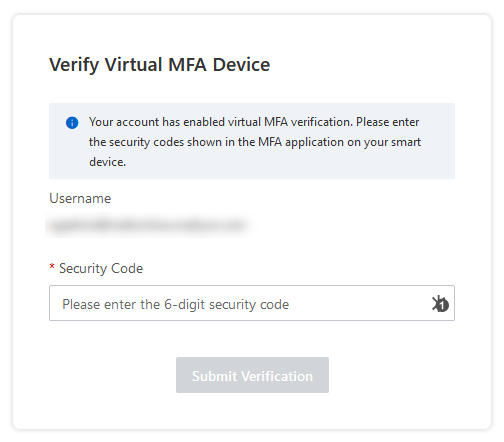
I'm not sure, how I could add this "input" to my RDM entry, so the MFA code gets filled in automatically.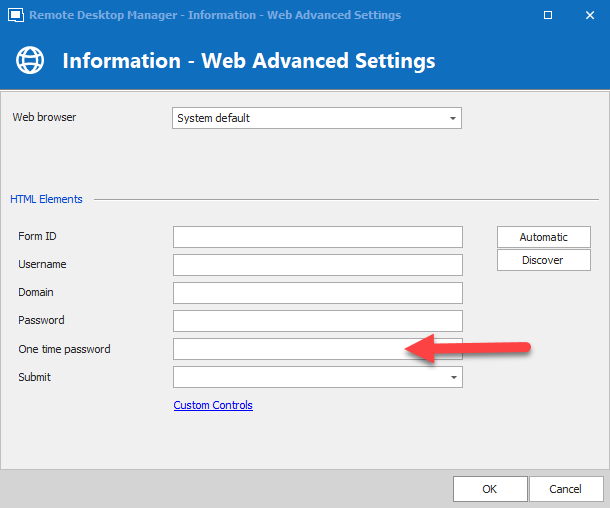
Is there anything I could add to this "one time password" element here?
Snag_80102e.png
sdffdsds.png
All Comments (2)
Hello,
Thank you for contacting us on that matter!
After discussing that matter with our Engineering Department they confirmed that since the HTML of this website does not provide us anything to specify these fields, the OTP option cannot be used in this case.
Sorry for the inconvenience.
Best regards,
James Lafleur
Hi,
Because the input where the OTP is expected doesn't have a name or ID, the possible workaround is to set the placeholder in the "one time password" element. In your case, the placeholder is: Please enter the 6-digit security code
Let us know if this workaround is working for you.
Best regards,
Olivier Désalliers