
florian03
lock down parameters on Entry templates
We would like to give access only to entry templates and not to default entries on vaults, we don't want our end users to be able to change certain settings when they create a new entry based on an entry template.
Could it be possible to add a new feature to create entry templates and lock down settings for end users? As Security, OTP, Asset?
SAMLv2 or OIDC authentication with on-premise solutions
Our authorities require us to remove the NTLMv2 protocol from our infrastructure.
Is it possible to configure Password Server with the Kerberos protocol?
Also, wouldn't it be possible to use an IDP On Premise (ADFS, PingFed etc...) as well as to use AD groups based on the MemberOf property when authenticating?
SAMLv2 or OIDC authentication with on-premise solutions
Hello,
Is it planned that you support SAMLv2 or OIDC authentication with on-premise solutions such as PingFederate or ADFS?
Currently we only have the option to use Windows authentication if we do not want to go through a cloud solution...
Delegating Add or Remove Users in a Vault to end users
Hello,
We would like to be able to delegate the addition or removal of users in a vault to our end users, on the same principle as for SharePoint, without having to define a vault owner, who would automatically give the vault administrator role to these users.
We plan to deploy your solution for more than 8000 users and we won't be able to dedicate IT staff to this management.
We do not want to use the PAM component to set up this delegation, as your support has proposed
Access denied lors de la création d'une entre RDP
Pour vous confirmer que la session de type RDP est bien coché.
N'ayant encore jamais utilisé cette fonctionnalité je ne sais pas si c'est un bug de la nouvelle version.
Access denied lors de la création d'une entre RDP
Je n'ai toujours rien dans les logs et voici le message d'erreur que j'ai quand je veux créer une entrée RDP...
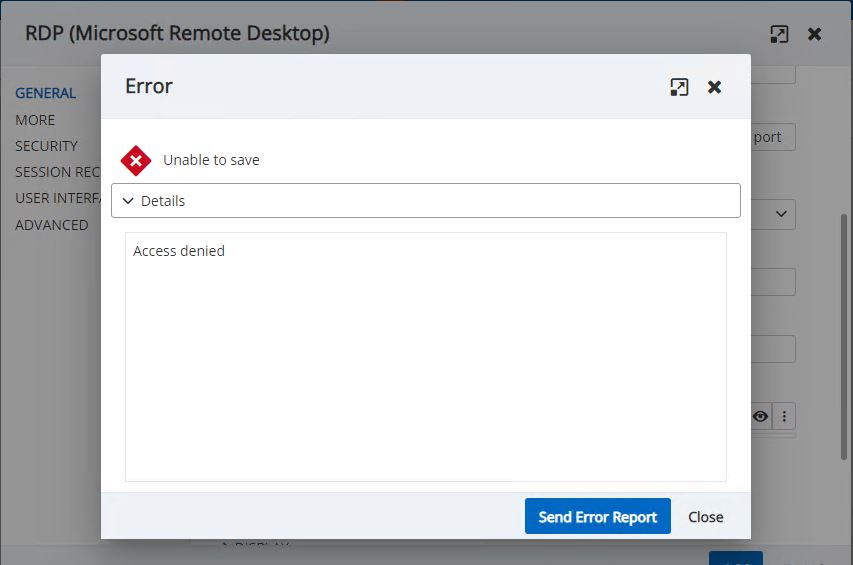
Access denied lors de la création d'une entre RDP
Bonjour,
Je suis en train d'essayer la dernière version de Password Server (2020.2.7.0), quand je veux créer une entrée de type RDP j'ai une erreur : access denied et je ne trouve rien dans les logs de la solution.
Y a t-il des prérequis spécifique ?
Pour précision :
J'ai bien une licence Devolutions Launcher.
J'utilise un compte administrateur de la solution
Clipboard buffer timeout
Hello,
Do you have an ETA on this feature?
Best regards
Password template doesn't apply correcly
Hello,
I'm getting this in the latest beta version of DVLS.
Regards
Password template doesn't apply correcly
Hello,
I have found a bug/misconfiguration in the password template.
Here is my template

If I force the use of this template in the settings and create a new entry 'Username / Password' who doesn't meet the security settings of the password template, here is the message

It doesn't warn up the user of the use of :
Underline (2)
Lower-case (2)
Following character ø (4)
And if, I click on Generate Password it does not follow all the prerequisites of the password template as you can see on the screenshot below

But I still can add my entry even if the password doesn't comply with the security settings.
Regards,
Florian
User activities logs
Hello,
Is there a way to retrieve user activities logs to a SIEM?
Regards,
Clipboard buffer timeout
Hello,
Password managers like KeePass provide a functionality where the clipboard buffer is cleared automatically after a predefined timeout, so that passwords cannot be pasted by accident.
Are you planning to add this feature on your roadmap?
Regards
Log event seems broken
Hello,
I'm not using RDM only DPS, I've noticed this issue on a Username / Password entry.
On the LOGS tab, it will just log the first event. If I click on Copy to Clipboard first and then click on View, there is just the event "Copied password to clipboard" and not "Password viewed" and vice-versa.
Regards
Log event seems broken
Hello,
On versions 5.1.1.0 and 5.9.6.0 there is an issue with the logs, when we view or copy a password it will only log the first attempt.
If I click on view the password and then click on copy the password, it will just log the "viewed" event not the "copied" one.
Regards
Install DVLS-Prerequisites.ps1 does not work
Hi Constantin,
The powershell script tried to download wpilauncher.exe via this link http://go.microsoft.com/fwlink/?LinkId=255386 (line 446 in the script) in order to install Web Platform Installer, which is useless if your server cannont connect to internet.
GUI Glitch Internet Explorer 11
Have you tried with another browser like Edge, Chrome or Firefox?
It is working perfectly with Chrome but unfortunately it is used for debugging purpose, Firefox is used only for internet. ATM we are stuck with Internet Explorer 11, still no plan to use Edge.
Are you using a SSL certificate with your Devolutions Password Server?
Yes, we are using a SSL certificate. I think it explains my second screenshot on my last post, if I disable SSL authentication and reload the page the GUI of IE does not glitch.
But I still have the first problem.
For Internet Explorer, could you please send us a screen shot of the Console tab?

Regards,
GUI Glitch Internet Explorer 11
Hello,
I'm trying the last version of Password Server and I'm having a GUI problem with Internet Explorer 11.

When I reload the page :

Have you ever had this kind of problem?
Regards