
eulogio
Password Sever installed. Use case examples?
Aloha Maurice!
I was able to download to update our server to the latest version. Since we last chatted, what were the features you mentioned we should check out? Sorry about that, I don't know where my notes went....:(
Devolutions chrome extension "web login"
I have been using the web login extension for a about a week now. I have it installed in Microsoft Edge and had to disable lastpass's exntension in edge, but keep it installed on google chrome. They both worked fine in edge, but they both overlapped each other in the entry boxes.
So it seems that for devolution's web extension to work, one of the browser tabs need's to be logged into the password server. Thus if web login page is closed or disconnects the web extension stops working until i log back in. One way to get around this is to create a connection entry in RDM. I get that. Is there a timeout vault in password server for the web login? I can't seem to find that. Seems like that may be by design.
With lastpass most of us have the lastpass enterprise with a separate lastpass personal account.
It's not that big of a deal, only a couple of us use both lastpass personal and enterprise, while the remainder of the team uses enterprise only and something else for their personal passwords.
Password Sever installed. Use case examples?
Hello,
Most of these questions refer to your internal policy and how you decide to apply infosec principles. If no one else in your organization wears the Chief Security Officer hat, then TAG,. you're it! Congratulations!!! (picking up hats from the floor happened to me quite a lot earlier in my career...)
A common baseline is https://www.cisecurity.org/white-papers/cis-primer-securing-login-credentials/
So, indeed unique passwords across the board
Since you have a password vault, increase your password complexity
Rotation is key if the password is ever viewed by others, AND/OR at least every 60 days
I would recommend NOT performing all encompassing changes. Identify your assets by layer of sensitivity or risks, address the inner circle first and live with the changes for a while, then move on to the next circle.
You are a long time user of RDM, we can have a quick phone call to go deeper in these topics. Simply drop me a PM to take me up on that offer.
Best regards,
Thanks for the offer and will take you up on it. I spoke to my Director so he's going to go over the features of password server and from there give me the direction to go and what to start with.
But he did mention that i should take a look at pointing rdm to the password server. Which got me thinking, with our existing RDM, the data source is a mysql db hosted on aws's RDS service. After using password server for a week, i have my own vault and looks like a vault for the active directory user password server uses to talk to AD.
Other than RDM's database source at aws being available both externally and internally to our network, Password Server's "vault" as a database source has the same functionality?
But with RDM on aws, The admins have a "user" account in the database, so the connection entries are shared. How do we do that if each admin here has their own "vault" on the password server? I started recreating the connections from the rdm source to my vault by switching back and forth between sources in rdm. Is there a better way to share and do this?
Password Sever installed. Use case examples?
I have the password server installed. Now where do I begin?
I have dell idrac, san management consoles accessed via web (HTML 5), vmware esxi root, horizon view management console (HTML5). AWS RDM. These are all local passwords on those services.
I have virtualcenter (HTML) that has both local and domain account access. Solarwinds (web) with domain account access.
I'm not sure where to start. Need some docs to refer to.
When should i be using a password that rotates? What use cases I should do that?
With my dell servers, all the idracs have a local account, 'root'. Should I change each the passord for root on idrac for each one to be different? Should I have it rotate? Should I take the extra time to configure idac to connect to active directory for additional authenticaion?
Quick setup step by step guide for setting up sql database for use with Password Server
I had scheduled a demo install today a resolved the remaining issues with the install an the server is now up.
Quick setup step by step guide for setting up sql database for use with Password Server
I'm confused at this part of the setup.
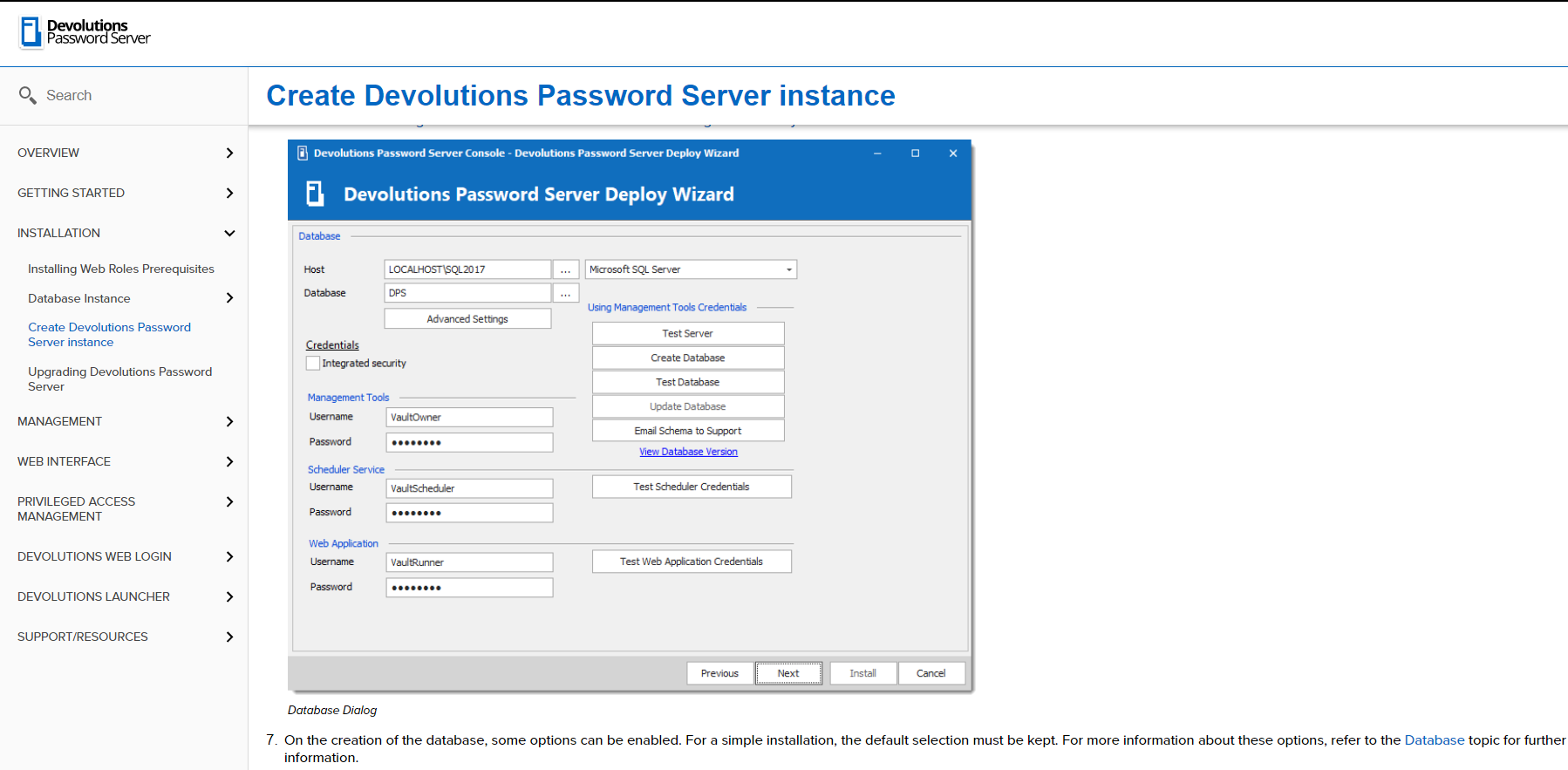
Why would i use integrated security?
a. If i do select this, then I have to create 3 accounts in my domain? A VaultOwner, VaultScheduler, VaultRunner? This is confusing, because I'll click on the check box for Integrated security and the create database works, test database, test scheduler credentials work and test web application credentials work, without creating any accounts in my domain.
But when I get to the end of the installation and i test the installation from the console, broswer opens but i get an error that it failed to log in (or connect to database, can't remember). There are instructions to configure Integrated security For "RDMRunner". But nothing about the scheduler service username and web application username.
Otherwise instead of using integrated security, I should instead create 3 accounts in the sql database? What permissions would they have? Do I grant all 3 of these accounts using the same procedure that grants permissions to domain accounts? https://helpserver.devolutions.net/configure_sqlpermissions.html
I've run through the installation 3 times from scratch and each time after i am done and I get to "TEST THE INSTALLATION" The browser opens and connects to the desktop but I get the error that the database connection failed.
I don't want to run through more repeated installations trying out different things. Can you explain what I'm doing wrong or what i need to check?
Quick setup step by step guide for setting up sql database for use with Password Server
So i'm at the point of having created a database instance on the sql server. Now what accounts and access do i create. In this post, https://forum.devolutions.net/topics/32705/initial-install-of-password-server--database-accounts the link there do not work. This is what I need next to continue configuring the server.
Quick setup step by step guide for setting up sql database for use with Password Server
Hi I just downloaded the Devolutions Password Server Trial and installed sqlexpress on the same server. Is there a quick setup step guide to configure the database?
Thanks!
how to enable flash in a chrome browser session in rdm?
rdm version 2019.2.24.0 64-bit
I created a browser session in rdm that connects to vmware virtual center (6.7 U3). I still need to use the flash interface and i know i could use the HTML5 but it doesn't have some options i need.
Outside of RDM i can do this:

How do i do the same thing inside RDM?

http:// entry... Web browser support - Edge
Ahh gotcha. I mainly use the embedded feature of RDM.
http:// entry... Web browser support - Edge
Will there be (are there even plans) for Edge browser support for Web Browser (http/https) entries? I actually have been a long time user of chrome but lately have been using edge and find using it more because it seems to work better with office365 and other websites in general.
Table 'XXXX.UserInfo' doesn't exist
I'm in. The colleague that installed 14 is an admin, so i see what happened.
Table 'XXXX.UserInfo' doesn't exist
returns 262...explains it.
Table 'XXXX.UserInfo' doesn't exist
where would I look in mysql bench to verify the "version" that is installed? I don't know much about sql database, but I can figure out where to look with the exact directions :).
Table 'XXXX.UserInfo' doesn't exist
One of my colleagues informed me they tried 14.x and had installed it some time last week.
So, i installed 14.0.6.0. Attached is screen shot when I launch 14. Confirms I set the option to not allow version 14 to connect. So did it still get upgraded and ignored that option and now that it is upgraded is still enforcing that option? So confused.
Table 'XXXX.UserInfo' doesn't exist
13.6.7.0. I am pretty sure I set the option where it only limited the use of version 13.x and below. I will install 14 and see what happens.
Table 'XXXX.UserInfo' doesn't exist
My RDM instance has been working, but the last time i was using RDM was yesterday, but today when i open RDM i get this error.
MySql.Data.MySqlClient.MySqlException (0x80004005): Table 'hpuRDMmysql.UserInfo' doesn't exist
at MySql.Data.MySqlClient.MySqlStream.ReadPacket()
at MySql.Data.MySqlClient.NativeDriver.GetResult(Int32& affectedRow, Int64& insertedId)
at MySql.Data.MySqlClient.Driver.NextResult(Int32 statementId, Boolean force)
at MySql.Data.MySqlClient.MySqlDataReader.NextResult()
at MySql.Data.MySqlClient.MySqlCommand.ExecuteReader(CommandBehavior behavior)
at System.Data.Common.DbDataAdapter.FillInternal(DataSet dataset, DataTable[] datatables, Int32 startRecord, Int32 maxRecords, String srcTable, IDbCommand command, CommandBehavior behavior)
at System.Data.Common.DbDataAdapter.Fill(DataSet dataSet, Int32 startRecord, Int32 maxRecords, String srcTable, IDbCommand command, CommandBehavior behavior)
at System.Data.Common.DbDataAdapter.Fill(DataSet dataSet)
at Devolutions.RemoteDesktopManager.Business.DataSources.DatabaseConnectionDataSource.GetData(String sql, IDbDataParameter[] parameters)
at Devolutions.RemoteDesktopManager.Business.DataSources.MySQLSecuritySubDataSource.GetUser()
at Devolutions.RemoteDesktopManager.Managers.SecurityManager.LoadSecurity(BaseConnectionDataSource dataSource)
at Devolutions.RemoteDesktopManager.Managers.ConnectionManager.ca4799bebd8b706f34eea94a778843b55(BaseConnectionDataSource c7f28727fc7a5daa94ba08f688b2a5781, Boolean cfe205b02d73750f8fd14d199343fe545)
at Devolutions.RemoteDesktopManager.Managers.ConnectionManager.LoadConnections(BaseConnectionDataSource dataSource)
Not sure, what has happened.
When i connect with mysql workbench to the mysql database, i see the username i connect with listed in users and privlieges.
How to configure https connection to windows server that uses windows sso?
Ok no worries. Day to day, i'm moving the various windows and consoles i work on, into RDM. So far I've moved a lot. I was eventually going to encounter a system admin tool i use that wouldn't work in RDM....
How to configure https connection to windows server that uses windows sso?
The Application running on the windows server allows access to the website based on role associated with the local administrators group on that server. My ad account is part of the local administrator group of the server and that group is associated with the role for the web application. I am never presented with a login page or asked for credentials. When I launch chrome and type in the url, i am granted into the website.
Active Directory or local machine groupsBy default, Active Directory or local machine groups are used to control gateway access. You can manage gateway user and administrator access from within the Windows Admin Center interface.
On the Users tab you can control who can access Windows Admin Center as a gateway user. By default, and if you don't specify a security group, any user that accesses the gateway URL has access. Once you add one or more security groups to the users list, access is restricted to the members of those groups.
How to configure https connection to windows server that uses windows sso?
The windows server I am connecting to has Windows Admin Center running on it. (Formerly known as Project Honolulu). Outside of rdm in either Edge/Internet Explorer and Chrome, when i connect to the website, it doesn't prompt me for a password and lets me right into the web admin center page. I am assuming that rdm's https connection doesn't support windows sso? Is there a way to configure RDM to allow this? Or is there a way to configure the rdm http connection differently to get this to work?
Not able to connect to APC PDU remote web console.
Only applies for Internet Explorer, pop up for login doesn't work for firefox or chrome.
Not able to connect to APC PDU remote web console.
Ok. i figured this part out. in the login section, I cleared all the entries for Credentials and unchecked auto submit and check URL Encode Credentials.
Sorry for the noise....
Not able to connect to APC PDU remote web console.
Looks Like i figured out that it's using basic authentication. I was able to log in by setting authentication to Basic, in the Login tab, for the connection properties. I put the username and password and clicked the "Auto submit" button.
But how do I make it so rdm presents the login pop up so the other people using RDM and this connection entry will have to input their username and password?
Not able to connect to APC PDU remote web console.
I'm trying to setup entries for APC pdu's. Their are accessible via a browser. I created entries based off "Remote Connections" and "Web Browser (http/https).
The connection doesn't require ssl. The url is simple: http://10.0.0.1/ just and ip address. When I connect, I get the error, it's a browser response error:
"
Protected Object
This object on the APC Management Web Server is protected. Either your User Name/Password is invalid, or your access is restricted.
"
I've tried all "Web Browser applications" in the drop down, Internet Explorer, Google Chrome, and Firefox.
I'm able to get to the APC pdu with a web browser outside of RDM. I get the old school username and password pop window from the browser. I don't know what the correct term would be for that. But I'm guessing, i'm not configuring the rdm http connection entry correctly to all that pop up window to be displayed.
RDM and AWS Free RDM MySQL as a source.
I just talked to my colleague that is on the demo. He installed the current version of 13.6.7 and is able to connect to the existing aws database I set up for rdm. Maybe my install of 13.9.7 on my machine didn't make any changes to the database?