Quick setup step by step guide for setting up sql database for use with Password Server
Quick setup step by step guide for setting up sql database for use with Password Server

Disabled
Hi I just downloaded the Devolutions Password Server Trial and installed sqlexpress on the same server. Is there a quick setup step guide to configure the database?
Thanks!
All Comments (5)
Disabled
So i'm at the point of having created a database instance on the sql server. Now what accounts and access do i create. In this post, https://forum.devolutions.net/topics/32705/initial-install-of-password-server--database-accounts the link there do not work. This is what I need next to continue configuring the server.
Hello,
During the creation of the DPS instance, the database will be created by the installation wizard. Here is the DPS instance creation documentation page.
https://helpserver.devolutions.net/install_createrdmsinstance.html
Sorry about the broken link in the other forum thread. We have created a new section called Knowledge Base, and this link was changed. The link error was corrected and you can follow the directions here: https://kb.devolutions.net/dps_pre_deployment_account_survey.html
Best regards,
Érica Poirier
Disabled
I'm confused at this part of the setup.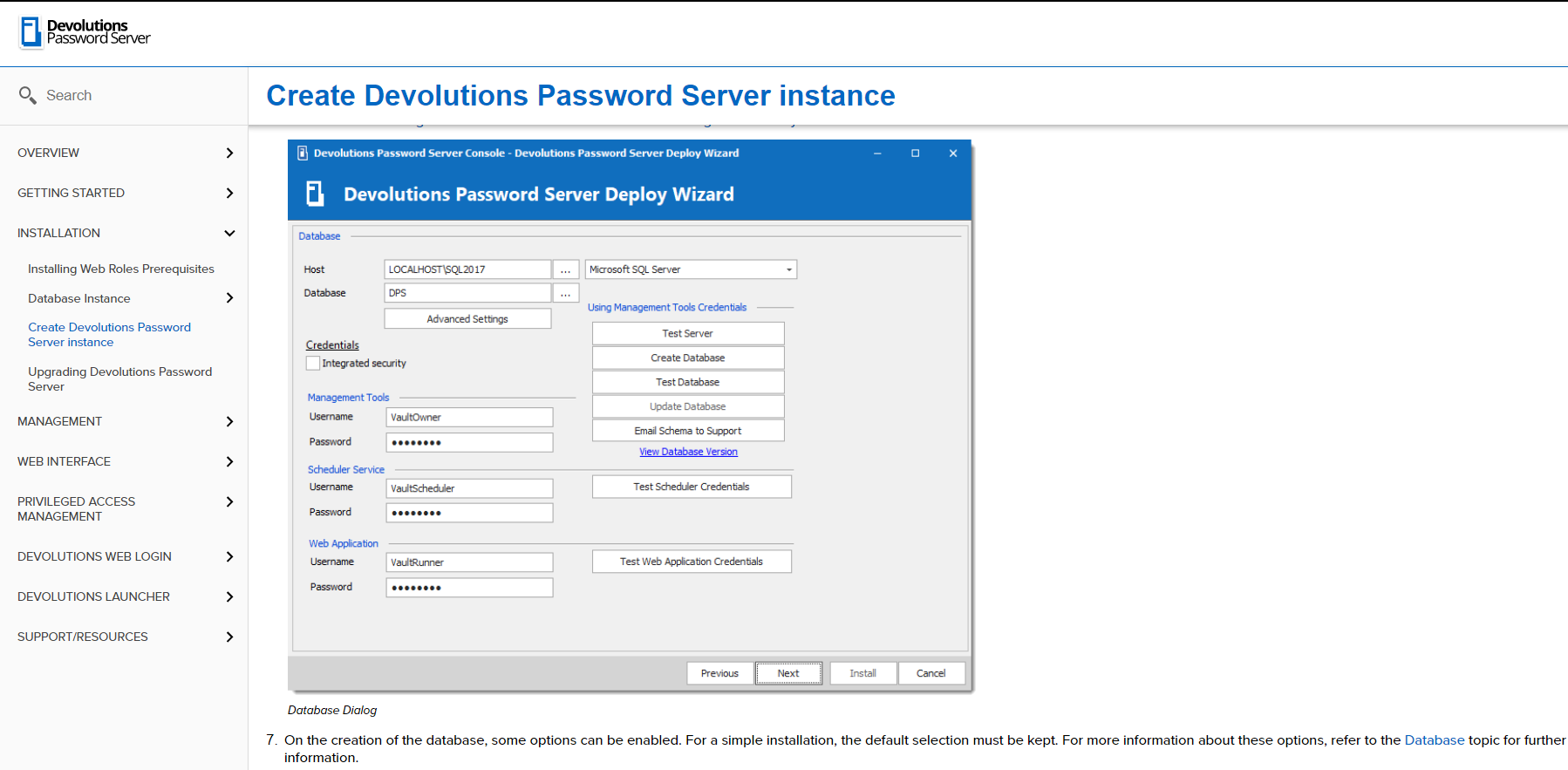
- Why would i use integrated security?
a. If i do select this, then I have to create 3 accounts in my domain? A VaultOwner, VaultScheduler, VaultRunner? This is confusing, because I'll click on the check box for Integrated security and the create database works, test database, test scheduler credentials work and test web application credentials work, without creating any accounts in my domain.
But when I get to the end of the installation and i test the installation from the console, broswer opens but i get an error that it failed to log in (or connect to database, can't remember). There are instructions to configure Integrated security For "RDMRunner". But nothing about the scheduler service username and web application username.
- Otherwise instead of using integrated security, I should instead create 3 accounts in the sql database? What permissions would they have? Do I grant all 3 of these accounts using the same procedure that grants permissions to domain accounts? https://helpserver.devolutions.net/configure_sqlpermissions.html
I've run through the installation 3 times from scratch and each time after i am done and I get to "TEST THE INSTALLATION" The browser opens and connects to the desktop but I get the error that the database connection failed.
I don't want to run through more repeated installations trying out different things. Can you explain what I'm doing wrong or what i need to check?
password server instance.PNG
Disabled
I had scheduled a demo install today a resolved the remaining issues with the install an the server is now up.
Hello,
The utilization of Integrated Security serves many purposes. Among them, there are:
- easier to monitor / audit accounts
- no actual password are actually stored in the web.config file
The reason why Integrated Security worked in your context, is because SQL-Server was installed and configured using your profile. Therefore it has been granted Sys Admin privileges. When the DPS Console is lauchned, it uses the same identity thus granting Sys Admin privileges on the database server.
Then, the scheduler and Web application database connectivity tests uses this identity as well and will successfully connect (yes the results are a little biased)
These tests won't be gathering the actual identities of those actual components (web application pool identity and DevolutionsSchedulerService).
Also note that populating domain credentials in the console is not supported, only SQL accounts are.
As discussed, the permissions required are provided on demand, since it changes for the different versions of DPS.
I'm glad we could help you install your DPS, Do not hesitate to contact us again for any question or concerns.
Best regards,
Alex Belisle