
acralon
Remote jumps fail to open (Windows to Windows, different versions)
SUCCESS! Version 2023.3.39.0 (standalone zip) works. I am able to do remote jumps from local, automatically go through the jumpbox, to the desired host two steps away. I confirmed remote jumps work on two jumpboxes in different datacenters.
It makes sense that upgrading RDM to .NET 8.0 could have broken this.
THANK YOU!
Jump server settings gone from
Any updates on this? See my related post:
Remote jumps fail to open (Windows to Windows, different versions)
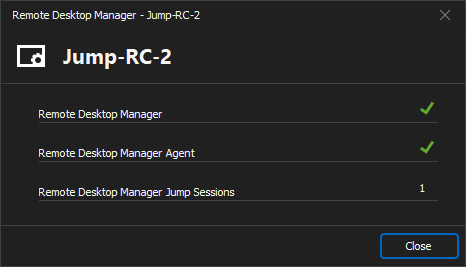
Remote jump sessions fail to open in the jumpbox after upgrading on April 24, 2024. I normally remote into a jumpbox, wait for RDM to open, then open the green remote jump connection (through the jumpbox). But the jumpbox doesn't show any signs of getting the request. No tabs attempt to open. RDM Agent is running, and the jumpbox tab's "Agent Status" shows green checkmarks for RDM and RDM Agent and shows 1 jump session (but it's not there).
This happens in every jumpbox I've tried, even in different environments (RC, Prod) in different datacenters, etc. I called support (they were very helpful, by the way!) and upgraded to latest. Then we tried two older standalone versions, but they all fail the same way.
Local: Windows 10 Enterprise 22H2 - RDM versions 2024.1.27.0, 2024.1.25.0, 2024.1.20.0, 2024.1.12.0 (all fail the same way)
Jumpbox #1: Windows 2012 R2 - RDM versions 13.5.6.0 (old version because reasons)
Jumpbox #2: Windows 2019 - RDM versions 13.5.6.0 (old version because reasons)
RDP version: Latest (on all connections)
RDP gateway: n/a
Now I'm wondering if a local security patch or the VPN is suddenly blocking it.....
Keyboard doesn't work when jumping in RDM
Ahhh. That's a start.
Do these need to be installed on all boxes -- local, jump hosts, and remote hosts?
Keyboard doesn't work when jumping in RDM
Attached is a screenshot of my workaround to "fix" the keyboard not working:
* Right click the jump host's task bar
When you go back to the 2nd host tab, everything works fine.
Keyboard doesn't work when jumping in RDM
I've confirmed "Turn on Filter Keys" was already disabled on many boxes:
* My local box
* 3 or 4 jump hosts
* 5 or 6 remote boxes (the host after jumping)
So that doesn't appear to be related. What other ideas do you have?
Keyboard doesn't work when jumping in RDM
Yes, the 2nd box is the RDP session on the jump host.
Yes, I've tried with and without jumping in RDM 13.0.6 -- without meaning two manual RDM connections: local to jump host, then jump host to 2nd box. Results for without jumping are mixed -- the keyboard works fine for me but NOT for my coworkers.
As with any bug report, you may need to ignore some of the data points that are unhelpful for debugging.
Timeline w/ version info:
* All boxes had version 11.5.4 until recently -- local and jump host.
* Jump host was updated first to 13.0.6.
* Keyboard input stopped working on the second RDP connection from the jump host.
* Local versions were updated to 13.0.6, per recommendation of customer support.
* Keyboard input still doesn't work consistently.
OS info:
* Local boxes are all Windows 7
* Jump host is Server 2008 R2 Standard
* 2nd boxes are Server 2012 R2 Standard
Random note:
I have a hunch it is related to the new style of windows UI (typical start orb opens the full-screen tiles menu).
Keyboard doesn't work when jumping in RDM
After jumping in RDM, the keyboard doesn't work. Keystrokes do not affect the 2nd box. The mouse works fine on the 2nd box, however. It's driving my team members crazy.
Jump Host Settings (defaults otherwise):
* Entry Type: Microsoft Remote Desktop (RDP) -> Configured
* Display: Embedded (tabbed)
2nd Box Settings -- same as Jump Host:
* Entry Type: Microsoft Remote Desktop (RDP) -> Configured
* Display: Embedded (tabbed)
To reproduce the issue:
* Double-click 2nd Box's entry -> connects to Jump Host
* Manually click mouse / press enter at login banner
* RDM automatically opens and connects to 2nd Box
* Double-click to open Windows Explorer
* Keyboard input does nothing on 2nd Box -- arrows don't move the cursor, characters aren't typed, etc
When I manually connect twice, I don't have the problem -- just after jumping. My coworkers, however, do not have jumps configured. They manually connect twice, and the keyboard does not work on the 2nd box.
Workaround:
To "fix" the issue, I right click on the Jump Host's taskbar. Then I click back into the 2nd Box's tab, and the keyboard works! It's very repeatable.
NOTES:
* This only started after updating from v11 to v13. This was never a problem for me or my coworkers before.
* Local and Jump Host RDM Versions: 13.0.6.0
* RDM Versions Before Updating: 11.5.4.0