
GALVAR
Azure's Flexible Server's PostgreSQL management.
Hello.
As we continue our journey into the cloud, most of our VMs have been migrated to the cloud, AKS and PostgreSQL are our main services. I would like to manage PODs and PostgreSQL from RDM if possible.
Best regards.
Cannot add nor edit in new installation v2024.1.27 Windows
The update went ok on the computer, so something went wrong with the new one, I'll reinstall the app and check.
Cannot add nor edit in new installation v2024.1.27 Windows
Hello.
I have just set the very same Personal hub in my usual computer, Windows RDM v2024.1.23.0, and works without issues:
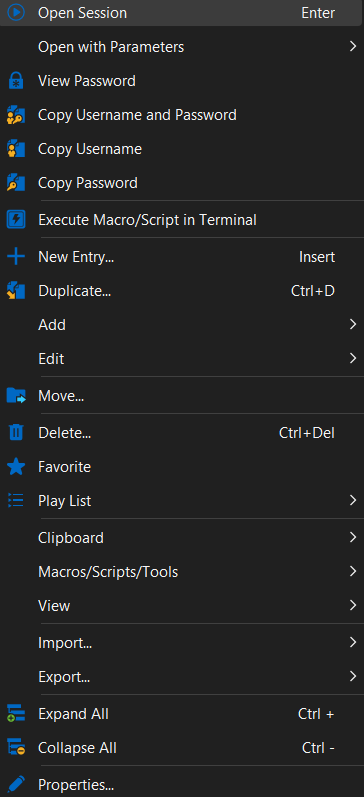
I'll try to upgrade to v 2024.1.27 and test again
Cannot add nor edit in new installation v2024.1.27 Windows
Hello.
Thank you, but in the installation it already said it must update from legacy to current Hub Personal, any way I cannot see the option to migrate it. Also, if I connect to a newly installed Linux machine and connect to Hub, everything is updated and editable so, I think it is pointing to something in the Windows app.
Cannot add nor edit in new installation v2024.1.27 Windows
Hello.
I have just installed into a new computer, linked the data from the personal HUB and in the RDM v2024.1.27.0 app all the edit, add are greyed. I have checked my acount and I'm the deba owner and my profile is IT support, any idea?
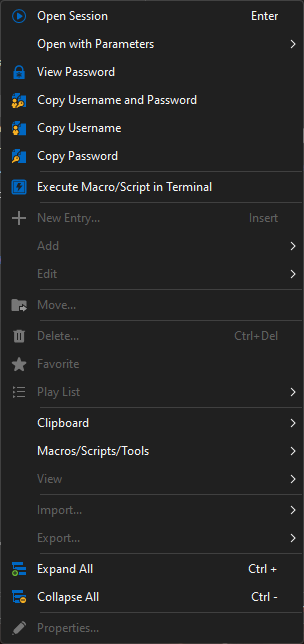
I can only add new entries from the web interface, it is how it should work?
Update, I have tested in the Linux version and it allows editing.
SSH login error using private key and jump server
After playing a bit I have found the trick, WinSCP gave me a clue
in host add:
server2
In user
user1@user@host1
Tricky solution.
SSH login error using private key and jump server
Hello.
Our servers require a jump, Putty works ok using the format:
user1@user2@server1@server2
And the path to the key file.
If I import it into RDM it works but converting it to native RDM SSH (v2021.2.22) creates a no-valid entry.
Converted RDM entry keeps asking for an user name and if typed connection ends with error (attached pic)

MobaXterm also works, could you please help?
Inventory Report on Linux servers
Hello.
Ok I'll try it as workaround.
Regards.
Inventory Report on Linux servers
Hello.
Thanks.
I don't mind using PowerShell if it gets the job done, I'll need to connect to several Linux servers, launch a query, grab the data and import it into unknown (by me) fields in the RDM database. I don't know how to do it using PS.
Regards.
Inventory Report on Linux servers
Hi.
I'm still pressing on this, I can launch several simple scripts in order to get the OS version, RAM, or CPU, so I would like to import the data from the script into the inventory tab and fields, how can I do that?
Regards.
Inventory Report on Linux servers
Hi.
So, back to post #1, about 2 years ago. Most of my servers are Linux based, but the inventory option doesn't work for them, there is a roadmap to fix it?.
Regards.
Inventory Report on Linux servers
Ok, the inventory option, is it working on Linux?, I see the function works on Windows servers, only as a domain admin. I've tried without success.
Regards.
Inventory Report on Linux servers
Hi.
It seems the .csv check is more for importing data than keep updated several fields, specially for HW information. In the link https://help.remotedesktopmanager.com/importcsv_strategies.htm#csv-samples several data, like OS, IP, MAC or the HW type is not described also, seems that all host info must be re-entered in the csv, in the server an easy query like "sudo facter | grep -i 'hw_model'" produces an answer like "hw_model => HP ProLiant DL380p Gen8", how can I launch it from RDM and import the data into the requested field or fields?.
Kind regards.
Inventory Report on Linux servers
Hi.
It's not a CSV but it can be done, I'll check and let you know how it works, thank you.
Regards.
Inventory Report on Linux servers
Hi.
.
It seems this issue is stuck, can I add the script result into the RDM inventory database?.
Regards.
Inventory Report on Linux servers
Hi, any update on this request?.
Regards.
Inventory Report on Linux servers
Hi.
Yup:
sudo facter | grep -i 'hw_model'
=> HP ProLiant DL380p Gen8
Inventory Report on Linux servers
Hi.
It seems network security team doing its job, I can launch a script as a sub-connection to get some wmic queries, I would like to import that answer into the information tab as much as effortless as possible also, doing the same for Linux.
Regards.
Inventory Report on Linux servers
Thanx, I´m still getting the ERROR: Description = The RPC server is unavailable, it seems there are not allowed ports, so I'm trying to launch a remote script or use the agent, but how can I import the data into the RDM database?. BTW any hope to get some script documentation for the Linux inventory?.
Regards.
Inventory Report on Linux servers
Hi.
Any news?, I would like to launch a script after Linux login to update / fill the inventory also, for Windows, it seems is not working unless you are domain admin, shouldn't it work as a local admin?. I'm currently using version 11.7.6.0 until our security team approves framework update.
Regards.
Error executing comand in several SSH sessions
Hi.
Cool, thank you I´ll try to speed up framework 6 installation.
Thank you very much.
Error executing comand in several SSH sessions
Hello.
If the sessions are already opened and that I send the command via the Execute script in terminal, onlyh works in one session, the issue appears when more than one session is opened.
I have the delay at 500 ms, but normally I open the sessions first.
Regards.
PD- I´ve found the problem is related to the RemoteDesktopManager64, RemoteDesktopManager works flawlessly.
Error executing comand in several SSH sessions
Hi.
Yes, all of them are SSH.
Regards.
Error executing comand in several SSH sessions
Hello.
I´m currently using v11.7.6.0 due to issues in new framework versions. Execute Script in Terminal has been working for few weeks but now it launches the command several times in the very first session opened instead of one command in each session:
[user@server31]ls -lha ls -lhals -lha -lha
Instead of:
[user@server31]ls -lha
[user@server32]ls -lha
[user@server33]ls -lha...
Any help?
CISCO VPN
Hello.
Yes, it´s exactly the same issue- Thank you, I´ll stick to that thread.
Regards.