Cannot add nor edit in new installation v2024.1.27 Windows

Hello.
I have just installed into a new computer, linked the data from the personal HUB and in the RDM v2024.1.27.0 app all the edit, add are greyed. I have checked my acount and I'm the deba owner and my profile is IT support, any idea?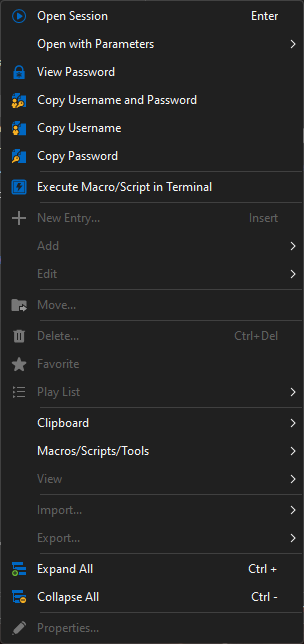
I can only add new entries from the web interface, it is how it should work?
Update, I have tested in the Linux version and it allows editing.
imagen.png
All Comments (5)
Hello,
It sounds like you're facing an issue where your permissions in Remote Desktop Manager (RDM) seem to be limiting your actions to read-only, even though you are the database owner and your profile is set up correctly as IT support. This can happen if you are using Hub Personal Legacy, which defaults to read-only mode for desktop clients while allowing modifications through the web interface.
To resolve this issue, you can migrate from Hub Personal Legacy to the newer version by visiting Devolutions Hub. The migration process is straightforward, and it should allow you to regain full editing capabilities in your RDM application on all platforms, including Windows.
Please try this and let us know if it helps or if you encounter any other issues.
Best regards,
David Hervieux
Hello.
Thank you, but in the installation it already said it must update from legacy to current Hub Personal, any way I cannot see the option to migrate it. Also, if I connect to a newly installed Linux machine and connect to Hub, everything is updated and editable so, I think it is pointing to something in the Windows app.
Hello,
I will verify with the Linux team; perhaps they have not yet implemented the read-only mode. I can guarantee you that if you use the Hub Personal Legacy on Windows 2024.1, it is in read-only. We are about to announce the steps for the phase-out and decommission after the summer.
Here is another thread with the same issue:
https://forum.devolutions.net/topics/41782/read-only-data-source-after-upgrade-rdm
Regards
David Hervieux
Hello.
I have just set the very same Personal hub in my usual computer, Windows RDM v2024.1.23.0, and works without issues: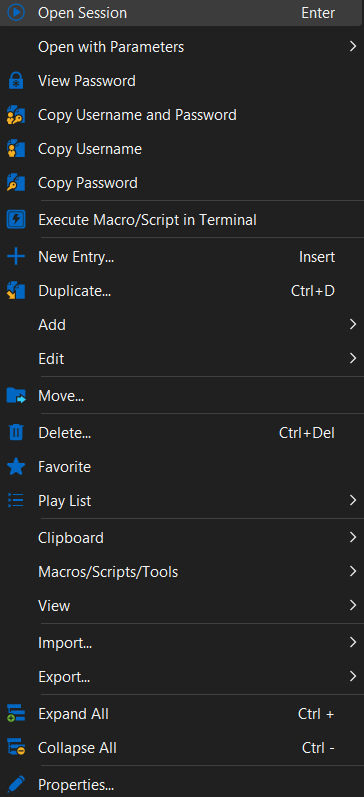
I'll try to upgrade to v 2024.1.27 and test again
6225dff7-a254-4b6d-8842-192a72df7f64.png
The update went ok on the computer, so something went wrong with the new one, I'll reinstall the app and check.