
cazi
PSMSI RunOnUninstall CustomActions different and not passing ScriptArguments?
Thanks so much. You and your software rock for PowerShell!
PSMSI RunOnUninstall CustomActions different and not passing ScriptArguments?
I think I found the issue in the PSMSI WixXmlGenerator.cs file on GitHub.
For RunOnInstall (line 103) it uses:
new XAttribute("ExeCommand", $"{customAction.Arguments} -File \"[#{customAction.FileId}]\" {customAction.ScriptArguments}"),But for some reason RunOnUninstall (line 125) it uses a different action/command structure instead:
new XAttribute("ExeCommand", $"{customAction.Arguments} -Command \"{{& '[#{customAction.FileId}]'}}\""),Can someone from IronmanSoftware update the PSMSI module so RunOnInstall and RunOnUninstall have matching action/command structures?
PSMSI RunOnUninstall CustomActions different and not passing ScriptArguments?
@Adam Driscoll Is this a bug? Running a different type of command for RunOnInstall vs RunOnUninstall?
PSMSI RunOnUninstall CustomActions different and not passing ScriptArguments?
Been a big fan of PowerShell Universal and bought it for work. Recently discovered PSMSI which I want to start utilizing but I seem to be running into an issue with CustomActions.
Trying to pass the same/similar ScriptArguments to RunOnUninstall doesn’t appear to work as RunOnInstall.
Looking at the generated WXS file shows two different PowerShell command methods (Install CustomAction = -File vs Uninstall Custom Action = -Command) and no ScriptArgument being passed for the Uninstall CustomAction:
<CustomAction Id=“CAf877bc71c53b4331ac4af05cc5d30941INSTALL” Property=“POWERSHELL” ExeCommand=“-NoExit -File "[#InstallScript]" -Message "Application Installed"" Return=“ignore” Execute=“deferred” />
<CustomAction Id=“CA2487b58486ae4f91b3d4c0ff74c440c7UNINSTALL” Property=“POWERSHELL” ExeCommand=”-NoExit -Command "{& ‘[#UninstallScript]’}"" Return=“ignore” Execute=“deferred” />
Shouldn’t it use the same method for each and the only difference be when it runs, on Install vs Uninstall?
Additional Send Durations
Thank you so much! You guys are great with incorporating customer feedback.
Additional Send Durations
Really appreciate the new Send durations, would just like to request a longer one, such as 1 month and/or a custom duration.
We regularly create user accounts for new employees weeks before they start and place the temporary password info/url in the ticket. 1 week is still too short for us.
Thanks.
Purpose of the Infrastructure Vault?
Fairly new to Devolutions Server. I was able to find a page on the purpose of the System Vault, but I didn't find anything on the purpose of the Infrastructure Vault. Can someone please explain and perhaps add a page to the documentation for it?
Auto-submit RDM Datasource MFA One Time Password
Thanks for the follow up. Looking forward to this timesaver and modern experience. 😊
Auto-submit RDM Datasource MFA One Time Password
Any update or roadmap on this request? We're still having to enter the MFA OTP and click validate to access RDM. Whereas most other modern apps simply auto-validate after the sixth digit is entered.
Thanks. 😊
CredSSP errors when attempting to use RDP Web Client
After adding the KDC proxy, I'm getting this error: [CredSSP] CredSSP Caused by: InvalidToken: ASN1 DER error: TruncatedData
CredSSP errors when attempting to use RDP Web Client
The account is a Domain Administrator. I can connect normally through Remote Desktop Manager and the RDP client.
I think it may be related to that account being a member of the Active Directory "Protected Users" group, which protects the credentials from caching?
CredSSP errors when attempting to use RDP Web Client
When attempting to use the Devolutions Server RDP Web Client
[CredSSP] CredSSP Caused by: InvalidToken: CredSSP server returned an error status; status is STATUS_ACCOUNT_RESTRICTION [0xc000006e]
Any help would be greatly appreciated.
Auto-submit RDM Datasource MFA One Time Password
Sorry, here's a screenshot to provide better clarity. It's when performing the OTP MFA to access the RDM datasource. Clicking Validate or pressing enter is an extra step that has to be done everytime. If the OTP is always six characters (which I believe it is), then can we just have it "auto-validate" like some other apps with OTP, such as Windows Hello (PIN) and Apple IDs where as soon as the sixth character is entered it performs the submit.

Example:
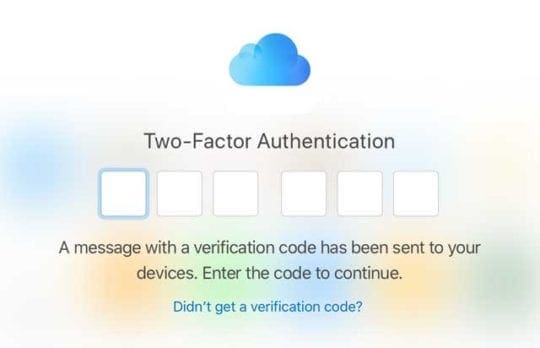
iCloud MFA has no submit button because it auto-submits on the last character.
Auto-submit RDM Datasource MFA One Time Password
The datasource MFA One Time Password (OTP) for Authenticator apps is always 6 characters (I believe). Therefore, can we have it auto-submit after entering the 6 characters, like some other websites and apps do?
It would save a step and time of having to click Validate or press enter, and make the process just a little more seamless. Thank you.
Advanced Mode Toggle Switch on Right
A very minor cosmetic change request. Can we have the Advanced Mode toggle switch on the right side of the text, rather than before the text. It's the far more common placement of toggle switches for user interfaces. Also, the toggle switch doesn't really need to be quite so wide.

vs

(Source)
Thanks.
Thumbnails View
Hi Hubert,
RDM is running locally on my Windows 10 (1709) PC. Not through VM, RDP, Citrix, etc.
Thumbnails View
Thanks for adding the ToolTip to the thumbnails view, we love it!
I am still having the double click issue though. When I go from a session tab to the Thumbnails tab, if I double click a thumbnail box it doesn't jump to that session. If I switch to the Thumbnails view, click anywhere in the Thumbnails window, then double click on a session it work. Not sure if it is a focus issue? One additional detail, I do run my RDM under a separate privileged account, if that makes a difference or helps.
Thumbnails View
Hi David,
I'm double clicking the screen preview in thumbnail view. I've recorded the issue and attached a video (double rings = double click, single ring = single click).
Also, yes. Would like tooltip when hovering over thumbnail name and have it display like when hovering over tab name.
Thumbnails View
I notice that when I go to the Thumbnails view from another tab and double click on a thumbnail it does not go to the session. Instead, I have to click in the Thumbnail window first then double click the thumbnail to have it open the session (or triple click). So would like to be able to double click or more preferably use my next suggestion.
Perhaps more consistent with the RDM interface, instead of using a double click for thumbnails, similar to the tab behavior, why not highlight the thumbnail background when hovered over and allow a single click to go to the session? This would benefit touchscreen users as well.
Also, I would like to see the session details just as when hovering over a tab, by hovering over the session name of a thumbnail.
Just my 2 cents, thanks.
AD sync ignores OU change of objects
After discussion with the engineering department, the LDAP Over SSL button only add ":636" to the domain machine.
Could you try to add manually ":636" to change the mode to Custom enter your domain and manually enter :636 avec the Domain Machine please.
Also, at the same time, could you go to Help --> Profiler -> Debug Only Tab and set the Debug Level to 3. Please let this window open and try to do the LDAPS connection.
If it doesn't work, please send us by email at support@devolutions.net the Profiler log.
Best regards,
Appending :636 to the domain machine does work properly. I have sent the Debug Logs to support.
AD sync ignores OU change of objects
Hi,
Could you test with the LDAP Over SSL uncheck and let me know if you have the same problem.
Best regards,
The list populated correctly with LDAP Over SSL unchecked. Although, it is now not sending the credentials or computers securely, which we want to avoid.
AD sync ignores OU change of objects
Hello Cazi,
What version of RDM are you using?
Could you send us a print screen of the LDAP configuration please.
Also, if you try to use the Mode: Custom and to specify the OU/Container DN. Does it sync only the servers OU ?
Best regards,
David,
I am running version 12.6.1.0. Attached is the screen shot of the Synchronizer's properties.
Setting the Mode to Custom results in the same issue, all domain PCs sync'ing.
AD sync ignores OU change of objects
I'm having an issue with existing AD synchronizers. I have them specified to a Servers OU (via LDAP Path) and now it is syncing all domain computers rather than just the Servers computers as it did before.