
mfalardeau
View password no longer working for connect string credential
Hi,
I confirm that the problem is fixed in version 2019.1.30.0
Regards,
Martin
View password no longer working for connect string credential
Hi,
I ran some other tests. I installed many version between version 14.1.3.0 and 2019.1.27.0 and from my test I can see that the problem started to occur from version 2019.1.15.0.
Attached is a Word file with screenshot for all version that I tested. You can see that starting from version 2019.1.15.0 when you look at the properties of connection string credential, the host, username and password is no longer feeded.
Martin
View password no longer working for connect string credential
Hi,
I just changed all permission for Everyone for View, Edit, Delete, View Password, connect (execute),Edit permission, Entry history and password histor. The problem is still there
My user currently connected in RDM is not a read-only user. I am not the full admin of RDM but I have many permission on some repository (vault). I tested with my co-worker tht is RDM administrator and he still have the same problem.
As you can see in the screenshot I am able to open the view password screen but it seem that credential are not populated from the connection string correctly.
View password no longer working for connect string credential
Hi,
I still have the same problem.
Martin
View password no longer working for connect string credential
I don't think it's the same problem.
If the credential is of type "Username/Password" I can view the password correctly. But if the credential is of type "Connection String" the view password show empty field.
Both credential have the same permission.
Martin
View password no longer working for connect string credential
Hi,
We just upgrade to version 2019.01.25 and now the View Password button is no longer showing credential when credential is of type "Connect String". Everything appear empty. Only workaround I found is going in the properties and click on the eye icon to display the connect string. The password appear somewhere in it. This is very time consuming.
Martin
Restrict permission on Open Session
Hi,
I solved my problem.
The problem was that the server I was using to run some test was running RDM version 13.6
After upgrading it to version 14 I am now getting error message "You don't have enough rights to perform this action" when I set the execute permission to "never".
Regards,
Martin
Restrict permission on Open Session
Yes,
Even when setting "execute" permission to Never i am still able to use "Open Session"
Regards,
Martin
Restrict permission on Open Session
Hi,
Here is my problem.
I have a SSH connection defined in RDM. This SSH is using Credential based in the repository and everyting is working fine.
If I have a different user that don't have access to the credential (Cannot view the credential), if he try to open the session he is getting message to provide the username and password. So this is correct.
But if I have a user that can see the credential but can not view the password he can still use the SSH session. I would like to be able to prevent someone to use "Open Session" if he don't have permission to view the password of the attached credential.
Is it someting possible?
Regards,
Martin
Request: PLSQL Developer Add-On
Hi,
I would like to request a new add-on for PLSQL Developer. This product is from AllRound Automation (https://www.allroundautomations.com/) and allow you to connect to Oracle Database.
This application can be started using command line like: plsqldev.exe "userid=sys/sys_password@database as sysdba" or plsqldev.exe "userid=user/user_password@database"
I don't know if the documentation of the product is available online but I know that the pdf file is available locally when you install the product.
Le me know if you need more information.
Regards,
Martin
Unable to view credential of type Connection String
Hi,
I confirm that the new beta version 12.5.12.0 is fixing the view credential problem.
I don't know if I should open a new thread or open a new one but I woul like to suggest some improvement with the view credential of the connection string.
When you click "View Password" button, the pop up that appear is showing 3 fields (username, domain and password). The username and password are now filled correctly but the domain is still empty. Maybe it could be a good idea that instead of the domain field it should be possible to view the Host or the server name referenced by the connect string.
Regards,
Martin
Unable to view credential of type Connection String
Hi,
I just check with our RDM Admin and even when we check the checkbox "Allow view Credential Action" we are not able to view the password.
Also, what kind of privileges is required for a user to have this checkbox available? The admin account have it but not me.
Martin
Unable to view credential of type Connection String
Hi,
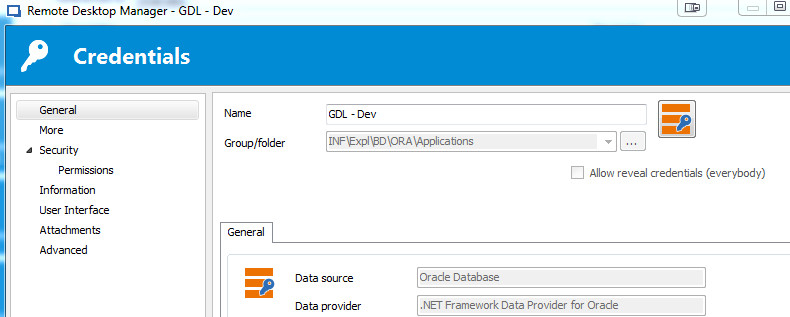
This checkbox is missing when looking in the properties.
I will check with our RDM Administrator if it can be related to some missing privileges
Martin
Unable to view credential of type Connection String
I am using Remote Desktop Manager Enterprise Edition Version 12.0.8.0
Martin
Unable to view credential of type Connection String
Hi,
In RDM I created a new credential of type "Connection String". I configure the data source as Oracle Database and specified the host, username and password. I can also test the connection and everything work fine.
When I go back to RDM navigation tree and select my credential and click on view password, the screen that appear is showing the fields Username, Domain and password but everything is blank.
Is this a bug or I am missing something?
Regards,
Martin