
francois01
Text in [] to Tags
Greetings
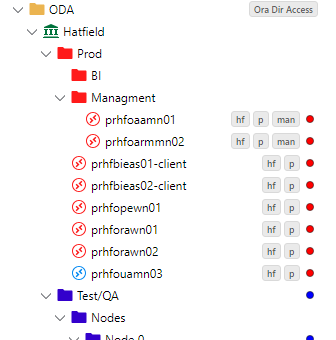
I was pleasantly surprised to see that text in the description field that is inclosed in [] is shown to the right and it looks like tags. However I notice that it is not tags.
Would it be possible to either add a edit function (or by default) change text included in [] to tags
Regards
Enhance Documentation Tab
Greetings
To add diagrams to the documentation/notes pages, where one can use Markdown.
Would it be possible to integrate PlantUML (https://plantuml.com/) code and have it render?
Regards
Enhancements to the Password Generator
No problem, not everyone works with barcodes.
Sometime the text you want to enter is to long to generate a barcode for - for example file locations.
The barcode scanner decode the barcode and send the text to your workstation.
For your application it looks like you are using a keyboard.
Enhancements to the Password Generator
The workflow to install a server is as follows
1) Decide on the server names, and so on.
2) Generate all required passwords
3) Generate 2 documents
Doc 1: Install procedure, with server names, install location, special instructions. This document becomes part of the DR document set.
Doc 2: All the barcodes (server names, passwords, user names etc). This document is locked away and will be used during a DR event.
4) Do the install and where possible, instead of typing scan the barcodes. It negates user typos
Hope this helps
Enhancements to the Password Generator
Greetings
I download the images and then paste it in the worksheet.
I then scan it
Regards
Enhancements to the Password Generator
Greetings
For the password generator, can I suggest the following enhancements:
1) Add a text box to so that one can list items with which a password may not start.
Reason: When you create a password for some Oracle installs you must not start the password with $
2) Add the ability to use a pattern when generating a password
For example 999XXXxx will generate 985OPXio
3) Allow the editing of templates
4) Provide the option to generate a barcode from the selected password. Either Code 128 or QRcode.
Reason: When you prepare the installation worksheet add the barcode then during installation you can just scan the barcode
Sometime copy and paste does not work.
Search/Filter: Search on custom fields
Greetings
Under the search option I notice that one can't search on the custom fields - or am I missing somehting? for example Can one search using the variable names %CUSTOM1% for example?
Regards
Password Generator - Prevent certain characters to be adjacent
There is certain characters that can be confused with each other i.e
O and 0 [Oscar and Zero]
1 and I [India and One]
l and | [Lima and | ]
It would be nice if in the password generator one can either have the option to avoid having these characters next to each other. In Keepass the option is called “Exclude look-alike characters”