Enhancements to the Password Generator
0 vote

Greetings
For the password generator, can I suggest the following enhancements:
1) Add a text box to so that one can list items with which a password may not start.
Reason: When you create a password for some Oracle installs you must not start the password with $
2) Add the ability to use a pattern when generating a password
For example 999XXXxx will generate 985OPXio
3) Allow the editing of templates
4) Provide the option to generate a barcode from the selected password. Either Code 128 or QRcode.
Reason: When you prepare the installation worksheet add the barcode then during installation you can just scan the barcode
Sometime copy and paste does not work.
All Comments (8)
Hello,
I will create an enhanced task. The only one I'm not sure is the barcode. How do you extract generated QRCode and send it to the system?
Thank you.
Regards
David Hervieux
Greetings
I download the images and then paste it in the worksheet.
I then scan it
Regards
Thank you for the clarification. I will add an enhancement request for that but I have another question. Once it's in the worksheet, how do you use it? Is it specific to a system? I'm just curious to understand the complete workflow.
Regards
David Hervieux
The workflow to install a server is as follows
1) Decide on the server names, and so on.
2) Generate all required passwords
3) Generate 2 documents
Doc 1: Install procedure, with server names, install location, special instructions. This document becomes part of the DR document set.
Doc 2: All the barcodes (server names, passwords, user names etc). This document is locked away and will be used during a DR event.
4) Do the install and where possible, instead of typing scan the barcodes. It negates user typos
Hope this helps
I must be idiot but it's the "where possible" that I don't understand. Where is it possible. Sorry to bother you with this. Do you use an application to read the QRCode and convert it to text or something else?
Regards
David Hervieux
By the way the enhancement request is created.
Regards
David Hervieux
No problem, not everyone works with barcodes.
Sometime the text you want to enter is to long to generate a barcode for - for example file locations.
The barcode scanner decode the barcode and send the text to your workstation.
For your application it looks like you are using a keyboard.
Hello Francois,
In regards to your second request. We already have a way to generate a password using a pattern when changing the "Mode".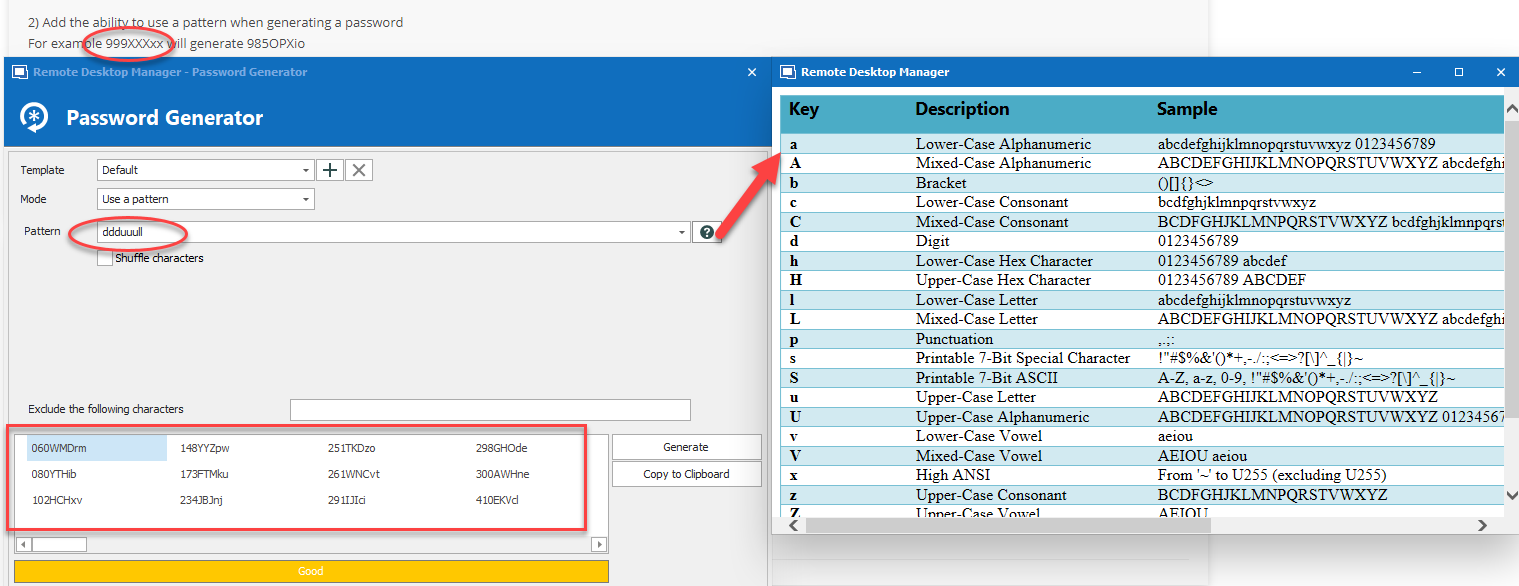
When creating password templates it is also possible to create a "Pattern" password template. Is there any option missing in this feature to make it usable in your context or would this already be satisfactory?
Regards,
Michaël Beaudin
PatternPassword.png