
david04
RDM 2025.1.31.0 x64 freezes
Version: RDM 2025.1.31.0 x64
Hosted on W10 10.0.19045.5737
Symptoms:
Locks up after 'some time' (>30 min use??)
Occasionally comes back to life but killing the process is more useful.
Possibly only occurs when connecting to a Linux x64 Mint system but TBC.
Logs:
System.NullReferenceException: Object reference not set to an instance of an object.
at Devolutions.RemoteDesktopManager.RemoteDesktopManagerCommunicator.Open(String[] parameters)
[PipeClientTransport][Error][2025-04-22 17:25:40Z] System.OperationCanceledException: The operation was canceled.
at System.Threading.CancellationToken.ThrowOperationCanceledException()
at System.Threading.CancellationToken.ThrowIfCancellationRequested()
at System.IO.Pipes.NamedPipeClientStream.ConnectInternal(Int32 timeout, CancellationToken cancellationToken, Int32 startTime)
at System.Threading.ExecutionContext.RunFromThreadPoolDispatchLoop(Thread threadPoolThread, ExecutionContext executionContext, ContextCallback callback, Object state)
--- End of stack trace from previous location ---
at System.Threading.ExecutionContext.RunFromThreadPoolDispatchLoop(Thread threadPoolThread, ExecutionContext executionContext, ContextCallback callback, Object state)
at System.Threading.Tasks.Task.ExecuteWithThreadLocal(Task& currentTaskSlot, Thread threadPoolThread)
--- End of stack trace from previous location ---
at Devolutions.Ipc.Network.Transport.Client.PipeClientTransport.ConnectAsync(String pipeName, CancellationToken cancellationToken)
Other info:
I'm a long time user and the system is regularly updated and this issue only appears to have started in the last month, since connecting to MINT. (But TBC)
Having read this forum, I'm running RDM as 'admin' to see if that alters behavior.
Free version hangs on startup..
HI - thanks for the quick response...
Free version hangs on startup..
OK, this is certainly a 'thing' and it fails when it tries to authenticate against your server(s). I've copied the old install dir (so I still have any logs) installed the prog, renamed the %appdata% dir and done a clean install.
When I first run the app up I get the 'logon/register/use Devolutions cloud' and if I opt for 'cloud', I get the never ending 'progress bar' and have to kill the app. If I 'register later' it works.
Incidentally, I then tried to register a new account, and never got the email with the link. And can't find anyway to resend it.. help pls!
Thanks
D.
Free version hangs on startup..
Thanks for the reply.
I don't think it is ~quite~ the same as I'm using W7 x64 Ent not W10 1903. Today, Monday, I'm on a client site and have just u/gd the Free version to 2019.1.9.0 and on W7 x64 1803 it works fine. I'll force and u/g to 1903 and see what happnes.
My office version still hangs and when it does I can't close it or do anything other than kill the process.
best wishes
David
Free version hangs on startup..
JUst run it up today (Sat 8th) after using it on FRiday and now it hangs at 'connecting to devolutions cloud. In the background is an empty window titled 'authentication'.
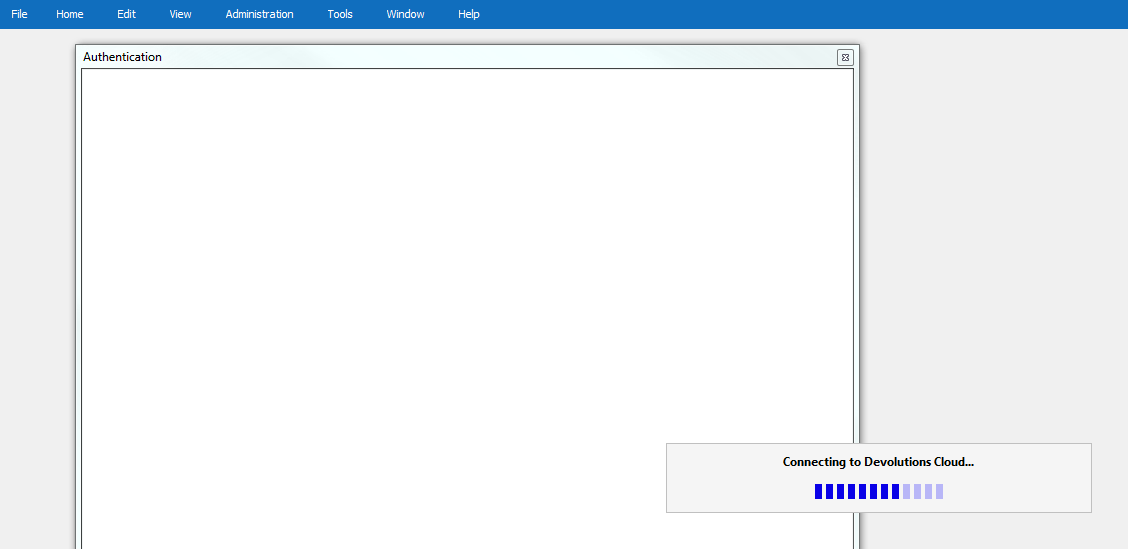
any clues pls?
Thanks
David
Stand alone off line install
Many thanks.
Stand alone off line install
Hi
Any advice as to how best to do an install on systems which are off line with no Internet connects (secure site)?
The msi seems also to need vcredest_x86.exe - but is there anything else?
How about making a full off line installer?
best wishes
David