
NathanBenz
VPN Prompt to connect if unable to ping/scan
Awesome, thanks so much Hubert and David!
Cisco AnyConnect inserts duplicate "n" answer for certificate question into username field
Actually, I just reinstalled the addon through the addons interface and it replaced the file with a later one. Now I see the relevant options you talked about! I tried connecting and it works, sorry about the false alarm :)
Cisco AnyConnect inserts duplicate "n" answer for certificate question into username field
I just checked my AppData folder, and the version there is 3.0.6.1, so I have a feeling that's the issue. Let me uninstall / remove files / reinstall the VPNAddOn.dll and see if that works.
Cisco AnyConnect inserts duplicate "n" answer for certificate question into username field
Hi Hubert,
Thanks for the fast response! I've included a screenshot of the plugin versions I'm using, and that is my current version.
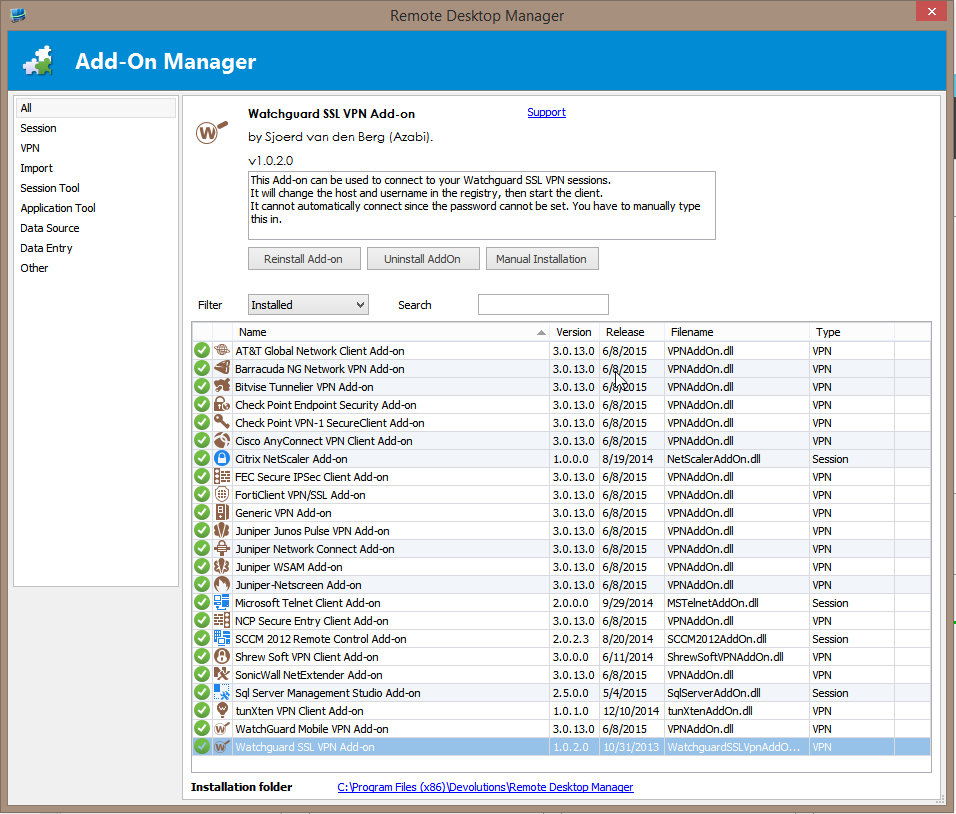
Cisco AnyConnect inserts duplicate "n" answer for certificate question into username field
Also, I have confirmed that if I enter the information manually into the window it does indeed connect as expected, so the duplicate "n" is definitely the issue.
Cisco AnyConnect inserts duplicate "n" answer for certificate question into username field
When using Cisco AnyConnect and selecting "No" for the "Digital Certificate Answer" and specifying a group number, the certificate answer is correctly entered, then the group number is correctly entered, but an additional "n" is entered into the usrename field when the logon prompt appears, and then the subsequent answers are out of order - i.e., the password field gets the username entered into it, the logon fails, the group number is prompted again and that's where the password ends up being entered in clear text :)
Is this by design? Is there usually a second prompt for certificate that this client is missing? If so I'm happy to add a feature request instead :)
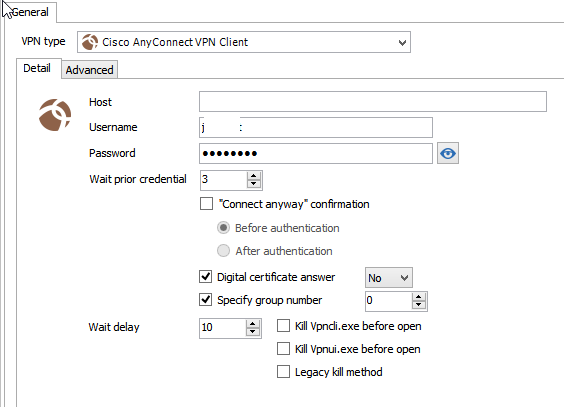
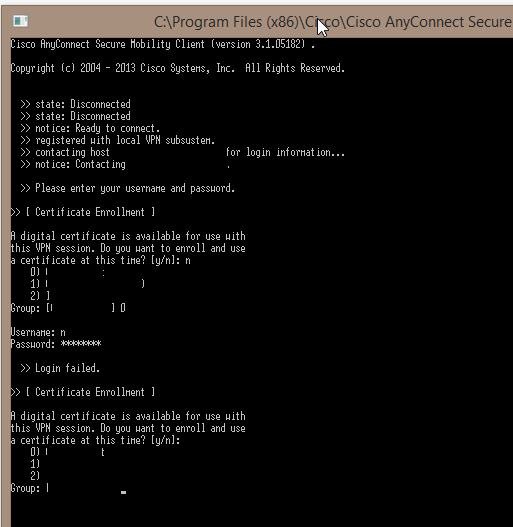
Regards,
Nate
VPN Prompt to connect if unable to ping/scan
Thanks David!
Nate
VPN Prompt to connect if unable to ping/scan
Hi David!
So more like
a) if the server can be reached then just RD/connect the session as usual
b) if the server can't be reached, then prompt to open VPN rather than automatically connecting
Actually while I am saying this, I realize that many other people might not have the same issue as me, as I have (for instance) many customers I connect to with AnyConnect, and I essentially have to clear out any cached AnyConnect settings and profiles before we launch the AnyConnect client - which we do with a powershell script. It's actually the running of this script that causes the issue, not the RDM app per se. But the above option would be perfect if it's something you can include at some stage.
Now if you want to get really tricky, have the AnyConnect session be able to clear out saved profiles/previously connected to sessions ;) But that's a whole other problem.
VPN Prompt to connect if unable to ping/scan
It would be great to have a combination of the prompt and ping/scan options in the VPN connection settings.
Consider this scenario (not uncommon in my world) - Connected to a client's VPN, and I have 6 RD sessions open, all with inherited (or not) VPN settings from the folder level. I reboot a server, and then in a moment attempt to RD to it again, but it's not up yet - so if I have the 'connect if unable to ping/scan' option set, it will disconnect the VPN, and reconnect it, disconnecting the other RD sessions (but they may sit and try to reconnect). If the server is still not up by the time the VPN connects, the RD session will time out, and the VPN will drop again, making the other RD sessions drop as well.
I really want the capability to connect automatically if the server is pingable, but prompt if the server is not pingable, especially on initial VPN establishment, but then if the above scenario happens I lose it all. The prompt if unable to ping option gives me the best of both worlds :) I use RDM extensively every day, so I love it! Thanks for all your hard work.