
stever
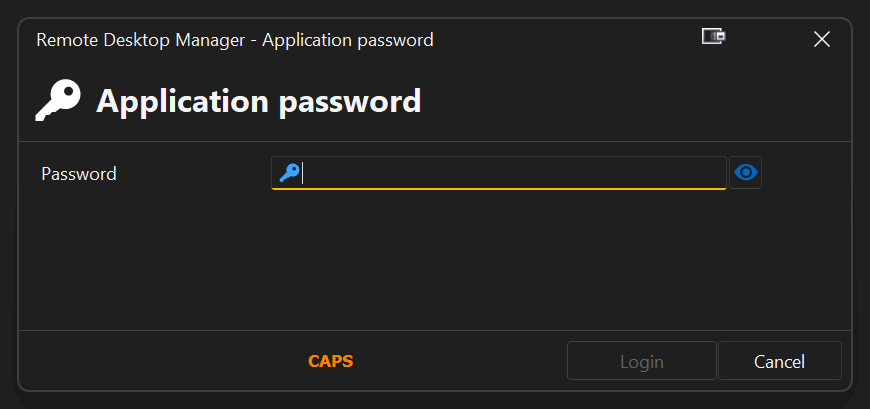
Caps Lock On Indicator when logging in
Hi Maxim,
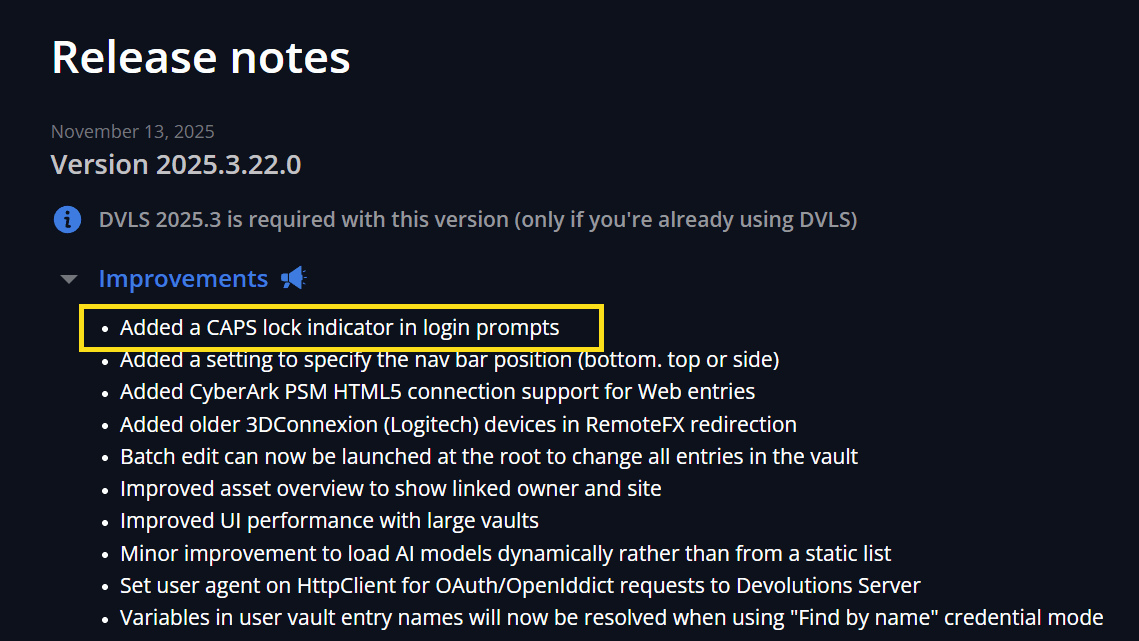
very cool and had seen the release notes when prompted to upgrade and was at the top of the list! Amazing and very much appreciate the team being so responsive and implement the change so quickly! Love using the product and with this being my third enhancement - very invested in the tool and always recommend RDP to personal friends as a reliable password vault and Devolution's Corporate products where use cases apply!
Regard,
Steve R.
Caps Lock On Indicator when logging in
Hello David,
Thanks for the quick response - screenshot attached as you requested. Excellent customer service from Devolution's as always!
Caps Lock On Indicator when logging in

When first opening the app to log in... please add caps lock indicator when entering password to log into Devolution's Remote Desktop Manager. I log into my PW vault daily to connect to my browser plug in and I never know if my caps lock on or off...
Maybe there is a security reason, but every other application has this behavior.
Copy Password Functionality on Hidden Vault Items appears to be broken
I mean - any password entry that is in Remote Desktop Manager Vault. Any entry that has a password website entry with a password cannot be copied without unmasking. I hesitate to share a screenshot of my personal RDM containing information also I am unable to take any screenshots from my mobile device due to RDM Policy.
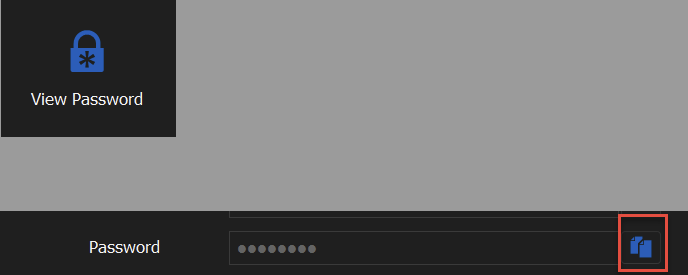
In the attached screenshot from the desktop application which is similar to the mobile app. Click View Password on the password entry -> you then can see the password which is masked. When you click the "copy" icon - nothing happens.
Copy Password Functionality on Hidden Vault Items appears to be broken
In previous versions of RDM for Android I have been able to use the 'Copy to Clipboard' icon while the vaulted password was hidden. I often do copy/paste password entries in browsers. The only way to now copy the password is to unhide the vaulted password which to me is a security risk (over the shoulder viewing).
Please confirm if this is an intended change or potential bug and if can be fixed.
Currently using version 2023.1.2.0 or Remote Desktop Manager for Android.
Feature Request - Firearms Information Entry Type
Looking for a new Information Type to be created as an option to select for "Firearms" with a custom icon. Here in the U.S. many firearms owners and businesses retain critical information related to insurance, inventory, or compliance.
The following fields:
Manufacturer Name
Description
Finish
Purchase Date
Model Number
Serial Number
Cost
Caliber
Magazine Capacity
Ammo - Home Defense
Ammo - Range
Phone Number
Website
FFL / Dealer
FFL / Dealer Phone Number
FFL / Dealer EMail
FFL / Dealer Website
Report for Security Questions and Answers
Hello Hubert,
Would the report be displayed within Devolutions RDM API, similar to the existing Password Analyzer report? The standard HTML report would suffice as an export.
Thanks for the continued support and excellent products!
Report for Security Questions and Answers
As a feature request,, Looking for a report to be created within RDM for entries containing security questions and their respective answers associated website entires or any other entries containing security questions.
With many more sites requiring security questions, I can see value in a report to evaluate and report, export on entries containing security questions.
Steve R.
Please add additiona fields to Login Account Type
Please add the following additional fields to the Login Account Type
Pin - Many website have pins instead of passwords.
Associated email - Many websites still use login names instead of your email, but still would be helpful to track what email address the account was created and attached to.
Entry Count / Reports Summary
Not sure if already incorporated but can you add a reports/summary page containing the number of entries in the current connected database, number of different types of connections, database size, type of connection - similar to what you see in RDM.
edited by steverosenquist@gmail.com on 6/25/2015
Offline Mode with DOD (Devolutions Online Drive)
I was not connected to any wireless/4g - was completely in a place where not type of service was available.
Off-line mode with MS-SQL Datasource
that is correct - i have seen the similar behavior when using offline mode and a DOD datasource. Connection screen empty - but in my case - after i do a refresh after a few minutes - even when still offline - the connection screen does display the data. Try a refresh when still offline and see if the data appears.
Long Press / Edit entries
Currently only have 376 Entries and the data source type is DOD (Devolutions Online Drive).
Long Press / Edit entries
Happens on all entry types and does happen every time i select the edit option.
Change Icon type of imported data
Currently using Online Drive as the data source. Installed the latest version earlier this morning. Currently on verion: 6.4.0.0
Perfect - this fixed the problem as you were correct - the enable custom images was unchecked/disabled.
I had used previous version of PVM and had about 70 to 100 custom images that i had in my dropbox account. Thanks for the assistance.
Change Icon type of imported data
very good - i am in the Windows version. Data was imported from passwordsafe and all the entries defaulted "Account" - but in the process of changing to "Web"
Change Icon type of imported data
I do not see the "X' you are speaking of - can you advise where it would be located.
Custom Icons
I previously imported some custom icons for gmail and other entries. When displaying the entries within PVM - the custom icons appear very small.
is there a default process for add and a specific size requirement to match the existing icons.
see attached screenshot of how it is displayed on the phone.
Change Icon type of imported data
Imported all my data from passwordsafe and many of my entries have the type "Account". Want to change the type to Web - but when i do - the old Account icon remains even after i clear all the fields and uncheck the Account check box.
Is there a way to easily change the types?
Security Questions Category
Along the same line - recovery passwords & phone numbers may be another option/feature.
Vertical Ellipses to view entries
When using apps on phone - i always count the number of presses/windows to access the information - the less the better for the user. for the phone app - the ability to view passwords using a minimum of 2 windows/presses is preferred.
One press to view the entry - another press to view the password information. just my preference.
Security Questions Category
Today it is very common for all types of websites/accounts to have one or more security questions.
Can you add another category within RDM/PVM for Security Questions - similar to the categories within the properties window of an entry on the left side such as Alarm, Alarm Codes, Bank Information, etc. A dedicated category "Security Questions" would be helpful allowing up to 5 security questions and even the ability to upload a security image for safekeeping and the ability to view.
The functionality may already be there - if so - please advise.
Steve
Offline Mode with DOD (Devolutions Online Drive)
Had%20a%20situation%20today%20where%20had%20no%20wireless/4g%20coverage%20and%20when%20entering%20offline%20mode%20-%20took%20longer%20than%20normal%20to%20open%20as%20i%20assumed%20was%20looking%20for%20a%20connection.%20%20The%20app%20did%20not%20crash%20nor%20did%20the%20data%20come%20up%20on%20screen.%20%20I%20had%20to%20perform%20a%20re-sync%20of%20the%20offline%20connection%20and%20the%20data%20was%20immediately%20available%20on%20the%20phone%20in%20offline%20mode.
edited by steverosenquist@gmail.com on 6/25/2015
Long Press / Edit entries
When you perform a long press on an entry and are given the Edit/Delete option, Upon entering Edit and view the entry - there seems to be a very long delay when you click on the final "Done" button.
Not sure what programming is occurring behind the scenes and may be related to the sync occurring after exiting the entry, but just wanted to note.
Vertical Ellipses to view entries
When viewing entries - was not completely intuitive to click on the vertical ellipses to view the connection.
Probably by design - are you opposes to going directly into the entry pressed and having an eye to view the password - but retaining the existing functionality.