
kaufinger.christoph
Error Message at Change / Add new Entry in RDM
Hello,
i send the Schema to your Support Mail.
Thanks!
Regards
Christoph Kaufinger
Error Message at Change / Add new Entry in RDM
Hi,
Thanks for checking. Is there any Information how the database Schema should look like? (e.g. Tables)
Maybe I can check my Database in the meantime of all tables are correct?
Thanks!
Regards
Christoph Kaufinger
Error Message at Change / Add new Entry in RDM
Hello,
file was sent out.
Thanks!
Regards
Christoph
Error Message at Change / Add new Entry in RDM
Hello all,
i just faced some problems in our RDM System. We tried to Change some Entry and also tried to add some Entry but we always receive the following Error Message.
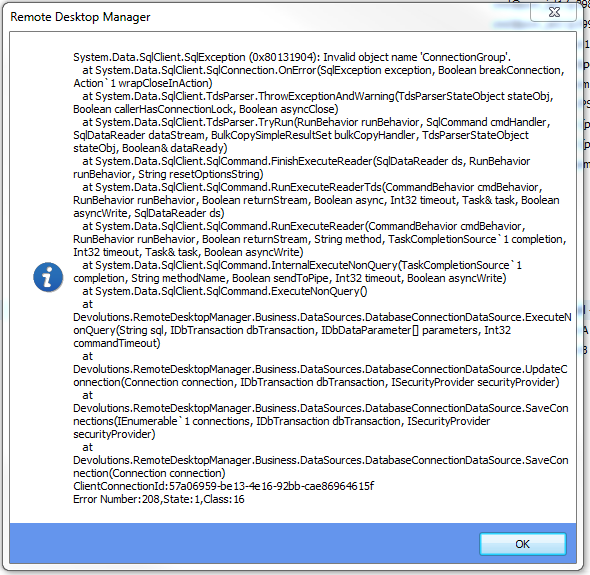
We are all running on 10.6.7.0 x64.
Maybe somenbody of you know how to help me. On Friday I could add and chage everything I wanted and until today nothing was changed on DB Side e.g.
Thanks for help!
Regards
Christoph
AddOn Manager is empty
Hello,
the Workaround is working - the old XML File has just two lines. Line 1 with XML Version Information and then the Close of the AddOn Info.
I think this was the issue.
Thanks for your help!
Regards
Christoph
AddOn Manager is empty
Hello,
first of all thanks for the quick reply!
I'm running the newest Version 10.6.1.0 but I had this issue already on 10.5.4.0 and thought that maybe the new update will solve the isse.
The Message I receive under Application Log is the following:
System.Net.WebException: The server committed a protocol violation. Section=ResponseStatusLine
at System.Net.HttpWebRequest.GetResponse()
at Devolutions.RemoteDesktopManager.Business.WebBrowserManager.GetWebFileSize(String url)
Hope this helps - if you Need further Information just let me know. I'll try in the meantime the Workaround.
Thanks so far.
Cheers
Christoph
AddOn Manager is empty
Hello all,
I have at the Moment an strange issue with the RDM. When I'm opening the RDM AddOn-Manager I could not see any AddOn.
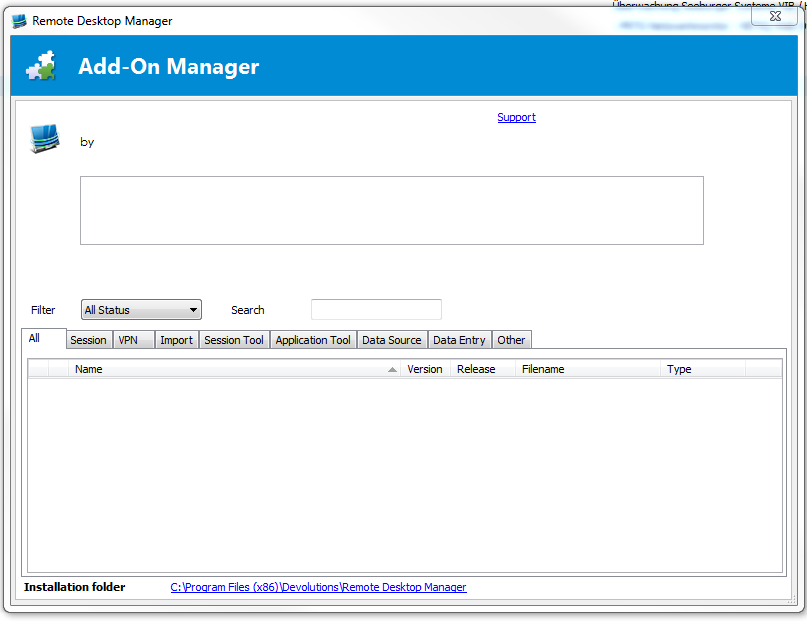
Is there any trick to solve this? Proxy is configured in RDM. This Problem was already existing with RDM 10.5.4.0 and still present at 10.6.1.0.
Thanks for checking and help!
Cheers
Christoph