
ben732
PIN an Entry
I would like to be able to PIN an entry so it's ALWAYS visible in the navigation bar. This would be handy for a credential entry. I'm using a PAM tool to manage my passwords and sometimes have to copy the PW to the clipboard to use it elsewhere. When I've filtered the navigation bar to what I'm working on, I have to clear the filter to find my credential to copy the PW. :)
Save Connection in Android App
Hi Marc
Yes, a bookmark is more what I was referring to. I'm try again tonight and look for the bookmark option.
Thanks!
Save Connection in Android App
Marc,
Thanks much! For now, I'll need to memorize the number. :)
Thanks again!
Save Connection in Android App
I have Wayk Now installed on my desktop at home. Without memorizing the numeric ID to connect, how do I either save the connection in my mobile app, or search for it?
Export Log from SSH Session
Hello,
Just to be sure, is he using our SSH Shell entry?
If that is the case, we have an option in the Advanced tab of the Properties of the entry to enable logging and specify a destination path for the log as well as the log mode. You have a choice between Event and Printable output;

Is this what you're looking for?
Best regards,
Hi Mark,
I pointed him to that feature. Will this export everything that happens in the SSH Shell window?
That option is available on the free version?
Thanks!
Export Log from SSH Session
My supervisor recently downloaded the free version of RDM. He has a networking background and uses SecureCRT to connect to the network switches. He wants to use RDM to connect over SSH, but would like to know if there's a way to export a session log before he logs off.
I know he can enable logs, but does this need to be done at the start of the session? Will it record his commands as well as the output?
Thanks,
Unable to install KeyPass Plugin
Thanks everyone, I fixed it myself. I had to launch RDM as an administrator! The plugin successfully installed once I did that. :)
Unable to install KeyPass Plugin
Hello,
Could you post a print screen of the error message please.
Best regards,
Here is the screenshot. I click INSTALL PLUGIN, Accept the Request for Elevation, and then get this.
I get the same message if I go to the Add-On Manager and attempt to install it from there.
I have KeePass 2.35 installed on my PC and I've made sure to install it in that directory (even though it wanted to go into the "KeePass Password Safe 2" folder. The folder has EVERYONE - FULL CONTROL permissions set.
Thanks,
Unable to install KeyPass Plugin
Okay, I just uninstalled keepass 1.1 and installed Keepass 2.35. I'm getting the same error. I changed permissions to everyone full control on the directory again as well.
Unable to install KeyPass Plugin
I see the issue, Keepass 1.x is not supported. We're using keepass 1.1. :(
Unable to install KeyPass Plugin
I'm trying to install the keypass plugin for RDM to link to my keypass db. The error message I get is that the directory seems to be read only. I've assigned Everyone Full Control to the "c:\program files (x86)\KeyPass Password Safe" directory with no success.
When I click the link for More Information (Installation and Required Settings), it brings me to a URL with a 404 error.
https://help.remotedesktopmanager.com/installation_keepass.htm
I went to the online help and searched for keypass and found nothing.
Thanks,
Web Browser Auto Login Discover
This is the page source:
<!DOCTYPE html PUBLIC "-//W3C//DTD XHTML 1.0 Transitional//EN" "http://www.w3.org/TR/xhtml1/DTD/xhtml1-transitional.dtd">
<!-- saved from url=(0014)about:internet -->
<html xmlns="http://www.w3.org/1999/xhtml" lang="en" xml:lang="en">
<head>
<title>vSphere Web Client</title>
<meta http-equiv="Content-Type" content="text/html; charset=utf-8" />
<style type="text/css" media="screen">
body {
display: none;
}
html, body {
height: 100%;
overflow: auto;
margin: 0;
padding: 0;
font: 13px Arial, 'Helvetica Neue', sans-serif;
}
p {
margin: 20px;
padding: 0;
}
img {
border: 0;
}
#flashContent {
display: none;
}
#container_app {
position: absolute;
top: 0;
left: 0;
width: 100%;
height: 100%;
outline: none;
}
</style>
<link type="text/css" href="history/history.css" rel="stylesheet" />
<link type="image/x-icon" href="assets/application.ico" rel="shortcut icon" />
<script type="text/javascript" src="history/history.js"></script>
<script type="text/javascript" src="assets/swfobject.js"></script>
<script type="text/javascript" src="assets/jquery.min.js"></script>
<script type="text/javascript" src="assets/jquery.scrollbars.js"></script>
<script type="text/javascript">
$(window).load(function() {
if(self == top) {
document.getElementsByTagName("body")[0].style.display='block';
} else {
top.location = self.location;
}
});
//<![CDATA[
swfobject.embedSWF(
'UI.swf',
'flashContent',
'100%',
'100%',
'11.5.0',
'playerProductInstall.swf',
false, {
quality: 'high',
bgcolor: '#ffffff',
allowscriptaccess: 'sameDomain',
allowfullscreen: 'true',
menu: false,
flashvars: 'locale=en_US&localeChain=en_US&resourceModuleURLs=locales/UI-en_US.swf',
scale: 'noscale',
wmode: 'opaque'
}, {
id: 'container_app',
name: 'container_app',
align: 'middle'
});
swfobject.createCSS('#flashContent', 'display: block; text-align: left;');
$.scrollbars({
swfId: '#container_app'
});
//]]>
</script>
</head>
<body>
<div id="container"></div>
<div id="flashContent">
<p>
To view this page ensure that Adobe Flash Player version
11.5.0 or greater is installed.
</p>
<p>
<a href="http://www.adobe.com/go/getflashplayer">
<img src="assets/getFlashPlayer.gif" alt="Get Adobe Flash Player" />
</a>
</p>
</div>
<noscript>
<object classid="clsid:D27CDB6E-AE6D-11cf-96B8-444553540000" width="100%" height="100%" id="container_app">
<param name="movie" value="UI.swf" />
<param name="flashvars" value="locale=en_US&localeChain=en_US&resourceModuleURLs=locales/UI-en_US.swf"/>
<param name="quality" value="high" />
<param name="bgcolor" value="#ffffff" />
<param name="allowScriptAccess" value="sameDomain" />
<param name="allowFullScreen" value="true" />
<!--[if !IE]>-->
<object type="application/x-shockwave-flash" data="UI.swf" width="100%" height="100%">
<param name="flashvars" value="locale=en_US&localeChain=en_US&resourceModuleURLs=locales/UI-en_US.swf"/>
<param name="quality" value="high" />
<param name="bgcolor" value="#ffffff" />
<param name="allowScriptAccess" value="sameDomain" />
<param name="allowFullScreen" value="true" />
<!--<![endif]-->
<!--[if gte IE 6]>-->
<p>
Either scripts and active content are not permitted to run or Adobe Flash Player version
11.5.0 or greater is not installed.
</p>
<!--<![endif]-->
<p>
<a href="http://www.adobe.com/go/getflashplayer">
<img src="assets/getFlashPlayer.gif" alt="Get Adobe Flash Player" />
</a>
</p>
<!--[if !IE]>-->
</object>
<!--<![endif]-->
</object>
</noscript>
</body>
</html>
Web Browser Auto Login Discover
I am attempting to add my VMware vCenter server URL as a web browser link in RDM.
I've entered the URL (https://vcenter.domain.com:9443/vsphere-client/#) in RDM, gave it a name and went to the LOGIN tab. I then clicked DISCOVER, and got the error below.

I've been trying to get this resolved myself and haven't been successful. Any suggestions?
Thanks in advance!
AWS Console Column Request
I would love to see a column for the Instance Tags. We tag instances with different things to show what application the instance is being used for, who supports it, etc. If possible, I would love to see the tags as a column in the AWS Console in RDM.
Pass DOMAIN for URL entry
Nevermind... I found the "other" advanced section and made the change and it worked! THANKS!
Help with URL Entry
Jean-Francois,
Thanks! I went in there and changed the username format field to be {Domain}\{User} and that worked!
Pass DOMAIN for URL entry
Hi Maurice,
The only thing I have under the advanced tab is Automatic Refresh.
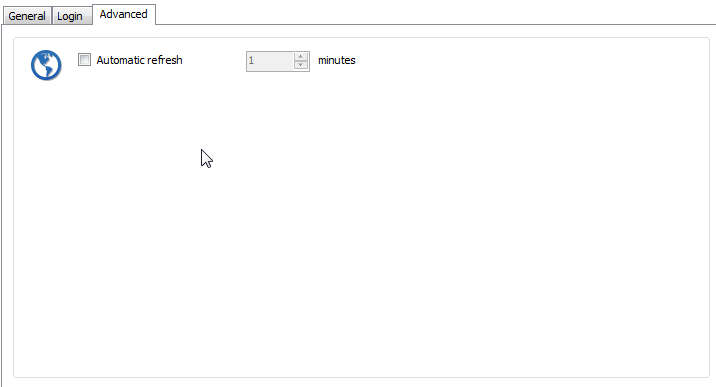
Pass DOMAIN for URL entry
When I login to a webpage and pass credentials from the credential repository, it only lists the username and not the domain.
It would be nice to be able to pass a variable there like: $domain$\username for it to pass the domain information.
Thanks!
Help with URL Entry
AHhh I see.. I appreciate the help. Right now, the login fails and I just enter @domain.com after my username and hit enter... it works... but if I can get it to login automated, it would be nice.
I will submit a feature request. :)
Help with URL Entry
Ahhh, I don't want to change from the repository so I don't need to remember to change my password in multiple places. Our passwords expire every 45 days so I'm changing them fairly often.
Why is there a button to view the Variable list at the bottom (see my screenshot from earlier) if I cannot use a variable there?
Help with URL Entry
Jean-Francois - The Advanced Tab only has "automatic refresh".
Brandur - I tried using both and also tried switching the % for $ as the Variable List as $username$ and $domain$. When I change the default "username" the username field is blank.

Help with URL Entry
Correct, the credential entry looks exactly like that.
Help with URL Entry
Hi Brandur,
I think you are misunderstanding ME... I am using an entry in the Credential Repository above your screenshot so those fields are grayed out.

Help with URL Entry
Hi Jean-Francois,
I am using the Credential Repository which has my domain user account. I use this Credential Repository entry to login to all my windows servers with no issue. As I need to pass the same information to login to this URL, I am trying to use the same Credential entry.
Help with URL Entry
Hi Brandur,
I orignally set it up with the DISCOVER button, and it fills in "username" in that field, however, when it fills in the field, it only puts my username and the domain is not listed anywhere...
There is not a separate field for domain, so the username field needs to be filled in with username@domain.com OR domain\username.
Thanks,