
salfer
Import TeamViewer CSV
Thanks for the script, unfortunately I get it not to run.
Can you explain the import again.
I launched PowerShell by RDM. (My version: 11.6.2.0) then run the script.
My CSV file looks like this: CUSTOMER \ TEST \ TEAMVIEWER, SERVERNAME, TV ID, PASSWORD TV - it is in the same directory.
The only message is "Done!"
ask for help
Common rasphone.pbk no longer works in v10
or you can tell me a better way?
Is it possible to store the pptp settings in RDM?
Common rasphone.pbk no longer works in v10
Yes - "run als Administrator" i Need this Function for openvpn.
What can i do? I test it on different machines. The rasphone.pbk stored on mapped network drive. With offlinesync enable. So i can use the rasphone file even i'm not connected to my Company.
or you can tell me a better way?
edited by salfer on 8/14/2015
Common rasphone.pbk no longer works in v10
HI,
okay i found the different between v9 and v10 - i run RDPMANAGER.exe in v10 as Administrator - because of my SSL VPNs (OPENVPN) if i run in normal user mode - the OPENVPN Route can't added.
If i Run RDPM as normal User - rasphone.pbk works fine.
How can i combine both ways?
Common rasphone.pbk no longer works in v10
the VPN connection is not established ?!
it seems that the rasphone.pbk is not used
The settings Are The Same - we just Update from v9 -> v10
edited by salfer on 8/14/2015
Common rasphone.pbk no longer works in v10
Hello there,
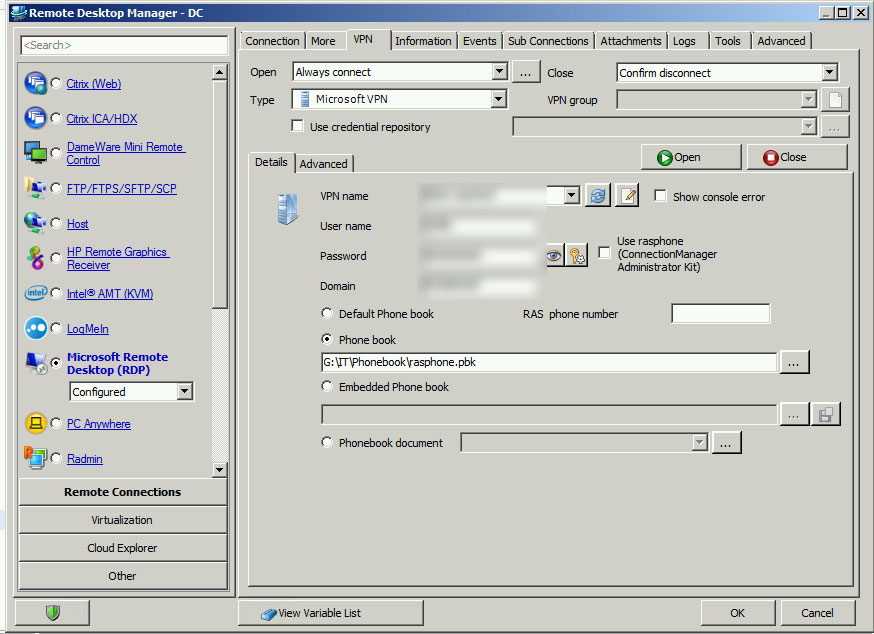
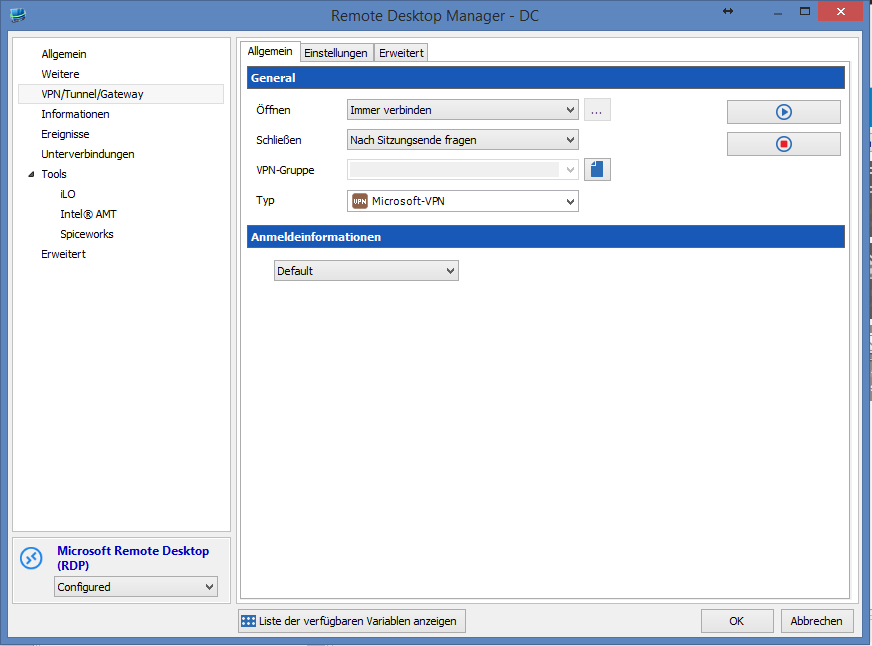
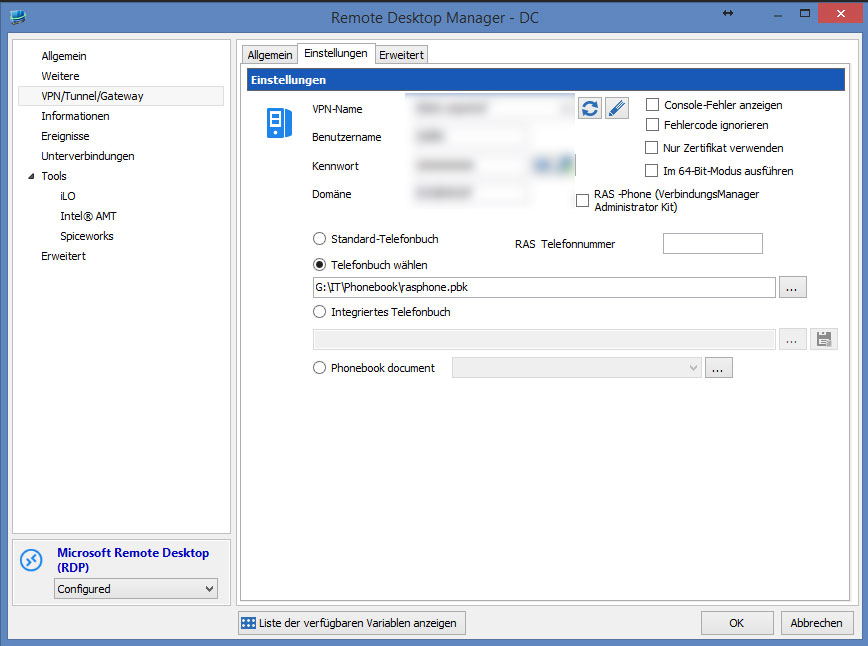
we have long time RDMv used 9. We have a elections a central file rasphone.pbk for PPTP. In version 10 (10.6.7), this is a failure. Have some screenshots attached! What needs to be changed in v10, so that I and my colleagues have access to the same "Phonebook"
OLD:
NEW:
edited by salfer on 8/13/2015
edited by salfer on 8/13/2015
Database Upgdadt 8.0.4 possible ?! / 7.5 Clients ?
Hi there,
we use RDM Enterprise with 10 clients (SQL SERVER)! If one Client updates the version from 7.5 to 8.0.4 and the DB is updated, is it possible for a 7.5 client connect to the same DB?
Or update all Clients at once?
Thanks for the support
Regards
Michael
phion entegra VPN Client
Hi everybody,
we use rdm enterprise for 2 years now - for a new connection we need the PHION ENTEGRA VPN CLIENT - is that possible to add?
Thanks for the support
Best regards
Michael
Microsoft Hyper-V Support
okay thanks - i research the problem!
And your fix (2008r2) 7.0.2.0.a - is this permanently so, or release a new version officaly?
Microsoft Hyper-V Support
@salfer
I think that you don't have the access rights or the firewall block the WMI (RPC server unavailable)
Your Fix works for me too, but only in LAN! If i connect to our Network with PPTP VPN (Firewalls on both Sides disabled), the same error?
Microsoft Hyper-V Support
[12.03.2012 20:15]ERROR System.InvalidCastException: Das Objekt des Typs "System.String[]" kann nicht in Typ "System.String" umgewandelt werden.
bei Devolutions.RemoteDesktopManager.Business.HyperVVirtualMachine.SetProperty(String name, Object value)
bei Devolutions.RemoteDesktopManager.Business.HyperVVirtualMachine..ctor(ManagementObject managementObject)
bei Devolutions.RemoteDesktopManager.Managers.HyperVManager.<GetTargetComputers>d__4.MoveNext()
bei System.Collections.Generic.List`1..ctor(IEnumerable`1 collection)
bei System.Linq.Enumerable.ToList[TSource](IEnumerable`1 source)
bei Devolutions.RemoteDesktopManager.Managers.ThreadManager.<>c__DisplayClass5.<RefreshHyperVVirtualMachines>b__3()
bei Devolutions.RemoteDesktopManager.Managers.ThreadManager.<>c__DisplayClass15.<Execute>b__14(Object param0)
The same error on all my 2008r2 servers
edited by salfer on 3/12/2012
Another Error if i wan't to use this feature while i was connected over vpn* (to the same server)
[12.03.2012 20:21]ERROR System.Runtime.InteropServices.COMException (0x800706BA): Der RPC-Server ist nicht verfügbar. (Ausnahme von HRESULT: 0x800706BA)
bei System.Runtime.InteropServices.Marshal.ThrowExceptionForHRInternal(Int32 errorCode, IntPtr errorInfo)
bei System.Management.ManagementScope.InitializeGuts(Object o)
bei System.Management.ManagementScope.Initialize()
bei System.Management.ManagementScope.Connect()
bei Devolutions.RemoteDesktopManager.Managers.HyperVManager.GetTargetComputers(String serverName)
bei Devolutions.RemoteDesktopManager.Managers.ThreadManager.<>c__DisplayClass5.<RefreshHyperVVirtualMachines>b__3()
bei Devolutions.RemoteDesktopManager.Managers.ThreadManager.<>c__DisplayClass15.<Execute>b__14(Object param0)
edited by salfer on 3/12/2012
edited by salfer on 3/12/2012
Microsoft Hyper-V Support
HI,

the checkbox is enabled - without this, the HYPER-V column is inactive.
But no server appears...?!
Microsoft Hyper-V Support
Hi @ all,
we renew our Enterprise license today.
The Feature: "Hyper-V Support" is a great thing!!!!!

But i can't find this in the new Version ?! Whats wrong
edit:
okay - meanwhile i found the option:

but no server is shown?! What was the reason?
thanks
greetings from germany
edited by salfer on 3/12/2012