
meinHoster.pro
NoVNC implementation
Hi Manuel, hi David,
this would be very great, in fact Proxmox Virtual Environment for server virtualisation has changed everything to noVNC a few month ago.
Informations about Proxmox will be here: http://www.proxmox.com/en/proxmox-ve
Traget ID field to short
Hi,
as source and target id's are based on IP addresses, please check the target id field.
It will not accept addresses like 192.168.45.128 - Yes, the address is out of the rfc private range,
but if there are historical grown networks some could run in a problem and will not try or use Wayk anymore :-)
Nightly greetings from near Munich
Host Availability for SSH Connections still not working
Hi,
just tried out the 10.9.8.0 Beta and it seems to work in this version.
I will do some further tests and give you a feedback :-)
Host Availability for SSH Connections still not working
Makes no difference, sorry :-)
Host Availability for SSH Connections still not working
the default credential
Host Availability for SSH Connections still not working
Pinging v-tpl-debian7.meinemail.name [192.168.97.206] with 32 bytes of data:
Request timed out.
Request timed out.
Request timed out.
Request timed out.
Ping statistics for 192.168.97.206:
Packets: Sent = 4, Received = 0, Lost = 4 <100% loss>,
Approximate round trip times in milli-seconds:
Host Availability for SSH Connections still not working
Update: Ping check works on RDP hosts but not on SSH hosts.
Host Availability for SSH Connections still not working
Hello again,
tried to change host availability to PING in fact of faster results instead of PORT.
The problem is on my version 10.6.7.0 that host check via ping shows every host as available even if it is not pingable.
Host Availability for SSH Connections still not working
Perfect, thank you. Port scan is the prefered way for me too :-)
Host Availability for SSH Connections still not working
Thank you and have a nice weekend :-)
Host Availability for SSH Connections still not working
The native (integrated) SSH
Host Availability for SSH Connections still not working
Manual Port Scan is working, resolving the correct host address and showing right status.
Port opened [OK] on running machines
Not reachable [FAIL] on offline machines
...but host in the tree only gets red on rdp, not on offline ssh hosts.
Host Availability for SSH Connections still not working
Hello Devolutions Team,
we are using version 6.3.9600.16384 by now.
The Host Availability for RDP Connections is working in both, Ping and Portscan but in no way for SSH Connections.
Is there a way this will work or the better question: Does it work by now, and how :-)
Greetings from Munich
SSH Connection stays open after Session closed
Hello David,
thank you for the tip. I tried the Beta right now and everything looks good.
After closing the SSH session the connection is also closed immediately :-)
SSH Connection stays open after Session closed
Hi David,
thank you for your feedback. I tried some different configurations but by now it's only the problem on SSH-Shell.
SSH Connection stays open after Session closed
Thank you, great :-)
SSH Connection stays open after Session closed
Yes, that's the only working way by now
SSH Connection stays open after Session closed
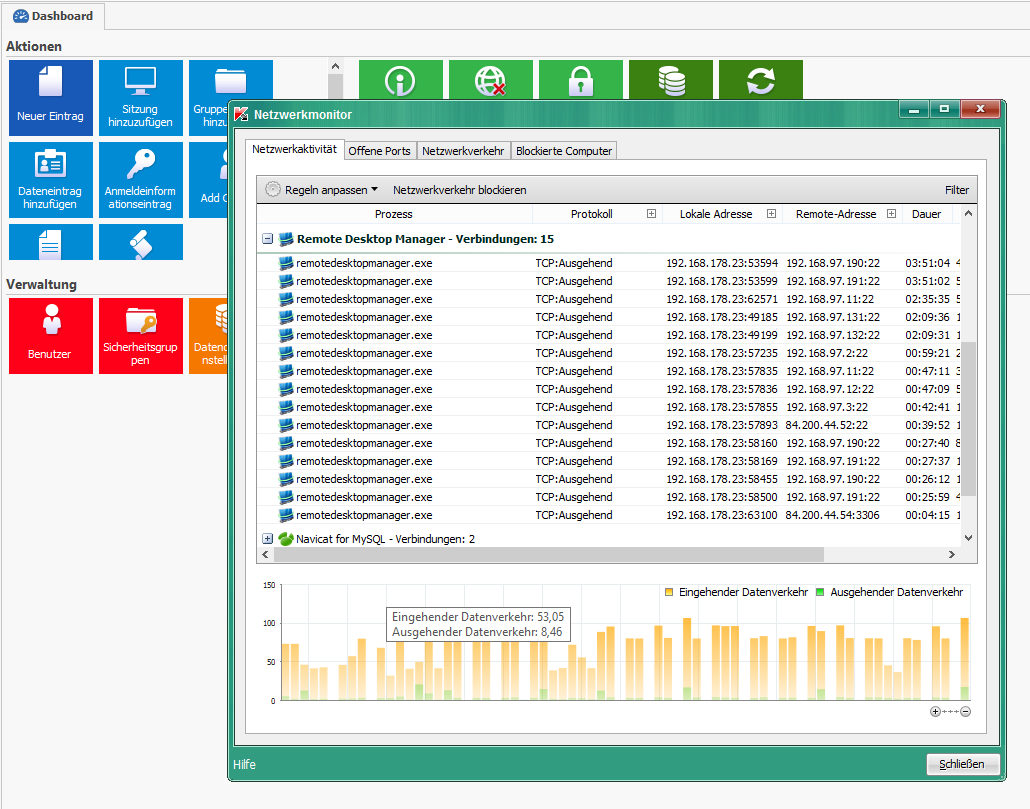
As you see, all sessions in RDM are closed but you can see on the network monitor of my Kaspersky that the connections are still established.
Double checking on all of these servers from another laptop of me showes the connections are really established to the servers.
SSH Connection stays open after Session closed
Could you try to type exit to close the connection?
also the same, session is closed but the connection stays alive to the server :-(
SSH Connection stays open after Session closed
Any news about the issue right now?
SSH Connection stays open after Session closed
Hello,
When you say you do an exit command, does this mean that you have checked the "Exit command on disconnect" option in the Terminal tab?
Best regards,
Hello Maurice, yes that's correct. But it makes no difference if the "Exit command on disconnect" is checked or not.
SSH Connection stays open after Session closed
Could you try with Putty to see if you get the same behavior?
Hello David, yes I tried the same with Putty over RDM but it only occures on the use of SSH-Shell
SSH Connection stays open after Session closed
On my Windows Version of RDM 10.0.4.0 I found out, that the ssh connection on standard port 22 still is alive AFTER the session was terminated by closing the connection tab and also when I do an exit command.
Troubleshooting was done with different types of settings but occures only in the use of SSH-Shell.
On closing the connection tab the "exit" command is executed on the remote server as expected.
In case of doing many work on different servers or also the same server you get more and more and more open and alive connections on the destination maschine. Here is a short output with ps on the server:
358 ? Ss 0:01 /usr/sbin/sshd -D
18568 ? Ss 0:00 sshd: root@notty
18745 ? Ss 0:00 sshd: root@notty
18902 ? Ss 0:00 sshd: root@notty
19032 ? Ss 0:00 sshd: root@notty
19159 ? Ss 0:00 sshd: root@pts/0
as you see the ended sessions are still connected to RDM