
glenc
RDM 2024.1.27.0 64 Bit Licensed
Hello. I just downloaded the latest zip file version of RDM and I'm receiving the following error when I try and launch the RDM cmdlet...

As I'm running this on a laptop for work I do not have any admin rights which is why I use the zip file so I can update without help. I am running windows 11 and before when I was running 2023.2.32.0 on windows 10 it was working just fine. We did an in-place upgrade to win11. Is there anything I can do without admin rights? I'm afraid if I run it with admin rights once to what I would hope take care if this issue my regular account AD account would not be able to execute rdm from that point on.
Any ideas or logs I could gather?
Thank you.
Glen
RDM 2023.2.9.0+ Type Clipboard stopped working for RDP sessions
Nope. NO issue at all. My mistake because I think I provided the incorrect parameter file which disabled the type clipboard.
I'm good now.
Regards,
Glen
RDM 2023.2.9.0+ Type Clipboard stopped working for RDP sessions
Ok. It looks like I may have been importing a settings configuration that was either corrupt or was set to turn this feature off. It works fine before I import my saved configuration. After the import the type clipboard stops working.
Glen
RDM 2023.2.9.0+ Type Clipboard stopped working for RDP sessions
Hello. While I had some other issues with 2023.2.17.0 and 2023.2.18.0 I went back to see where those issues last worked. While doing so I noticed in 2023.2.17.0 that Type Clipboard stopped working along the way.
When I went back to 2023.1.29.0 and the WinSCP Template opening issue was the last time that it worked. I also found that Type Clipboard also stopped working after 2023.1.29.0 version. So 2023.2.9.0 and above I noticed that Type Clipboard is not working in RDP sessions as expected.
Regards,
Glen
Winscp Template not working in 2023.2.14.0 64 bit windows 10
Just as an FYI....I went back to 2023.2.9....Winscp did not work. I went back to 2023.1.29 and Winscp works.
Regards,
Glen
Winscp Template not working in 2023.2.14.0 64 bit windows 10
Hello. I just updated to the version requested (2023.2.18.0) and it still acts the same.
Also now when I just click on a host without opening the template I get a dialog saying "the host is required". The entry does have the host as I can bring up the host under 2023.2.17.0.
Glen
Winscp Template not working in 2023.2.14.0 64 bit windows 10
Hello.
Here is the application log output when trying to open a connection with a template configured to use WinSCP:
[7/20/2023 5:30:31 AM - 2023.2.17.0 - 64-bit] Error Silent: System.Threading.ThreadAbortException: Thread was being aborted.
at System.Threading.WaitHandle.WaitOneNative(SafeHandle waitableSafeHandle, UInt32 millisecondsTimeout, Boolean hasThreadAffinity, Boolean exitContext)
at System.Threading.WaitHandle.InternalWaitOne(SafeHandle waitableSafeHandle, Int64 millisecondsTimeout, Boolean hasThreadAffinity, Boolean exitContext)
at System.Threading.WaitHandle.WaitOne(Int32 millisecondsTimeout, Boolean exitContext)
at Devolutions.RemoteDesktopManager.Business.HttpBrowserLinker.Run()
[7/20/2023 5:30:31 AM - 2023.2.17.0 - 64-bit] Error Silent: System.Threading.ThreadAbortException: Thread was being aborted.
at Devolutions.RemoteDesktopManager.Business.HttpBrowserLinker.Run()
at System.Threading.ExecutionContext.RunInternal(ExecutionContext executionContext, ContextCallback callback, Object state, Boolean preserveSyncCtx)
at System.Threading.ExecutionContext.Run(ExecutionContext executionContext, ContextCallback callback, Object state, Boolean preserveSyncCtx)
at System.Threading.ExecutionContext.Run(ExecutionContext executionContext, ContextCallback callback, Object state)
at System.Threading.ThreadHelper.ThreadStart()
Regards,
Glen
RDM 2023.2.17.0+ - Using Synchronizer with PowerShell Scripts?
Hello. I'm creating my own AD Synchronizer since the one supplied for AD does not bring back the description field into the entry name at this time. Plus I can progmatically create additional folders and sub-connections based upon what's filled out in AD and do comparisons and create the necessary folders/groups or entries based upon the AD computer object. So launching the PowerShell script say daily or maybe upon start of RDM would make sense to I'm capturing any new AD entries.
Regards,
Glen
Hello,
Its usual to use the windows task scheduler to plan execution of a task. In the Entry Information section of the session properties, you will find a field containing the Command Line that will launch your session automatically.

Using RDM Portable Version - Any Settings File that can be moved from one version to another?
Hello. Since I have converted to use the portable version of RDM, I'm wondering if there is a settings files I can move from one version to another so I don't have to keep going back through and updating RDM configuration each and every single time.
I keep forgetting the changes I made and would just love to be able to copy a file from one version to the next.
Thanks.
Glen
RDM 2023.2.17.0+ - Using Synchronizer with PowerShell Scripts?
Hello. Is it possible to use the Synchronizer functionally that is existing to launch PowerShell scripts? I have created a PowerShell script which updates folders and entries and was wondering if it's possible to have it automagically launched.
Thanks.
Glen
Proper method to create folders and subfolders in RDM PowerShell
Hello. I was able to figure out the issue using the Update-RDMUI commandlet.
Glen
Hello,
Do you have a sample of the script you are using?
What data source type are you using?
Have you tried using Set-RDMSession with the -Refresh switch following the New-RDMSession to save the new folder?
Best regards,
Proper method to create folders and subfolders in RDM PowerShell
Hello. Can someone provide a simple way to create folders and sub-folders in powershell?
I'm using New-RDMSession to create the folders and subfolders but after a while it stops working and updating the data source using F5 does not show the top level folder. The folder showing it's being generated by the PS output but I get nothing in the data source anymore. I'm using 2023.2.17.0 portable. Powershell 7 with Devolutions Powershell 1023.2.0.2.
I followed several of the old articles posted but they stopped working too.
Glen
Winscp Template not working in 2023.2.14.0 64 bit windows 10
FYI....I downloaded and unzipped the latest version released today 2023.2.17.0 and using the sample template I now get this dialog.
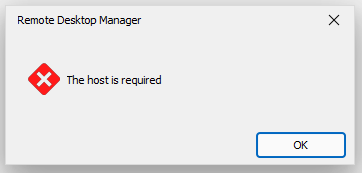
Still waiting on the information to provide you the logs.
Glen
Winscp Template not working in 2023.2.14.0 64 bit windows 10
Patrick,
The version I'm currently using is the portable version (latest). Can you provide the details on the application log debug? I tried to max out the debug but saw what I would call normal debug and now showing any kind of parameters being passed to the command line. Can you provide the necessary details to setup the application logs properly so I can send them too you?
Thank you.
Glen
Hello,
Thank you for contacting us on that matter.
I'm sorry to hear that you're experiencing issues with Variables. I will open a case for the engineering department regarding this issue to get it resolved as soon as possible.
In the meantime, could you provide the application logs? This will help us identify the root cause of the problem and find a solution.
Also, I suggest trying a portable version of RDM version 2023.2.9.0. To do so, please follow the steps below:
1. Close RDM.
2. Download the .zip file from the following URL: https://cdn.devolutions.net/download/Devolutions.RemoteDesktopManager.Bin.2023.2.9.0.zip
3. Create a new folder on your Desktop.
4. Extract the content of the .zip file into the folder you just created.
5. Go to the folder where you extracted the files and run remotedesktopmanager.exe.
6. Connect to your data source.
I hope this helps and please let me know if you have any further questions or concerns.
Best regards,
Winscp Template not working in 2023.2.14.0 64 bit windows 10
Hello. The template for Winscp stopped working when I changed from 2023.1.27.0 64 Bit Windows 10 (installer version) to RDM 2023.2.14.0 64 Bit Licensed Windows 10 (Zip file version). All I get now in the window asking for the hostname. The rest of the information is not filled out correctly as seen below.
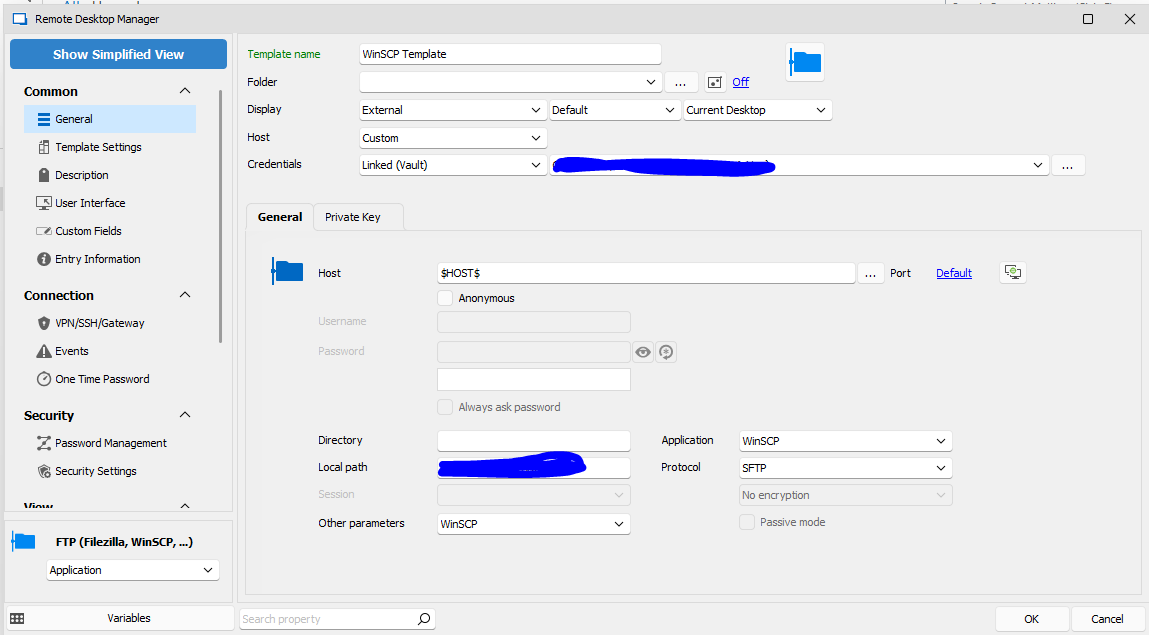
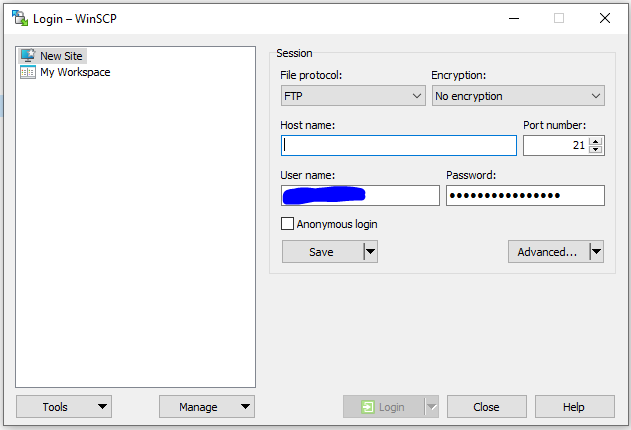
I moved from installed version to zip file version since I lost the ability to update myself with loss of admin permissions in windows. I still have the installer version installed if that makes any difference.
Any ideas?
AD Synchronizer - Question on how to bring in computer object description into name
Hello. It's been a little over 3 months and I'm curious as to the details of the ticket that you have for this. My opinion would if possible is to allow configuration of the synchronizer to return what was needed to fill the host configuration. Maybe have a configuration box with all the details that would be returned and allow us the checkbox what we wanted to return from the query to fill the host configuration. If someone didn't need the description, they would just not select it and so on.
Just curious about the details of the RFE. I'm in no way an expert just something I thought about in the last few months.
Thanks,
Glen
Valut Column - Cannot remove column
Hello,
Could you confirm your Remote Desktop Manager version? Also, if you want to remove a column, a simple drag and drop should do the trick!
Best Regards,
WOW!
Version: 2023.1.27.0
Ok I tried that. I was not aware it was that easy. Usually in a column chooser I've seen it would be in a section of it's own and you just double click or uncheck it. Nice to know that's the way it works.
Thanks!
Glen
Valut Column - Cannot remove column
Hello. I added an additional column to the vault pane and now I can't seem to remove it. I tried to go to the column selector thinking I could double click on it again and it would disappear but it's no longer in the selector.
What do I need to do to remove it. I tried right-clicking on it but no select menu appears, etc.
Thanks,
Glen
p.s. I added a screenshot but don't know how to make the image inline.
Template Usage Question
Hello. I have a question on the use of templates and certain settings within. I would like to change the "Name" of the SSH shell when using a template. Or modify the name to add the entries "Description" in the Name of the entry.
I tried to use "Override entry name" in the template settings and thought it might update the final entry when saved. I'm not really sure if this is even correct usage of this. I could not find any documentation on it's usage. Sorely lacking for sure. I could have missed it. :-)
This goes back to my original question 3 or so months ago on the AD Synchronizer and the whole description issue. The AD tool does update the description area in the SSH entry but I would really like that placed in the "Name" of the entry. Even when I do a preview is shows what I want but the final result is not getting me what I'm looking to do so I'm just trying to find work-arounds. I did update to 2023.1.27.0.
Thanks.
Glen Collins
Support for Centrify Privilege Access Service
Hello. Has there been any thought about supporting Centrify's PAS service by accessing usernames/passwords via their API for use in RDM?
Many companies are now using this service to automagically rotate accounts passwords and it could be nice to be able to get the current password from the vault when needed and if you have access to it.
Thanks
Installer support for placing RDM into users directory user c:\users\
I'm needing to move my RDM instance from "C:\Program Files\..." to my user home directory to I can install the updates rather than having my desktop support help since I'm not able to get Admin access to my laptop. Does RDM support upgrades (meaning finding the binary location) if I were to place it in my home directory on windows?
I'm finding many enterprise companies now defaulting to the users home directory for installs of their product because it make it easier for them to upgrade the product without needing additional support in an enterprise environment.
Just wondering if this will work and if you ever thought about defaulting to the users home directory or providing the screen option for selection.
Just something to think about I guess.
Thanks
AWS Dashboard and SSO Support
Hello. I know this same question was posted a little more than a year ago but the user never got back to answer the question asked. So I decided to write a new message to ask about is the AWS Dashboard will ever support SSO. My company implemented SSO into AWS connected to the companies Active Directory. So when you login with your AD credentials and you have permissions you are logged into a shared account you select from the Web GUI.
So I'm wondering if the console will support this option using my active directory credentials on-prem and being able to log into the shared account in AWS that I'm allowed to get into. Right now the dashboard just gives an error and I'm assuming it's not using a Start SSO URL because it does not know about it. I'm not anywhere near and expert in AWS and the whole login methodology stumps me.
Thanks
Active Directory Synchronization
Ok, Thanks for the information. Though I believe it is a bit out of date as of now because when I use it, I also get back the description field that's filled out in AD. And as it's noted in the link you provided:
From Active Directory Synchronizer
This approach will create entries from an LDAP request on a domain controller.
One downside of this setup is that only the Host field will be filled from the synchronizer, the Privileged Account and the component have to either remain empty, or all using the same setting (coming from the template).
Are there plans on updating the documentation to provide the values that are returned and the variables they are mapped to in the future?
Thanks so much!
Glen Collins
Active Directory Synchronization
Hello. Is there any detailed documentation on the AD Synchronizer and what data is available to be placed in a template returned from the OU and computer object? I'd like to start using it and pull data from AD and update the SSH/RDP entries from AD. Today I manually enter each system and I would rather use the tools available in RDM.
I'm currently using 2022.1.25.0.
Thanks
Glen Collins
AD Synchronizer - Question on how to bring in computer object description into name
Hello. Maybe someone can help. I currently run the AD Synchronizer and I want to have a better name/title for each entry. So I want to add the computer object description and the system name to be shown together so I can search for key words that I don't have to manually put in each configuration. So in my navigation section I want to see:
Local Data Source
AD Linux Systems
OU Name <<< Generated by AD Sync
Server Name (Description from AD object) <<< Generated by AD Sync
I tried the sync configuration in session name "Host and description" and also tried to add in "Session name suffix" something like ($DOMAIN_DESCRIPTION$) and something like ($DESCRIPTION$) but none of those worked.
Can someone educate me on how this works?
Thanks!
Glen Collins