Winscp Template not working in 2023.2.14.0 64 bit windows 10

Hello. The template for Winscp stopped working when I changed from 2023.1.27.0 64 Bit Windows 10 (installer version) to RDM 2023.2.14.0 64 Bit Licensed Windows 10 (Zip file version). All I get now in the window asking for the hostname. The rest of the information is not filled out correctly as seen below.
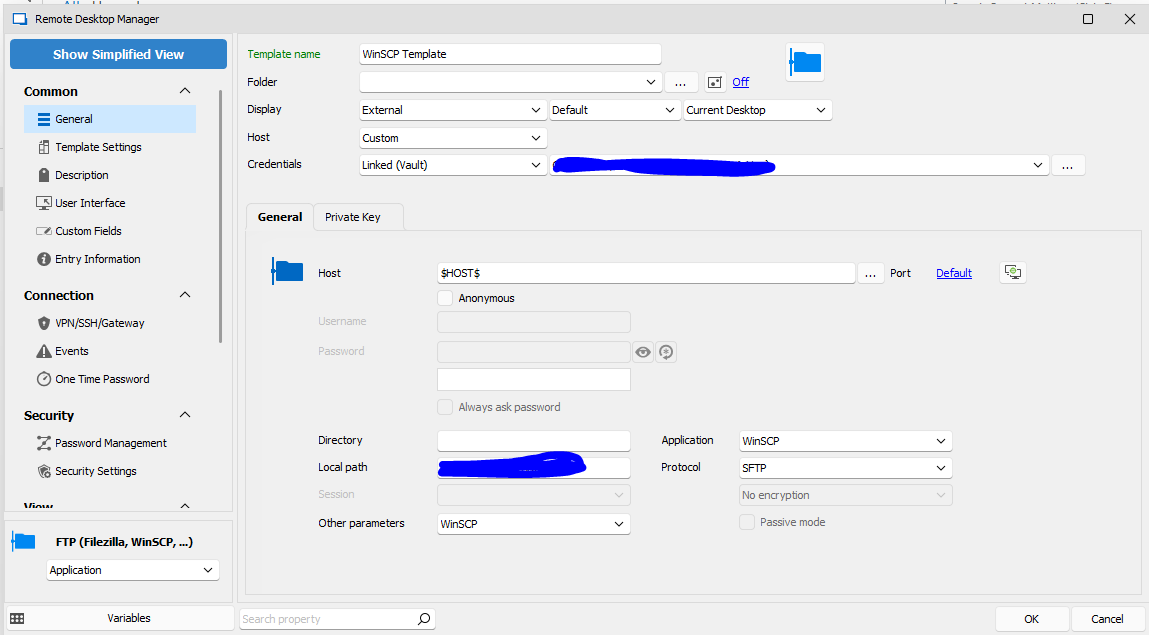
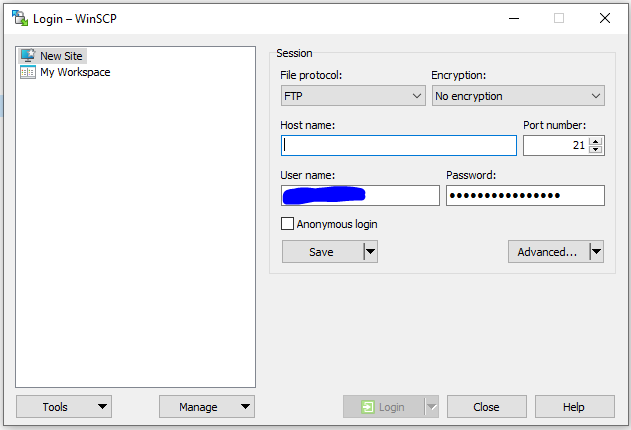
I moved from installed version to zip file version since I lost the ability to update myself with loss of admin permissions in windows. I still have the installer version installed if that makes any difference.
Any ideas?
All Comments (12)
I'm having similar issues passing variable to putty for telnet via template using $HOST$ as well. RDM Open with Template not inheriting variable from host (devolutions.net)
Hello,
Thank you for contacting us on that matter.
I'm sorry to hear that you're experiencing issues with Variables. I will open a case for the engineering department regarding this issue to get it resolved as soon as possible.
In the meantime, could you provide the application logs? This will help us identify the root cause of the problem and find a solution.
Also, I suggest trying a portable version of RDM version 2023.2.9.0. To do so, please follow the steps below:
1. Close RDM.
2. Download the .zip file from the following URL: https://cdn.devolutions.net/download/Devolutions.RemoteDesktopManager.Bin.2023.2.9.0.zip
3. Create a new folder on your Desktop.
4. Extract the content of the .zip file into the folder you just created.
5. Go to the folder where you extracted the files and run remotedesktopmanager.exe.
6. Connect to your data source.
I hope this helps and please let me know if you have any further questions or concerns.
Best regards,
Patrick Ouimet
Patrick,
The version I'm currently using is the portable version (latest). Can you provide the details on the application log debug? I tried to max out the debug but saw what I would call normal debug and now showing any kind of parameters being passed to the command line. Can you provide the necessary details to setup the application logs properly so I can send them too you?
Thank you.
Glen
Hello,
Thank you for contacting us on that matter.
I'm sorry to hear that you're experiencing issues with Variables. I will open a case for the engineering department regarding this issue to get it resolved as soon as possible.
In the meantime, could you provide the application logs? This will help us identify the root cause of the problem and find a solution.
Also, I suggest trying a portable version of RDM version 2023.2.9.0. To do so, please follow the steps below:
1. Close RDM.
2. Download the .zip file from the following URL: https://cdn.devolutions.net/download/Devolutions.RemoteDesktopManager.Bin.2023.2.9.0.zip
3. Create a new folder on your Desktop.
4. Extract the content of the .zip file into the folder you just created.
5. Go to the folder where you extracted the files and run remotedesktopmanager.exe.
6. Connect to your data source.
I hope this helps and please let me know if you have any further questions or concerns.
Best regards,