
Co1m
Since i installed the new version i cant use FTP
Hi
ohh great, it works. I can connect to all of my FTPs. Thank you very much!
But (there is alway a but... ;-) ) the password-field is the same, i cant enter new passwords.
Its not an issue for me (at the moment) because i have all my FTPs in the RDM.
When i try to create a new FTP Connection... i have the same problem, i cant write a password in the field.
Pretty Strange.
Regards
Co1m
Since i installed the new version i cant use FTP
Hello Folks
i installed the new Version 7.0.3 RDM. I use ist just for RDP and FTP (via Filezilla).
Since the Update i cant use FTP anymore.
Every FTP Connection brings me 2 PopUps while trying to use:
The first one: "Unexcpected Parameter "/passive" "
The Second one is a short information about the startup parameter of filezilla.
---
So i tought to check the Settings of the FTP and i was supprised as I saw that i couldnt change the ftp password and the option "passive" anymore.
Below there is a information in red: "Only available in Enterprise Edition".
---
Please dont tell me that the use of password-protectet FTP is not free anymore... or is it?
Here is a Pic of the configuration=> Attached File:
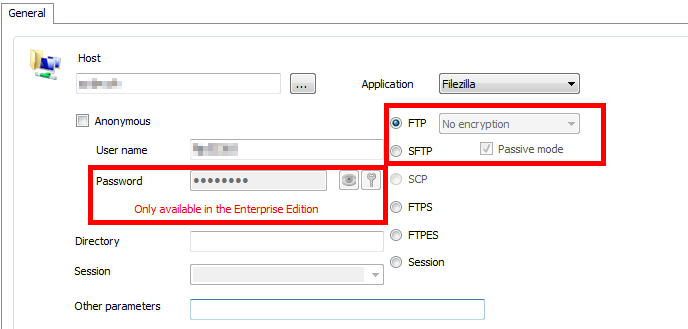
What i'm doing wrong?
Regards
Co1m
RDM 6.6.0.0 - Credentials Issues
Hi
it worked with the embedded mode.
What could be the Problem?
regards
Daniel
RDM 6.6.0.0 - Credentials Issues
Domain\Username
Hello
First I added the Domain to the Username (additonally to the Domain). Same behavior.
Then i deleted the Domain name and tried the same thing. Same behavior.
What else could it be?
Kind regards
Daniel alias Co1m
RDM 6.6.0.0 - Credentials Issues
Hello
Im a new User of the RDM. Great Tool!!! Back to Topic:
I have the same problem. I think i know the what the problem is:
I create a new RDP Session
=>Server, User, Domain => Save Credentals.
Now, if i connect directly (double click RDO Session) then is the Domain missing. If I click "open session (prompt for Credential)" then is the Domain there.
Look here the Screenshots:
The configuration:

---------------------------------------
The Direct Login:

---------------------------------------
The Login with credential Prompt

---------------------------------------
As you can see, with the prompt the Domain is set, with the direct login it doesent is set. Thats the reason why we cant login, cause the domain name is missing.
Regards
Co1m
edited by Co1m on 12/2/2011