
RustedSwitch
Sorting options for Password List credential entry
Hello,
I'd like to request some sorting options for the new Password List credential entry. By default, the entries are listed in the order in which they were added. I would like to see some other sorting options for the OCD among us.
Sort alphanumerically by default (my preference)
Checkbox for alphanumeric sort (in case there's anyone who wants these out of order, god help them)
Priority sort, like session entries (if folks want to dictate order)
I can provide more details/use-cases if need be.
Thanks!
Bomgar Representative Console Add-on - Issue
I figured this out. The default location for the executable is:
C:\Program Files\Bomgar\Bomgar Representative Console[sitename]
If you choose this path in the RDM Path options, launching a session won't work. Furthermore, you can't choose the parent to this folder, because no executable exists there by default. You must manually copy/paste the bomgar-rep.exe file into the parent folder and set your path there.

Ultimately, I would like to suggest that a user more user friendly approach be considered. Copying this file is a manual step, which, for large departments like mine, is unreasonable. Furthermore, the workaround feels unnatural - I wouldn't have expected it to work without the rest of the application in the correct relative path. If Bomgar makes the right kind of change, this could all break.
It's also worth noting that if during setup the user chooses not to install for everyone who uses the machine, Bomgar deploys to the AppData folder instead of Program Files.
Bomgar Representative Console Add-on - Issue
Hello,
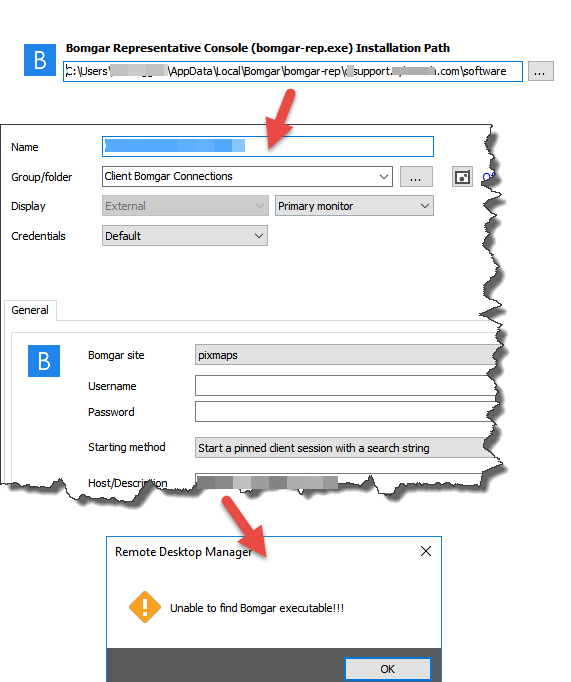
I'm also having trouble getting this to work. Unfortunately, the folder structure for my Bomgar installation doesn't line up with expectations, and the executable is not found when I launch a connection.
1. In order to configure Bomgar usage with a valid path to the EXE, I must choose the 'software' sub-folder from within my site folder.
2. Then, configuring a session automatically looks for site sub-folders. There are none, so I must choose 'pixmaps'
3. Launching the connection fails
Multiple custom URLs for a single Connection
Nevermind - not sure why this wouldnt work the other day. Thanks!
Multiple custom URLs for a single Connection
I get an error pop up. Will include whe I get a chance to reproduce.
Multiple custom URLs for a single Connection
I did try that first, but the subconnection will not save. I'm using beta 7.4 with SQL backend at the moment.
edited by mofunz on 6/28/2012
Multiple custom URLs for a single Connection
Would it be possible to increase the number of custom URLs for a connection? Currently I use the Home Page feature to link to our monitoring page for that device. However, we provide multiple services that can be managed through the web, and would like to access them all through the connection dashboard.
As I see it, the best way to introduce this feature would be to drop the "Home Page" name for the existing field, allow the URLs to have custom names, and allow some number of URLs >1.
2 would be awesome, but with cloud services becoming more popular, I could potentially see this number growing.
Monitoring Page
Cloud backup console
Cloud AV console
Etc...
PowerGUI
Apologies, but Im not sure what you're asking for. Forgive my naivete :)
PowerGUI
Has there been any talk about integrating PowerGUI as a tool?
New connection form
What is the best way to have a 3rd party create a new connection?
New connection form
Excellent - thank you.
My (hopefully) last question: What are the GUID considerations when having an outside database insert new connections? If that part of the XML is left blank in my form, will RDM manage that for me?
New connection form
I found a tool that can sync between Sharepoint Lists and SQL databases, but I'm not sure the best way to extract the data in a useful way...
Can you provide an example of a query string or select statement to your SQL database that extracts relevant data?
If it helps, here's an example export of a fully configured RDP session
<Connection>
<ConnectionType>RDPConfigured</ConnectionType>
<CredentialConnectionID>37045440-6720-43b3-abcf-bcc88f62c4f4</CredentialConnectionID>
<Description>SERVERNAME-SRV</Description>
<Events />
<Group>ABC [ABC Company]\AUB</Group>
<ID>78b2bcb9-1094-4457-8275-17f6e0c63361</ID>
<MetaInformation>
<CustomField1Title>PRTG ID</CustomField1Title>
<CustomField1Value>11806</CustomField1Value>
<Expiration d4p1:nil="true" xmlns:d4p1="http://www.w3.org/2001/XMLSchema-instance" />
<IsVirtualMachine>true</IsVirtualMachine>
<ServerHomePageUrl>https://www.monitoringurl.com/device.htm?id=$CUSTOM_FIELD1$</ServerHomePageUrl>
</MetaInformation>
<Name>MONITORINGNAME</Name>
<OpenEmbedded>true</OpenEmbedded>
<RDP>
<RedirectedDrives>
<string>%HOMEDRIVE%</string>
</RedirectedDrives>
</RDP>
<SoundHook>DoNotPlay</SoundHook>
<Stamp>8e8cd603-7fc0-4045-b459-843944c36f7c</Stamp>
<Url>192.168.24.78</Url>
<UsesSerialPorts>false</UsesSerialPorts>
</Connection>
</ArrayOfConnection>
edited by mofunz on 12/9/2011
New connection form
We are planning to use Microsoft SQL 2008 for the database. Is there any documentation on how the database needs to be linked?
New connection form
I dont believe this is a feature already, so please forgive me ...
I would like to migrate my MSP/helpdesk to Remote Desktop Manager, and have been able to prove the utility of the application to Management. However, we have not used a tool like this before, so we do not have a pre-existing database to import; I am not looking forward to adding all of our connections manually.
Would it be possible to use some sort of form based data entry? Something that connects to the database directly and can add a connection in a simple fashion.
My goal is to integrate RDM with a SharePoint site, so connections can be added or modified using workflows. Perhaps something using Microsoft Infopath product?
Server - Home page open embedded
Thanks
Server - Home page open embedded
Hey -
Im a big fan of opening all my connections in an embedded session. However, I find that I cannot make this the default behavior for the "Server - Home Page" feature.
It automatically opens in a seperate browser.
Any chance this can be modified?
iPad App
I have sent them an email,we will see if there is some possibilities.
I wonder if there's any news?
iPad App
I was not aware of this company but I will contact them for sure.
This would make my ... month
iPad App
Perhaps you could work together to develop this feature with http://itap-mobile.com/?
My favorite mobile RDP client and my favorite session manager together. Yum.
individual user credentials
Im looking for something along these lines - I have ~25 users that manage ~1000 systems, belonging to different companies.
For some of the companies there are common credentials that I can set globally.
For others, users have a unique ID they log in with.
For the situations that require a unique ID, I'd like to enforce this "override" in the connection configuration, and not save usernames & passwords in the database for these connections.