Keyboard shortcuts while editing text

Hi!
This is just a small annoyance
When the cursor is in a text field, for example in a search field in RDM or while renaming an entry in the tree view, I'd expect keyboard shortcuts like Ctrl+Shift+Left, Ctrl+Shift+Right to select text (whole words) in the text field. They do that, but they are also handled by RDM to switch tabs. Similarly, double clicking a word should select the word, but when editing text while renaming an entry in the tree view, it will also open the session and cancel the rename.
So basically, double click and keyboard shortcuts should be handled by the text field, not by the general RDM UI. I'm using RDM 2026.1. I'm pretty sure it was different in older versions.
Thank you!
All Comments (4)
Hello,
Thank you for contacting us regarding this matter.
The shortcuts are enabled in RDM when the magnet icon at the bottom-right corner of the application is activated.
Could you please try disabling the magnet icon and let me know if the shortcuts then work as expected?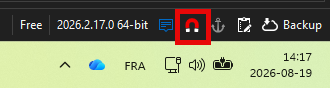
Best regards,
Tommy Sanders
5dec91e0-e595-4505-9940-439a3b209c3a.png
Hi!
When I disable the magnet icon, the text editing shortcuts (Ctrl+Shift+Left/Right) work as expected, but double click still starts the session, and none of the normal RDM shortcuts work anymore (like F2 to rename the entry in the first place).
I would expect the keyboard shortcuts to be handled by the text input and not "bubble" up to the main RDM window. An event should be handled by one UI element, not multiple at the same time.
I tested it in RDM 2025.3.32.0 and it's the same there, so it was not introduced in RDM 2026 like I thought.
My workaround will be to just disable or change the keyboard shortcuts to switch tabs.
Thank you!
Best regards,
Daniel
Hello Daniel,
Thanks for your feedback. We'll have to see in what way we could improve this.
Just one small thing about the second issue you mentioned:
Similarly, double clicking a word should select the word, but when editing text while renaming an entry in the tree view, it will also open the session and cancel the rename.
In our upcoming 2026.3 release, a lot of our UI has been reworked to a different framework. In this specific scenario, the "inline" renaming instead prompts a window to modify the name. So you can freely double click and similar to help you modify the name more easily.
If this new way of editing names of entries easily doesn't work well for you, we'd welcome your feedback. We have much more control over what our UI can do and how we present it with this rework, so certain things will be much simpler for us to implement from now on (and in more aesthetically pleasing ways, too 😄).
As for the main issue with the shortcuts, the problem is that some users may want this behavior for this specific shortcut combination, or they may have bound this shortcut combination to these keys for a different action. Unlikely, but we have to take this into account when changing a default behavior that's been there for a long time.
I see a handful of ways we could go about it:
- Ignore shortcuts when in the filter or search in the main window
- Similarly to above, introduce a new setting for shortcut configurations to help specify even more precisely in what context the shortcut should apply (e.g., not while focus is in a textbox)
- Unmap these specific shortcut keys (Ctrl-Shift-Left + Ctrl-Shift-Right) by default so a user has to willingly configure them
- Map these specific shortcuts to a different combination that's less intrusive
- Offer different keyboard shortcut mapping defaults, with one having less shortcuts configured by default to avoid these kinds of possible interactions
There's probably other options that haven't come to mind yet too, but they all come with a few negatives in either discoverability of shortcuts and what can be mapped, clarity of configuration, or experience for users that were previously using these shortcut combinations and were satisfied with the behavior.
I'm glad the workaround is enough for you at the moment but I've taken a note about looking for ways to improve this in the future.
If I missed anything or you have other concerns, let me know.
Regards,
Hubert Mireault
Thank you!
Those are all possible solutions, but I think the simplest one should be just using UI event bubbling correctly.
I don't know which UI framework RDM uses, but as far as I understand, keyboard input is usually delivered to the element that has focus, and if that element handles the event, it should not propagate (bubble) to parent container or "global" shortcut handlers. I'd expect that to be the default behavior when implementing a UI.
It actually does work like that with Ctrl+A for example. When renaming, it selects all text in the entry name, but when not renaming, it selects all entries in the list, but it never does both.
Looking forward to the new UI! Maybe it's not worth fixing things like this, when soon everything's going to be different anyway. For now, I'll just unmap these shortcuts in our default config.
Best regards,
Daniel