PowerShell Script (remote) not available

I am following the Academy guide to create a script for restarting the Zabbix service. However, I ran into a problem right at the beginning.
According to the tutorial video, I should have an option called "PowerShell Script (remote)", but this option is not available in my environment. The only option I have is "PowerShell Script".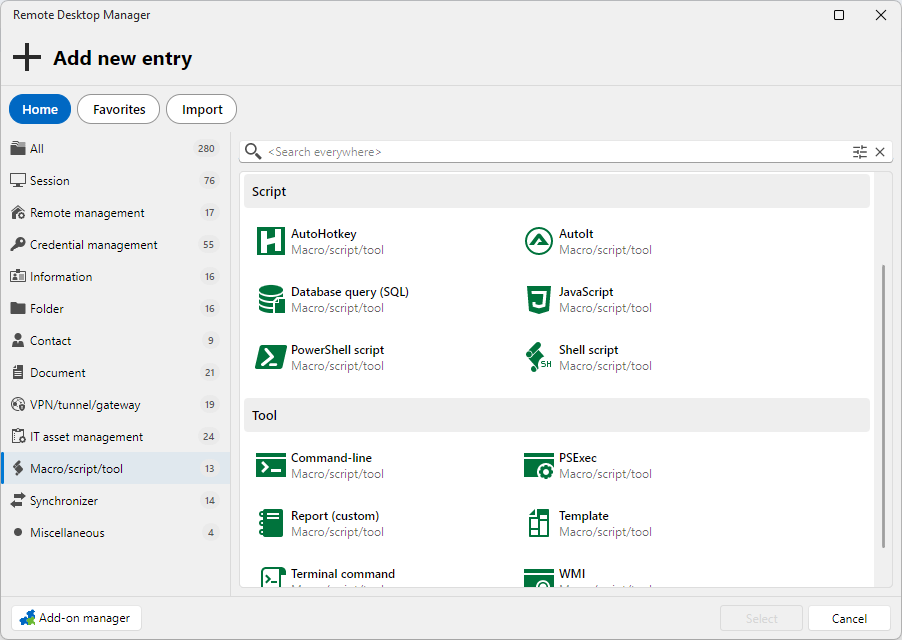
When I use it, all of my saved scripts are executed locally instead of on the remote machine.
Could you please let me know what I am missing or what needs to be configured?
4802fb34-4e74-48b8-8406-cf2331eec8f2.png
All Comments (11)
Hello,
Thank you for contacting us regarding this matter.
Could you please let us know your RDM version, as well as the workspace/data source you are using?
In the meantime, could you please try selecting the All tab instead of Macro/Script/Tool and let us know if that resolves the issue?
Best regards,
Tommy Sanders
I am using Remote Desktop Manager version 2026.2.12.0 64-bit (PreJIT).
As our data source, we are using Devolutions Cloud at: https://cisgruppe.devolutions.app
On the All tab, when I search for "remot", I do see "PowerShell Terminal (remote)". However, it is available as a Session type, not as a Macro/Script/Tool type, as shown in the tutorial.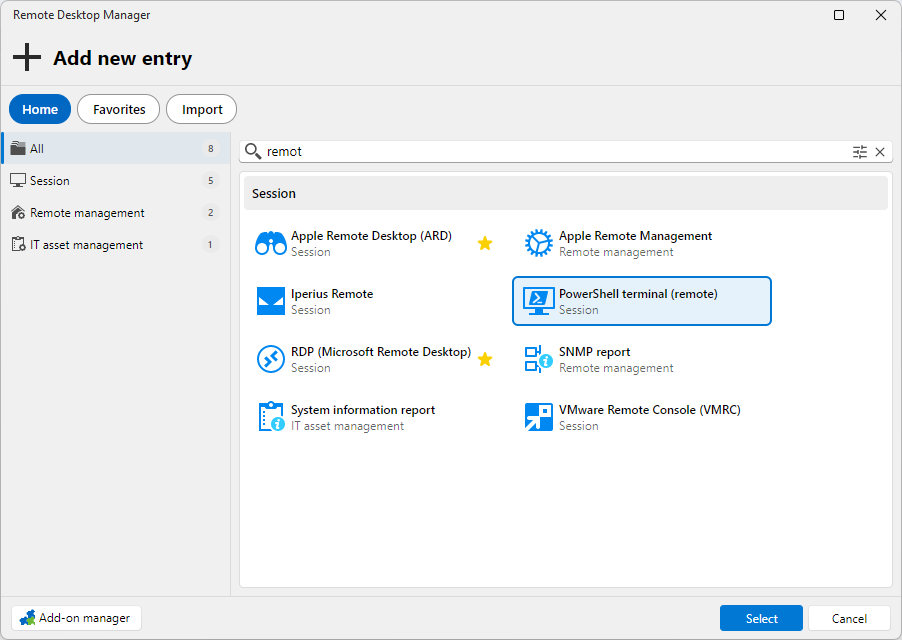
6af0f781-69d1-41f0-8062-3c0fa2a35be4.png
Hello,
Thank you for your response.
I see it under Session as well, so it may be an issue with the tutorial. Could you please send me the link to the tutorial you're following so I can take a look?
Best regards,
Tommy Sanders
Hello,
The (Remote) entry was deprecated. I believe that you can instead use the generic PowerShell script and in the "Run" section there is a "Mode" that can be set to either local or remote.
In most cases the "Automatic" mode should work fine but you might have hit a limitation in your use case where you have to configure the mode by hand.
Please do let us know if this works for you.
Best Regards,
Michaël Beaudin
Changing the Mode property to either Remote or Local always produces the same result: a PowerShell window opens and reports that there is no service named “Zabbix Agent”. The window remains open. When I then enter the command $env:COMPUTERNAME, it always displays the name of my local computer instead of the server on which I am trying to stop the service. Interestingly, the open PowerShell tab is labeled with the name of the remote server.
The tutorial I am following is called “Remote Desktop Manager - Advanced -> Automating tasks with scripts and macros”, time 0:36.
a95de06e-c8d4-45ca-a061-df037c1dbe16.png
Hello,
Sorry for the delay we had to test quite a bit to reproduce the issue. From what I can see we enter a case where opening the session with RDP stops the script from working properly.
I have put the script "hostname" in the remote script and execute it against the machine.
- RDP is opened towards the same machine -> The hostname returns the local machine
- RDP is not opened to the same machine -> The hostname returns the remote machine
To do this you can right click the session -> Macro/Script/Tools -> Select your remote script. Do it when the RDP session is running and then when it's not running
Can you confirm if you have the same behavior and we can investigate further from there?
Best Regards,
Michaël Beaudin
Hello,
To add to what Michael said, if you were only getting this issue when the RDP session was running, a fix will be included in version 2026.2.14.0.
Regards
Jonathan Del Signore
Hello,
When the RDP session is not running, I get the following output:
When the RDP session is running, I get the following output: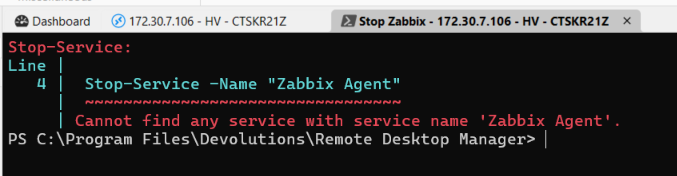
You absolutely don’t need to apologize for the late reply. On the contrary, I really appreciate your analysis of the issue and your effort to help. Thank you very much.
1d2129e1-c402-467f-a29e-7d79b1943f4e.png
048f447c-1c6e-44b1-b318-36ce6612ea8a.png
Hello,
Now this makes more sense. The PSSession is what we use to connect to the remote machine in the script and it is most likely failing due to missing configurations on your computers.
Usually it's about activating WinRM on both the local and remote computers, then adding the remote computer to your trusted hosts on your local computer. You can also try with and without the "Use SSL" setting in your Powershell Script entry's properties.
You can try playing with these 2 settings depending on your configuration.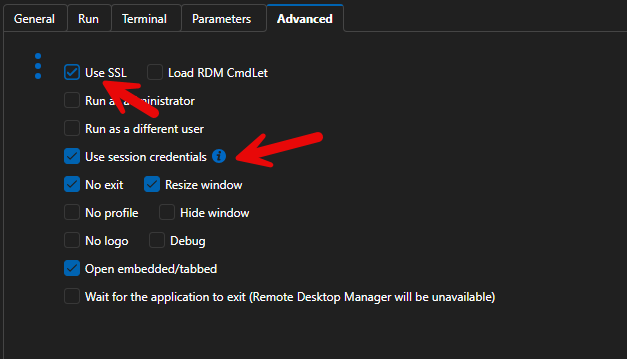
I would say that, from here on, your best bet would be to provide the PowerShell error messages you get to whichever AI agent you use and let it help you configure your local environment to support the PSSession
I would also suggest talking with your IT or Security departments about these actions to make sure they do not go against any of your company's policies.
Best Regards,
Michaël Beaudin
4d195d2a-b680-48fc-83eb-8feaf5015a3e.png
Hello,
Thank you for being so patient!
I'm pleased to inform you that a new version of RDM (2026.2.14.0) has been released, featuring the fix for your issue.
Latest Version: Download RDM
Please let us know if this works or if you encounter any issues.
Best regards,
Maxim Robert
I’m very sorry for the late reply.
The RDM update really helped; afterwards it was only necessary to fine‑tune the settings of the suggested properties.
Thank you very much for your support!