PowerShell Script (remote) not available

I am following the Academy guide to create a script for restarting the Zabbix service. However, I ran into a problem right at the beginning.
According to the tutorial video, I should have an option called "PowerShell Script (remote)", but this option is not available in my environment. The only option I have is "PowerShell Script".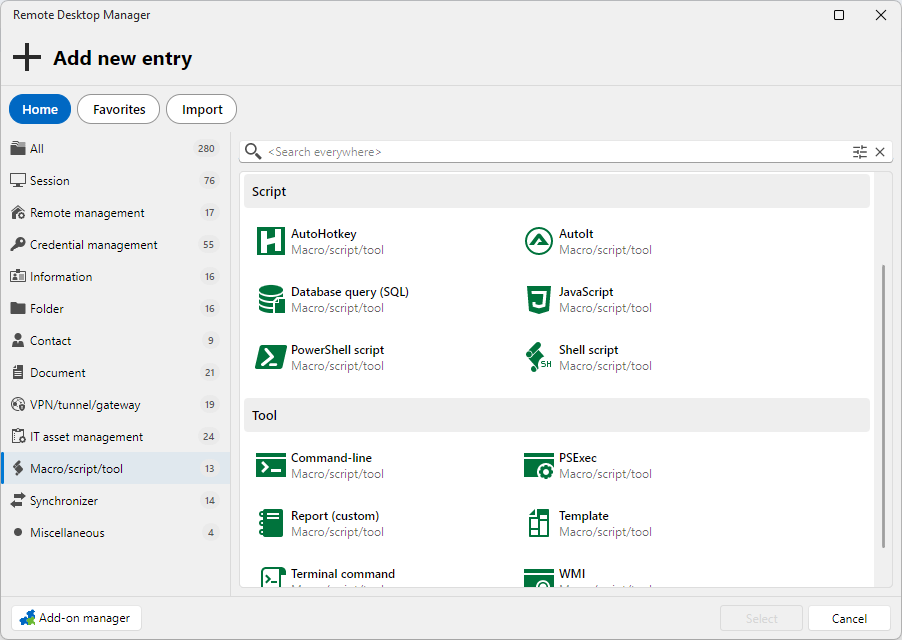
When I use it, all of my saved scripts are executed locally instead of on the remote machine.
Could you please let me know what I am missing or what needs to be configured?
4802fb34-4e74-48b8-8406-cf2331eec8f2.png
All Comments (2)
Hello,
Thank you for contacting us regarding this matter.
Could you please let us know your RDM version, as well as the workspace/data source you are using?
In the meantime, could you please try selecting the All tab instead of Macro/Script/Tool and let us know if that resolves the issue?
Best regards,
Tommy Sanders
I am using Remote Desktop Manager version 2026.2.12.0 64-bit (PreJIT).
As our data source, we are using Devolutions Cloud at: https://cisgruppe.devolutions.app
On the All tab, when I search for "remot", I do see "PowerShell Terminal (remote)". However, it is available as a Session type, not as a Macro/Script/Tool type, as shown in the tutorial.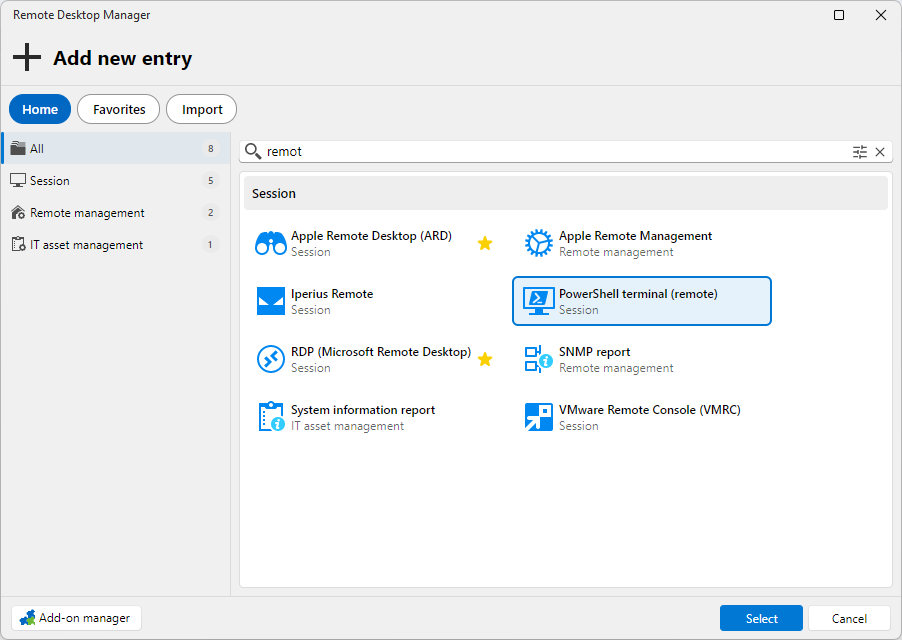
6af0f781-69d1-41f0-8062-3c0fa2a35be4.png
