High GPU load in the latest releases (26.2.7).

Posting on behalf of fritz, they say:
High GPU load in the latest releases (26.2.7). It's always around 25%.
Best regards,
Vincent Forest
All Comments (17)
Hi,
Thank you for the reports. We're aware of this issue following the 2026.2.. update, and our team is actively investigating. We'll post an update here as soon as we have more to share.
We appreciate your patience.
Best regards,
Stephan
Hello,
We believe this is most likely linked to an issue RDM has on terminal server environments. We will have a fix for this in the upcoming RDM 2026.2.9.0.
Please do let us know if the issue persists after updating to that version.
Best Regards,
Michaël Beaudin
Hello,
We believe this is most likely linked to an issue RDM has on terminal server environments. We will have a fix for this in the upcoming RDM 2026.2.9.0.
Please do let us know if the issue persists after updating to that version.
Best Regards,
@Michael Beaudin
Hi
We have the same issue on our terminal server CPU 25% per user using RDM. after updating the version to 2026.2.9.0 the issue still persists :(
They all have their own database with sql-lite.
It has been recreated for a few; did not help.
Gr,
Bram.
The fix doesn't work. The behavior is exactly the same in version 26.2.9. There were no issues up to version 26.1.23. An RDP connection results in about 5% GPU load—even with a single connection to a server without a Terminal Server environment. Each additional RDP connection adds another 5% at peak.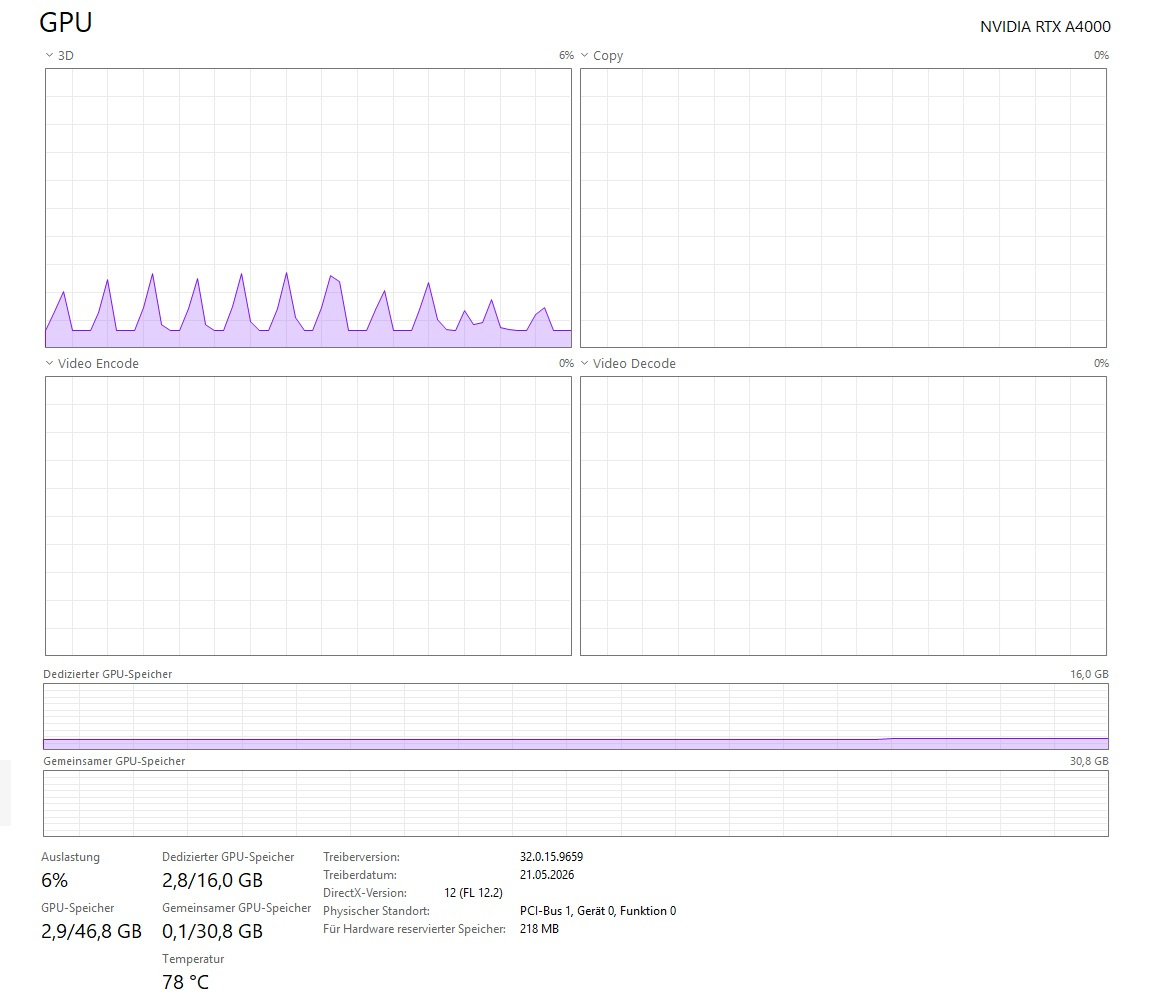

rdm-gpu2.jpg
rdm-gpu1.jpg
Hello @bramsoethof
This thread is specifically about GPU performance; your issue seems to be this one. Note that the thread I linked was opened for an older version of RDM, but we're currently tracking a regression in 2026.2.x in Terminal Services environments and the recent posts are about that. I encourage you to subscribe to that thread for updates.
Thanks and kind regards,
Richard Markievicz
Hello @fritz
I just want to clarify a few things so we're not muddling issues.
You're running RDM on a client machine, and in the 2026.2.x release you see high GPU usage. Is it high at idle? Or it just steps up when opening RDP sessions?
Can you please share your precise OS version (winver) as well as the relevant details of your hardware? The specification and graphics information from Settings > System > About would be helpful.
Thanks and kind regards,
Richard Markievicz
Hi,
We are experiencing the same issues. With version 2026.2.8 and also with version 2026.2.9.
Winver W11 25H2 26200.8655
The more Terminal sessions are open, the more GPU usage I have (Around 3% per session open).
GPU usage is there even when RDM is minimized or in the background with some sessions open.
Hello
@support52 when you say "Terminal" sessions, do you mean RDP or something else (SSH)?
In either case, both @fritz and @support52 can you check if you have the following option enabledFile > Settings > Entry types > Sessions > Remote Desktop (RDP) > Advanced > Enable RDP hardware mode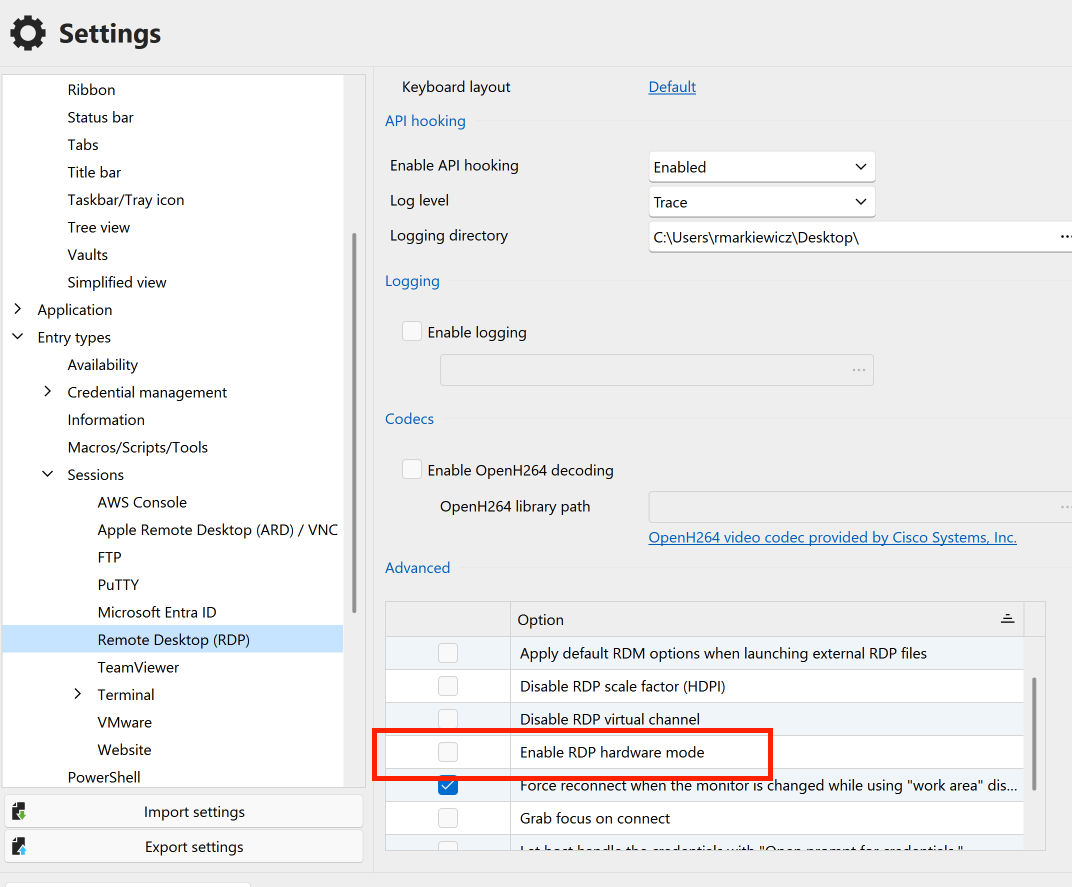
If it's enabled, please try disabling it and let me know if that improves the situation.
Thanks and kind regards,
Richard Markievicz
Screenshot 2026-06-18 at 09.36.09.png
Hi,
This setting was off. I've tried it with on but it is the same behaviour.
Issue is only happening when using RDP session, when using SSH there is no GPU usage at all.
Hello
Thank you for the information.
I do believe I've hit upon the problem and submitted a mitigation fix to the RDM Windows team. My understanding is that they are eager to get this issue patched so I would expect you'll see this rolled into a minor update very soon; however more details will follow early next week.
Subsequently once that is in everyone's hands I'll work on a more comprehensive fix and provide a more detailed analysis of what the problem is and what we will change to prevent it reoccurring.
In the meantime, please don't hesitate with further questions or comments
Kind regards,
Richard Markievicz
Hello again
I do believe this issue is caused by certain animations in the RDM UI and the upcoming version will provide an option to disable them; which I hope will work around the issue.
However I'd like to understand better what's going on here. If the machine had no GPU at all (like, running as a Terminal Server) I can understand a situation where we have elevated CPU usage. But it's not clear to me how a machine with a dedicated GPU can see elevated usage from, for example, a loading spinner animation. I'd like to be able to detect this kind of situation and tune RDM's performance automatically, instead of requiring the user to fiddle with their settings.
I would be really helpful to know exactly what GPU and driver combination is being used that shows this behaviour.
Thanks and kind regards,
Richard Markievicz
Hello
Thanks for your patience.
RDM Windows 2026.2.12 has been released. I encourage you to update and then navigate to File > Settings > Performance > Avalonia Rendering, and uncheck the option "Enable UI animations". For best results you should probably restart RDM after making that change.
Please let me know if that fixes the problem.
I believe the problem reported here is strong correlated to this thread, where users in no-GPU environments (e.g. Terminal Services) are seeing elevated idle CPU. In that case, I'm doing a best effort detection that the machine doesn't have a GPU and tweaking the rendering settings automatically. In this case, your machine(s) clearly have a GPU making this likely related to the specific GPU and driver and its interaction with the compositor. Disabling (actually downgrading animations) should work around the issue, but for a true fix I need to understand:
- If that setting mitigates the problem
- What specific GPU hardware you are using (and driver information if possible)
Please, let me know if something isn't clear or you have further questions
Kind regards,
Richard Markievicz
Hi
Thank you for the new version! I've tested the new version and it seems my GPU issue is fixed! However I'm not sure if it is due to the new Enable UI Animations switch. So I did some testing with both options (Enable UI animations and Enable RDP Hardware mode)
- Enable UI: ON - Enable RDP Hardware mode: ON -> Some small GPU usage when loading session, afterwards zero usage
- Enable UI: OFF - Enable RDP Hardware mode: ON -> Some small GPU usage when loading session, afterwards zero usage
- Enable UI: ON - Enable RDP Hardware mode: OFF -> No GPU usage at all
- Enable UI: OFF - Enable RDP Hardware mode: OFF -> No GPU usage at all
So it seems that toggle did not much to my GPU usage, however as told before, the issue is fixed :)
I'm running RDM on my notebook with Ryzen AI 9 HX PRO 375 with Radeon 890M GPU and 32GB RAM. Driver 32.0.13066.12
Hello
I am a bit confused; especially so because although your GPU is integrated it seems to be quite high-end. So I wouldn't have expected any trouble here in the first place.
That being said, outside of the settings I did introduce some other optimization to how animations are handled in RDM and that seems to have been the fix for you.
Since things are working well now, I don't suggest troubleshooting any further unless you want to get some more insight. Let me know.
Otherwise, thanks again for your patience
Kind regards,
Richard Markievicz
Hello,
I have to agree with support52. With the latest update, the high GPU usage has disappeared. The fix works. However, the “Enable UI / Enable RDP Hardware Mode” switch has almost no effect. GPU usage with an RTX A4000 remains at about 0-1%.
I think the (old) problem is caused by the Avalonia GUI. The new UnigetUI tool (2026.2.2), which is now based purely on Avalonia, also causes heavy GPU load.
When UnigetUI is running, the following processes show high GPU load:
dwm.exe 15%
UnigetUI 5%
WUDFHost.exe 7%
Without UnigetUI running, it’s about 0–1%.
I haven’t found a support forum for UnigetUI. Please forward the bug report :) Thanks!
Kind regards,
Hello
First, for the UniGetUI; there isn't a forum for that (at least not yet, right now GitHub is still the place for issues and discussions; I don't know if they'll be a forum in the future). The developers have seen your comment and made a fix on their side which should be in the next version. You can let me know in this thread or on GitHub if it helps. In the meantime, there is an option in UniGetUI called "Reduce Motion" - you can try enabling that and see if it helps? Let me know.
Second, you are correct that this is caused by Avalonia. What I know concretely is that certain animations have a poor performance profile when using a software renderer (which would be the case on a machine with no GPU). The problem is aggravated that in Avalonia 11 certain classes of animation are not stopped when the control is not visible. So, we hide the animated control but it actually keeps running and fires the compositor at a very high rate. That issue is actually fixed in Avalonia 12. In the meantime the fixes I made cover the following
- For the "session connecting" screen (with the animated spinner), ensure the animation is stopped once the connection sequence finishes rather than just hidden
- For machines where we detect no GPU (and therefore will take a software rendering path) automatically switch to software rendering (no 3D acceleration in software) and disable/degrade animations
- Provide the option to disable/degrade animations manually
My guess is that you're either hitting (1) and the GPU does still spike momentarily, but it's no longer a runaway issue; or (2) for some reason we're not detecting the GPU on your machine. In any case I wouldn't expect these animations to actually cause an issue on any modern GPU so the issue remains a little bit mysterious. We'd know more if you launched RDM with the /profiler 131 switch and looked at what was getting configured for the rendering. But it does seem solved, so that's only relevant if you want to pursue this.
Finally, just so you know, the "hardware mode" option for RDP allows the embedded RDP sessions to use hardware acceleration, although it won't always apply (certain conditions force it "off" regardless of what you choose). It does sound like this was never the problem (I had thought it could be related based on some evidence I saw in the other thread).
Please, don't hesitate if you have further questions or comments
Kind regards,
Richard Markievicz
Hello again @fritz
I did take a look at UniGetUI code and I'm still confused. Can you do a test for me? If you close RDM, and then run it from the command line with the switch `/profiler 131'; it will launch with the profiler window active.
For example, in PowerShell the command looks like this& 'C:\Program Files\Devolutions\Remote Desktop Manager\RemoteDesktopManager.exe' /profiler 131
Then, if we check the first few lines of output it should show the Avalonia graphics detection (if we found a hardware GPU and the renderer and composition modes that were selected). You can see an example in my screenshot.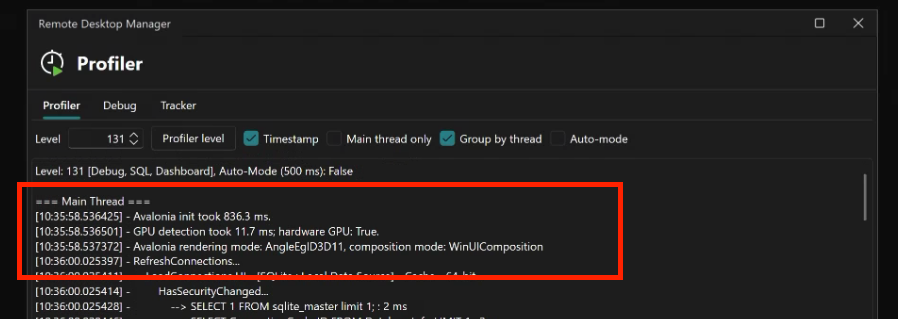
Please, let me know if something isn't clear
Kind regards,
Richard Markievicz
Screenshot 2026-06-30 at 11.05.44.png