Password generator and viewer suggestions
1 vote

Hello!
I have some minor suggestions for the Password generator/viewer in RDM, but they could apply to DVLS web interface too!
- Can you change the output to a monospace font? It could be the same formatting (including color coding) as in the View password window when "Show password hints" is enabled (see below)
- Ctrl + C should be a shortcut for Copy to clipboard
- Add an option to copy the password without automatically clearing the clipboard. It might have happened before, that I copied the password from the generator, pasted it twice in a form to change the password, then tried to paste it in the password manager to save it, but the clipboard has already been cleared. That's how you end up locking yourself out of systems. And with the "paste one (secure)" mode, there's a special behavior for the password generator where it gets cleared after 3 pastes by default, which can be a trap too. I think there should be an option to disable that too.
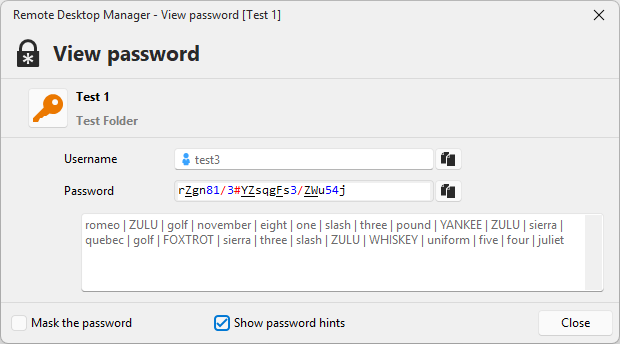
For reference, I have already noted some of these suggestions in a bug report thread 3 years ago.
Thank you!
826c289f-1336-45bc-91cd-981a114abd6c.png
All Comments (5)
Hello Daniel,
Those are great points.
Before I open a ticket, I'd just like a small confirmation for your third request. From what I understand, if we added an option in File>Settings to completely disable clearing the password when using the generator, it would be perfect for you. Is this correct?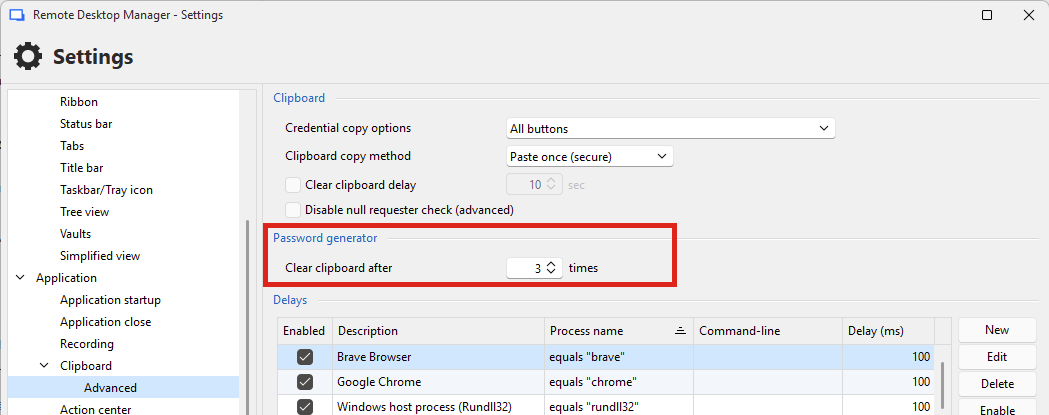
So, a new option here to never clear the clipboard.
For DVLS, does the clipboard also get cleared automatically? I'm less familiar with its options, but if it's something we do I'm sure we could also add an option there.
Regards,
Hubert Mireault
0c7eaf00-6d6f-4ab1-b8e7-63706462754d.png
Thank you!
The option would need to disable both the counter (Clear clipboard after: 3 times) and the timer (Clear clipboard delay: 10 sec), which is also enabled by default.
It might be good to duplicate all options (copy method, counter/paste-once and the clear timer) for the password generator, so you can have it be cleared after 10 seconds only for normal "Copy password" actions, but not for the generator.
So the options would be:
Copy password options - General
  Copy method: [Legacy, Secure]
  [x] Clear clipboard after: [1] pastes #(this would be the "Paste Once" behaviour)
  [x] Clear clipboard after: [10] sec

Copy password options - Password generator
  Copy method: [Legacy, Secure]
  [x] Clear clipboard after: [3] pastes
  [x] Clear clipboard after [10] sec

Clipboard options
  Credential copy options [All buttons, ...]
  [x] Disable null requester check
The options GUI is also under "Help > Clipboard diagnostics", but I guess that's just loads the same form.
For DVLS, does the clipboard also get cleared automatically? I'm less familiar with its options, but if it's something we do I'm sure we could also add an option there.
I've seen DVLS show a reminder if there's sensitive data remaining in the clipboard, but in a browser it can't clear the clipboard on a timer. Browsers don't allow that - it has to be initiated from a user interaction.
Thanks!
By the way, I noticed when both the clear timer and paste once mode are enabled, when the clipboard gets cleared after the paste, the timer resets and continues to count down in the status bar. When the timer expires, it doesn't actually clear the clipboard a second time (in case you have copied something else in the mean time), so it's just a visual bug, but I think clearing the clipboard should also stop the timer, not restart it.
60a49d7c-ebd2-4f2e-a133-5f95a7413133.png
While I'm here, I had some more minor improvement ideas :)
- Besides adding a Ctrl+C shortcut, you could add a context menu too, so if you see a generated password you like, you can just do right click > Copy
- Add a "Copy all" button! You can already select multiple (or select all with Ctrl+A). You could add "Select all" to the context menu as well
Copying multiple passwords currently doesn't work when paste once mode is enabled. It only pastes the first selected one, so I guess that's a bug.I found out with paste once mode, it just puts all the selected passwords into the clipboard one-by-one, so you need to paste multiple times. I guess that can be useful, but it could also be an option ("paste all passwords at once", like with Legacy mode, or "paste passwords one-by-one sequentially")
Thanks for the details!
So, if I sum up everything...
In the generator:
- Change the generated password's font to the same monospace font as the View Password window, with the formatting as an option
- Add Ctrl-C to copy the selection
- Add a context menu to allow copying, similarly to Ctrl-C
- Add a "Copy all to clipboard", instead of a "select all", as the goal here would be to copy them anyway
In the settings:
- Rework the settings to have both the clipboard clearing settings available for the password generator so it can operate differently from "regular" copy actions
- Add an option to choose the way the passwords are copied when there's a multi-selection in the generator: all in one 'blob' (the same format as when we don't use "paste once"), or the current format which is all of them in separate 'pastes'
After copying:
- Fix the issue where the "Clearing clipboard in X sec" label refreshes after a paste
Let me know if I missed anything. If it seems good, then I'll open the necessary tickets on our side so we can get working on this.
Regards,
Hubert Mireault