Tree view shows sessions as open, even after they have been closed
Tree view shows sessions as open, even after they have been closed

Hello!
First off: We have the following issue with RDM version 2025.2 only. It's not present in 2025.1 or 2025.3. But since we use DVLS stable version 2025.2, it's the only version that's compatible with our DVLS instance. I'm posting in Support rather than Bug Report, because it seems to be a bug that's been fixed already. I'm here to find a workaround until 2025.3 becomes stable
The problem is in some vaults, all RDP sessions show as if they are opened, even though the session (tab) has been closed earlier. You have to manually click on "Close" to make it show closed in the tree view again. Without doing that, you can't open the session again.
It shows like this, even though the session is closed: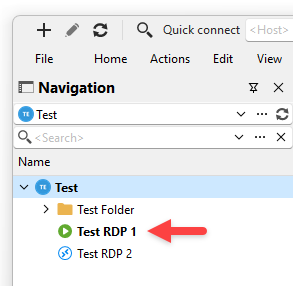
I can't reproduce this behavior in any test vault or test instance we have, but I have noticed it in two of our production vaults in DVLS.
Can you help me diagnose the issue?
Thank you!
Best regards,
Daniel
0c4c9643-9c82-4b3d-a348-16fc011492cb.png
All Comments (4)
Hello,
Thank you for contacting us regarding this matter.
At the moment, there is no direct workaround available. However, you may try the following option:
- Go to Administration → System Settings → General and uncheck the box labeled “Allow entry states.”
Alternatively, you could try force-closing the session via the tree view.
Please note that the stable version 2025.3 will be released soon, which should address this issue.
Best regards,
Tommy Sanders
Hi Tommy!
Unfortunately, changing the "Allow entry states" option didn't help. I also removed any special status (Archived, Expired) from all entries.
Manually clicking "close" in the tree view works, so it's not too bad. It seems we'll have to live with it until the next stable release.
Thank you!
Best regards,
Daniel
Hello @Daniel Albrecht
Thank you for your response.
The stable version will be released later this week, a few days after version 2026.1 is released. Please note that the “Stable” version will be renamed to “Extended Maintenance” starting with the next release.
I wanted to inform you in advance to avoid any confusion if you do not see the “Stable” label in future versions.
Best regards,
Tommy Sanders
Thank you!