PowerShell remote session with RDM v2025.3.20

Establishing PowerShell remote session fails when chosen terminal is Windows Terminal. The session tab is created for couple of seconds and after that the tab just closes.
When chosen terminal is Classic, the connection is established.
The affected configuration page in session: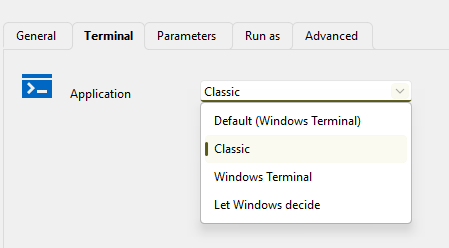
842bd53a-bc8b-4e91-98dc-39d281192d1d.png
All Comments (10)
Hello,
Thank you for your feedback.
Could you send us the Windows version you are currently using? You can get the information with the winver command.
It's possible that the Windows Terminal isn't supported on your Windows version.
Best regards,
Érica Poirier
OS is Windows 11 23H2.
Actually, the same problem also occurs with local PowerShell session.
Hello,
Thank you for your feedback.
Is this the same problem as in the other thread here?
Did the provided solution help with this one too?
Best regards,
Érica Poirier
no, it's different. The problem in other thread opens console window and then shows error message in PowerShell session. Here, the console window doesn't open at all.
Updated to 2025.3.22, still same problem
I am experiencing the same issue which is unfortunate as classic generates a rather scary looking incident on Microsoft Defender XDR regarding credential theft and lateral movement.
RDM 2025.3.22
Windows 11 Enterprise 23H2
Hello,
Thank you for the follow-up.
Could you please confirm whether you’re able to see any logs in the application logs section under the Help ribbon menu?
Do you get any error messages as well?
I look forward to your reply.
Best regards,
Jacob Lafrenière
No related errors in Application logs.
But now I can't any more reproduce the problem. The only difference from time before should be applying November Windows updates.
Hello,
Thank you for the follow-up.
Please let me know if the issue occurs again, and we’ll be happy to investigate further.
Best regards,
Jacob Lafrenière