Hide archived folder

Hi,
is there a way to hide a folder and all sub-entries that as been archived?
I know there is an uption under User preferences to hide archived entries, but it do not hide the parent folder.
If it's not yet possible i would like to place a feature request for it.
Thank you
Recommended Answer
Hello,
Thank you for reaching out to Devolutions Support.
At this time, it is not possible to hide folders that have been marked as archived. However, there are a few workarounds that may suit your needs:
- If you're using an advanced data source, you can remove the View permission on the folder for all users. This will make it invisible to regular users.
- If you simply don’t want to see the archived entries yourself, you can mark both the entry and the folder as expired, then enable the "Hide expired entries and groups" option by going to File > Settings > Tree View.
If none of these workarounds meet your requirements, I’d be happy to forward your request to our team as a feature suggestion.
Best regards,
Carl Marien
All Comments (6)
I'm using the Devolutions Hub ENT connected to RDM.
I'm a regular user and not an administrator. The archived entries in my personnal vault are hiden, but not the folder itself.
What i woul like is to hide the forlder also and not just the entries in that folder.
Thank you
Hello,
Thank you for reaching out to Devolutions Support.
At this time, it is not possible to hide folders that have been marked as archived. However, there are a few workarounds that may suit your needs:
- If you're using an advanced data source, you can remove the View permission on the folder for all users. This will make it invisible to regular users.
- If you simply don’t want to see the archived entries yourself, you can mark both the entry and the folder as expired, then enable the "Hide expired entries and groups" option by going to File > Settings > Tree View.
If none of these workarounds meet your requirements, I’d be happy to forward your request to our team as a feature suggestion.
Best regards,
Carl Marien
For informations, in Devolution hub, archived folder are hiden, but not in RDM
Hi,
No matter if the folder is marked as Archived, Disabled or expired, there are still show in RDM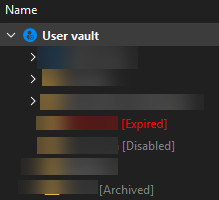
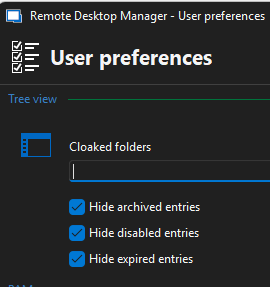
0e540880-f630-44ea-8d58-05e5f8d169e0.png
61ab00ff-1ade-4b08-97ee-0450a770a63b.png
Hi @carl marien
I found the option "Hide expired groups. thank you for that, but is it possible to have the same option but for archived and disabled groups?
Thank you
Hello,
Unfortunately, this would be considered a feature request. If you would like to suggest this feature, you can use the following link:
https://forum.devolutions.net/forums/17/remote-desktop-manager--feature-request
Best regards,
Carl Marien