RDM error "Request failed on background thread."

Last couple weeks we are randomly getting the following error in RDM: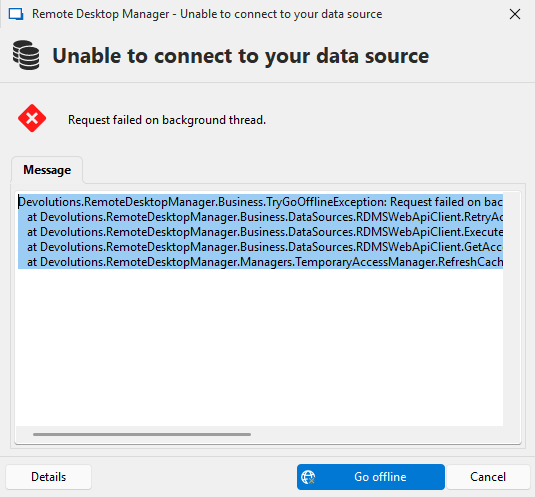
Devolutions.RemoteDesktopManager.Business.TryGoOfflineException: Request failed on background thread.
  at Devolutions.RemoteDesktopManager.Business.DataSources.RDMSWebApiClient.RetryAction[T](ExecuteActionDelegate`1 action, String label, Boolean logoff)
  at Devolutions.RemoteDesktopManager.Business.DataSources.RDMSWebApiClient.ExecuteAction[T](ExecuteActionDelegate`1 action, ExecuteActionLogMode logMode, Boolean retryAction)
  at Devolutions.RemoteDesktopManager.Business.DataSources.RDMSWebApiClient.GetAccessRequests()
  at Devolutions.RemoteDesktopManager.Managers.TemporaryAccessManager.RefreshCache(ConnectionEngine engine, Boolean refreshHubCache)
RDM version: 2025.2.23.0
Devolution Server version: 2025.2.5.0
Devolutions Gateway version: 2025.2.3
mCP90Ybe.png
All Comments (23)
Hello,
Thank you for your feedback.
Could you try updating your DVLS to the latest 2025.2.7 version?
First, we suggest installing Devolutions Server in a staging environment before deploying it in your production environment.
Second, we recommend that you follow the instructions on this online help page to perform the DVLS upgrade.
We also offer a free remote session to assist you during the upgrade process of your DVLS instance. If you want to book a session, please send your request to service@devolutions.net, and we will send you a link to our online reservation system.
Let us know if that helps.
Best regards,
Érica Poirier
Hello! at the moment we got below version of DVLS architecture
RDM version: 2025.2.27.0
Devolution Server version: 2025.2.10.0
Devolutions Gateway version: 2025.2.3
We are still experiencing this issue sometimes. Is there a way to have a longer timeout setting with our MSSQL database? Below our current configuration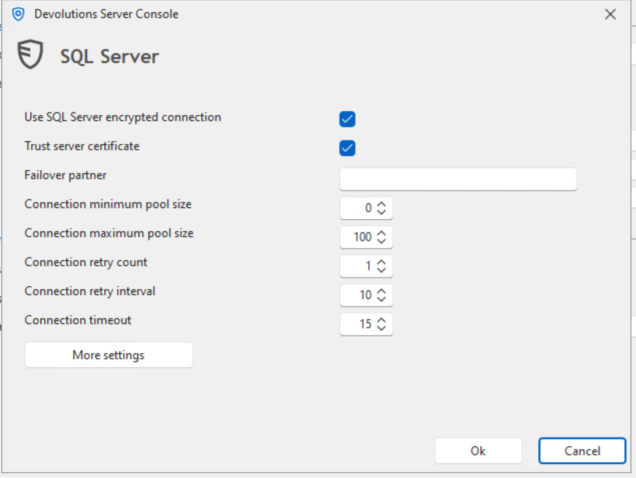
20110a45-fc9c-4e80-ab84-f6e6b2b7c786.png
Hello pvansluisveld,
The timeout connection could also be set in the Devolutions Server console.
under Server -> Edit -> Database -> Advanced settings -> Connection timeout.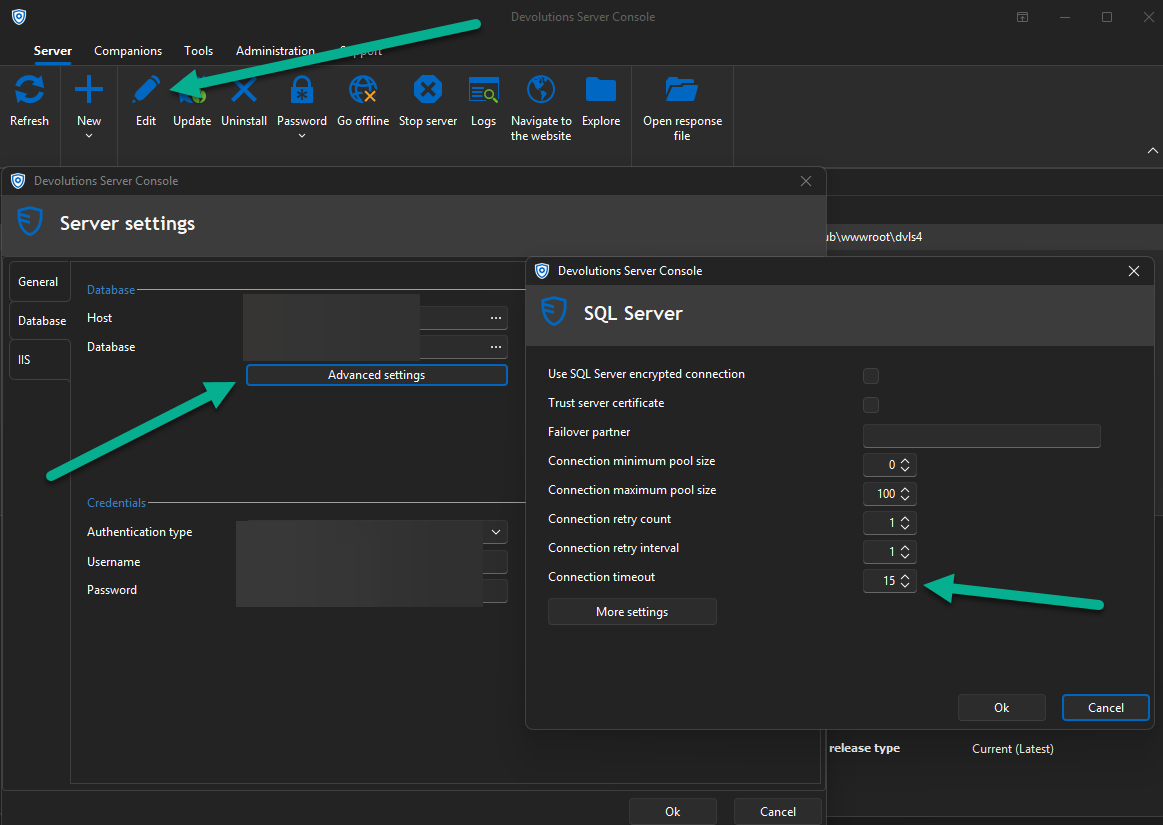
What is more intriguing is the error message.
Are you using any temporary access?
Is under the Data source logs, you also have something that could be related to this error message?
https://docs.devolutions.net/server/web-interface/utilities/reports/logs/#data-sources-logs
Best regards,
Patrick Ouimet
2025-10-16_07-59-59.png
Hello,
Thank you for your feedback.
Could you try updating your DVLS to the latest 2025.2.7 version?
First, we suggest installing Devolutions Server in a staging environment before deploying it in your production environment.
Second, we recommend that you follow the instructions on this online help page to perform the DVLS upgrade.
We also offer a free remote session to assist you during the upgrade process of your DVLS instance. If you want to book a session, please send your request to service@devolutions.net, and we will send you a link to our online reservation system.
Let us know if that helps.
Best regards,
@Erica Poirier
We are a couple months futher, unfortunately we still experiencing the same issue.
Currently we are on the follow versions of our Devolutions architecture:
Devolutions Server: 2025.3.4.0
Devolutions Gateway: 2025.3.2
Devolutions Remote Desktop Manager: 2025.3.20.0
We are not seeing anything in our logs of the Devolutions Server what gives us something to work with. Is this a known issue by the development team? The only lead I got is for example if I got a little hick up in my VPN connection the error prompt is coming to the foreground. When I click on Go Offline, the pop-up dissapears and when I go Online again everything works fine. Is there something I can do to resolve this issue? I suggest something with timeout settings with the connection between the Devolutions Server and the MSSQL database.
Hello pvansluisveld,
Thank you for this feedback.
Could you gather the performance profiling from the RDM set on level 1 and send us the result at services@devolutions.net?
https://docs.devolutions.net/rdm/commands/help/profiler/
Best regards,
Patrick Ouimet
Hello Patrick,
we have same issue as pvansluisveld reported above.
We are getting the same error message. I am unable to say exactly under what conditions this message appears.
The data source logs on the server are logs of the type AUTHENTICATION_LOGIN_TIMING_DEBUG at the approximate time of the message.
We currently have the following versions:
DVLS: 2025.3.8
RDM: from version 2025.3.20.0 to 2025.3.23.0
We do not use Devolutions Gateway
Following your previous advice, we enabled Performance Profiling for a colleague who encountered this error today, and I have some data from this tool.
Do you have any advice on this issue? Would you like me to send you this data from Performance Profiling and Data source logs by email?
Hello Jakub Vácha,
Thank you for this feedback.
You can share these logs with us at service@devolutions.net.
We will analyze it and investigate accordingly.
Best regards,
Patrick Ouimet
Hello Patrick Ouimet,
thank you for your answer. I have send email with logs to address as you mentionded.
Thank you
best regards
Jakub Vácha
Hello pvansluisveld,
Following the recent investigation, it appears that this issue is related to the load balancer.
Could you tell us if you also have this environment?
Do you still experience this issue if you connect directly to the server without using the load balancer?
Best regards,
Patrick Ouimet
Hello pvansluisveld,
Following the recent investigation, it appears that this issue is related to the load balancer.
Could you tell us if you also have this environment?
Do you still experience this issue if you connect directly to the server without using the load balancer?
Best regards,
@Patrick Ouimet
Hello, We enabled the below setting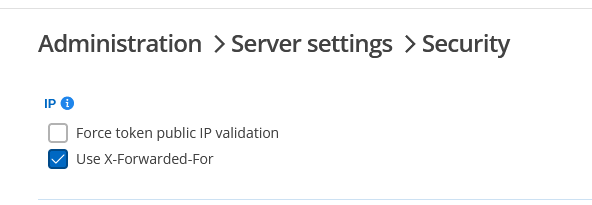
Unfortunately we experienced the same issue again. If I look at the response headers when I'm browsing to our Devolutions Servers I dont see the X-Forwarded-For header in the response.
HTTP/2 200
content-type: Text/html
content-encoding: br
vary: Accept-Encoding
server: Microsoft-IIS/10.0
strict-transport-security: max-age=31536000
content-security-policy: default-src 'self'; img-src 'self' blob: data: https://ui-avatars.com https://secure.gravatar.com; font-src 'self' data:; style-src 'self' 'unsafe-inline' https://challenges.cloudflare.com https://*.cloudflare.com; script-src 'self' 'unsafe-inline' 'unsafe-eval' https://challenges.cloudflare.com https://*.cloudflare.com; object-src 'none';frame-src 'self' https://challenges.cloudflare.com https://*.cloudflare.com https://challenges.cloudflare.com/cdn-cgi/ https://off-dvls-gw03.linux.interconnect.services:7171 https://off-dvls-gw04.linux.interconnect.services:7171 https://devolutions.net/;connect-src data: 'self' https://challenges.cloudflare.com https://*.cloudflare.com https://challenges.cloudflare.com/cdn-cgi/  wss://off-dvls-gw03.linux.interconnect.services:7171/ wss://off-dvls-gw04.linux.interconnect.services:7171/ https://off-dvls-gw03.linux.interconnect.services:7171 https://off-dvls-gw04.linux.interconnect.services:7171;
x-frame-options: SAMEORIGIN
x-content-type-options: nosniff
referrer-policy: same-origin
x-htb: cZ99TaNrdNmoR+3leKSgPHp44BXrhqNYtFU=
date: Tue, 02 Dec 2025 07:32:30 GMT
X-Firefox-Spdy: h2
We already restarted our IIS service, but that did not worked for us. Is there another place in IIS or something where we have to configure the X-Forwarded-For header?
125722a0-91fa-4600-a359-258e7a88380e.png
67980ae4-3c33-4157-9919-6a21aa854dff.png
Hello pvansluisveld,
Following the recent investigation, it appears that this issue is related to the load balancer.
Could you tell us if you also have this environment?
Do you still experience this issue if you connect directly to the server without using the load balancer?
Best regards,
@Patrick Ouimet
I follow below guide to add X-Forwarded-Header to the request header for logging on both servers
https://docs.devolutions.net/server/kb/how-to-articles/add-x-forwarded-for-column-iis/
After this guide and IISRESET, still no X-Forwarded-For header in the response header when browsing to
https://dvls.office.interconnect.services
IIS config of both servers:
OFF-DVLS01
C:\WINDOWS\system32>%systemroot%\system32\inetsrv\appcmd.exe list config "Default Web Site" -section:system.applicationHost/sites
<system.applicationHost>
  <sites>
    <siteDefaults>
      <bindings>
      </bindings>
      <limits />
      <logFile logFormat="W3C" directory="%SystemDrive%\inetpub\logs\LogFiles">
        <customFields>
          <add logFieldName="X-Forwarded-For" sourceName="X-Forwarded-For" sourceType="RequestHeader" />
        </customFields>
      </logFile>
      <traceFailedRequestsLogging directory="%SystemDrive%\inetpub\logs\FailedReqLogFiles" />
      <hsts />
      <ftpServer>
        <connections />
        <security>
          <dataChannelSecurity />
          <commandFiltering>
          </commandFiltering>
          <ssl />
          <sslClientCertificates />
          <authentication>
            <anonymousAuthentication />
            <basicAuthentication />
            <clientCertAuthentication />
            <customAuthentication>
              <providers>
              </providers>
            </customAuthentication>
          </authentication>
          <customAuthorization>
            <provider />
          </customAuthorization>
        </security>
        <customFeatures>
          <providers>
          </providers>
        </customFeatures>
        <messages />
        <fileHandling />
        <firewallSupport />
        <userIsolation>
          <activeDirectory />
        </userIsolation>
        <directoryBrowse />
        <logFile />
      </ftpServer>
    </siteDefaults>
    <applicationDefaults applicationPool="DefaultAppPool" />
    <virtualDirectoryDefaults allowSubDirConfig="true" />
    <site name="Default Web Site" id="1" serverAutoStart="true">
      <bindings>
        <binding protocol="http" bindingInformation="*:80:" />
        <binding protocol="https" bindingInformation="*:443:dvls.office.interconnect.services" sslFlags="0" />
      </bindings>
      <limits />
      <logFile>
        <customFields>
        </customFields>
      </logFile>
      <traceFailedRequestsLogging />
      <hsts />
      <applicationDefaults />
      <virtualDirectoryDefaults />
      <ftpServer>
        <connections />
        <security>
          <dataChannelSecurity />
          <commandFiltering>
          </commandFiltering>
          <ssl />
          <sslClientCertificates />
          <authentication>
            <anonymousAuthentication />
            <basicAuthentication />
            <clientCertAuthentication />
            <customAuthentication>
              <providers>
              </providers>
            </customAuthentication>
          </authentication>
          <customAuthorization>
            <provider />
          </customAuthorization>
        </security>
        <customFeatures>
          <providers>
          </providers>
        </customFeatures>
        <messages />
        <fileHandling />
        <firewallSupport />
        <userIsolation>
          <activeDirectory />
        </userIsolation>
        <directoryBrowse />
        <logFile />
      </ftpServer>
      <application path="/" applicationPool="Default Web Site">
        <virtualDirectoryDefaults />
        <virtualDirectory path="/" physicalPath="C:\inetpub\wwwroot" />
      </application>
    </site>
  </sites>
</system.applicationHost>
OFF-DVLS02
C:\WINDOWS\system32>%systemroot%\system32\inetsrv\appcmd.exe list config "Default Web Site" -section:system.applicationHost/sites
<system.applicationHost>
  <sites>
    <siteDefaults>
      <bindings>
      </bindings>
      <limits />
      <logFile logFormat="W3C" directory="%SystemDrive%\inetpub\logs\LogFiles">
        <customFields>
          <add logFieldName="X-Forwarded-For" sourceName="X-Forwarded-For" sourceType="RequestHeader" />
        </customFields>
      </logFile>
      <traceFailedRequestsLogging directory="%SystemDrive%\inetpub\logs\FailedReqLogFiles" />
      <hsts />
      <ftpServer>
        <connections />
        <security>
          <dataChannelSecurity />
          <commandFiltering>
          </commandFiltering>
          <ssl />
          <sslClientCertificates />
          <authentication>
            <anonymousAuthentication />
            <basicAuthentication />
            <clientCertAuthentication />
            <customAuthentication>
              <providers>
              </providers>
            </customAuthentication>
          </authentication>
          <customAuthorization>
            <provider />
          </customAuthorization>
        </security>
        <customFeatures>
          <providers>
          </providers>
        </customFeatures>
        <messages />
        <fileHandling />
        <firewallSupport />
        <userIsolation>
          <activeDirectory />
        </userIsolation>
        <directoryBrowse />
        <logFile />
      </ftpServer>
    </siteDefaults>
    <applicationDefaults applicationPool="DefaultAppPool" />
    <virtualDirectoryDefaults allowSubDirConfig="true" />
    <site name="Default Web Site" id="1" serverAutoStart="true">
      <bindings>
        <binding protocol="http" bindingInformation="*:80:" />
        <binding protocol="https" bindingInformation="*:443:dvls.office.interconnect.services" sslFlags="0" />
      </bindings>
      <limits />
      <logFile>
        <customFields>
          <add logFieldName="X-Forwarded-For" sourceName="X-Forwarded-For" sourceType="RequestHeader" />
        </customFields>
      </logFile>
      <traceFailedRequestsLogging />
      <hsts />
      <applicationDefaults />
      <virtualDirectoryDefaults />
      <ftpServer>
        <connections />
        <security>
          <dataChannelSecurity />
          <commandFiltering>
          </commandFiltering>
          <ssl />
          <sslClientCertificates />
          <authentication>
            <anonymousAuthentication />
            <basicAuthentication />
            <clientCertAuthentication />
            <customAuthentication>
              <providers>
              </providers>
            </customAuthentication>
          </authentication>
          <customAuthorization>
            <provider />
          </customAuthorization>
        </security>
        <customFeatures>
          <providers>
          </providers>
        </customFeatures>
        <messages />
        <fileHandling />
        <firewallSupport />
        <userIsolation>
          <activeDirectory />
        </userIsolation>
        <directoryBrowse />
        <logFile />
      </ftpServer>
      <application path="/" applicationPool="Default Web Site">
        <virtualDirectoryDefaults />
        <virtualDirectory path="/" physicalPath="C:\inetpub\wwwroot" />
      </application>
    </site>
  </sites>
</system.applicationHost>Hello pvansluisveld,
Could you also confirm that the MultiSubNet Failover is also set to True?
https://docs.devolutions.net/server/kb/how-to-articles/deploy-high-availability-load-balanced-env/
If you still have this issue, please send the DPS_Main logs to service@devolutions.net
https://docs.devolutions.net/server/web-interface/administration/configuration/server-settings/general/logging/
https://docs.devolutions.net/server/kb/how-to-articles/enable-server-log4net-log/
Best regards,
Patrick Ouimet
Hello pvansluisveld,
Could you also confirm that the MultiSubNet Failover is also set to True?
https://docs.devolutions.net/server/kb/how-to-articles/deploy-high-availability-load-balanced-env/
If you still have this issue, please send the DPS_Main logs to service@devolutions.net
https://docs.devolutions.net/server/web-interface/administration/configuration/server-settings/general/logging/
https://docs.devolutions.net/server/kb/how-to-articles/enable-server-log4net-log/
Best regards,
@Patrick Ouimet
Yes we confgured True for MultiSubNet Failover. I dived into our setup and we are not using a load balancer for our Devolutions Servers, we have 2 single Devolutions Servers pointing to the same IIS URL:
https://dvls.office.interconnect.services
For DNS loadbalancing we configured A/PTR-record for these 2 Devolutions Servers in our domain.
Like below:
dvls1 ip address x.x.x.x = "dvls.office.interconnect.services"
dvls2 ip address x.x.x.x = "dvls.office.interconnect.services"
We too are having this issue.
We have a load balancer in front, 4 webservers and a SQL always-on backend.
"Use X-Forwarded-For" is already enabled.
We're running 2025.3.11.0 and 2025.3.26.0
If we can help the resolution of this by supplying some logs, please do let us know which to gather.
Thanks.
We configured 2 haproxy loadbalancers to loadbalance our 2 Devolutions Servers. After this change we did not experienced the issue anymore.
HAproxy config in /etc/haproxy/haproxy.cfg
global
        log /dev/log    local0
        log /dev/log    local1 notice
        chroot /var/lib/haproxy
        stats socket /run/haproxy/admin.sock mode 660 level admin
        stats timeout 30s
        user haproxy
        group haproxy
        daemon

        # Default SSL material locations
        ca-base /etc/ssl/certs
        crt-base /etc/ssl/private

        # See: https://ssl-config.mozilla.org/#server=haproxy&server-version=2.0.3&config=intermediate
        ssl-default-bind-ciphers ECDHE-ECDSA-AES128-GCM-SHA256:ECDHE-RSA-AES128-GCM-SHA256:ECDHE-ECDSA-AES256-GCM-SHA384:ECDHE-RSA-AES256-GCM-SHA384:ECDHE-ECDSA-CHACHA20-POLY1305:ECDHE-RSA-CHACHA20-POLY1305:DHE-RSA-AES128-GCM-SHA256:DHE-RSA-AES256-GCM-SHA384
        ssl-default-bind-ciphersuites TLS_AES_128_GCM_SHA256:TLS_AES_256_GCM_SHA384:TLS_CHACHA20_POLY1305_SHA256
        ssl-default-bind-options ssl-min-ver TLSv1.2 no-tls-tickets

defaults
        log     global
        mode    http
        option  httplog
        option  dontlognull
        timeout connect 5000
        timeout client  50000
        timeout server  50000
        errorfile 400 /etc/haproxy/errors/400.http
        errorfile 403 /etc/haproxy/errors/403.http
        errorfile 408 /etc/haproxy/errors/408.http
        errorfile 500 /etc/haproxy/errors/500.http
        errorfile 502 /etc/haproxy/errors/502.http
        errorfile 503 /etc/haproxy/errors/503.http
        errorfile 504 /etc/haproxy/errors/504.http

...

frontend devolutions-https
       mode tcp
       bind INTERNAL_LOADBALANCE_IP:443
       default_backend servers-devolutions-https

backend servers-devolutions-https
       mode tcp
       server off-dvls01 INTERNAL_IP_DVLS1:443 check
       server off-dvls02 INTERNAL_IP_DVLS2:443 check backup
       retries 5
       option redispatch
       retry-on conn-failure response-timeout
Our Devolutions Servers have not configured "Use X-Forwarded-For" header. This because we are using TCP loadbalancing, because we want to manage the SSL certificate on the IIS webserver of the Devolutions Servers. In our setup we are only using 1 Devolutions Server and if this server is not reachable anymore the HAproxy loadbalancer switches after 5 retries automatically to Devolutions Server 2.
Remember that in this setup one of the Devolutions Servers is not being used, and is commented as DOWN in the server dashboard.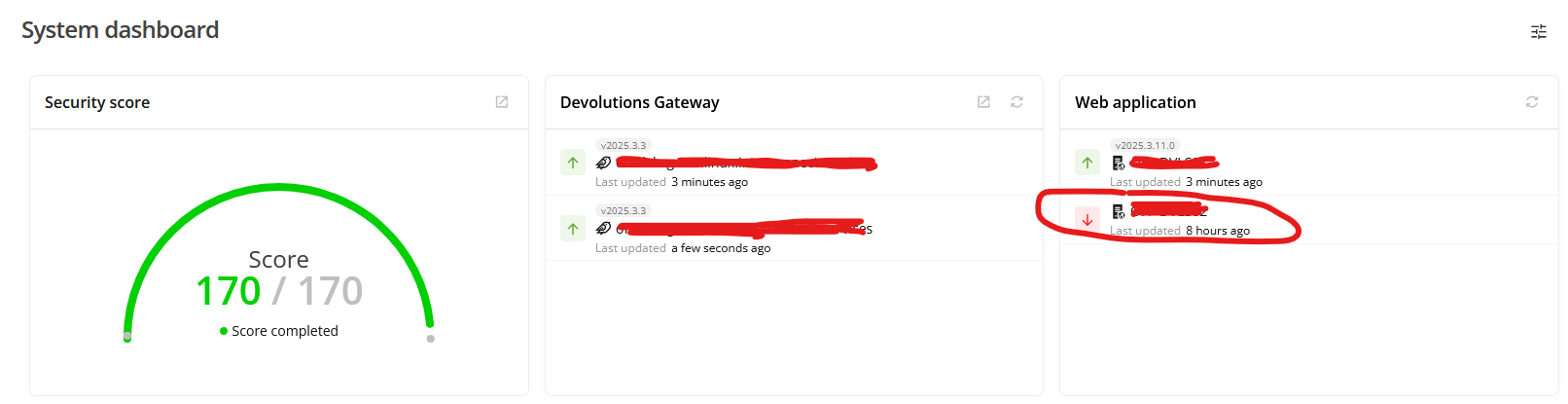
1c4166cf-b5fe-4273-8f25-54e67c644c05.png
Hello All,
I appreciate your patience on this case.
Could you send us the X-forward logs from IIS?
After a session and exchanging with Jakub Vácha, I think this could only be related to RDM.
This is how you can enable these logs in IIS:
https://docs.devolutions.net/server/kb/how-to-articles/add-x-forwarded-for-column-iis/
You can share these logs by sending them to service@devolutions.net
Best regards,
Patrick Ouimet
Hello All,
I appreciate your patience on this case.
Could you send us the X-forward logs from IIS?
After a session and exchanging with Jakub Vácha, I think this could only be related to RDM.
This is how you can enable these logs in IIS:
https://docs.devolutions.net/server/kb/how-to-articles/add-x-forwarded-for-column-iis/
You can share these logs by sending them to service@devolutions.net
Best regards,
@Patrick Ouimet
Long story short, we experienced the same error in RDM again yesterday. I shared our IIS logs with you on the e-mail: service@devolutions.net
Hello All,
Thank you for your time and investigation.
We have reproduced this issue, and an internal ticket is now open.
We will let you know when it will be fixed.
Best regards,
Patrick Ouimet
Hi!
One of our users got the same error message today too. RDM 2025.2.30.0, DVLS 2025.2.22.0
"Request failed on background thread."
Let me know if you need any logs or if you have a solution :)
Thanks!
Hi!
One of our users got the same error message today too. RDM 2025.2.30.0, DVLS 2025.2.22.0
"Request failed on background thread."
Let me know if you need any logs or if you have a solution :)
Thanks!
@Daniel Albrecht
This bug is fixed in the latest version of RDM 2025.3.32.0.
Thank you! Looking forward to the next Extended Maintenance release then
Hello Daniel,
We are currently releasing our 2026.1 version today.
The 2025.3 version should soon be available as the new Extended Maintenance.
Best regards,
Érica Poirier
Thank you Erica! Good luck with the release :)