Issue with RD-Gateway since 2023.3.34.0

Hi,
I use RD-Gateway connections through Azure Application proxy a lot. Everyversion including up to 2023.3.33.0 is working with no issue. Since 2023.3.34.0 everytime it tried to authenticate to the Gateway I get a popup with "The logon attempt failed." when use a stored password. Using an earlier version on the same system works with no issue. After typing in the correct username and password it logs in with no issue.
The issue is not resolved on 2023.3.36.0
Thanks a lot.
FailedLogin.png
All Comments (9)
Hi,
This issue appears oddly similar to the one described in this other thread
If it is the related, then KB5032190 which affects Windows 11 23H2, 22H2 but Windows 11 21H2 (it got KB5032192 instead) could be responsible, and I suspect it is linked to the new revamped passwordless experience changes that affect mstsc.exe.
Does it work if you don't attempt to inject RD Gateway credentials to let it prompt? Is your client pure Azure AD joined, or hybrid joined? What about the machine running the RD Gateway? Can you go over the other thread and see if you can find similarities?
Best regards,
Marc-André Moreau
I dont think it is releated. The System RDM is running on is a Windows 10. The RD Gateway is running on Server 2022 or Server 2019 (both have the issue). And when I use 2023.3.33.0 or any version before that, there is no issue.
So I installed 2023.3.36 .. I had the issue.. I downloaded the binaries of all the previous versions and started the RDM from the extracted binary. So it used the local DB with the same setting across all of them. 36,35 and 34 have the issue, 33 does not.
And its only the saved password, when I type in the password it works.
When looking at what others posted, I was wondering if this was releated to the UTF-8 changes (https://forum.devolutions.net/topics/40943/problem-running-external-rdp-sessions-after-upgrade), but did not resolve in .36
Hum...
If it broke starting from 2023.3.34, then it is most likely related to the reworking of the RD Gateway credential injection I did hoping to fix the other issue: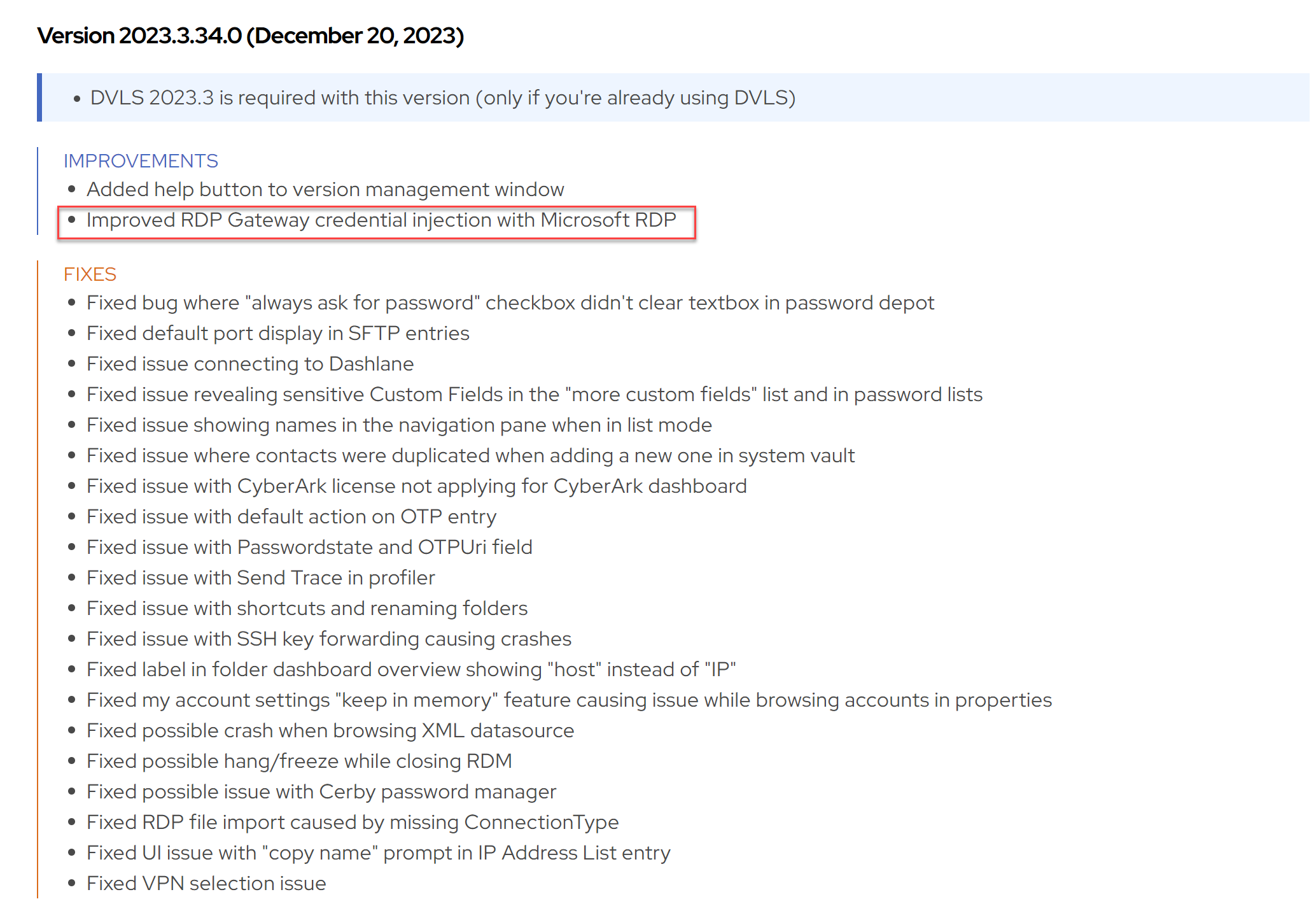
I doubt the UTF-8 issues really have to do with it. I also checked the other changes I did around that time, and there was one which could have been related, but it was introduced in 2023.3.33 and that version works for you.
The original code for the RD Gateway credential injection logic was old, convoluted and especially quite different between the embedded mode and external mode, which is why I ended up reworking it, since nobody remembered why it was the way it was. Let's try to figure out what's going on in your case that would explain the credential injection failure.
First, while it's unlikely to be related, let's just rule it out: can temporarily disable RDP API hooking to see if it changes anything?
https://docs.devolutions.net/kb/remote-desktop-manager/knowledge-base/microsoft-rdp-api-hooking/
Once you're done trying without RDP API hooking, turn it back on, and enable the logs. The API hooking lets us log a lot of internal stuff that's happening within the Microsoft RDP client, hopefully I can find a hint in there. Try it with both the internal and external modes, and see if the behavior is different. Then try it once without credential injection to get a log of a successful connection for comparison. Save the logs and send them to our support team (service@devolutions.net), mentioning this thread.
Best regards,
Marc-André Moreau
28ad2e78-d123-4945-95ae-6663bba8fbbe.png
Hi Marc-André,
I was not able to pull the logs really and then lost track of it. Now I was able to setup a test environment that I could give credentials to you, so you can test the problem.
As said, it works with no issues in 2023.3.33 and does not work with any version since then.
What is the best way to give you the credentials so that you can look at the issue directly.
Hello
Marc-André is on vacation at the moment, but I'll be happy to take a look at this in his absence.
You can send the credentials by generating a secure link using Devolutions Send (https://send.devolutions.com/). Set a short duration, like 24 hours on the link, and then you can send it to me either by PM on the forum, or to rmarkiewicz [at] devolutions.net.
Please let me know if something isn't clear or you have further questions!
Thanks and kind regards,
Richard Markievicz
Hello again
Thanks for your correspondence by email. I'm posting back here for visibility.
The problem is directly caused by the changes introduced that were mentioned in the linked thread. There was a change to the way the temporary credential is written to CredMan, but the issue is thorny: there may be different behaviour for the embedded versus external modes, the Windows/mstsc version (and what hot fixes or patches are applied) as well as if any of the machines in question are AD/AzureAD/AzureAD-Hybrid joined.
Broadly speaking, the prior behaviour in RDM was to write the temporary credential either as a generic and domain password, or only a generic password. The new behaviour is to only write the domain password; but in your case it's a generic password that's needed.
The fix is obvious - to recreate the generic password - but if I do that, I don't know what other scenarios I'm going to break. We need to take a second look at this, and I'll likely need to discuss it with Marc who is, as I wrote, on vacation right now. I've opened a ticket for that internally and linked it to this issue.
In the meantime, I'd like to get your use case unblocked. Is there a reason you use the "Local" password storage option for the Gateway credentials? Is something blocking you from using the "Database" option and allowing RDM to directly inject the credentials? If you're unsure, please try it and let me know.
Otherwise, if you have further questions or comments, or something isn't clear, please don't hesitate to get in touch
Thanks and kind regards,
Richard Markievicz
Thanks a lot, I will try the workaround. I normally only use the local passwords since the systems I work on are ephemeral. Basically, I use them for a week and then delete the system again. So, I was going with the (from my point of view) least complex solution. And it worked before ;-)
Hello
Yes, I recognize this isn't the most convenient, please consider it a workaround in the short term. I think the best thing for us to do will be to reinstate the option to create a generic credential, since it's obviously required in at least some cases. I'll check with Marc-Andre once he's back from vacation and we'll update this thread when there's some news.
Thanks a lot for your patience
Kind regards,
Richard Markievicz
Hello again
Thanks for your patience.
We're trying to figure out under exactly what circumstances a generic credential is required for the RD Gateway. From some research, it looks like this could be a Windows 10 issue - can you please let me know the exact build number you are running? The easiest way to find it is to Start > Run (or [Windows]+[R]), and execute "winver".
Please, let me know if something isn't clear or you have further questions
Kind regards,
Richard Markievicz