External RDP sessions through a Microsoft Remote Gateway do not work.
External RDP sessions through a Microsoft Remote Gateway do not work.

After a Microsoft Update external RDP sessions from RDM through a Microsoft Remote Gateway do not work.
You get error: Your computer can’t connect to the remote computer because a security package error occurred in the transport layer.
If you click of the “Use RDP Gateway generic credentilas” under Options…Types..Remote
Desktop, you get prompted for the credentials for the RD Gateway then you successful connect.
This do not affect when running RDP in embedded mode.
Clients: Windows 11
RDM 2023.2.35.0 Licensed.
Data source: Microsoft Azure SQL
6c803db0-ae88-4e9b-9360-0f8831472da1.png
All Comments (23)
Hello,
As a test, does disabling the API Hooking option under File > Options > Types > Sessions > Remote Desktop prevent the issue ?
Best regards,
275550cf-3500-40af-b75c-3896da7ea216.png
That did not solve the problem.
Hello,
Understood, would it be possible to update to the latest RDM version (2023.3.25.0) to validate if this resolves the issue ?
We did have an issue in 2023.2 in relation to RDP entries in external mode on Windows 11 and I'd like to know if the fix implemented in the later versions of RDM solves your RDP problem.
Note that an upgrade of your Azure SQL database will be necessary. For more on this, please reading the following documentation: https://docs.devolutions.net/rdm/windows/installation/database-upgrade/
Best regards,
Hello,
I have now made a test environment and running 2023.3.28.0, I get the same problem with this version.
I suspect that it is the security update that creates the problem:
2023-11 Cumulative Update for Windows 11 Version 22H2 for x64-based Systems (KB5032190)
Hello,
It's certainly possible, I will speak with our developers to see what we can do about that.
I'll update you once I have news.
Best regards,
This problem is on Windows 11 22H2 and 23H2 with KB5032190.
Windows 11 21H2 do have a different KB5032192 and her it works.
Hello,
Thank you for confirming this, I've let our developers know in the ticket I opened.
I'll update you once I have news.
Best regards,
Hello,
Are there any updates on this?
Hi,
Can you take a look and see if you and have old saved credential entry the Windows credential manager for the RD Gateway?
https://learn.microsoft.com/en-us/answers/questions/1376300/security-package-error-in-the-transport-layer-(win
Otherwise you can go in the Windows Credential Manager and look for saved entries that could be it: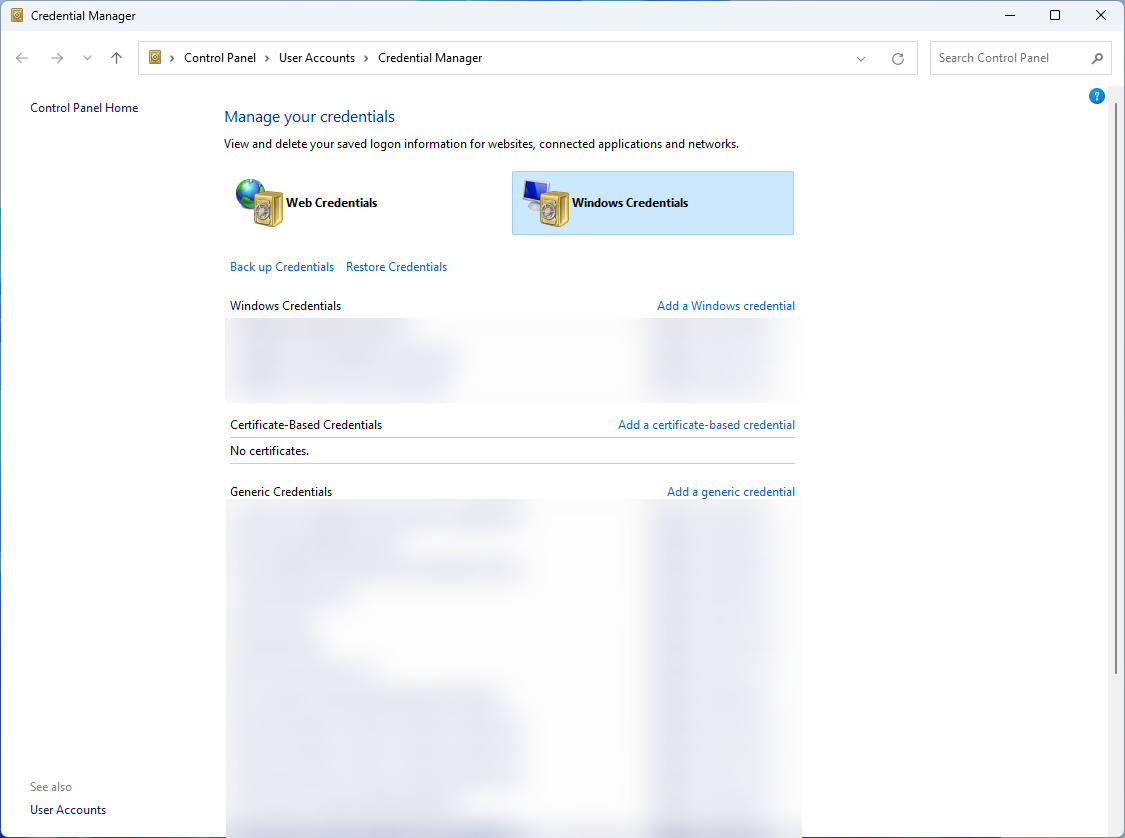
Since it only affects external sessions and not the embedded mode, the usage of temporary saved credential entries is the most likely cause.
Does it work for some other systems using the same version of Windows?
Best regards,
Marc-André Moreau
16bfebab-d42f-4074-a718-9c515ccab5bb.png
I have tried deleting the credentials from Windows Credential Manager, it does not fix this problem.
I have tested this from around 10 computers and all the Windows 11 2022H2 and 2023H3 fails
and it works on Windows 11 2021.
This started when KB5032190 was installed.
Also tried setting the registry key fClientDisableUDP, it does not resolve this problem.
HKEY_LOCAL_MACHINE\SOFTWARE\Policies\Microsoft\WindowsNT\Terminal Services\Client
KEY VALUE –fClientDisableUDP SET TO 1
Hi,
I have Windows 11 23H2 with KB5032190 installed, and I've been unable to reproduce the issue with a few configurations of RDP through RD Gateway. The "Use RDP generic credentials" option is turned on by default and only affects the temporary Windows credential manager entry type we inject using CredWrite to be picked up by mstsc.exe when launched in external mode. If you uncheck this option, it calls CredWrite using a "domain password" type instead. It's unclear why we have this option available, but my guess is that it was sometimes required to make things work, and more research into the mstsc.exe internals would be required to figure out why and when to use which.
Can you clarify if you disabled "Use RDP Gateway generic credentials" or if you left it enabled (default)? If so, why did you disable it? If you thought this would result in getting prompted for the credentials, this is not what it does. One important thing you did mention earlier is that in the embedded mode, it prompts for the credentials. Is there a particular reason why you are not saving the RD Gateway credentials in RDM to have them automatically injected? Also, are the credentials used for the RD Gateway different from the credentials used to connect to the RDP server, or are they the same?
The "Your computer can't connect to the remote computer because a security package error occurred in the transport layer. Retry the connection or contact your network administrator for assistance." is most likely caused by a faulty or incomplete credential entry picked up by mstsc. The incorrect type could be it, so the first thing I would try is re-enabling the default "Use RDP Gateway generic credentials" option, then try again after restarting RDM.
The second thing to try is to check "Use same RD Gateway credentials as remote computer" if they are indeed the same, this is generally better than saving them twice. If they are not the same and you expect to be prompted, click on "Credentials" and make sure that it is all empty, no username or domain.
Best regards,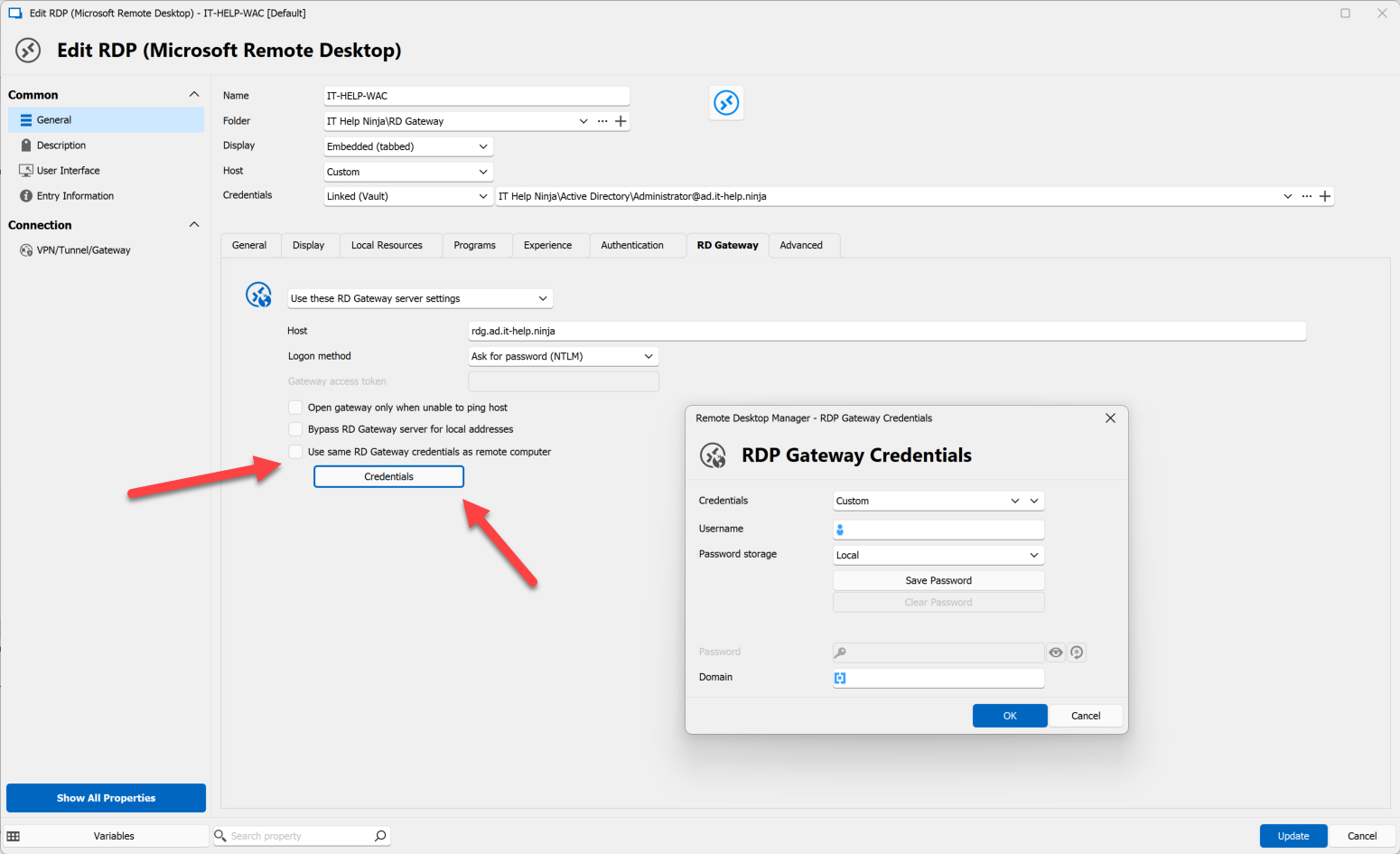
Marc-André Moreau
ce63d7b9-1b4c-40e5-b822-71500fff6e52.png
Hi,
First, I will clarify we do not get prompted for credentials when using embedded mode, we use RDP Gateway Credentials Finde by name (UserVault).
What I meant was that if “Use RDP Gateway generic credentilas” is not checked I get prompted for username and password by the gateway and then the external RDP session
works, But you have to log on ever time.
It is normally checked as shown in the screen shot.
We do not have the same user for the RD Gateway and the server behind it.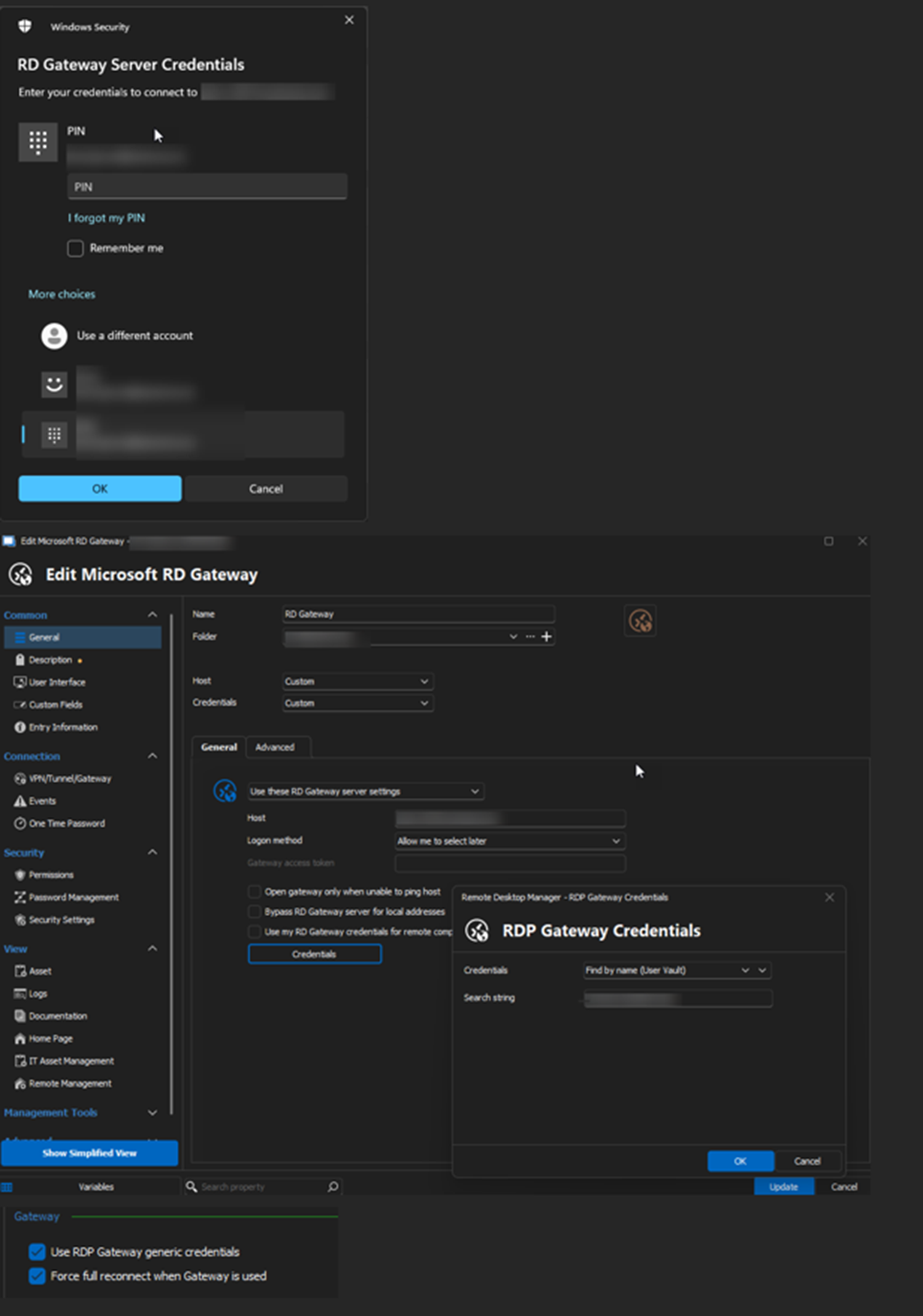
c7f9d5de-089a-4433-8598-d6499e8c1367.png
I am running the Microsoft Remote Desktop Gateway’s on Windows Server 2019, what are you testing on?
I get the same error when using a Microsoft Remote Desktop Gateway on Windows Server 2022
My test lab environment is using Windows Server 2022 for the RD Gateway and destination server, but I've been unable to reproduce the issue despite running Windows 11 23H2 with the same KB installed on the client, so it must have to do with the specific connection configuration you're using.
Can you re-enable API hooking + enable MsRdpEx logs, make the same connection in both embedded (known to work) and then external (known to fail), save the corresponding logs from %LocalAppData%\MsRdpEx, then export your connection entries (RDP and RD Gateway, if the RD Gateway is defined separately) to a .rdm file, and send those to our support team?
Follow the instructions here for MsRdpEx logs: https://docs.devolutions.net/kb/remote-desktop-manager/knowledge-base/microsoft-rdp-api-hooking/#microsoft-rdp-logging
Best regards,
Marc-André Moreau
Files sent to you by PM
Hi,
I still have this problem in version 2023.3.36.0, any update on this?
Hi,
I don't have anything new on this. I've updated MsRdpEx with improved SSPI logging so I could at least catch the error code for the failing call I found in your logs, which might give me a new trail to follow, but it's not guaranteed. If you want to give the improved logging a shot before 2023.3.37, download the zip file for MsRdpEx here, then replace MsRdpEx.dll in C:\Program Files\Devolutions\Remote Desktop Manager\runtimes\win-x64\native with the latest version, after which you can capture new MsRdpEx logs.
I've been unable to reproduce the problem you have, despite having updated Windows 11 23H2 past KB5032190 which you identified as the Windows update where the issue began. The same KB5032190 is available for Windows 22H2, but Windows 11 21H2 got KB5032192 instead, and you mentioned KB5032192 on Windows 11 21H2 doesn't have the issue.
I have looked at the release notes for KB5032190 and found one major new feature that certainly affects the same parts of Windows involved with RDP authentication: introduction of passkey support, but also a brand new passwordless signing experience, which I have recently learned overhauled the new Azure AD SSO in mstsc:
Both of these new features don't seem to have been backported to Windows 11 21H2 through KB5032192, so there's a good chance that whatever Microsoft has changed that broke things for you was part of the changes for this new feature. There's a link to the new EnablePasswordlessExperience policy in Intune, can you check if this is something you have enabled? There are many more authentication-related Intune policies in that same page, can you check if anything else is set on your side?
What is the Entra ID join state of the client system, and target system? Is this a hybrid-joined environment? What account types are you using for the RD Gateway and destination RDP server? Is one of them an Entra ID account?
Please try to provide as much information clearly on what could give me new trails to investigate.
Best regards,
Marc-André Moreau
e8cbae30-c4bb-41b8-8e03-c95ce6f07894.png
Windows Client is Azure Joined to the same domain that the GW servers are AD members off.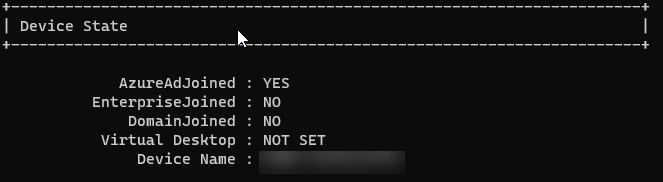
13ba92c1-33ca-4b31-a373-1f94d4294ced.png
Is it pure Azure AD joined (not hybrid, only cloud) and again, is the RDP user an Azure AD user, and is the RD Gateway user an Azure AD user. From what I could grasp from the logs, the issue really happens during the RD Gateway authentication, and it started occuring *after* the major changes from Microsoft for the new Azure AD SSO experience. There's a big difference between hybrid-joined and pure Azure AD joined, please provide as much details as possible for your RD Gateway deployment and how it relates to Azure AD. Is there special RD Gateway authentication in place? RADIUS? Azure MFA? Etc.
Marc-André Moreau
The picture in my last post is the status of the client, shown result by the command dsregcmd /status.
The Client is Azure joined not hybrid.
The RD Gateway is Ad Joined to the same domain.
There is a standard user authentication on the GW without anything else.
It seams to be the logon to the GW that fails, if I change so RDM do not find the GW
Username and password, I get the logon prompt to the GW if I manually log in to the gateway the session to the server is established.
Another strange thing about this is that after a windows update it works until you reboot the computer.
Hi,
> The Client is Azure joined not hybrid.
Ok, so "pure Azure AD joined", and the user for the Windows session is an Azure AD user, not a hybrid account. In other words, it never spoke to a traditional domain controller, only Azure? There's no domain controller at all involved for this user account?
> The RD Gateway is Ad Joined to the same domain.
I've heard that Windows Server 2019, 2022 could now be Azure AD joined, is this the case? If they're joined to the same domain, and the client is pure Azure AD joined - not hybrid-joined - then is that RD Gateway pure Azure AD joined as well, with no traditional domain controller involved? Or is there a domain controller in the picture, and the machine hosting the RD Gateway is hybrid-joined?
> Another strange thing about this is that after a windows update it works until you reboot the computer.
This may be further hint that the difference in behavior is *directly* related to the new Azure AD SSO changes that were introduced in KB5032190: after logging in once, it would stay logged in and it would reuse the SSO context for future connections until you reboot and lose that SSO context. It is very possible that RD Gateway now expects Azure AD SSO from mstsc after this update, and that we can't inject those credentials (or there's a new trick to it), as it would now expect Azure AD SSO, the login which you could perform manually with success.
Best regards,
Marc-André Moreau
RDM 2023.3.37 is out with the improved SSPI logging in MsRdpEx, it should be easier to re-do the logging and send them to me so I can see the SSPI error code associated with the RD Gateway authentication failure. I'm not making promises, but it'll hopefully give me something new to research.
Best regards,
Marc-André Moreau