Paste Once and TeamViewer

Hi!
When Paste Once is enabled and there's a TeamViewer session open, which tries to sync the clipboard to the remote computer, I cannot copy/paste a password.
When I use Clipboard Diagnostics, I can see TeamViewer was allowed to read the clipboard: 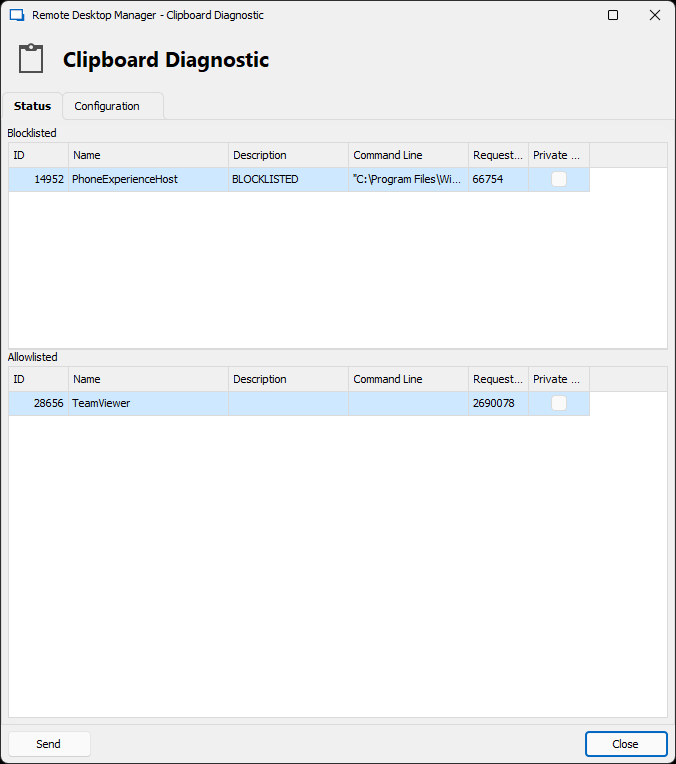
I don't know exactly how it works, but I assume RDM recognizes TeamViewer reading the clipboard, thinks that's a successful paste, and clears the clipboard, so there's nothing to paste anymore.
After adding that TeamViewer entry to the blocklist (right click / Add), it looks like this: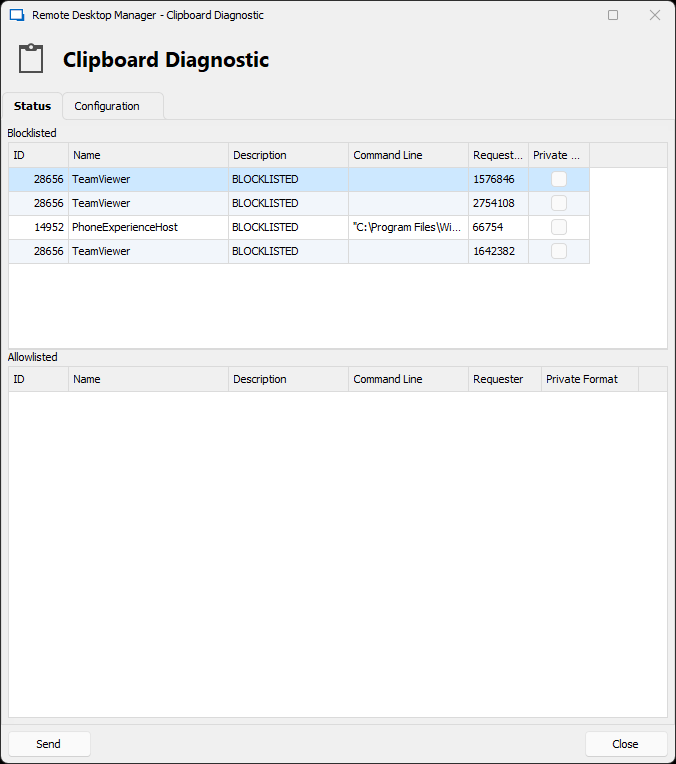
Now I can paste the password somewhere on my local system, but it is not synced to the remote TeamViewer session. It's the same with "PhoneExperienceHost", which is the Phone Link app that tries to sync the Windows clipboard to my Android phone.
A workaround would be to paste the password in a text editor locally and then copy it from there again. Then it will sync and RDM will not clear it. But is there a better way? Is that what the "Delays" list is for? How does that work exactly?
I imagine there could be a setting for a global delay, during which any access to the clipboard would be allowed (or denied) without clearing the clipboard. That way, any software reading the clipboard in the background, wouldn't cause RDM to clear the clipboard unwantedly. You wouldn't need to set exceptions for specific processes.
In general I believe the Clipboard Diagnostics windows could use a GUI overhaul. It's confusing and hard to use for me.
Also the "Password was copied to the clipboard" popup appears exactly in front of the "Clearing clipboard in X sec." status bar message, if the clear clipboard delay is enabled.
0c4d9f2f-70b4-4282-be9a-4d4b82a290c1.png
0c69212f-db3d-4d62-bc0b-2433b51f22fe.png
download.png
All Comments (31)
Hello Daniel,
Thank you for reaching out to us regarding this,
I have a few questions which you can hopefully answer.
- Which version of RDM are you using?
- Which type of data source are you using?
The "Delays" is used to set a delay for how long we will allow the software, for example, to ask for the clipboard's content.
We also have the following knowledge base article regarding the Clipboard Diagnostic tool that I believe may be of interest:
https://docs.devolutions.net/kb/remote-desktop-manager/troubleshooting-articles/clipboard-diagnostic/
Let me know,
Best regards,
Samuel Dery
Hi Samuel!
I just updated from RDM 2023.1.25.0 to 2023.1.26.0 and it's the same behavior. We're using DVLS 2023.1.6.0 as the data source.
So after reading the article I understand there's no way to allow a process to read the clipboard without it being cleared, correct?
- When the access is allowed (default), the clipboard is cleared immediately
- If the process is in the Delay list, it will be cleared after the configured delay. That's meant to deal with apps that need to access the clipboard multiple times in order to paste.
- If the process is in the Disallowed list, it will not be able to access the clipboard and it will also not be cleared.
I think it would be useful to add more clearer wording to that dialog.
"Allowlisted" is wrong because it's not really a permanent list. It's just a log of which processes have been allowed.
"Add" could be changed to "Add to block list". Also an "Add to delay list" would be useful.
And again, I think a global delay would be useful, so you don't really have to configure any processes individually – even if it's block only. But I think an option to globally allow access to the clipboard for a specific delay would also be useful. That way any background processes can access the clipboard to sync or whatever, and only after all the automatic stuff happened, the clipboard will be cleared after a paste. It will allow to paste passwords on remote sessions like TeamViewer, or on the mobile phone. Right now I always have to use a text editor to paste and copy again, if I want to sync the clipboard somewhere.
I understand it is a security concern that passwords are synced to remote devices, but an option would be nice.
Let me know if I got anything wrong.
Another suggestion: Can you add an option to disable clipboard clearing in the Password Generator? Right now you can only set the number of times to paste, but not disable it. It happened at least once that someone* generated a password, pasted it twice (or more) to set it on an appliance, and then when they tried to paste it into the password manager to save it, it was already cleared. That's a fun way to lock yourself out of an account/appliance. To quote the LockPickingLawyer: "I now have a lock to which I don't know the combination"
Thanks!
By the way I found a little bug in DVLS Web: When you double click the version number at the bottom left it disappears :)
*) yes it was me
Daniel,
Thank you for the feedback we will take that into consideration.
First, with the situation you find yourself in with Team Viewer your only option is to go with Clipboard copy method set to Legacy mode. Long explanation below.
As for your questions:
When the access is allowed (default), the clipboard is cleared immediately
Correct, but only in Paste once (secure) mode
If the process is in the Delay list, it will be cleared after the configured delay. That's meant to deal with apps that need to access the clipboard multiple times in order to paste.
Correct, but only in Paste once (secure) mode
If the process is in the Disallowed list, it will not be able to access the clipboard and it will also not be cleared.
Correct, but only in Paste once (secure) mode
I think it would be useful to add more clearer wording to that dialog.
"Allowlisted" is wrong because it's not really a permanent list. It's just a log of which processes have been allowed.
Agreed, the Allowlisted header could become Processes Accessing Clipboard
and Blocklisted could be Processes Denied Clipboard (Blocklisted) or something along those lines.
"Add" could be changed to "Add to block list". Also an "Add to delay list" would be useful.
Agreed
And again, I think a global delay would be useful, so you don't really have to configure any processes individually – even if it's block only. But I think an option to globally allow access to the clipboard for a specific delay would also be useful. That way any background processes can access the clipboard to sync or whatever, and only after all the automatic stuff happened, the clipboard will be cleared after a paste. It will allow to paste passwords on remote sessions like TeamViewer, or on the mobile phone. Right now I always have to use a text editor to paste and copy again, if I want to sync the clipboard somewhere.
This is what Legacy mode does, it will clear the clipboard according to the "Clear clipboard delay".
Another suggestion: Can you add an option to disable clipboard clearing in the Password Generator? Right now you can only set the number of times to paste, but not disable it. It happened at least once that someone* generated a password, pasted it twice (or more) to set it on an appliance, and then when they tried to paste it into the password manager to save it, it was already cleared. That's a fun way to lock yourself out of an account/appliance. To quote the LockPickingLawyer: "I now have a lock to which I don't know the combination"
The copy to clipboard of the password generator will also follow the Clipboard copy method you've set. In the case of Legacy, it will be cleared after the delay, in the case of Paste once (secure), you can paste x times controlled by the Password Generator - Clear clipboard after setting.
Detailed explanation
Why Legacy mode?
Well, first we need to explain how the Windows clipboard works. The simple case is a process sends data (& format) to the clipboard and then a second process asks for the data (& format) for the paste. In the example of text, you send the data to the clipboard then all other processes can read the data and do whatever they want with it. This is like leaving a Post-it note with your password on your keyboard, you have no control who has access to the data. The only option is for the process to clear the clipboard after a given amount of time. In RDM we call this the Legacy mode.
Where things get tricky is with Past once (secure) mode. We use the clipboard mechanism of Delayed Rendering. For example, say you copy the entire content of a web page in a web browser, the copy action might look something like this: I'm ready to supply (Delayed Rendering) to any process data in any of the following formats [HTML, text, PDF] (Display Format). The idea here is to save on processing time, why would I generate the PDF format if you don't paste it. Once a process asks for a given format, the promising process is asked to supply the requested format of the data. Once it does, the data is now owned by the clipboard, think Legacy mode, we don't want to stay here long so we quickly replace the clipboard data with "" (empty string).
So how does RDM handle Disallowed or Delayed exceptions? Since we use delayed rendering, the control comes back to our process (RDM) when a paste request is done and we get to inspect the caller (1*) and then decide what action to take. In the case of disallowed we simply don't reply to the request and nothing happens, the call process can't get to the data. For delayed processes we will supply the data and delay the "clear" action for the given amount of time (ms).
So unless you put a 5-10000ms delay on TeamViewer the Paste once (secure) mode will never work for you. This is why I suggest you use the Legacy mode.
Crazy idea, thinking about it, we could possibly allow some processes, TeamViewer for example, to copy once. We would define a new Copy Once exception list. The logic flow would look something like this:
Before (I use TeamViewer here but this could work with any application):
- RDM copy username
- TeamViewer opens the clipboard via OpenClipboard and requests the clipboard value
- RDM supplies the value "username-01"
- TeamViewer gets the value
- RDM clears the clipboard
With the Copy Once exception list
- RDM copy username
- TeamViewer opens the clipboard via OpenClipboard and requests the clipboard value
- RDM supplies the value "username-01"
- TeamViewer gets the value
- RDM restarts the copy username (new delayed rendering)
- TeamViewer opens the clipboard via OpenClipboard and requests the clipboard value (again)
- since TeamViewer is in the Copy Once List we would ignore the request
- Paste into NotePad would then work
- Paste within the TeamViewer application would also work since TeamViewer owns a copy of the clipboard from the first call
- Paste as many times as you want in TeamViewer since RDM doesn't have any control over the clipboard within TeamViewer.
This might just be crazy enough that it could work. The only problem is documenting all of this, I know the existing KB is already lacking. The topic is somewhat complex to grasp and explain.
I hope this clarifies somewhat how things work in regards to RDM the clipboard and other applications. Believe it or not, there is even more involved here but I will leave that for another day/thread/post/topic/KB.
Best regards,
1* Some applications will always supply null when calling OpenClipboard, this limits what we can do.
P.S. I will let the DVLS team know about the double-click bug.
Stéfane Lavergne
Hi Stéfane!
Thanks so much for the detailed explanation! It's exactly how I imagined it would work. But I also think the documentation and the GUI could be more clear about this. It is indeed quite complex for what it does.
The copy to clipboard of the password generator will also follow the Clipboard copy method you've set. In the case of Legacy, it will be cleared after the delay, in the case of Paste once (secure), you can paste x times controlled by the Password Generator - Clear clipboard after setting.
OK I see. It would be nice to be able to configure the Password Generator copy independently. When you generate a new password you often have to paste it a varying number of times, and it can be bad if the password gets cleared from the clipboard after you've set it but before it was saved. After it happened to me I try to remember to save the password before changing it. But for new users, if you're not used to the clipboard being cleared automatically it can happen. btw, please make Ctrl+C work in the Password Generator :)
Regarding the global delay:
This is what Legacy mode does, it will clear the clipboard according to the "Clear clipboard delay".
What I like to suggest is different: The global delay would *prevent* the clipboard from being cleared for a short time after copying. That way, background processes have time to (try) read the clipboard without it being cleared. Only after the delay has expired, when the user pastes manually, the clipboard is cleared. So it would still be a Paste Once scenario.
So the process would look like this:
- User copies password in RDM
- RDM starts the global delay timer (for example 100 ms)
- Background processes like TeamViewer and PhoneLink try to read the clipboard to sync it. Depending on settings and allow/blocklists, RDM allows or blocks access to those requests but does not clear the clipboard.
- The global delay timer expires
- The user pastes the password and RDM clears it immediately, or after a second configured delay, like it worked before.
I think the Delays and Disallowed lists could even be combined into a general "Rules" list, which is processed in sequence for each paste request. You set a filter and an action for each entry.
The filter would include
- Process name, command line (like before)
- time elapsed since copy (?)
- the copy source/type, e. g. username, saved password, newly generated password, OTP code ... (?)
The actions would include
- Allow access and keep clipboard
- Allow access and clear clipboard (after x ms)
- Block access to clipboard
There could be 3 different delay timers active in combination:
- One right after copying, to ignore any automatic requests from background processes (what I called global delay)
- One after a successful paste, so apps like Chrome can read the clipboard multiple times when pasting
- A longer delay that clears the clipboard after a timeout, so sensitive data doesn't stay in the clipboard forever. So basically Legacy mode and Paste Once mode can both be enabled/disabled independently.
The Status tab's "Blocklisted" and "Allowlisted" could be combined into a single log display, where each action (copied, access allowed, access blocked, clipboard cleared) is logged with timestamps.
Any "clear clipboard" action would actually just decrement the counter for "clear clipboard after x times" scenarios, or copy the next bit of information for scenarios like "copy username and password"
I really like the concept of the Paste Once mode, but the way it is implemented now is difficult to troubleshoot and configure. I hope my ideas are helpful!
Thanks again for the explanations!
Best regards,
Daniel
Hello Daniel,
I'm working in DVLS Web team and you wrote this in a previous comment :
By the way I found a little bug in DVLS Web: When you double click the version number at the bottom left it disappears :)
I just want to let you know that it is not really a bug, it is an hidden feature for us I would say. Our documentation team uses that to be able to make screenshots whithout version number in it. We have never thought that a user could find that. I hope you don't have any problem if we keep that behavior.
Best regards,
François Dubois
it is not really a bug, it is an hidden feature
That's funny! 😁 Thanks for letting me know.
I often double click text to select words (or triple click to select paragraphs).
Hi Daniel,
As for your suggestions, I will take all of it into consideration. Nothing is simple when it comes to the Windows Clipboard but I do like the ideas being thrown around here and I think I can even get it to work. I will add this to our hackathon list so that we can get a POC and see what can be achieved.
Unfortunately no ETA, I would love to be working on this today but I got other priorities.
Best regards,
Stéfane Lavergne
Awesome, Thank you!
Hi! Reviving this thread for context...
How does "Paste once" work with the Windows clipboard history? Copied usernames and passwords don't seem to appear in the Clipboard history at all, but it also doesn't appear in the Clipboard Diagnostics window as Allowlisted or Blocklisted.
Regards,
Daniel
In RDM we flag the data as "sensitive" (via the flags, see example) to prevent the clipboard history window to pick it up and list it. Because they respect these flags the clipboard history never tries to access the clipboard for the value therefore there is nothing in Allowlsited or Blocklisted.
Note, not all third party clipboard history tools respect these defined types and will still put the values into the history.
Best regards,
Stéfane Lavergne
Thank you! That's exactly what I suspected. Which API or library does RDM use for the clipboard functions? Might be interesting to play around with that myself.
PS: your "see example" link seems missing on the forum here, but in the notification email I got it's a lickable clink.
We call the Windows API directly
RegisterClipboardFormat
OpenClipboard
SetClipboardData
EmptyClipboard
CloseClipboard
GetOpenClipboardWindow
...
PS: your "see example" link seems missing on the forum here, but in the notification email I got it's a clickable clink.
Fixed, thanks
Best regards,
Stéfane Lavergne
Here's another little nuance with Paste Once: I tried to copy a username and paste it to a browser inside an RDP session that is open in RDM, which didn't work.
I think the problem is, that the remote browser, like a locally running browser, tries to read the clipboard multiple times. But the process that reads the clipboard is RDM, so it doesn't get the needed delay applied.
After I added RemoteDesktopManager to the Delay list, it worked.
So, I still think a global delay for all processes would be a good option.
Thank you!
PS: Apparently PhoneExperienceHost (The Phone Link app) still syncs the clipboard to my smartphone, even with the "sensitive" flags set by RDM. Isn't that exactly what those flags are supposed to prevent? So this doesn't seem to work, and PhoneExperienceHost needs to be added to the Blocklist explicitly.
Here's another little nuance with Paste Once: I tried to copy a username and paste it to a browser inside an RDP session that is open in RDM, which didn't work.
I think the problem is, that the remote browser, like a locally running browser, tries to read the clipboard multiple times. But the process that reads the clipboard is RDM, so it doesn't get the needed delay applied.
After I added RemoteDesktopManager to the Delay list, it worked.
Correct, since the process is not on the local machine but rather being passed from the RDP client to the host we have no control over the paste action. Since our RDP is running embedded, the read request we receive from the OS identifies RDM as the clipboard requester. So at this point, your only option is to delay RDM as you did.
So, I still think a global delay for all processes would be a good option.
I like the idea, I will add this to my to-do list.
PS: Apparently PhoneExperienceHost (The Phone Link app) still syncs the clipboard to my smartphone, even with the "sensitive" flags set by RDM. Isn't that exactly what those flags are supposed to prevent? So this doesn't seem to work, and PhoneExperienceHost needs to be added to the Blocklist explicitly.
Correct, some/most of these clipboard sharing/backup type apps don't respect the "sensitive" flags this is precisely why we introduce the blocklist functionality. I will ask the documentation team to document PhoneExperienceHost (The Phone Link app) as being a potential problematic app.
Stéfane Lavergne
Thank you!
Please consider my previous post here about the 3 different timers: https://forum.devolutions.net/topics/39461/paste-once-and-teamviewer#176237 (does that link work?)
Again, I really like the idea of Paste Once, but I think the way it's implemented could be much easier, without requiring manual exceptions for each process.
Regards,
Daniel
Hi! Sorry for using this old thread again, but I think it's still relevant :)
I noticed another little quirk:
When Paste Once is enabled, the "clear clipboard delay" option gets grayed out, but it's still active.
When you copy a password, the clear timer starts. Then, when you paste the password before the timer runs out, the clipboard gets cleared but the timer still continues.
Then when you copy something else in the clipboard (independently from RDM), the timer might delete your clipboard unexpectedly.
So I think when the clipboard gets cleared by Paste Once, it should also disable the timer.
And the "clear clipboard delay" option should not be grayed out when Paste Once is enabled, because it's still in effect.
Thanks!
Daniel
Hi Daniel,
I will investigate. As you pointed out, this is not the intended behavior, as they should be mutually exclusive.
Best regards,
Stéfane
Stéfane Lavergne
So I had a quick look at the code.
When Paste Once is enabled, the "clear clipboard delay" option gets grayed out, but it's still active.
They grayed out might actually be the issue here. If you copy secure but never paste, you could want the clipboard to be cleared in say 10-30 seconds. So that makes sense. (see third point)
When you copy a password, the clear timer starts. Then, when you paste the password before the timer runs out, the clipboard gets cleared but the timer still continues.
Then when you copy something else in the clipboard (independently from RDM), the timer might delete your clipboard unexpectedly.
We should stop the clear timer once we paste, as we've already cleared the value so the clear timer is no longer needed. Make the "copy something else" work properly without being cleared.
So I think when the clipboard gets cleared by Paste Once, it should also disable the timer.
And the "clear clipboard delay" option should not be grayed out when Paste Once is enabled, because it's still in effect.
You are correct this is they way to do it. I didn't get this statement the other day when I read it. One step further if you copy secure, copy some random text, we should also disable the clear timer as we no longer control the contents of the clipboard.
Best regards,
Stéfane Lavergne
Sounds good, Thanks!
There's still some other quirks and manual configuration for Paste Once to work properly. Maybe could you consider my suggestions above from 2 years ago? The global delays would remove the need to put individual processes into a allow/block list.
I agree, I would really love to rewrite the entire clipboard code. With all we've learnt over the years. We could auto-detect allow/block processes, while still allowing manual overrides.
How could we auto-detect? Using a honeypot, when we start a copy/paste action, any paste request within say 50ms of the copy action is most likely due to a process and not user interaction. I've yet to see a user click & paste within 50ms. Any process falling within the honeypot would get flagged automatically. In your case you would allow PhoneExperienceHost & TeamViewer to get the content but still allow you to paste.
Best regards,
Stéfane Lavergne
Yes, or having the option to allow pasting without clearing the clipboard for 50ms, so copied passwords can be synced to remote sessions or to your phone etc. It's a security concern, but I would at least make it an option, because it is sometimes useful. Maybe add a quick toggle somewhere in the menu or status bar ("Allow automated access to clipboard: yes/no")
And the same goes for manual pasting, as some applications try to access the clipboard multiple times (hence the delay rules exists currently). After the 50ms initial delay, when the user pastes, there could be an additional 50ms delay where access to the clipboard is allowed multiple times, before it gets cleared.
Thanks for your consideration!
Daniel
Changes are done and will be available in the next beta release of 2025.1
Best regards,
Stéfane Lavergne
Hi!
I never got around to testing the new clipboard behavior until now. It seems to work great in general but we still have a problem when TeamViewer has an open session trying to sync the clipboard.
I think it's because TeamViewer behaves very weird here. Shortly after the Copy, it reads the clipboard and RDM blocks it, like it should. But then 1 second later TeamViewer reads the clipboard again, so RDM allows it and clears the clipboard, but the clipboard in the remote TeamViewer session does not change (it doesn't get set to the copied password, and it doesn't get emptied either - it just stays whatever it was). But interestingly, when I'm quick and paste in the remote session before the 1 second read, the password gets pasted successfully on the remote client, and then gets cleared locally, but not remotely.
I don't quite understand what's happening.
Can you add options to adjust the global delays? You mentioned it's 50ms, but I think it would be nice if it could be adjusted.
Also an option to select whether to allow or block the read during the initial delay would be useful. It could be used to allow syncing of the clipboard inn the background without adding entries to the allow list.
I guess the best option is just to add TeamViewer to the block list, because it's misbehaving...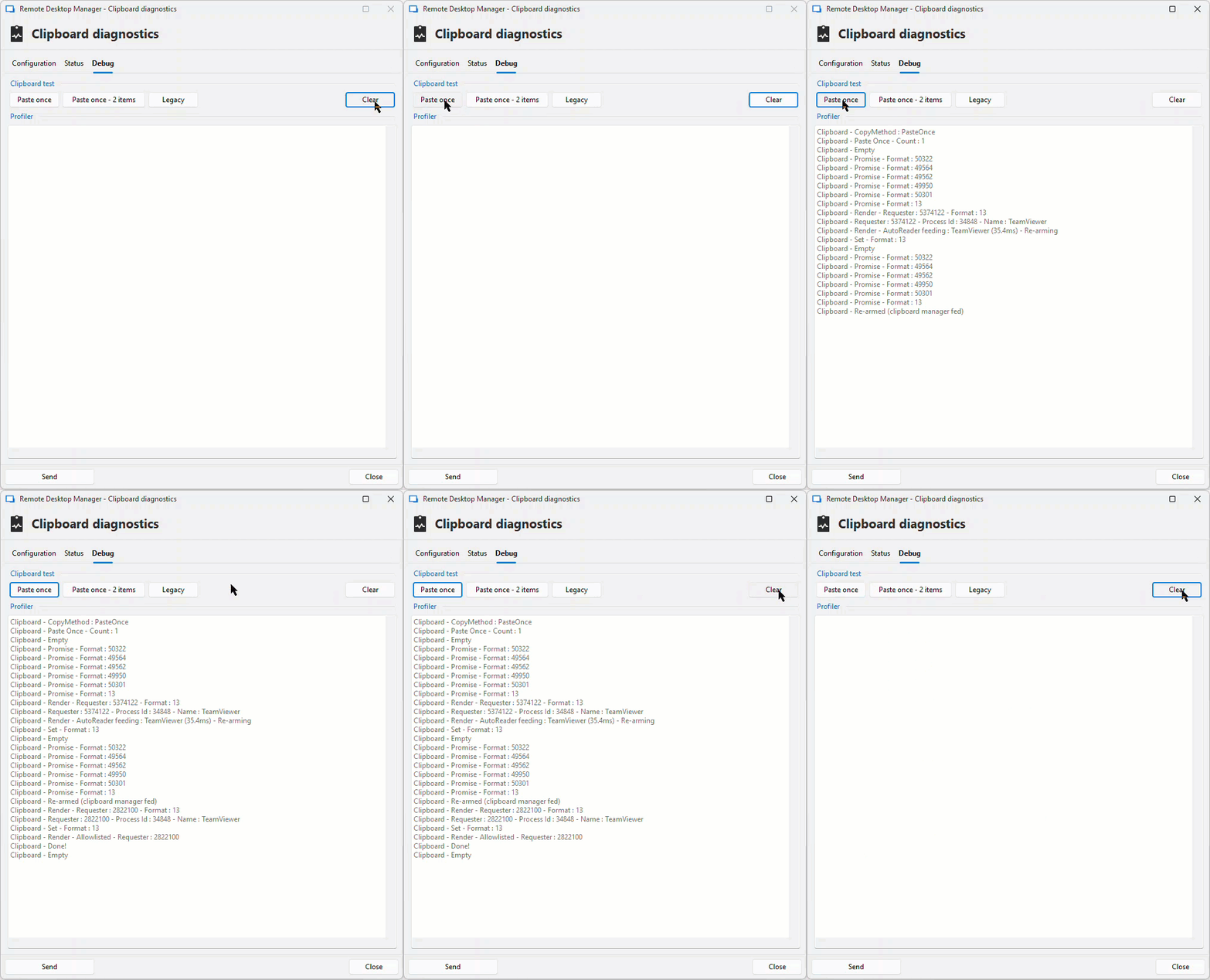
Here's the output of a copy action with a TeamViewer session in the background (You can see the 1s delay in the GIF above)
Clipboard - CopyMethod : PasteOnce
Clipboard - Paste Once - Count : 1
Clipboard - Empty
Clipboard - Promise - Format : 50322
Clipboard - Promise - Format : 49564
Clipboard - Promise - Format : 49562
Clipboard - Promise - Format : 49950
Clipboard - Promise - Format : 50301
Clipboard - Promise - Format : 13
Clipboard - Render - Requester : 9311008 - Format : 13
Clipboard - Requester : 9311008 - Process Id : 34848 - Name : TeamViewer
Clipboard - Render - AutoReader feeding : TeamViewer (13.2ms) - Re-arming
Clipboard - Set - Format : 13
Clipboard - Empty
Clipboard - Promise - Format : 50322
Clipboard - Promise - Format : 49564
Clipboard - Promise - Format : 49562
Clipboard - Promise - Format : 49950
Clipboard - Promise - Format : 50301
Clipboard - Promise - Format : 13
Clipboard - Re-armed (clipboard manager fed)
Clipboard - Render - Requester : 8913520 - Format : 13
Clipboard - Requester : 8913520 - Process Id : 34848 - Name : TeamViewer
Clipboard - Set - Format : 13
Clipboard - Render - Allowlisted - Requester : 8913520
Clipboard - Done!
Clipboard - Empty
Here's the output when I quickly paste in the remote session before the 1s read:
Clipboard - CopyMethod : PasteOnce
Clipboard - Paste Once - Count : 1
Clipboard - Empty
Clipboard - Promise - Format : 50322
Clipboard - Promise - Format : 49564
Clipboard - Promise - Format : 49562
Clipboard - Promise - Format : 49950
Clipboard - Promise - Format : 50301
Clipboard - Promise - Format : 13
Clipboard - Render - Requester : 5114340 - Format : 13
Clipboard - Requester : 5114340 - Process Id : 34848 - Name : TeamViewer
Clipboard - Render - AutoReader feeding : TeamViewer (10.3ms) - Re-arming
Clipboard - Set - Format : 13
Clipboard - Empty
Clipboard - Promise - Format : 50322
Clipboard - Promise - Format : 49564
Clipboard - Promise - Format : 49562
Clipboard - Promise - Format : 49950
Clipboard - Promise - Format : 50301
Clipboard - Promise - Format : 13
Clipboard - Re-armed (clipboard manager fed)
Clipboard - Render - Requester : 6032882 - Format : 13
Clipboard - Requester : 6032882 - Process Id : 34848 - Name : TeamViewer
Clipboard - Render - AutoReader feeding : TeamViewer (171.4ms) - Re-arming
Clipboard - Set - Format : 13
Clipboard - Empty
Clipboard - Promise - Format : 50322
Clipboard - Promise - Format : 49564
Clipboard - Promise - Format : 49562
Clipboard - Promise - Format : 49950
Clipboard - Promise - Format : 50301
Clipboard - Promise - Format : 13
Clipboard - Re-armed (clipboard manager fed)
Clipboard - Render - Requester : 4985712 - Format : 13
Clipboard - Requester : 4985712 - Process Id : 34848 - Name : TeamViewer
Clipboard - Set - Format : 13
Clipboard - Render - Allowlisted - Requester : 4985712
Clipboard - Done!
Clipboard - Empty
17-03-_2026_15-41-12.gif
Wow OK, something weird is going on with TeamViewer. I will need to test some more. Here is the analysis of the output (aka how to read it).
But first, the one thing I notice is how the requester ID changes on a TeamViewer read. This, for example, with notepad.exe happens if you paste to a different tab (each tab has its own ID).
Here are your logs with explanations. We see here that the system detects the first TeamViewer request, we consider it honeypot, as the request was so fast it can't be human action. 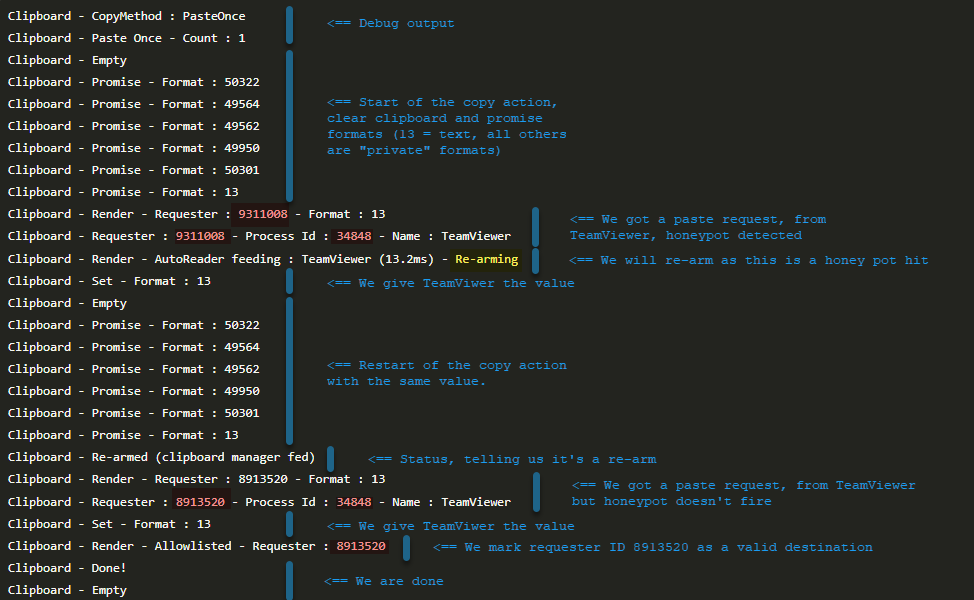
Questions:
- Are you running multiple TeamViewer sessions during the test?
- Why is the second one not detected as a honeypot as well?
Well we can try to change the value of ClipboardAutoReaderThresholdMs (default is 500) and see if that changes anything. File > Settings > hold CTRL + ALT + SHIFT and type "noui" this will open the Hidden settings window, find ClipboardAutoReaderThresholdMs set it to 300ms (also trye 700ms or others to see if it changes anything for you), save & save then test again. Capture and send us the output please.
Best regards,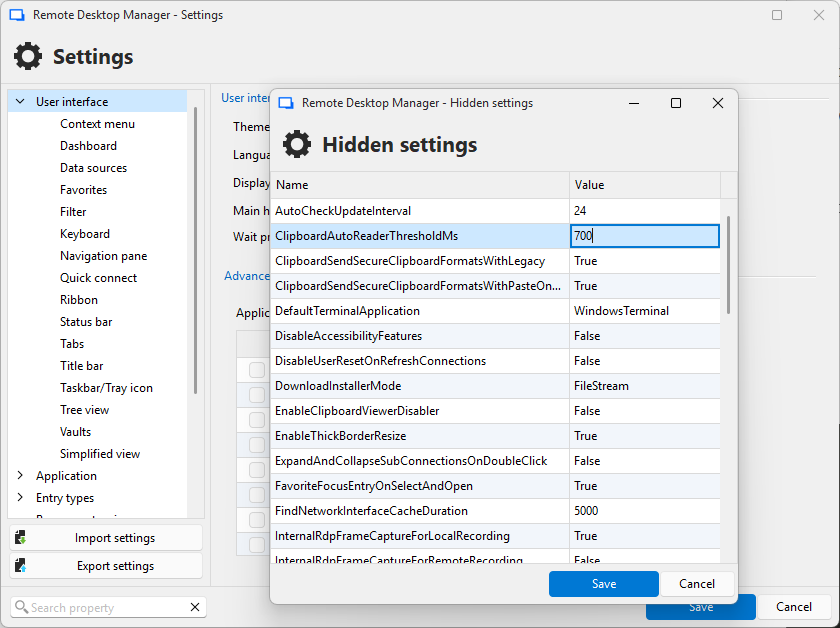
More info highlights: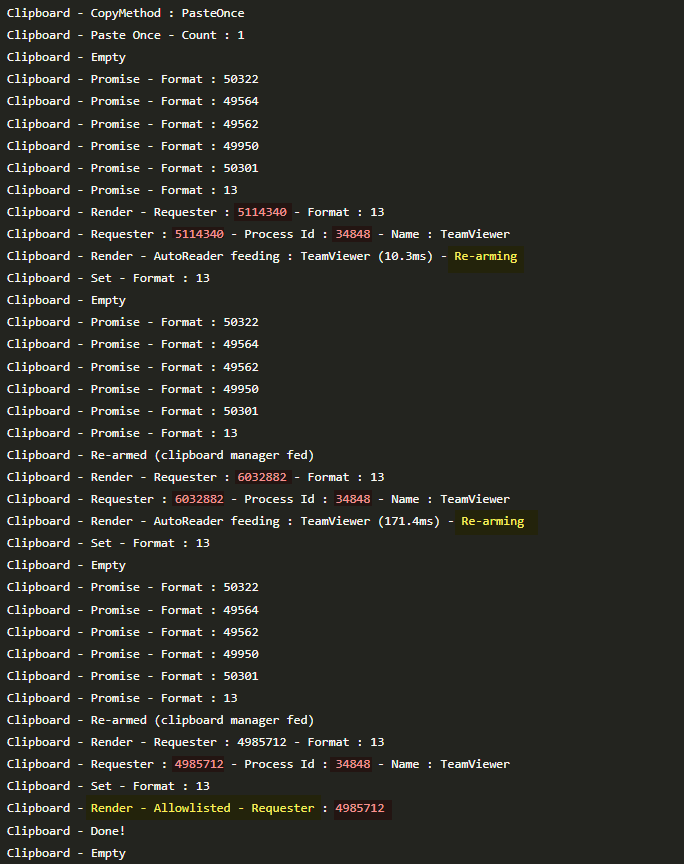
Stéfane Lavergne
7eaff846-e640-4a41-a8c4-78f5160781c8.png
1ca68b65-5d3c-4bb6-8b9f-6001c26c5fe6.png
b8fe2cf6-8112-4119-aee5-81ed43cfe993.png
Thank you Stéfane!
Are you running multiple TeamViewer sessions during the test?
No, just one session
Why is the second one not detected as a honeypot as well?
The second paste request happens 1 second after the first one, so it's after the honeypot delay.
This time I used "RemoteDesktopManager.exe /Profiler" to get timestamps in the debug output, so you can see the timing of events. I also added some blank lines when there's a notable delay between events. I'm testing with RDM 2026.1.14.0.
Like before, TeamViewer reads the clipboard instantly after the copy, which is allowed without clearing the clipboard because of the honeypot timer. Then 1 second later it reads the clipboard again, which is also allowed but this time it's after the honeypot delay and the clipboard gets cleared. Then I assume TeamViewer syncs the empty clipboard too, so pasting isn't possible anymore, but that last step isn't logged by RDM anymore.
09:34:25.159936	Clipboard - CopyMethod : PasteOnce
09:34:25.161586	Clipboard - Paste Once - Count : 1
09:34:25.170482	Clipboard - Empty
09:34:25.170754	Clipboard - RDM/Secure Formats...
09:34:25.172343	    Clipboard - Promise - Format : 50322
09:34:25.172539	    Clipboard - Promise - Format : 49564
09:34:25.172545	    Clipboard - Promise - Format : 49562
09:34:25.172549	    Clipboard - Promise - Format : 49950
09:34:25.172617	    Clipboard - Promise - Format : 50301
09:34:25.172751	Clipboard - RDM/Secure Formats : 1 ms
09:34:25.172764	Clipboard - Promise - Format : 13

09:34:25.209724	Clipboard - Render - Requester : 3803144 - Format : 13
09:34:25.211851	Clipboard - Requester : 3803144 - Process Id : 34848 - Name : TeamViewer
09:34:25.212435	Clipboard - Render - AutoReader feeding : TeamViewer (39,4ms) - Re-arming
09:34:25.213108	Clipboard - Set - Format : 13
09:34:25.217551	Clipboard - Empty
09:34:25.217960	Clipboard - RDM/Secure Formats...
09:34:25.218043	    Clipboard - Promise - Format : 50322
09:34:25.218153	    Clipboard - Promise - Format : 49564
09:34:25.218227	    Clipboard - Promise - Format : 49562
09:34:25.218291	    Clipboard - Promise - Format : 49950
09:34:25.218361	    Clipboard - Promise - Format : 50301
09:34:25.218405	Clipboard - RDM/Secure Formats : 0 ms
09:34:25.218415	Clipboard - Promise - Format : 13
09:34:25.218554	Clipboard - Re-armed (clipboard manager fed)

09:34:26.235091	Clipboard - Render - Requester : 7080818 - Format : 13
09:34:26.235290	Clipboard - Requester : 7080818 - Process Id : 34848 - Name : TeamViewer
09:34:26.235348	Clipboard - Set - Format : 13
09:34:26.235369	Clipboard - Render - Allowlisted - Requester : 7080818
09:34:26.239278	Clipboard - Done!
09:34:26.239283	Clipboard - Empty
When I add TeamViewer to the Block list, you can see some more interesting behavior: First it tries to read the clipboard shortly (44ms) after the copy. Then it tries again after I clicked the TeamViewer window to focus it. Then it tries again after I Press Ctrl+V in the remote session.
09:34:34.917388	Clipboard - CopyMethod : PasteOnce
09:34:34.917507	Clipboard - Paste Once - Count : 1
09:34:34.917601	Clipboard - Empty
09:34:34.917709	Clipboard - RDM/Secure Formats...
09:34:34.917762	    Clipboard - Promise - Format : 50322
09:34:34.917845	    Clipboard - Promise - Format : 49564
09:34:34.917856	    Clipboard - Promise - Format : 49562
09:34:34.917866	    Clipboard - Promise - Format : 49950
09:34:34.917890	    Clipboard - Promise - Format : 50301
09:34:34.917903	Clipboard - RDM/Secure Formats : 0 ms
09:34:34.917918	Clipboard - Promise - Format : 13

09:34:34.961738	Clipboard - Render - Requester : 3999752 - Format : 13
09:34:34.962200	Clipboard - Requester : 3999752 - Process Id : 34848 - Name : TeamViewer
09:34:34.962350	Clipboard - Render - Blocklsited
09:34:34.966855	Clipboard - Render - Requester : 3999752 - Format : 13
09:34:34.966863	Clipboard - Render - Blocked - Requester: 3999752

09:34:38.002646	Clipboard - Render - Requester : 4065288 - Format : 13
09:34:38.003027	Clipboard - Requester : 4065288 - Process Id : 34848 - Name : TeamViewer
09:34:38.003053	Clipboard - Render - Blocklsited
09:34:38.003195	Clipboard - Render - Requester : 4065288 - Format : 13
09:34:38.003198	Clipboard - Render - Blocked - Requester: 4065288

09:34:40.941689	Clipboard - Render - Requester : 4065288 - Format : 13
09:34:40.941699	Clipboard - Render - Blocked - Requester: 4065288
09:34:40.941933	Clipboard - Render - Requester : 4065288 - Format : 13
09:34:40.941939	Clipboard - Render - Blocked - Requester: 4065288

09:34:49.985993	Clipboard - Clear
I also tested with different values for ClipboardAutoReaderThresholdMs like you suggested. Setting it to 300ms or 700ms didn't make a difference, but when I set it to 2000ms, TeamViewer tried to read the clipboard over and over again, until the "Clear clipboard delay" triggered (which I had set to 15 seconds)
09:49:08.492503	Clipboard - CopyMethod : PasteOnce
09:49:08.494558	Clipboard - Paste Once - Count : 1
09:49:08.504503	Clipboard - Empty
09:49:08.504957	Clipboard - RDM/Secure Formats...
09:49:08.507052	    Clipboard - Promise - Format : 50322
09:49:08.507269	    Clipboard - Promise - Format : 49564
09:49:08.507277	    Clipboard - Promise - Format : 49562
09:49:08.507281	    Clipboard - Promise - Format : 49950
09:49:08.507365	    Clipboard - Promise - Format : 50301
09:49:08.507504	Clipboard - RDM/Secure Formats : 2 ms
09:49:08.507519	Clipboard - Promise - Format : 13

09:49:08.545858	Clipboard - Render - Requester : 18223156 - Format : 13
09:49:08.547270	Clipboard - Requester : 18223156 - Process Id : 34848 - Name : TeamViewer
09:49:08.547837	Clipboard - Render - AutoReader feeding : TeamViewer (40,0ms) - Re-arming
09:49:08.548381	Clipboard - Set - Format : 13
09:49:08.552655	Clipboard - Empty
09:49:08.553024	Clipboard - RDM/Secure Formats...
09:49:08.553075	    Clipboard - Promise - Format : 50322
09:49:08.553197	    Clipboard - Promise - Format : 49564
09:49:08.553319	    Clipboard - Promise - Format : 49562
09:49:08.553412	    Clipboard - Promise - Format : 49950
09:49:08.553529	    Clipboard - Promise - Format : 50301
09:49:08.553624	Clipboard - RDM/Secure Formats : 0 ms
09:49:08.553638	Clipboard - Promise - Format : 13
09:49:08.553874	Clipboard - Re-armed (clipboard manager fed)

09:49:09.568655	Clipboard - Render - Requester : 23400146 - Format : 13
09:49:09.568824	Clipboard - Requester : 23400146 - Process Id : 34848 - Name : TeamViewer
09:49:09.568847	Clipboard - Render - AutoReader feeding : TeamViewer (1015,1ms) - Re-arming
09:49:09.568874	Clipboard - Set - Format : 13
09:49:09.569736	Clipboard - Empty
09:49:09.570002	Clipboard - RDM/Secure Formats...
09:49:09.570039	    Clipboard - Promise - Format : 50322
09:49:09.570084	    Clipboard - Promise - Format : 49564
09:49:09.570369	    Clipboard - Promise - Format : 49562
09:49:09.570436	    Clipboard - Promise - Format : 49950
09:49:09.570787	    Clipboard - Promise - Format : 50301
09:49:09.570916	Clipboard - RDM/Secure Formats : 0 ms
09:49:09.570926	Clipboard - Promise - Format : 13
09:49:09.571067	Clipboard - Re-armed (clipboard manager fed)

09:49:10.589945	Clipboard - Render - Requester : 18354228 - Format : 13
09:49:10.590121	Clipboard - Requester : 18354228 - Process Id : 34848 - Name : TeamViewer
09:49:10.590152	Clipboard - Render - AutoReader feeding : TeamViewer (1019,1ms) - Re-arming
09:49:10.590181	Clipboard - Set - Format : 13
09:49:10.592313	Clipboard - Empty
09:49:10.592488	Clipboard - RDM/Secure Formats...
09:49:10.592534	    Clipboard - Promise - Format : 50322
09:49:10.592612	    Clipboard - Promise - Format : 49564
09:49:10.592655	    Clipboard - Promise - Format : 49562
09:49:10.592666	    Clipboard - Promise - Format : 49950
09:49:10.592689	    Clipboard - Promise - Format : 50301
09:49:10.592722	Clipboard - RDM/Secure Formats : 0 ms
09:49:10.592732	Clipboard - Promise - Format : 13
09:49:10.593059	Clipboard - Re-armed (clipboard manager fed)

... (removed 12 more instances of this happening) ...

09:49:23.915094	Clipboard - Render - Requester : 24317650 - Format : 13
09:49:23.915245	Clipboard - Requester : 24317650 - Process Id : 34848 - Name : TeamViewer
09:49:23.915269	Clipboard - Render - AutoReader feeding : TeamViewer (1029,4ms) - Re-arming
09:49:23.915302	Clipboard - Set - Format : 13
09:49:23.916119	Clipboard - Empty
09:49:23.916148	Clipboard - RDM/Secure Formats...
09:49:23.916165	    Clipboard - Promise - Format : 50322
09:49:23.916180	    Clipboard - Promise - Format : 49564
09:49:23.916185	    Clipboard - Promise - Format : 49562
09:49:23.916190	    Clipboard - Promise - Format : 49950
09:49:23.916201	    Clipboard - Promise - Format : 50301
09:49:23.916211	Clipboard - RDM/Secure Formats : 0 ms
09:49:23.916216	Clipboard - Promise - Format : 13
09:49:23.916409	Clipboard - Re-armed (clipboard manager fed)

09:49:24.141745	Clipboard - Clear
So that's not pretty, but it works. It actually allows pasting remotely in TeamViewer sessions this way.
Another thing: As I mentioned earlier (3 years ago 🙂) I would also like an option to choose whether to allow or block access to the clipboard during the honeypot delay. For security it makes sense to block access to any process trying to read the clipboard automatically in the background. But for functionality it can also be useful when the clipboard gets synced automatically to remote sessions or your smartphone etc. So both are valid options, and you could then use the Allow and Block lists to further tweak this. For example you could set it to always allow clipboard access in the background, except for TeamViewer because it behaves weirdly (by adding TeamViewer to the Block list). Or you could set it to always deny clipboard access in the background except for Windows Phone Link (by adding CrossDeviceService to the Allow list)
As a side note, I also noticed different behavior in RDM 2025.3.32.0 and RDM 2026.1.14.0. In 2025.3 the honeypot timer doesn't seem to work at all, but the changes were already made in 2025.1, right? I understand you probably won't fix it in the 2025 branch, but for reference, here's the output from RDM 2025.3, clearing the clipboard right after the automatic read from TeamViewer, even though it should be before the honeypot timer expired:
09:32:34.295092	Clipboard - CopyMethod : PasteOnce
09:32:34.297146	Clipboard - Paste Once - Count : 1
09:32:34.312836	Clipboard - Empty
09:32:34.315112	Clipboard - RDM/Secure Formats...
09:32:34.315173	    Clipboard - Promise - Format : 50322
09:32:34.315429	    Clipboard - Promise - Format : 49564
09:32:34.315450	    Clipboard - Promise - Format : 49562
09:32:34.315462	    Clipboard - Promise - Format : 49950
09:32:34.315543	    Clipboard - Promise - Format : 50301
09:32:34.315720	Clipboard - RDM/Secure Formats : 2 ms
09:32:34.315726	Clipboard - Promise - Format : 13

09:32:34.386460	Clipboard - Render - Requester : 5443488 - Format : 13
09:32:34.388566	Clipboard - Requester : 5443488 - Process Id : 34848 - Name : TeamViewer
09:32:34.389108	Clipboard - Set - Format : 13
09:32:34.389758	Clipboard - Render - Allowlisted - Requester : 5443488
09:32:34.396983	Clipboard - Done!
09:32:34.397410	Clipboard - Empty
Thank you!
Best regards,
Daniel
Hi Daniel,
Thank you for the detailed logs and the thorough testing, they were very helpful.
So it looks like TeamViewer is using a different requester ID (window handle) for each clipboard read. I did not anticipate this at all. The current honeypot logic detection only blocks on the requester ID, so they always look like a new requester and eventually the honeypot timeout hits (500ms) and we stop as the app think it's a human request.
As you suggested we should probably implement these two improvements:
- Configurable honeypot list
- A list in the clipboard options (alongside the existing Block list) where you can explicitly mark a process as a permanent honeypot. Processes on that list will always be fed and re-armed without ever advancing the paste sequence, regardless of timing. This gives a clean, per-process solution for tools like TeamViewer that do background clipboard sync.
- Process ID based tracking
- Instead of tracking auto-readers by requestor ID (window handle) alone, we'll also (or optionally) track by process ID. This means both of TeamViewer's reads will be correctly identified as coming from the same process, and we wouldn't feed any subsequent requests.
- We will have a local flag ClipboardHoneypotMatchMode (RequesterId, ProcessId or both)
- We should also maybe have it overridable per process.
Can you perform the test to see if you have two TeamViewer windows, those that give you two process IDs? In theory yes and if that's the case the solution above would work even with more than one TeamViewer window as each would get the value once.
Feedback? Recommendations? More suggestions?
Thanks again!
Stéfane Lavergne
Hi Daniel,
So I started the implementation and it looks promising, but I need to validate it before being certain. To test the theory and the code, I created a test script/app that runs in LINQPad and mimics the pattern used by the TeamViewer process.
With no special configuration set, it looks like we may have solved the issue.
Have a look and let me know what you think. I should be able to get this into the production app by the end of the week.
Best regards,
Clipboard - CopyMethod : PasteOnce
Clipboard - Paste Once - Count : 1
Clipboard - Empty
Clipboard - Promise - Format : 50789
Clipboard - Promise - Format : 49554
Clipboard - Promise - Format : 49553
Clipboard - Promise - Format : 50188
Clipboard - Promise - Format : 50486
Clipboard - Promise - Format : 13
Clipboard - Render - Requester : 5182558 - Format : 13
Clipboard - Requester : 5182558 - Process Id : 250960 - Name : LINQPad8
Clipboard - Render - AutoReader feeding : LINQPad8 (170.7ms) - Re-arming
Clipboard - Set - Format : 13
Clipboard - Empty
Clipboard - Promise - Format : 50789
Clipboard - Promise - Format : 49554
Clipboard - Promise - Format : 49553
Clipboard - Promise - Format : 50188
Clipboard - Promise - Format : 50486
Clipboard - Promise - Format : 13
Clipboard - Re-armed (clipboard manager fed)
Clipboard - Render - Requester : 5248094 - Format : 13
Clipboard - Requester : 5248094 - Process Id : 250960 - Name : LINQPad8
Clipboard - Render - AutoReader blocked (already fed) : LINQPad8 (1080.2ms)
Clipboard - Render - Requester : 1842648 - Format : 13
Clipboard - Requester : 1842648 - Process Id : 250960 - Name : LINQPad8
Clipboard - Render - AutoReader blocked (already fed) : LINQPad8 (2163.9ms)
Clipboard - Render - Requester : 3805778 - Format : 13
Clipboard - Requester : 3805778 - Process Id : 250960 - Name : LINQPad8
Clipboard - Render - AutoReader blocked (already fed) : LINQPad8 (3235.3ms)
Clipboard - Render - Requester : 3871314 - Format : 13
Clipboard - Requester : 3871314 - Process Id : 250960 - Name : LINQPad8
Clipboard - Render - AutoReader blocked (already fed) : LINQPad8 (4326.8ms)
Clipboard - Render - Requester : 5379166 - Format : 13
Clipboard - Requester : 5379166 - Process Id : 250960 - Name : LINQPad8
Clipboard - Render - AutoReader blocked (already fed) : LINQPad8 (5417.4ms)
Clipboard - Render - Requester : 15866358 - Format : 13
Clipboard - Requester : 15866358 - Process Id : 250960 - Name : LINQPad8
Clipboard - Render - AutoReader blocked (already fed) : LINQPad8 (6499.0ms)
Clipboard - Render - Requester : 6619616 - Format : 13
Clipboard - Requester : 6619616 - Process Id : 250960 - Name : LINQPad8
Clipboard - Render - AutoReader blocked (already fed) : LINQPad8 (7583.3ms)
Clipboard - Render - Requester : 6816224 - Format : 13
Clipboard - Requester : 6816224 - Process Id : 250960 - Name : LINQPad8
Clipboard - Render - AutoReader blocked (already fed) : LINQPad8 (8660.3ms)
Clipboard - Render - Requester : 4133458 - Format : 13
Clipboard - Requester : 4133458 - Process Id : 250960 - Name : LINQPad8
Clipboard - Render - AutoReader blocked (already fed) : LINQPad8 (9747.2ms)
Clipboard - Render - Requester : 790728 - Format : 13
Clipboard - Requester : 790728 - Process Id : 250960 - Name : LINQPad8
Clipboard - Render - AutoReader blocked (already fed) : LINQPad8 (10856.2ms)
Clipboard - Render - Requester : 859822 - Format : 13
Clipboard - Requester : 859822 - Process Id : 224180 - Name : Notepad
Clipboard - Set - Format : 13
Clipboard - Render - Allowlisted - Requester : 859822
Clipboard - Done!
Clipboard - Empty
Stéfane Lavergne
Hi Stéfane!
Can you perform the test to see if you have two TeamViewer windows, those that give you two process IDs?
Having multiple TeamViewer sessions/windows open doesn't seem to make a difference. It's the same process ID accessing the clipboard once about every second.
I can't really speak to the implementation details as I don't understand the logic behind keeping track of the handler/process IDs and rearming etc.
I think the whole logic could be simplified, at least from my user-centric point of view. If I were to design the Paste Once logic from scratch, I'd probably do this:
- When Paste Once is triggered, the clipboard promise is created
- Any request made to render the clipboard is passed through an ordered list of rules.
- Each rule has filters to determine if the request should match. Only the first rule that matches will be applied. Filters should include the process path matching a string, and if the time since copy (in milliseconds) is above/below a certain threshold.
- Each rule has an action to determine what should happen with the request: Allow and keep clipboard data, Allow and clear clipboard (move to next item in Paste Once sequence), Block access to clipboard
That way you can precisely control which application will have access to the clipboard after different delays.
The default configuration could be:
- Rule 1: Filter: Time before 500ms, Action: Block access to clipboard
- Rule 2: Filter: none (match any request), Action: Allow and clear clipboard (move to next item in Paste Once sequence)
If the user wants to allow apps in the background to sync the clipboard, they could change Rule 1 to "Allow and keep clipboard data"
If background processes like TeamViewer behave badly, users could add a rule to the top, like: Process name: TeamViewer.exe, Action: "Block access to clipboard"
Or even use the action "Allow and keep clipboard data" to make syncing still work, even when TeamViewer reads the clipboard multiple times after a long delay.
The filter and actions could be expanded for more complex scenarios, like adding a "time since last request" for example. I don't know if we even need to keep track of process IDs and requester window handles, but there could be a filter for "Request counter by process" and "Request counter by window handle", which will make these things still possible if needed.
Hope this makes sense :)
Thank you!
Best regards,
Daniel
Hi Daniel,
Thank you for the detailed write-up and for taking the time to test this.
What’s already fixed (coming in the next release)
The TeamViewer issue was caused by Paste-Once tracking clipboard requests by window handle. TeamViewer creates multiple windows within the same process, so each window effectively received its own “one free read,” bypassing the protection.
We’ve changed the default tracking to use process ID instead. Since the process ID remains stable for the lifetime of the process, regardless of how many windows it opens, this closes the loophole for TeamViewer and similar remote control tools.
Rule pipeline
Your proposal is excellent, I’ve opened a feature ticket for it. The plan is to merge the three separate systems (block list, auto-reader list, delay list) with a single ordered rule set.
Each rule will include filters (process name, time elapsed since copy, and so on) and an action:
- Block
- Allow and keep: lets the process read without consuming the paste-once slot (useful for cases like TeamViewer clipboard sync)
- Allow and clear: normal paste behavior, advancing the sequence
The default ruleset should work out of the box for most users:
- Requests within 500 ms of copy → Block (captures automated background reads silently)
- Everything else → Allow and clear (normal paste)
All existing configurations will be migrated automatically, with no manual changes required.
As for when this might be released, don’t expect anything before at least version 2026.3. The PM team still needs to triage the request, and v2026.2 is already in progress and at capacity.
Best regards,
Stéfane Lavergne
Hi Daniel,
v2026.1.16 is now available.
Best regards,
Stéfane Lavergne
Hi Stéfane!
I tested it in RDM 2026.1.16: With "Background clipboard access" set to "Feed once", it works. TeamViewer tries to access the clipboard immediately, which is allowed but the clipboard is not synced with the remote session (because TeamViewer is weird). I can then paste somewhere else and the clipboard gets cleared, so that's fine. (Side question: Could the Process ID still be used to match the requester, even if the requester ID is 0?)
Clipboard - CopyMethod : PasteOnce
Clipboard - Paste Once - Count : 1
Clipboard - Empty
Clipboard - Promise - Format : 50261
Clipboard - Promise - Format : 49677
Clipboard - Promise - Format : 49676
Clipboard - Promise - Format : 49836
Clipboard - Promise - Format : 50262
Clipboard - Promise - Format : 13
Clipboard - Render - Requester : 5836830 - Format : 13
Clipboard - Requester : 5836830 - Process Id : 29364 - Name : TeamViewer
Clipboard - Render - AutoReader feeding : TeamViewer (8,4ms) - Re-arming
Clipboard - Set - Format : 13
Clipboard - Empty
Clipboard - Promise - Format : 50261
Clipboard - Promise - Format : 49677
Clipboard - Promise - Format : 49676
Clipboard - Promise - Format : 49836
Clipboard - Promise - Format : 50262
Clipboard - Promise - Format : 13
Clipboard - Re-armed (clipboard manager fed)

Clipboard - Render - Requester : 3085236 - Format : 13
Clipboard - Requester : 3085236 - Process Id : 29364 - Name : TeamViewer
Clipboard - Render - AutoReader blocked (already fed) : TeamViewer (1017,6ms)
Clipboard - Render - Requester : 3085236 - Format : 13
Clipboard - Requester : 3085236 - Process Id : 29364 - Name : TeamViewer
Clipboard - Render - AutoReader blocked (already fed) : TeamViewer (1017,8ms)

Clipboard - Render - Requester : 0 - Format : 13
Clipboard - Render - Allow listed - Requester : 0
Clipboard - Requester : 0 - Process Id : 0 - Name : Idle
Clipboard - Set - Format : 13
Clipboard - Done!
Clipboard - Empty
Now, I think there's an issue when "Background clipboard access" is set to "Block all". TeamViewer again tries to access the clipboard immediately, but is still allowed (it should be blocked, right?) and then the clipboard gets cleared anyway, even before the ClipboardAutoReaderThreshold timer expired.
Clipboard - CopyMethod : PasteOnce
Clipboard - Paste Once - Count : 1
Clipboard - Empty
Clipboard - Promise - Format : 50261
Clipboard - Promise - Format : 49677
Clipboard - Promise - Format : 49676
Clipboard - Promise - Format : 49836
Clipboard - Promise - Format : 50262
Clipboard - Promise - Format : 13
Clipboard - Render - Requester : 5309956 - Format : 13
Clipboard - Requester : 5309956 - Process Id : 29364 - Name : TeamViewer
Clipboard - Set - Format : 13
Clipboard - Render - Allowlisted - Requester : 5309956
Clipboard - Done!
Clipboard - Empty
Looking forward to the new implementation!
Thank you!