Dark Theme Cannot read text in description

Good morning everyone,
I am using Dark Theme and when I go to description inside a session, the text is black making it next to impossible to read. I have attached a photo of what I mean.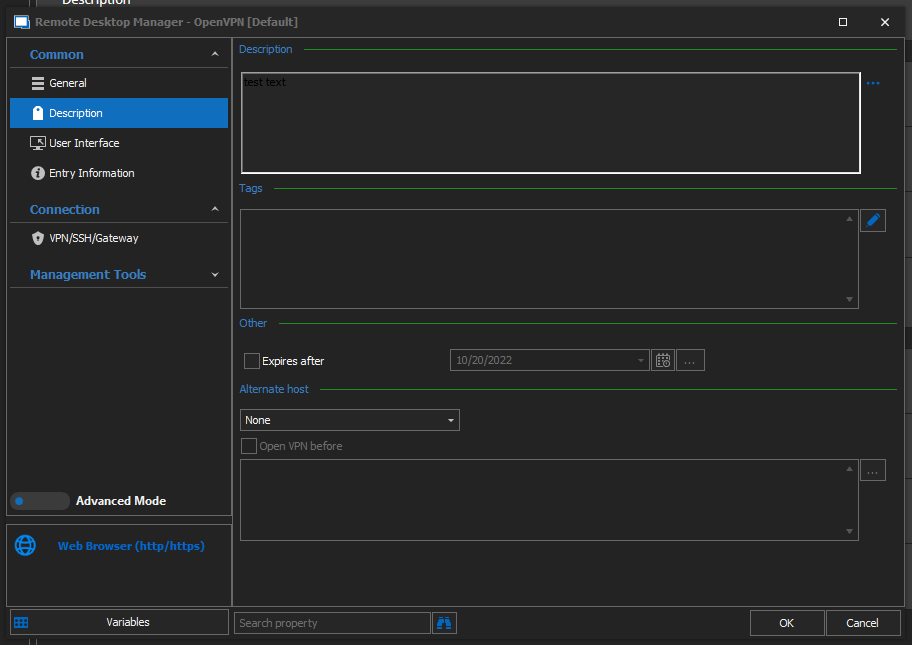
Thanks
2021-10-20 09_24_17-.png
All Comments (9)
Hello,
Thank you for contacting us on that matter and providing the screenshot. I just tested it with Enterprise version 2021.2.15 and it with was showing in white text over dark background.
Could you tell me the version of RDM that you are using?
Might be worth a try to click on Reset layout in the Window tab also.
Let us know!
Best regards,
Christine Breault
Good morning Christine,
We are using Ent 2021.2.18.0 but it was happening in 2121.2.16.0 as well. Tried reset layout, made no difference.
Thanks
Good morning Karl,
Upgraded my version to latest and still showing crispy white in the description field text section.
Could you try a portable installation and see if you reproduce the issue please? Here are the steps:
1- Download the .zip file below:
https://remotedesktopmanager.com/home/thankyou/rdmbin
2- Create a new folder on your Desktop
3- Extract the content of the .zip file into the folder created at #2
4- Go in this folder once the .zip file has been extracted and run remotedesktopmanager64.exe
5- Enter your current serial
6- Test the issue with a new entry
Let me know!
Best regards,
Christine Breault
When I do that, it works fine. However, when I add my data source (MySQL/MariaDB), it goes back to being black again so it must be something in my data source.
I should point out that it is only happening on the web page session type, SSH and RDP work fine.
Thank you for the test, I'm wandering if you have an old setting that might be interfering,
In the Properties of the Web Browser entry Description section, can you click on the 3 dots next to the box and send us the screenshot please?
Is Text selected?
If RTF is showing, try disabling the option in Administration - Vault Settings - Settings - Allow RTF description.
Best regards,
Christine Breault

If I go to text, it works as expected but it also deletes any text I have in the field.
2021-10-22 10_00_11-Remote Desktop Manager [8913chv02].png
Hello,
I suspect that the description for this entry is saved in RTF with the white color encoded. You could do a Select All, Cut, change to Text and Paste. This will remove the color encoding and save it in plain text.
Regards
David Hervieux
Awesome, thanks :) I'll do that :)