Non-blocking notifications
0 vote

Disconnects result in blocking popups.
Reproduce by logging in to several RDP and SSH sessions
And then disconnect the netwerk
This will result in popups notifying about the disconnect, timeout etc which require clicking OK
Very annoying if this happens more often.
Cannot do anything else as long as this (blocking) popup is open.
Any way these can be turned into some log text in a status bar, or some text in the tab which just says 'it was disconnected' without blocking operation?
All Comments (7)
Hello Rolf,
Thank you for contacting us on that matter!
I suspect that the option "Keep tab page opened on disconnect" could help you with this since it would allow you to keep your tab page opened even if the session is disconnected. That way the popups notifying you about the disconnect, won't disturb your workflow.
To enable this option at the application level, please go under File -> Options -> Types and set the "Keep tab page opened on disconnect" option to "yes":
Let us know if that helps!
Best regards,
James Lafleur
That setting ( Keep tab page opened on disconnect") causes tabs to stay open when you close a connection yourself, on purpose, which is just very, very annoying.
If a connection gets lost, RDM shows blocking popups preventing further actions until we close these popups
If a connection to a remote site is lost, or local network connectivity gets lost, and there's 10 RDP tabs open, this leads to 10 blocking popups showing up.
Those popups only show the button " OK " so they seem rather pointless anyway
You cannot continue using RDM until you click " OK " on all these popups
Hello Rolf,
Thank you for your swift reply!
In that case, I would recommend using the following options to disable these error messages when the connection is lost.
For your RDP connections, go under File -> Options -> Remote Desktop -> Check "Disable embedded RDP error message":
For your SSH connections, go under File -> Options -> Terminal-> Set "Display error messages to "No":
Both of these settings should prevent further popups from appearing when your RDP and SSH connections are lost.
Let us know if that helps!
Best regards,
James Lafleur
No, thank YOU for your swift reply.
Your comment put a smile on my face :)
I've checked these settings, will see if that improves workflow.
Seems like something that maybe could/should be turned off by default, seeing as how these popups prevent further use of the program. If a vpn disconnects these take focus, become child windows and I need to grab the mouse in order to click the OK button.
Hello Rolf,
You are more than welcome and thank you for your feedback.
Let us know if that works for you.
Best regards,
James Lafleur
Hi there !
I tried all above but cannot get rid of that annoying disconnect window popup!
Any help would be very appreciated ... 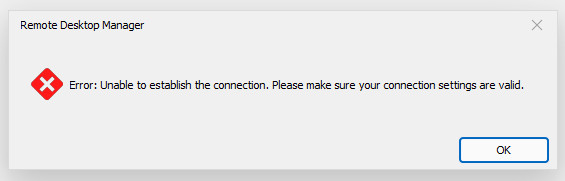
This popup appear after i loose vpn connection with my company!
I am using SSH connection terminal(s).
Untitled.png
Hello,
I will have a look and come back on your post here : https://forum.devolutions.net/topics/39473/disable-error-unable-to-establish-connection-popup-window
Best Regards,
Etienne Lord