DISABLE: Error: Unable to establish connection popup window

Cannot find how to remove this annoying "error establish connection" window popup!
This popup appear after i loose vpn connection with my company!
I am using SSH connection terminal(s).
Any option to disable it?
Tried all options in Options->Types
Tried also terminal SSH Properties ...
Everthing i tried doesn't work :(
Any help would be appreciated!
Brgds,
S.
RDM v. 2023.1.20.0 64-bit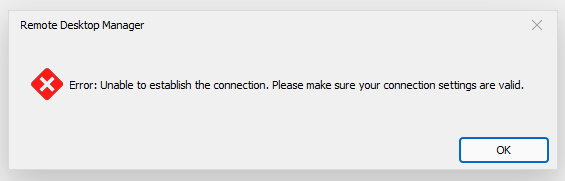
Untitled.png
All Comments (10)
Hello,
After looking into it, it sadly doesn't seem like we have an option to disable these kind of error messages.
Best Regards,
Etienne Lord
You are kidding me right? :)
With all these (more too much) options ?!
Cannot believe it :(
Brgds,
S.
Hello,
I will check with the engineering department to have an option added for this, keep you updated!
Best Regards,
Etienne Lord
Thanks!
Brgds,
S.
Hello,
Do you also have the SFTP enabled when using your SSH Session?
Best Regards,
Etienne Lord
Yes.
Now when i disabled SFTP the error is gone!
Hello,
The "Disable Error messages" option doesn't seem to affect the SFTP option in SSH, a ticket is open to have this fixed!
Best Regards,
Etienne Lord
Hello,
thanks for info!
Could you be so kind and get back to us when this is fixed? Thanks in advance!
Brgds,
S.
Hello,
We've included messages resulting from the SFTP part of the connection in the list of messages disabled by the setting in properties (section Advanced). This should be available for 2023.2.23
Regards,
Jafran Majeau