HPE iLO 5 auto submit

In the actual version of iLO 5 (2.14, march 2020 update) the auto submit doesn't work anymore.
In the previous version the Custom Html Control ID "log-in" had to be added for "Login button ID". That worked perfectly for the auto submit.
I'll try to find out the new html control ID for this versionf iLO.
Anybody else encountered this problem?
Regards, Sasha
All Comments (8)
Hello,
Thank you for contacting us on that matter!
We do have another forum thread on that matter https://forum.devolutions.net/topics/29887/support-for-ilo-v5 on which you have posted 1 month ago.
That being said, I haven't received a reply regarding my last post: https://forum.devolutions.net/topics/29887/support-for-ilo-v5#140284
Have you tried to create a Web Browser entry instead and see if this issue persist? Also, which version of RDM and what type of Data Source you are currently using?
Best regards,
James Lafleur
Hi all, just to interfere:
I've checked on one of our ILO5, the HTML code (partially attached) and was able to get it working by configuring:
Form id: login-form
username id: username
password id: password
login button ID: login-form__submit
Regards, Ben
ILO5logon.txt
Hello Ben,
Thank you for your feedback!
I hope that this information will help @sdjukic.
Best regards,
James Lafleur
Hi Ben,
this works perfectly, thank you very much for joining in. I went throuhg that html file myself and i didn't see those entries. Must be getting blind LOL
Regards, Sasha
Hi guys,
Thanks to everybody who joined in on this.
JFYI, here are the settings for iLO4 and iLO5.
I am not using the iLO entry in RDM, i'm using a browser entry with Google Chrome instead because i use the session recording option and that woks with Google Chrome only for now.
I thought i could sum this up, it might help somebody else.
Here you go:
iLO4: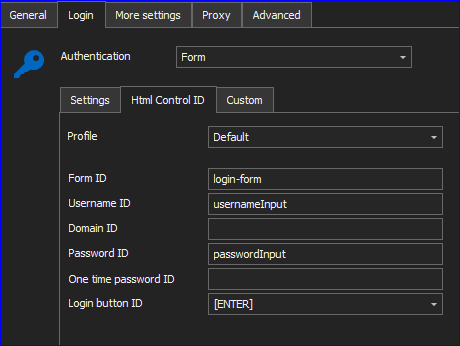
iLO5: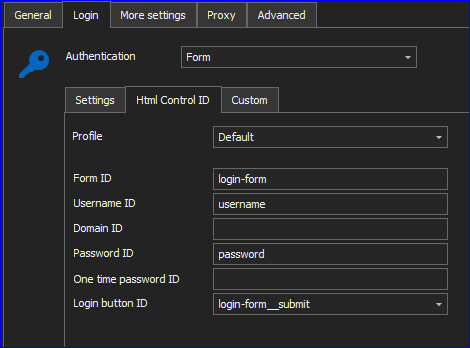
Regards, Sasha
iLO5.PNG
iLO4.PNG
Thank you, Ben and Sasha, for sharing this information with our community. Just so you know, we've also created a ticket to improve the entry so that we can have these information be used for the autofill and autosubmit.
Regards,
Hubert Mireault
Perfect, thank you Hubert!
Regards, Sasha
Hello,
The new version of RDM is now available, could you update your RDM to the latest version and see if your issue still occurs?
Please note that a database upgrade may be required depending on the version of RDM that you are currently using.
For more information on that matter, please consult this link:
https://docs.devolutions.net/rdm/windows/installation/database-upgrade/
Best regards,
Patrick Ouimet