Support for iLO V5
0 vote

I´m looking for iLO 5 Support.
Currently I can´t use the iLO Remote Console (Error 400).
Also the features "Auto fill login" and "Auto submit" are not working.
BR
Tino
All Comments (38)
Hello,
I will ask our IT team to try to find an iLO 5 server to reproduce it.
Regards
David Hervieux
Any news?
Hello,
David is in vacation this week, but I will verify with our Windows main developer and with our IT Team what is the status of this request.
Sorry for the delay.
Best regards,
Jeff Dagenais
Hello,
In the next build of RDM there will be an option for Version 5 of ILO. If you could let us know if it works for you it would be appreciated, since we don't have a setup for iLO5.
Regards,
Hubert Mireault
Hi Hubert,
which version should I test?
And when is it ready for download?
BR
Tino
Hello,
It will be in version 13.6.3.0 of RDM enterprise. We're hoping to release this new build this week.
Regards,
Hubert Mireault
Hi Hubert,
I´ve installed 13.6.5 today und also updated HPE ILO Remote Console (new version 1.3.3).
ILO Remote Console is running now, but features "Auto fill login" and "Auto submit" are still not working.
For my requirements is it enough, so I have to type in username + pwd
BR
Tino
Hello,
Does the autofill work if you use a Web Browser entry?
If it does, we added a section in the iLO entry to specify the user/password/submit fields in case the ones on your page are different than the default iLO installation. Otherwise, could you provide us the HTML of the page so we can see on our end if we can autofill?
Regards,
Hubert Mireault
Hi Hubert,
created a Web browser entry and autofill isn´t working.
Did not understand your "we added a section in the iLO entry to specify the user/password/submit fields in case the ones on your page are different than the default iLO installation".
I could specify username, pwd, auto fill and submit in the old version of RDM.
And of course the ILO-page isn´t available from outside...
BR
Tino
Hello,
You can send me the HTML of the page by saving it in HTML format (Right click on the page > save as) and sending me the file. It's so I can see the structure of the HTML to see if I can tweak the autofill so it works in your case.
Regards,
Hubert Mireault
Hi Hubert,
how can I send this file?
I don´t like it to share this in public.
But usually it´s good enough without "auto fill".
BR
Tino
Hi Tino,
the best way is to send the file to support@devolutions.net or in a private message click on the username => Send private message)
Regards,
Min
@tino,
We have not received anything from your end in the support@devolutions.net mailbox.
If you want to use a secure link to send us your file(s), please use the link below
https://devolutions.sharefile.com/share/getinfo/rff57f59a7134e59b
Let us know when it's done.
Best regards,
Jeff Dagenais
Hi,
I´ve sent a private message to Hubert
Hello,
Thank you, I got the file, this was what I was looking for.
Unfortunately the website uses other pages to load its information so the HTML comes up as a blank page. There isn't much else we can do to test without having access to the site itself.
We'll stay on the lookout for what we can do.
Regards,
Hubert Mireault
Hi Hubert,
sorry that I meddle, but I checked my entries and found an iLO5 entry that i created some time ago as web browser session. If I'm not wrong the auto fill works for this session.
I just insert following in the HTML control fields:
Form ID: login-form
Username ID: username
Password ID: password
We're not using auto submit - but maybe this could help with the auto fill option..
Regards,
Min
Hi guys,
Auto fill is running now, for an ILO session and also for web browser session with Mins additional fields.
BR
Tino
Thank you for letting us know, and thank you Min :)
Regards,
Hubert Mireault
Glad it's working :cheers:
Hi guys,
any news on the "auto submit" option? auto fill works perfectly if i select the "Version 5"
Regards, Sasha
Hello Sasha,
Have you checked the "Auto Submit" option under the "Login" tab of your HP iLO entry?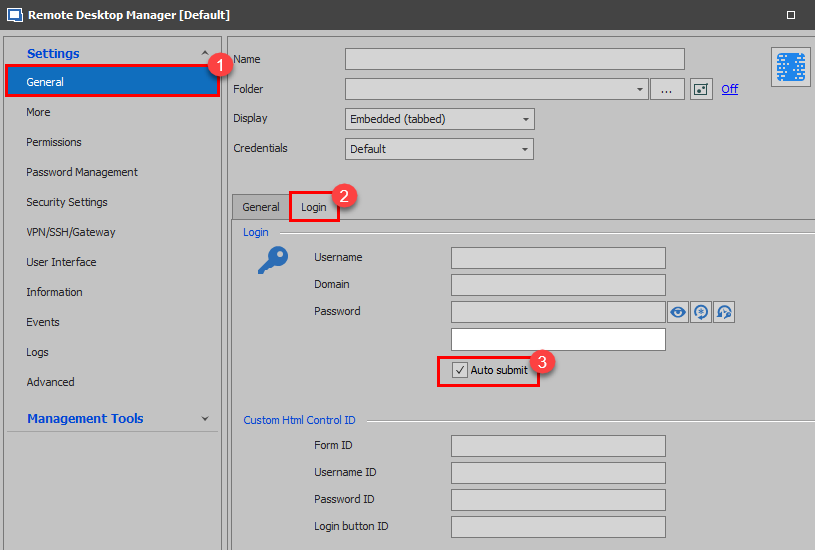
If so, do you encounter the same issue if you launch the connection using Web Browser entry instead?
Best regards,
James Lafleur
HPiLo.png
Hi,
I am able to resolved the iLO website (internal IP)
But the credentials are NOT passed through to the browser.
At the moment, it is set to Microsfot Edge but i can change it to Chrome or another if needed.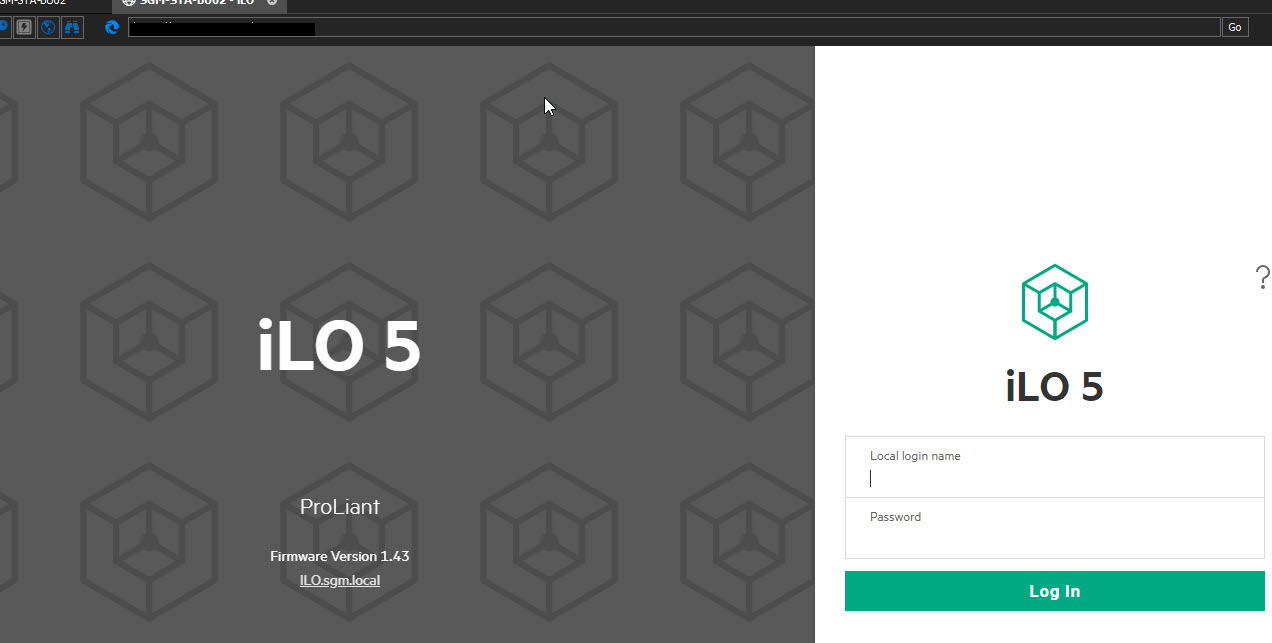
RDM - iLO Pass Through Credentials.jpg
Hi Ian,
this is what worked for me:
- Switch to Google Chrome


Regards, Sasha
Hi Sasha,
thank works for 1x iLO
but 2 others don't work even though i have the same settings configured
😢
Hi Ian,
same FW?
All iLO 5?
Regards, Sasha
mmmmm.... good question.
will need to check & get back to you
cheers
Yup, do that
Regards, Sasha
Hi Sasha,
BU02 = iLO 5 = Firmware v1.43 = working ok = Windows Server System
X01 = iLO 5 = Firmware v1.45 = Not Working = VMware ESXi 6.5
X02 = iLO 5 = Firmware v1.45 = Not Working = VMware ESXi 6.5
cheers
Ian
What server models do you have?
Regards, Sasha
3x HPE DL360 Gen10
I think first of all you should update the FW on all the servers to the latest version (2.71) and then try again.
https://support.hpe.com/connect/s/product?language=de&ismnp=0&l5oid=1010026818&kmpmoid=1010093150&cep=on&view=grid&tab=driversAndSoftware
Update the BIOS too
Regards, Sasha
Hi Sasha,
updated the iLO to latest v2.71
BU02 = iLO 5 = Firmware v2.71 = Not working = Windows Server System
X01 = iLO 5 = Firmware v2.71 = Not Working = VMware ESXi 6.5
X02 = iLO 5 = Firmware v2.71 = Not Working = VMware ESXi 6.5
ha ha ha...
i haven't updated the BIOS as yet as this requires a reboot & these servers are in production so not easily done
cheers
spoke to sooon...... all working !!
not sure why it wasn't working before but it seems good now
cheers 👍
Glad i could help
Regards, Sasha
Attempting this on iLO 4 and iLO 5 and still no luck. Fully upgraded on both systems (bios, firmware, etc). The autofill just does not work to their webpages. "Discover" also does not work, oddly enough.
Hello,
Thank you for reaching out to Devolutions Support.
I will try to recreate the issue on our end and will keep you informed if I am able to do so.
Best regards,
Carl Marien
Thanks Carl. If you need any screentime, just let me know. I have over 200+ iLOs across our portfolio. Thx!
Hello
My colleague Carl is following up your issue with the web console, although from my side it's been working well; perhaps this is just a configuration or environment issue.
I did want to make you aware that RDM 2024.3 now has native support for the iLO virtual console (you can find the new iLO session type, as opposed to iLO (Web)). If it fits your workflow I'd encourage you to give it a try, and we'd welcome any feedback or commentary about that.
Please let me know if something isn't clear.
Kind regards,
Richard Markievicz