Native SSH client - Font size

It's a minor bug.
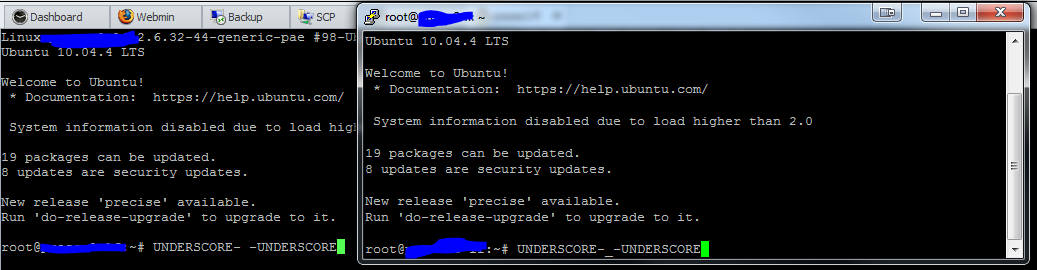
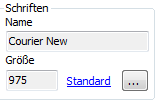
The font in the Native SSH client is slightly larger than the font is set. The font is set to Courier New 10 by default. If press the button ... under SSH Shell-Connection-Terminal-Font and select Courier 10, the size of the font in the configuration window changes to 9.75.
With this change, the visible font will be the same size as Putty ( Courier 10).
If I go back and set the font to default by clicking on Default, it will shows Size 10, but the font is slightly larger.
I had tried on an another computer, there it is set the 10.2. ( Both computers are running Windows 8)
All Comments (7)
Thank you for this.
David Hervieux
This has been fix, right?
Yes it has. It's in the current beta
David Hervieux
8.0.1.0 - Still there :(
Changing the fontsize to default seems a little buggy to ;)
edited by Max on 11/15/2012
sshBug.PNG
sshBug2.PNG
What do you mean by still there? It's 9.75 now the default
David Hervieux
Hi,
It's probably because your session had been created before the fix.
Could you simply change the font size by clicking on the Default(Standard) hyperlink.
You should see 10 as the font size.
Regards
André Sanscartier
- The default button only works if you use the english version. Now the Default is 10.
- Setting the font to 9.75 is not possible (see attached image)
(Die Schriftgröße muss eine Zahl Sein <-> The Font size has to be a Number)
- if i set the size to 8 there is also no underscore visible
edited by Max on 11/16/2012
sshBug3.PNG