what is the "break" keyboard shortcut?
How do I issue the 'break' command inside SSH sessions when working on Cisco devices?
Is there a default in RDM? I'm using ssh connection type
Is there a reason I can't also click on the tab for the connection and go to 'special commands'? Why isn't "break" one of the special commands?
All Comments (49)
Hello,
The question might be strange but a break is not only doing a CTRL+C? If not, could you explain in which context the break feature is used?
This will help us understand the use case and I will be able to open a feature request.
Best regards,
David Grandolfo

Hi David,
It's not a CTRL-C.
See my unresolved post here;
https://forum.devolutions.net/messages.aspx?TopicID=31661
Break is a special command (escape key) that can be send.
Same goes for backspace for example, which with default settings works for Cisco but not for some older HP (3Com) switches, which require Ctrl-H instead of Ctrl-? (127).
See this: https://www.cisco.com/c/en/us/support/docs/routers/10000-series-routers/12818-61.html
I haven't tried lately, the default for Cisco I believe is Ctrl-Shft-6
The context would be;
When you give a command, that spews out something and you want to cancel (break) the task.
Like for instance a Ping command or Traceroute
rolflobker is correct.
I have tried CTRL+C, CTRL+X, CTRL+SHIFT+ALT+X, CTRL+SHIFT+6, and all the other ones google says to try. Nothing works.
I need to break out of a ping or traceroute in Cisco devices and can't seem to be able to do it.
The 'special commands' area of the tab when right clicking the session tab would be a good spot for a 'break' command. In addition to actually being able to do it with a keyboard shortcut.
I found a way you can bypass it in the meantime, might be something you'd want to do by default;
In the configuration for the router or switch you can change the escape sequence;
conf t
line vty 0 15
escape-character 3
That makes it so Ctrl-C can be used. (apply same to console if required)
But this deviates from the norm, and requires changes to switches that not everybody might have access to, or would like to.
https://etherealmind.com/changing-break-sequence-cisco-ios-useful-different/
You might want to set this temporarily after logging in, using the macro typing option in RDM.
(which I use for example to send 'enable' on Cisco and 'terminal-length on HP switches)
To change the escape sequence for just the active session you would use;
terminal escape-character 3
First @rolflobker I apologize for the non-follow-up on your previous forum.
Thanks for the clarification both of you bring to this thread. I opened a ticket with the engineering department to add this feature request on RDM with the new SSH Engine.
As soon as I have further information I inform you.
Best regards,
David Grandolfo
No worries about the non-follow-up, I also didn't follow up or remind anyone ;)
why is it a feature request? Why do we need to wait for a new SSH engine?
My original question stands. How do you do this currently?
How does RDM send the break to the SSH session? And what RDM keyboard shortcut will make this happen.
The feature seems to be currently missing... so I'd consider it a request to get this implemented properly ;)
I'm sure someone someone from the engineering department will know how to handle this, and David will monitor this and make sure the SSH engine gets a proper implementation of sending special sequences, because this (ssh/telnet) is an important part of RDM that needs to work properly.
You don't have to wait for the new SSH engine. It will be added to the SSH engine.
David Hervieux
sorry, I guess I don't understand the difference. Was the previous post implying that RDM is working on a new SSH engine?
Or that the feature request would get implemented into the existing SSH engine that RDM uses?
Or both?
The feature request would get implemented into the existing SSH engine that RDM uses.
Regards
David Hervieux
I just started a traceroute through an SSH session to a Cisco router.
Of course I forgot to temporarily change the Break command, so I now have no way of stopping this process on the router.
I know this is already on the "bug list" - just a reminder :)
This is my next task. I am currently closing my previous one and will work on this bug today, I don't know exactly how long it will take me to correct this, I'm guessing this should be done by the end of the week. Hope your unstopped process won't get tired util then ;)
Regards
Denis Vincent
any updates? think this will make it into a beta?
It's implemented and this will be soon available.
Regards
David Hervieux
Great!
Just yesterday, I was logged into some Cisco routers using RDM and had to kill my sessions because I couldn't break the process.
Looking forward to this!
VERSION 2019.2.9.0 (October 10th 2019) Beta
•Added "send break" command for SSH shell entry
I tried this out immediately. Does not seem to work unfortunately.
Also; what would be the keyboard shortcut associated and how would we potentially change what the Break command is?
Hi,
Are you using the legacy terminal? Because the "send break" has not been implemented for it. But I think I did not understand your request correctly. Right now the "send break" sends an SSH break request, like what is done in the "special commands" menu of Putty. I thought you were referring to that, but it looks like its not the case. Do you have an example of a working break command in another terminal? Preferable Putty or OpenSSH. Or maybe you know the byte sequence sent on the wire?
As for using a keyboard shortcut, it is not possible right now, but I'm adding it to the feature request list. In fact, we are planning on a fully user customizable key shortcut table that could be used for that.
Regards!
Denis Vincent
Hi,
I am currently doing research on special terminal keys. I wonder if you tried CTRL + 6 because there is a special handling in RDM's terminal for this key combination. The result is the same as CTRL + ^ which should be the same as CTRL + SHIFT + 6. I am a bit at the mercy of the OS for some key combination but I will resolve this.
Regards!
Denis Vincent
Sending the break command STILL doesn't work. Just updated to latest 2019.2.12.0
Tried
CTRL + X
CTRL + SHIFT + X
CTRL + SHIFT + ALT + X
CTRL + 6
CTRL + SHIFT + 6
CTRL + C
Right click the connection tab -> special commands -> send break
nothing works.
Hi Hazen,
I had a chat with Denis and after research, we found that some Cisco router device uses different break commands as default [ Ctrl-Shift-6 (Ctrl-^) or Ctrl-Shift-6, X (^^X) ]. Moreover, some cisco device doesn't have any break command set.
Base on Cisco documentation https://www.cisco.com/c/en/us/td/docs/ios-xml/ios/fundamentals/command/cf_command_ref/D_through_E.html looks at the section for Escape-character. Then give us in your cisco configuration, the value of the escape-character.
Best regards,
David Grandolfo
What does this mean for RDM? Is this feature just not going to be available then? Or will it just take RDM staff more time to figure out the best/right way? (rotate through different break sequences, let user select different types of break via the GUI, etc ?)
Hello,
Unfortunatelly, we do not have the same device as you. We don't know what Cisco decided to use for this exact device as a break.
Could you give us your value "Escape-character"?
Regards,
David Grandolfo
So it works in putty, not sure why it doesn't work in RDM.
I am connecting to a WS-C2960X-24TS-L for example.
I issue the command "ping 1.1.1.1 repeat 1000"
a few seconds into the command running I can press SHIFT+CTRL+6 and the command will break out and stop.
If I do that exact same thing in RDM nothing happens.
So this isn't even a matter of Cisco having different commands. It works in putty, but doesn't work in RDM.
Yeah PuTTY handles the key combo differently, I believe it just sends the "Break" key (actual Break key on keyboard) values over the line.
Just tried in a up-to-date RDM w/ SSH Shell Rebex , connected to a Cisco Router.
Ctrl-6 doesn't do anything
Ctrl-Shift-6 changes the tabname , it appends [B6]
Tried SSH Shell session;
Same effect as w/ rebex
Ctrl-Shift-6 does not work
Special commands > send Break does not break
You can try it by connecting to a cisco device (router, switch) w/ ping 127.0.0.8 , that will fail (2 second timeout) but take a bit longer than pinging something which responds. Gives you more time to try out the escape sequences
Try pingin 127.0.0.8 repeat 10 for a longer period (20 seconds) to test
Try ping 127.0.0.8 repeat 100 for agony because there's no way to cancel / break the running task....
This behaviour can be changed on most cisco devices, but this would be far from practical / ideal to require this modification when using RDM
SW-CORE-AMS-01#terminal escape-character ?
BREAK Cause escape on BREAK
CHAR or <0-255> Escape character or its ASCII decimal equivalent
DEFAULT Use default escape character
NONE Disable escape entirely
soft Set the soft escape character for this line
Looks like CTRL-SHIFT-6 is handled by RDM, when I notice the Tab name being changed to SessionName [B6]
I think the answer is somewhere in here; https://en.wikipedia.org/wiki/ANSI_escape_code#Escape_sequences
But man, that brings back memories
I could be totally off here, but does this have anything to do with scancodes?
https://www.win.tue.nl/~aeb/linux/kbd/scancodes-1.html
Brk == e11d45e19dc5
The prefix e1used for Pause/Break indicated that this key sends the make/break sequence at make time,
I think RDM captures the modifiers (shift-ctrl)
I do not know what the actual escape sequence is, and how it is send over SSH
https://bharathisubramanian.wordpress.com/2010/01/05/telnet-and-ssh-escape-sequences/
I am sorry I have nothing more usefull to add, I am not a programmer and do not know the first thing about escaping en how terminals/ ssh send their data.
But this is indeed a very frustrating issue, not being able to cancel any running tasks. And I presume this could affect other types of connections as well, but I dont very often run into other vendors' routers / switches where I need to Break tasks
Thanks!
Knowing that ctrl + shift + 6 works in putty gives me the info I was looking for. I can't tell you right now when it will be fixed but I will work on it as soon as possible.
Regards.
Denis Vincent
@Everyone,
We found what “break” or catch the shortcut for the SSH Shell session. RDM catch the keyboard input and doesn’t transfer it to the session.
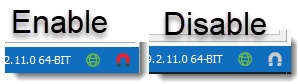
The first solution is to temporarily disable all the shortcut by clicking on the magnet.
The magnet is the icon at the bottom right of RDM.
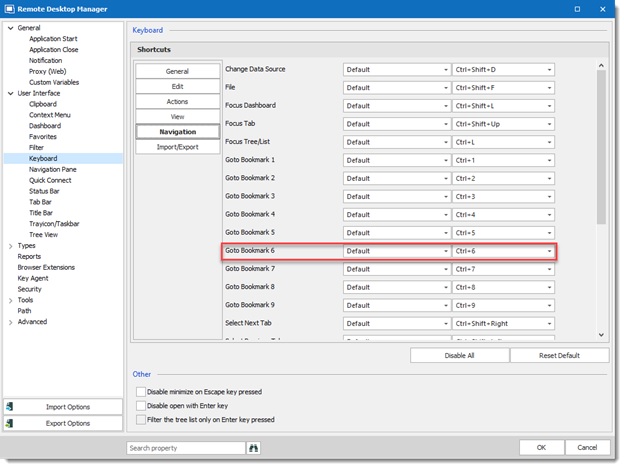
The second option is to disables shortcuts CTRL+6 under File -> Options -> User Interface Navigation or to set the option to When not in session
And for CTRL+SHIFT+6
Best regards,

David Grandolfo
CTRL+SHIFT+6.jpg
CTRL+6.jpg
Magnet_enable_disable.jpg
followed the instructions. Still doesn't work in RDM.
Hi Hazen,
We tested with Rlflobker and it works on his computer. have you tried to restart your RDM?
Could you try the Putty session in RDM?
Regards,
David Grandolfo
I can confirm that for me this works flawlesly and consistently.
Without the keyboard magnet I can send both Ctrl-6 and Ctrl-Shift-6, they both break my running ping on a Cisco switch.
Also changing the keys in the options to "when not in Session" had the desired effect.
I will check again tonight to see if I can find some differences., maybe pertaining to a session type or remote device.
Maybe the difference now is Rebex vs SSH shell, I will double check just to be sure.
interesting. ill create a rebex session to see if I see anything different.
Also, if you click the magnet.. how does that affect F5 when using webpage entries? Are you not able to refresh or find (CTRL+F) when using websites within RDM if you click the magnet?
The magnet manage all shortcut in RDM. I recommend you to use the "When not in session" feature.
David Grandolfo
Hi,
I just want to let you know I found another issue with key combinations like ctrl + 6, especially on non english keyboard layouts. I'll let you know when I found the solution.
Regards
Denis Vincent
I made a correction, it should be available in the next version.
Regards.
Denis Vincent
I got some things mixed up when testing.
To clarify;
Session type "SSH Shell"
Ctrl-6 and Ctrl-Shift-6 never work, turning off the Magnet and the shortcut key in the Options does not have any effect.
Session type "SSH Rebex"
Magnet on / shortcut keys in Options enabled > break does not work, Ctrl-6 and Ctrl-Shift-6 have no effect.
Key combinations (or magnet) turned off DOES work > Ctrl-6 (x2) breaks and Ctrl-Shift6 also breaks.
So with Rebex as the SSH session type we can get this working , by turning of the key combinations in the Options.


ok, I knew I wasn't crazy. I am using SSH shell as my entry types. So I wasn't sure how devolutions said they tested it with you and got it working when it didn't work for me.
^Yeah sorry for the mix-up.
When testing I noticed turningthe magnet / key combo off did work, but forgot to verify with the other SSH session types.
circling back to this. has RDM found a solution?
Hi,
Well it has been fixed. Sorry if I forgot to mention it here.
Ctrl + 2 to ctrl + 7 are used to send control characters that would otherwise be sent using ctrl + non alphabetic keys.
ctrl 2 = ctrl @ = 0
ctrl 3 = ctrl [ = ESC
ctrl 4 = ctrl \ = FS (1C)
ctrl 5 = ctrl ] = GS (1D)
ctrl 6 = ctrl ^ = RS (1E)
ctrl 7 = ctrl _ = US (1F)
and ctrl + 8 = DEL (7F)
Note you don't have to use the shift key.
You still have to make sure RDM is not using these keys as shortcuts, either by disabling the magnet or editing RDM's shortcuts.
Regards
Denis Vincent
Denis, I'm not sure if you saw my last post, but this isn't fixed.
I am running the latest version of RDM (2019.2.22.0)
Default out of the box config, if I press CTRL+6 during a ping test on a cisco device nothing happens
If I press CTRL+SHIFT+6 nothing happens
If I set the navigation section of the keyboard settings for CTRL+6 to "when not in session" nothing happens
If I right click the session, go to special commands, send break, nothing happens
this does not work.
any updates? This is still broken.
I'll investigate this today. I'll let you know if I find anything.
Regards
Denis Vincent
Hello,
I had a chat with Denis and we are not able to reproduce the issue. It seems that we fixe every bug we were able to reproduce or technically see.
We could continue to investigate, for this we will need to have direct access to the server. Not a remote session but SSH access to test with our tools.
If you would like to open a port for us, please send us an email at ticket@devolutions.net and you can provide us access for a specific time lap.
Best regards,
David Grandolfo
that we can't do.
I'm curious how you're unable to to reproduce this.
Can you please walk me through your internal RDM configuration/combination of settings... and what happens when you perform the steps above that cause this issue?
Do you have a cisco device (any cisco device really) that you SSH to via CLI.
You then run a traceroute or ping command .. then attempt to break out of the command.
ping 8.8.8.8 repeat 1000
then as that command is running you press CTRL+C, or CTRL+6, or any of the other actions... or even if you right click the toolbar and select special actions and break.... I'm genuinely curious what behavior your experiencing.
We know that it's not possible for us to test on any Cisco devices and Cisco has a different way to receive the information base on the model and the quality range of his appliance.
The Cisco test is a Cisco ASA 5506-X. We also confirm that RDM is sending proper command in SSH Shell window. In an OpenSSH server, we edit the /etc/inputrc and add the command
.
Also as explained by rolflobker at https://forum.devolutions.net/topic32542-what-is-the-break-keyboard-shortcut.aspx#post133970 the escape terminal can be updated.
What is the current escape character set?
David Grandolfo
Hi,
Was there ever a solution for this issue? I'm trying to convince the rest of the team to start using this product but without a way to send a CTRL + SHIFT + 6 to the terminal it's never going to happen.
Thanks.
Hello dmckeown,
Our engineering team tells me that if the shortcut CTRL + SHIFT + 6 should normally send a break command. If that is not the case for you, could you please click the Magnet button at the very bottom-right of the RDM window? It's possible that RDM is intercepting the shortcut and toggling the magnet would solve the issue.
If that does not do the trick, you can also disable the RDM shortcut assigned to this key combination to make sure RDM does not intercept it. This can be done by going to File > Options > User Interface > Keyboard. Once there, locate Set Bookmark 6, click on the Default box next to it and switch "Default" to "None" . You should then be able to use CTRL + SHIFT + 6 to send the break command
Best regards,
Gabriel Degrandpré
Thanks so much, clicking the magnet button did the trick.