
AniTexs
AI Tools (MCP)
While playing around with the MCP Server, I really wish these things were possible:
New Parameters for New-PSUAITool
-
Moduleand-Commandlike in Endpoints-Scriptblock {}to have the code inside theaitools.ps1file.-Endpointto use a endpoint instead of a script (Max wait time would need to be 60 or lower as a max)-ArchiveJobAfterCompletionto automatically archive the script run job log after completion or retrival, currently it creates a mess in the jobs table.
New Cmdlet New-PSUAIToolResponse to add the "structured" element to the response via the mcp server.
The Idea is more or less the same as the New-PSUApiResponse cmdlet.
Currently the output looks like this:
{
    "content": [
        {
            "type": "text",
            "text": "Information - {\r\n  \"GivenName\": \"XXXX\",\r\n  \"Surname\": \"XXX\",\r\n  \"UserPrincipalName\": \"XXXX@XXXXX.XX\",\r\n  \"Enabled\": true,\r\n  \"SamAccountName\": \"XXXXX\",\r\n  \"SID\": {\r\n    \"BinaryLength\": XX,\r\n    \"AccountDomainSid\": \"MEH\",\r\n    \"Value\": \"XXXXXXX\"\r\n  },\r\n  \"DistinguishedName\": \"Woo Hooo\",\r\n  \"Name\": \"XXXXX\",\r\n  \"ObjectClass\": \"user\",\r\n  \"ObjectGuid\": \"GUID\",\r\n  \"PropertyNames\": [\r\n    \"DisplayName\",\r\n    \"DistinguishedName\",\r\n    \"Enabled\",\r\n    \"GivenName\",\r\n    \"mail\",\r\n    \"Name\",\r\n    \"ObjectClass\",\r\n    \"ObjectGUID\",\r\n    \"SamAccountName\",\r\n    \"SID\",\r\n    \"Surname\",\r\n    \"UserPrincipalName\"\r\n  ],\r\n  \"AddedProperties\": [],\r\n  \"RemovedProperties\": [],\r\n  \"ModifiedProperties\": [],\r\n  \"PropertyCount\": 12,\r\n  \"DisplayName\": \"XXXXX XXXX\",\r\n  \"mail\": \"XXXX@XXXX.XX\",\r\n  \"ObjectGUID\": \"XXXXXXXX\"\r\n}"
        }
    ]
}
It's fine, but being able to return a structured element inside the "content" object, would help, this would also drastically help with not needing to convert to json before returning the result.
A parameter to choose encoding could be nice, like formats like Markdown,XML,Json,Csv etc.
SDK for Plugins
@Adam Driscoll Really looking forward to it, I'd be happy to test it once ready :)
Reload of Workflows missing
@Adam Driscoll The file changes does apper to show, but it does not reload.
Also hard to add many scripts in the workflow, maybe there could be a add button in addition to the drag-and-drop functionality?
Connect to PSU Server via VS Code Extension
Can there be a button for executing the `Connect-PSUServer` command in the PowerShell Extension Console?
The new Update is lovely, but really missing the connection from the old update.
SDK for Plugins
Release a SDK for Developing custom plugins to work with PowerShell Universal.
I want to expand the functionality of PSU with a better notification system which would not rely on powershell to run, so I could ensure I'd get notified even if PowerShell is acting up.
Also a extension for FTP/SFTP manager.
This is to extend the functionality of the Admin side of PSU.
Reload of Workflows missing
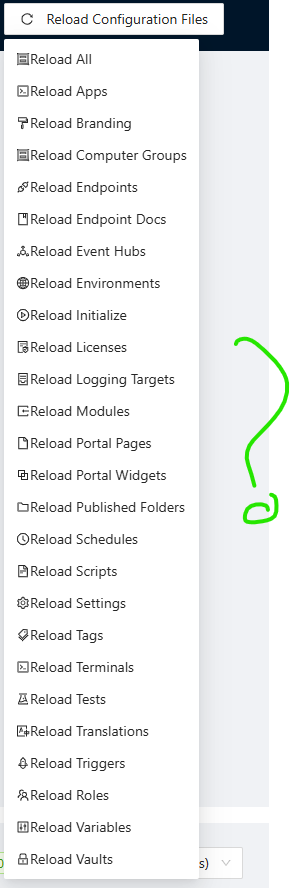
Under the Admin Panel => Settings => Files
The reload for workflows is missing.
It's not really registering my filesystem changes, so I have to reload everything in order for it to react on my file changes for workflows.
Pages not found in folders
Thank you @Adam Driscoll
Thanks for the conversation at PSConfEU :)
Make Workflows a Database Resource
From the docs here: https://docs.powershelluniversal.com/config/repository#database-resources
The workflows does not allow only being in the database.
This could be a really nice thing for different stages like a staging server and a dev and a prod server.
Pages not found in folders
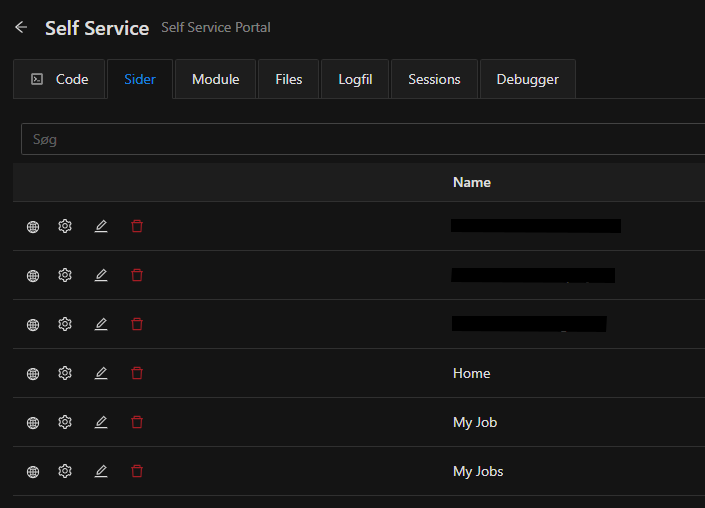
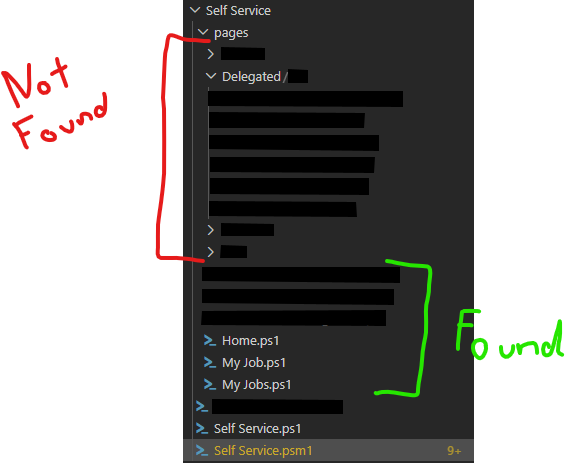
It does not recursivly search for pages under the `\AppName\Pages\*`


I'm running the latest 2026.2.0
Pages in folders not registered
The Apps are unable to find pages which are stored in folders under the apps. It only finds pages in the Root App Folder.
I'm running the latest 2026.2.0