Pages in folders not registered

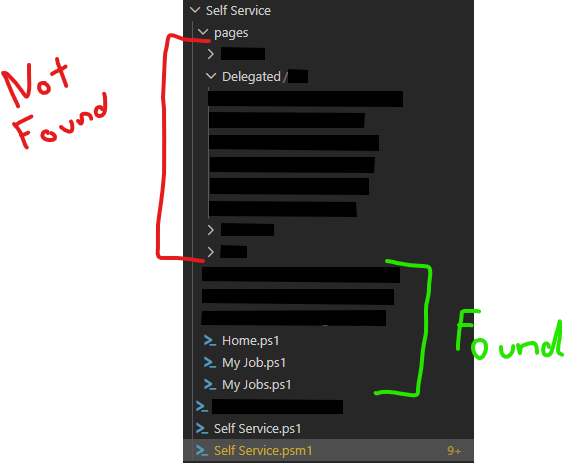
The Apps are unable to find pages which are stored in folders under the apps. It only finds pages in the Root App Folder.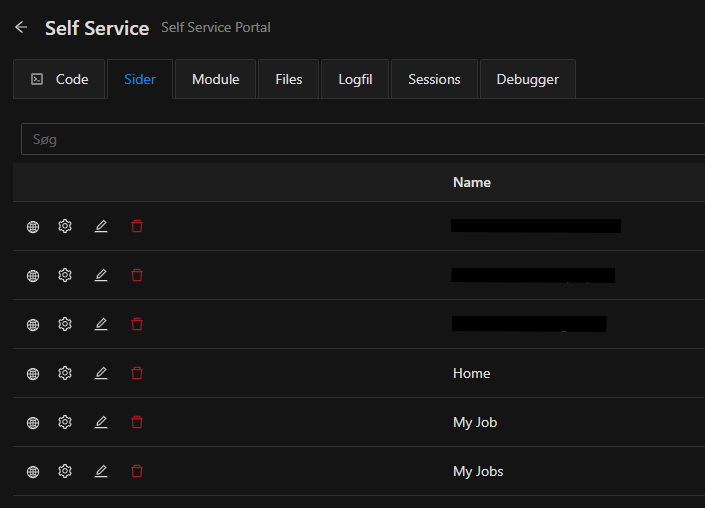
I'm running the latest 2026.2.0
cdabed32-b741-459b-b564-698691cef394.png
79f95fd0-26d0-4842-ac11-fc05ae90f214.png
All Comments (1)
Hello neja,
Thank you for the details and the screenshots regarding the Self Service app and the pages stored in subfolders.
We reproduced the behaviour on a clean PowerShell Universal 2026.2.0 instance, matching your setup: pages located directly in the root app folder are listed in the navigation, while pages placed in subfolders (for example, pages\ or Delegated) are not loaded.
What we found:
- This is not a defect in PowerShell Universal itself. The platform renders exactly the set of pages it is given; it does not automatically walk subfolders on your behalf.
- The cause is in the app's own page-discovery logic. When the entry script builds its list of pages by enumerating page files (typically with Get-ChildItem), a non-recursive enumeration only sees the root app folder, so any page in a subfolder is silently skipped.
- In a setup like yours, where a module file (Self Service.psm1) sits alongside the main app script, that enumeration is most often performed inside the module. That is the code path to review.
Recommended fix (either approach resolves it):
- Make the page enumeration recursive, for example: Get-ChildItem -Path $AppRoot -Filter *.ps1 -Recurse, then dot-source each file into the $Pages array passed to New-UDApp -Pages.
- Or explicitly add the subfolder pages to the -Pages array passed to New-UDApp.
In our reproduction, switching the enumeration to recursive immediately made all subfolder pages (including a deeply nested one) appear in the navigation, with no other change.
One additional note: we observed that the per-page -AutoInclude auto-discovery is unreliable on 2026.2.0 in folder-based layouts. We recommend building the page list explicitly and passing it via New-UDApp -Pages, which is the pattern used by the built-in Apps Documentation app.
To confirm the exact line to change in your environment, could you share your Self Service.ps1 and Self Service.psm1 files without sensitive information?
We can then point to the precise enumeration that needs to be made recursive.
For reference on defining and organizing app pages: https://docs.powershelluniversal.com/apps/components/pages
Best regards,
Patrick Ouimet