Reload of Workflows missing

Under the Admin Panel => Settings => Files
The reload for workflows is missing.
It's not really registering my filesystem changes, so I have to reload everything in order for it to react on my file changes for workflows.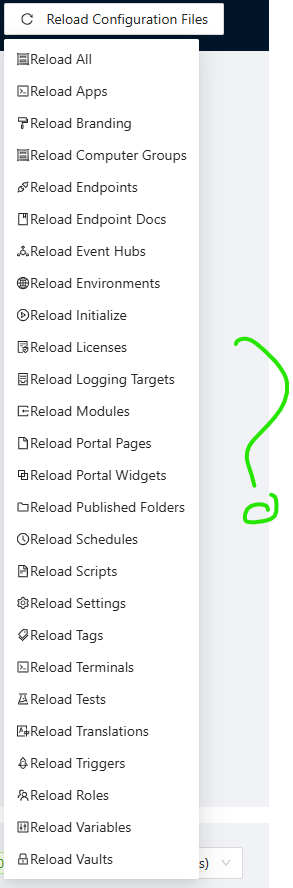
e810a980-b1f8-4d07-812a-511faa2bf155.png
All Comments (3)
@AniTexs If you go to the file tracker page do you see updated files there? It should be showing any file system change made inside or outside the system. That said, we should have a button for this as well.
Adam Driscoll
PowerShell Expert and Software Architect at Devolutions
@Adam Driscoll The file changes does apper to show, but it does not reload.
Also hard to add many scripts in the workflow, maybe there could be a add button in addition to the drag-and-drop functionality?
@AniTexs I've opened a feature request for the add button. That's a good idea.
Adam Driscoll
PowerShell Expert and Software Architect at Devolutions