
lloydmitchell
Inconsistent property behaviour in Apps
Hi Lloyd,
Thank you for your patience while we looked into this. Did your call with your AD team turn up anything about that node?
We have an update on our side. Our developers are now working on the Pipeline Output issue from my earlier messages, where a job that returns a Get-ADUser object shows MemberOf and the other extended values empty in its Pipeline Output tab (https://docs.devolutions.net/powershell-universal/automation/jobs/#jobs). That issue is in how a job stores its output, and we saw it in every environment, so it does not explain why your app loses the values only in Integrated on that one node. That part is still open.
Two readings from that node, before any service restart, will still show us where the values are lost. The first is the two Log tab lines from the script in my last message, from each environment. The second is the two pairs of app toasts from my message before it, which means switching the app back to Integrated briefly, then PowerShell 7. If you move the app to another way of reading AD, please take these readings first. Until then, the app can stay on PowerShell 7.
Best regards,
Michel
@Michel Audi
Sorry, I've been away from work for over a week, and the team didn't have any free time - I need to arrange with them again. I'll hopefully have time later today to check with the code you mentioned and post an update.
Inconsistent property behaviour in Apps
sorry for long delay (i forgot). here are my function with function calls:
....
I hope it will help
@krisr
No that's great, thank you!
Inconsistent property behaviour in Apps
I've been dealing with this issue since back when v4 was the thing (there are probably still posts about it on the old forum).
I ended up creating a custom function to fetch AD objects non-default properties into a PSCustomObject.
So for almost every array that I want to have cached, I have two instances:
$cache:ad_users — proper AD objects that I can use in scenarios where I need to deal with AD objects (only default properties)
$cache:ad_users_object — a standard PSCustomObject that has all the properties I want to read from
It's been working flawlessly since then (and fetching is extremely fast thanks to a custom function made by Claude).
@krisr
Thanks for sharing this - Maybe this will be my workaround. Would you mind sharing the function in question?
Inconsistent property behaviour in Apps
Hi Michel - I don't believe the $cache: scope is the issue. I'm using session variables for everything other than the properties list. The $cache:UserProperties is also only used within the app, but I'm still experiencing the issue in the test script where I specify the 'MemberOf' property manually.
Plus, combine this with the fact that it only seems to be an issue on one node.
I've got a chat booked in tomorrow with our AD team to attempt to figure this out, so I'll come back then if there's anything that needs querying.
Inconsistent property behaviour in Apps
And just to spam the posts:
I'm not ruling out authentication/permissions just yet in our environment. At this stage it looks like the way the Integrated environment is treated by Kerberos in some fashion is different to the PS7 method. I'll speak to our AD team and attempt to find anything, but if you could give me some kind of indication what to look for on their end, that would be great.
Inconsistent property behaviour in Apps
And just for full transparency, here's the updated script:
Param(
    [string]$Identity
)

try {
    Get-ADUser -Identity $Identity -Server "user.domain" -Property MemberOf,ShowInAddressbook

    Write-Host ("PowerShell {0} | ActiveDirectory {1} | {2} | adapters {3}" -f $PSVersionTable.PSVersion, (Get-Module ActiveDirectory).Version, [Microsoft.ActiveDirectory.Management.ADEntity].Assembly.Location, @(Get-TypeData Microsoft.ActiveDirectory.Management.* | Where-Object TypeAdapter).Count)
}
catch {
    Write-Error "Unable to fetch user details`n$_"
}Inconsistent property behaviour in Apps
We haven't set any Run As parameters for PowerShell 7 vs Integrated - it's all as normal. I've also double-checked the properties for the Environments, and no RunAs properties have been set there, either.
I've been testing in a script, so I've pushed the string to Write-Host instead.
Here's integrated:
PowerShell 7.6.5
ActiveDirectory 1.0.1.0
C:\Windows\Microsoft.NET\assembly\GAC_64\Microsoft.ActiveDirectory.Management\v4.0_10.0.0.0__31bf3856ad364e35\Microsoft.ActiveDirectory.Management.dll
adapters 38
And here's PowerShell 7:
PowerShell 7.6.5
ActiveDirectory 1.0.1.0
C:\Windows\Microsoft.NET\assembly\GAC_64\Microsoft.ActiveDirectory.Management\v4.0_10.0.0.0__31bf3856ad364e35\Microsoft.ActiveDirectory.Management.dll
adapters 38
To my eyes, they appear identical.
Inconsistent property behaviour in Apps
Thanks for your time Michel.
This has taken a few twists. I managed to isolate it to the node in a single site - so fingers were pointed at AD (replication/permissions/etc) as it was working consistently outside of that site.
BUT!
If I change the environment from Integrated to PowerShell 7, it works consistently, every time. If I switch it back, it breaks.
So, I have a single node that fails to return these attributes every time I use Integrated. Otherwise I have the same: Code, Version, Service Account, and DCs.
Inconsistent property behaviour in Apps
Ok, to make matters more confusing, I've tested in a script and I see the same behaviour - but still the terminal window is absolutely fine. Testing on an old v3.4.6 install, properties are returned no issue.
Forgot to mention: we're running the latest 2026.3.2.
Inconsistent property behaviour in Apps
I've got the following code (stripped down to mostly just logic), which gets AD user details.
Sometimes I get all properties back, but rarely. More often than not (95% of the time), the MemberOf value is missing. Very frequently Canononical Name, Last Logon Timestamp, Mail, and TargetAddress will also be missing. I always get back Name, SamAccountName, UPN, DN and SID. The properties names exist in the object, just not their corresponding values.
At first I thought it might be something with the session scope, but that doesn't seem to be the case (I've tested with toast messages outputting the object assigned to a temp variable before handing it off to the session). I don't get this issue if I test in the terminal, nor do I get it running scripts - so the service account is fine. It's only using the app.
Note: The code does a couple of 'sync-udelement' hops because there are other items being pulled back elsewhere in the full version.
$session:UserID = $null
$session:User = $null

$cache:UserProperties = @(
    "Name",
    "SamAccountName",
    "UserPrincipalName",
    "Enabled",
    "CanonicalName",
    "DistinguishedName",
    "LastLogonTimestamp",
    "SID",
    "Mail",
    "TargetAddress",
    "MemberOf",
    "ShowInAddressBook"
)

New-UDApp -Title "User Overview" -Content {
    New-UDForm -Content {
        New-UDTextbox -Id 'txtSearchQuery' -Label 'Enter User ID'
    } -OnSubmit {
        $session:UserID = $EventData.txtSearchQuery
        Sync-UDElement -Id 'LoadUser'
    }

    New-UDDynamic -Id 'LoadUser' -Content {
        if (-not [string]::IsNullOrWhiteSpace($session:UserID)) {

            # Issue appears to be right at the 'get-aduser' call - property values are missing here
            $session:User = Get-ADUser -Identity $session:UserID -Property $cache:UserProperties

            Sync-UDElement -Id 'UserDetails'
        }
    }

    New-UDDynamic -Id 'UserDetails' -LoadingComponent {
        New-UDProgress -Circular
    } -Content {
        if ($session:User) {

            # Splits the object into a name/value list
            $Data = ($session:User | Select-Object -Property $cache:UserProperties).psobject.Properties.foreach({ [pscustomobject]@{Property=$_.Name; Value=$_.Value} })

            $Columns = @(
                New-UDTableColumn -Property Property -Title Property
                New-UDTableColumn -Property Value -Title Value
            )
            New-UDTable -Data $Data -Columns $Columns
        }
    }
}SSH keys are broken in 2026.3.2 - maybe earlier
Ok - so I got it working.
From the PSU terminal (because it's running as that service account for the SSH connection):
$knownHosts = Join-Path $env:USERPROFILE '.ssh\known_hosts'
Get-Content $knownHosts
ssh-keyscan ssh.dev.azure.com >> $KnownHosts      # Ignore the red [ERROR] messages - it's probing different algorithms apparently
Get-Content $KnownHostsSSH keys are broken in 2026.3.2 - maybe earlier
@Adam Driscoll
That command doesn't appear to do anything - from what I can see, it just searches the known_hosts file for the 'ssh.dev.azure.com' string and returns if it's found.
SSH keys are broken in 2026.3.2 - maybe earlier
We're trying to verify a fix for this. It works on a fresh Windows server for me and I will be testing Linux as well. That said, it would be useful if we could see if git logs any additional information. In 2026.3, we made git logging opt-in because it could log sensitive data. To enable it, you need to add the following to appsettings.json and restart.
{
"Logging": {
"LogLevel": {
"PowerShellUniversal.Git.GitCommandDiagnostics": "Debug",
"PowerShellUniversal.Git.GitService": "Debug"
}
}
}
If someone has the time to configure this and send the output, that would be helpful.
@Adam Driscoll
Just for clarification, I was having the issue on 2026.2 and upgraded to the latest before seeing this thread.
Anyway, here's what I get in the log file (sanitised) after making the changes:
2026-09-29 15:09:00.993 +01:00 [DBG][PowerShellUniversal.Git.GitService] Repository directory already exists. Validating whether it is a valid git repository.
2026-09-29 15:09:00.998 +01:00 [DBG][PowerShellUniversal.Git.GitService] Repository directory is valid repository.
2026-09-29 15:09:00.999 +01:00 [DBG][PowerShellUniversal.Git.GitService] Updating remote.
2026-09-29 15:09:01.004 +01:00 [DBG][PowerShellUniversal.Git.GitService] Repository has a configured remote.
2026-09-29 15:09:01.017 +01:00 [DBG][PowerShellUniversal.Git.GitService] Repository has a configured remote.
2026-09-29 15:09:01.034 +01:00 [DBG][PowerShellUniversal.Git.GitService] Running external Git command remote.
2026-09-29 15:09:01.066 +01:00 [INF][PowerShellUniversal.Configuration.SshKeyService] Reused installed SSH key <KEYNAME> with public fingerprint <FINGERPRINT> at C:\path\to\pem.pem.
2026-09-29 15:09:01.307 +01:00 [DBG][PowerShellUniversal.Git.GitService] External Git command remote completed with exit code 0.
2026-09-29 15:09:01.307 +01:00 [DBG][PowerShellUniversal.Git.GitService] Running external Git command pull.
2026-09-29 15:09:01.314 +01:00 [INF][PowerShellUniversal.Configuration.SshKeyService] Reused installed SSH key <KEYNAME> with public fingerprint <FINGERPRINT> at C:\path\to\pem.pem.
2026-09-29 15:09:01.960 +01:00 [DBG][PowerShellUniversal.Git.GitCommandDiagnostics] External Git command pull failed with exit code 1. Standard error: No RSA host key is known for ssh.dev.azure.com and you have requested strict checking.
Host key verification failed.
fatal: Could not read from remote repository.

Please make sure you have the correct access rights
and the repository exists.

2026-09-29 15:09:01.960 +01:00 [ERR][PowerShellUniversal.Git.GitService] External Git command pull failed with exit code 1.
2026-09-29 15:09:01.996 +01:00 [ERR][UniversalAutomation.GitSyncService] Git sync 251538 failed with result "InvalidSshKey".SSH keys are broken in 2026.3.2 - maybe earlier
Same here - we're using Azure Devops.
Is this a config change on Microsoft's side?
Assembly loading error after trying to connect to Exchange Online in script when calling from app
Update:
Ok, figured this out. It was an established session to Exchange server onprem that was causing the EOM module to get flustered.
Panic over, ty if you've already read the above!
Assembly loading error after trying to connect to Exchange Online in script when calling from app
UPDATE: Solved - see my follow up
Struggling with this one!
I have a script that pulls mailbox details from Exchange Online using a certificate and app-registration in Azure (so it's non-interactive, but don't think this is relevant).
The script runs by itself (directly) without issue. However, if I try and call it from an app I get an error.
Command:
$session:UserMailbox = Invoke-PSUScript -Name 'Exchange\Get-ExoMailbox.ps1' -Parameter @{ Email = ($session:User).mail } -Wait -TrustCertificate -Environment 'PowerShell 7 - Exchange'
Error:
Could not load file or assembly 'Microsoft.Exchange.Management.ExoPowershellGalleryModule, Version=15.0.0.0, Culture=neutral, PublicKeyToken=31bf3856ad364e35'. Assembly with same name is already loaded
I've specified different environments for both app and script, so should be in their own runspaces. But the error seems to indicate otherwise...
The 'PowerShell 7 - Exchange' environment is set to load the ExchangeOnlineManagement module. I've also tried loading it directly in the script. Either way, same problem.
Version: 2026.2.4
Formatting of New-UDChartJS documentation broken
For awareness:
Looks like the formatting's broken on the page - New-UDChartJS | Devolutions PowerShell Universal | Product guides & reference
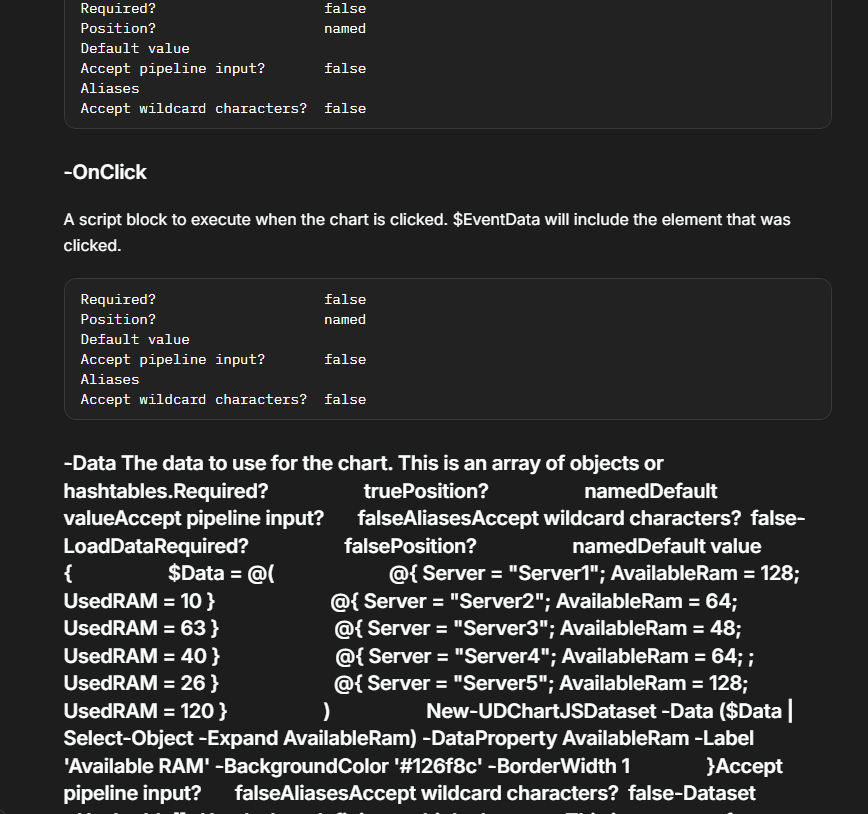
EDIT: Also on New-UDChartJSDataset
Get-PSUCache -Detail
Thank you both, I will use the '-list' flag for the time being if needed.
Get-PSUCache -Detail
Thanks for getting back. Here're the answers:
We're using MS SQL server - not sure of the version, it's handled by another team.
The nodes are the windows service, and I'm accessing one node directly during development, not the load-balanced address.
The command I run is this (integrated flag due to ssl errors if I run it without from the app):
Get-PSUCache -Key "CacheName" -Integrated -Detail
I don't know about prior versions; this is the first time I've tried getting the detail.
Also, I've tried this in all available environments (PS 5.1 / 7 / Integrated).
If this was a database error, I'd have thought the metadata wouldn't be retrieved for display on the web UI, either?
I've further tested this within a script, without the '-Integrated' parameter, and same result.
HOWEVER.... In the app/script, I notice that I'm getting the SecurityContextId attribute populated with the GUID. This doesn't happen in the web console. Not sure if this is a key piece of information, or irrelevant!
Get-PSUCache -Detail
Version 2026.2.4
I've got a cached variable, and am able to retrieve data from it. It's persisted in the DB as I'm running an HA pair.
However, if I try and pull the cache detail, I get no metadata back. i.e.:
AbsoluteExpiration              :
AbsoluteExpirationRelativeToNow :
SlidingExpiration               :
Persist                         : False
Roles                           :
SecurityContextId               : 00000000-0000-0000-0000-000000000000
LastRead                        : 1/1/0001 12:00:00 AM
Created                         : 1/1/0001 12:00:00 AM
Updated                         : 1/1/0001 12:00:00 AM
Id                              : 0
However, I DO get the cached data in the Value property.
This is the same whether I try and get this detail via web console or add detail to a Card in an app.
But if I view the cache in the web ui, the information's there:

Any ideas?
Passing array of strings to endpoint via url - seems to be joining with a comma
Fantastic, I shall check and (hopefully) update my scripts.
Git sync failure when using SSH keys
Thank you @DataTraveler - I shall try the external client today.
I think another suggestion is to make it more clear in the documentation that an external client is needed. If you search for 'ssh keys' and follow the Git the link from the search bar, it takes you directly to the sub-heading without realising that it's underneath the External Git Client section. This is where I went wrong!
Maybe the first sentence could be updated to something like "You can use PowerShell Universal to generate and manage SSH keys for use with an external client." ? And also potential add something to the label of the 'SSH Key' field in the Git settings?
Git sync failure when using SSH keys
Hi,
I'm attempting to use ssh keys instead of username/password credential with Azure devops. After generating the credential on PSU and entering it into the keys section in the cloud, I keep encountering this when trying to sync:

Hoping for a little insight on where to go for troubleshooting this further!
Support arrays for types that can be cast from string
By default, strings work fine:
Param([string[]]$AString)
That will pull up the mutliple-selection interface - all good.
if you do this:
Param([mailaddress[]]$AnEmail)
You will only get the option to input a single string. If you provide default parameters, only the first element will be shown in the web interface.
As a string (with valid formatting) can be cast to type [mailaddress], it would be great to support this in the web interface when selecting multiple elements. Obviously ValidateScript is an option from the string input, but being able to use standard powershell conventions would be a lot neater.
I found this, not sure if it's any help: c# - Can I check if a variable can be cast to a specified type? - Stack Overflow
Passing array of strings to endpoint via url - seems to be joining with a comma
Hello!
I'm wondering if someone can point me in the right direction.
Script consists of:
Param([string[]]$Text)

foreach($Item in @($Text)) {
    [pscustomobject]@{
        Text = $Item
    }
}
If I then use the following (after creating the endpoint):
https://PSU.server.address/EndpointName?Text=sometext&Text=somemoretextit seems to be joining both strings into a single string, delimited by a comma:
[
  {
    "Text": "sometext,somemoretext"
  }
]
Is this known behaviour, or am I doing something wrong?