
squinlan
Groom Jobs Do Not Complete and Scheduler stops processing until restarted
Hi there. I was not able to find v5.5.4, so I just upgraded to the latest version - 2026.3.4.0.
This does seem to have fixed the problem - jobs are no longer getting stuck. I will give it another 2 weeks in Dev while I test all our scripts and apps, then will update our prod server to the same version.
Prod is still on v5.5.2, but doesn't have the job issue, which is why I found it weird.
Thanks for the assistance.
Groom Jobs Do Not Complete and Scheduler stops processing until restarted
PowerShell Universal Version: 5.5.2
I have an issue on my Development server, where the Groom Jobs do not complete and this causes the scheduler to stop processing any new jobs. Restarting the PowerShell Universal service fixes it, but this is not a great solution. The same issue does not occur on my production server (thankfully).
After a restart, everything works normally, but it takes around 2 hours before the scheduler stops processing new jobs. Any new jobs started manually just stay in the "queued" status forever. Any scheduled jobs simply don't get queued at all.
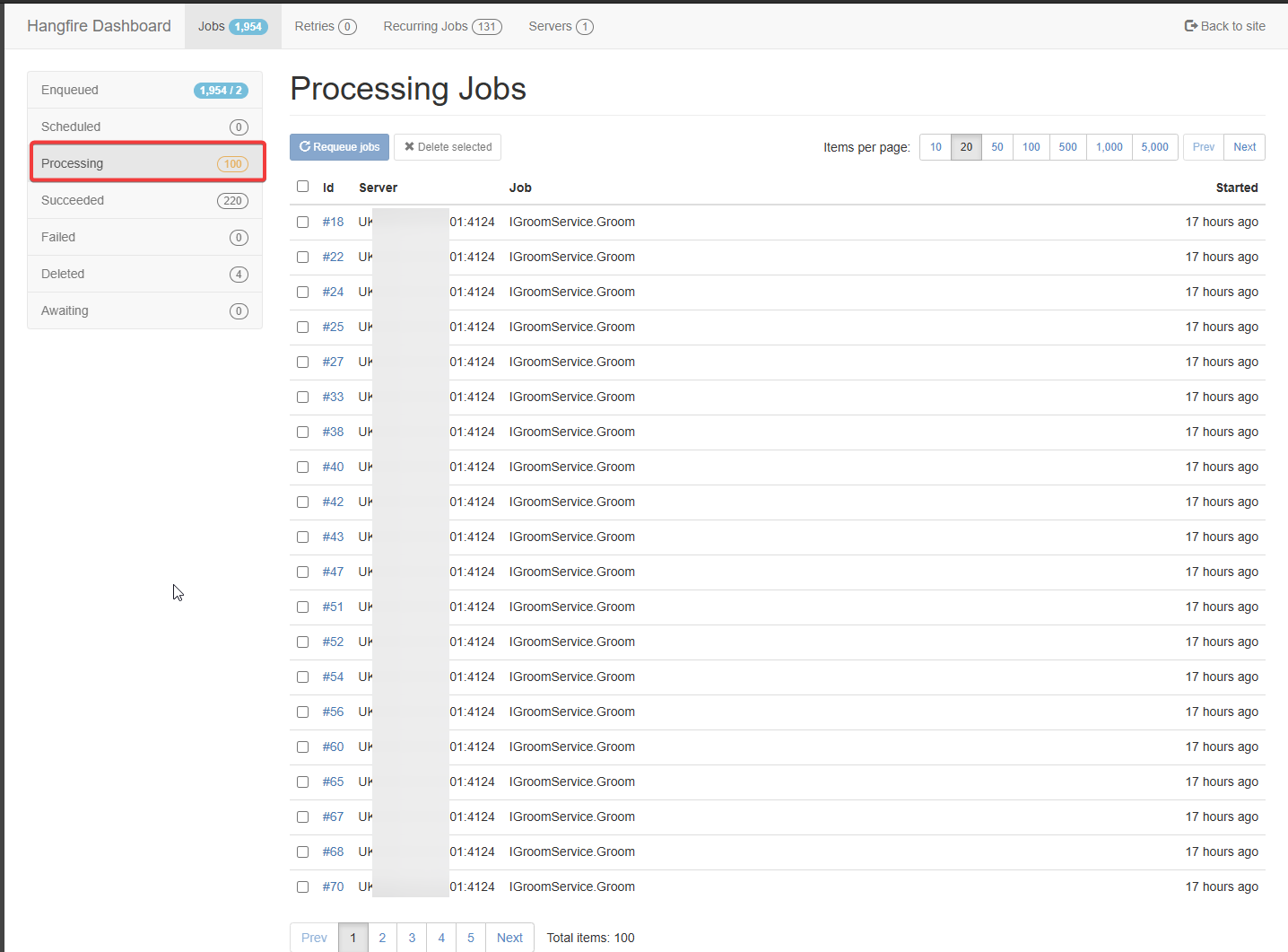
I looked in Hangfire, and the groom schedule runs every minute or so, but the jobs never complete. Other scheduled or manual jobs do appear in the hangfire queue and do complete normally, but once the hangfire queue gets to 100 processing jobs, then everything just stops. All 100 jobs are for the Groom Service. It always stops once the processing jobs gets to 100 entries.
I restarted the service yesterday and then left it overnight so you can see the issue more clearly via the screenshots. There are exactly 100 jobs in the processing queue. And they are all the same IGroomService.Groom job. There are almost 2000 queued up jobs. 17 hours ago was when I restarted the service. The enqueued jobs are both Groom ones and the ones from the PSU scheduler.
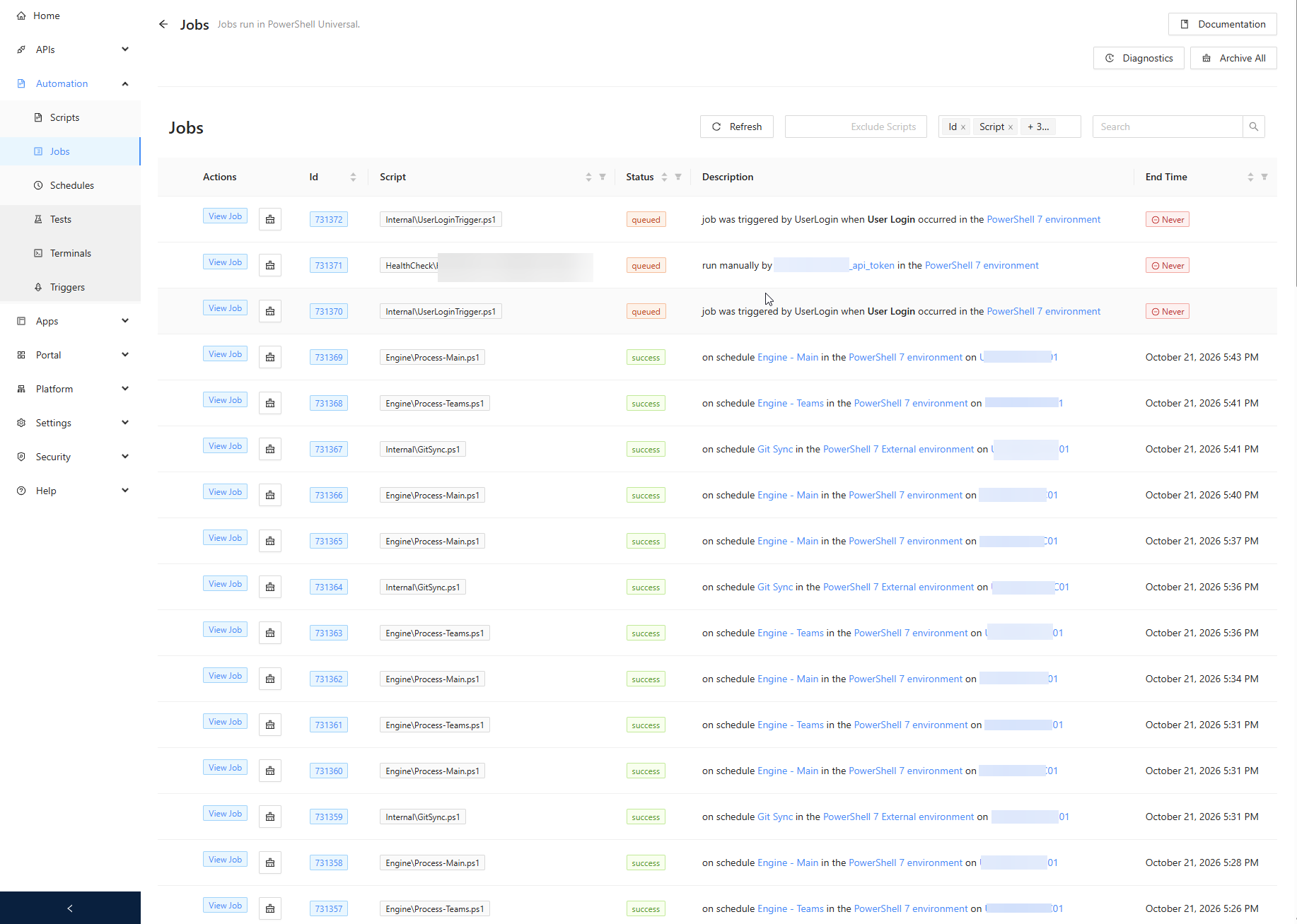
In PSU, the jobs page shows all the jobs being successful up until the hangfire processing queue filled up, and then just the login trigger script when I logged in, and one job that gets launched via an api trigger. The scheduled jobs just never get queued in this view. They are visible in hangfire though (enqueued jobs).
I enabled debug logging and after the restart of the service, I see these errors in the system log. They repeat multiple times per second.
2026-10-21 16:06:21.226 +01:00 [WRN][UniversalAutomation.GroomService] Failed to clear job queue.
Microsoft.EntityFrameworkCore.DbUpdateConcurrencyException: The database operation was expected to affect 1 row(s), but actually affected 0 row(s); data may have been modified or deleted since entities were loaded. See https://go.microsoft.com/fwlink/?LinkId=527962 for information on understanding and handling optimistic concurrency exceptions.
   at Microsoft.EntityFrameworkCore.Update.AffectedCountModificationCommandBatch.ThrowAggregateUpdateConcurrencyExceptionAsync(RelationalDataReader reader, Int32 commandIndex, Int32 expectedRowsAffected, Int32 rowsAffected, CancellationToken cancellationToken)
   at Microsoft.EntityFrameworkCore.Update.AffectedCountModificationCommandBatch.ConsumeResultSetWithRowsAffectedOnlyAsync(Int32 commandIndex, RelationalDataReader reader, CancellationToken cancellationToken)
   at Microsoft.EntityFrameworkCore.Update.AffectedCountModificationCommandBatch.ConsumeAsync(RelationalDataReader reader, CancellationToken cancellationToken)
   at Microsoft.EntityFrameworkCore.Update.ReaderModificationCommandBatch.ExecuteAsync(IRelationalConnection connection, CancellationToken cancellationToken)
   at Microsoft.EntityFrameworkCore.Update.ReaderModificationCommandBatch.ExecuteAsync(IRelationalConnection connection, CancellationToken cancellationToken)
   at Microsoft.EntityFrameworkCore.Update.Internal.BatchExecutor.ExecuteAsync(IEnumerable`1 commandBatches, IRelationalConnection connection, CancellationToken cancellationToken)
   at Microsoft.EntityFrameworkCore.Update.Internal.BatchExecutor.ExecuteAsync(IEnumerable`1 commandBatches, IRelationalConnection connection, CancellationToken cancellationToken)
   at Microsoft.EntityFrameworkCore.Update.Internal.BatchExecutor.ExecuteAsync(IEnumerable`1 commandBatches, IRelationalConnection connection, CancellationToken cancellationToken)
   at Microsoft.EntityFrameworkCore.Storage.RelationalDatabase.SaveChangesAsync(IList`1 entries, CancellationToken cancellationToken)
   at Microsoft.EntityFrameworkCore.ChangeTracking.Internal.StateManager.SaveChangesAsync(IList`1 entriesToSave, CancellationToken cancellationToken)
   at Microsoft.EntityFrameworkCore.ChangeTracking.Internal.StateManager.SaveChangesAsync(StateManager stateManager, Boolean acceptAllChangesOnSuccess, CancellationToken cancellationToken)
   at Microsoft.EntityFrameworkCore.DbContext.SaveChangesAsync(Boolean acceptAllChangesOnSuccess, CancellationToken cancellationToken)
   at PowerShellUniversal.Extensibility.EFTable`2.SaveWithRetryAsync(DbContext context) in D:\a\universal\universal\src\PowerShellUniversal.Extensibility\Persistence\EFTable.cs:line 720
   at PowerShellUniversal.Extensibility.EFTable`2.SaveWithRetryAsync(DbContext context) in D:\a\universal\universal\src\PowerShellUniversal.Extensibility\Persistence\EFTable.cs:line 726
   at PowerShellUniversal.Extensibility.EFTable`2.DeleteAsync(T item) in D:\a\universal\universal\src\PowerShellUniversal.Extensibility\Persistence\EFTable.cs:line 158
   at PowerShellUniversal.Extensibility.EFTable`2.DeleteAsync(T item) in D:\a\universal\universal\src\PowerShellUniversal.Extensibility\Persistence\EFTable.cs:line 158
at UniversalAutomation.GroomService.GroomJobQueue(Int32 groomDays) in D:\a\universal\universal\src\Universal.Server\Services\GroomService.cs:line 29Apps restart when git runs, even though apps set not to auto deploy
I have been trying to replicate the problem on my Dev server. But this one does not exhibit the same issue - I can make changes to the Dev branch and when the git sync runs, the apps do not restart.
To work around this, I changed the git sync time on both servers to "999999", to essentially prevent it from ever running (the servers will reboot for monthly patching before that many minutes have passed anyway). I also created a small script to run every 5 mins and run "git pull" in order to sync any changes.
This worked fine on my Dev server and I have now made that same change to the git sync and synchronised the "git pull" script as well. No app restarts in the last 24 hours, but I will continue to monitor it.
I looked through the log files in C:\ProgramData\PowerShellUniversal\Logs but I could not find anything in there that was related to git and nothing around the times that the Prod server was rebooting, so I didn't send them via email. I did change the logging to Debug though on both Dev and Prod, so I will hopefully have better logs if the problem does reoccur. Although I will disable the debug logging next week if there are no issues by that time.
Thanks for the assistance, I have a workaround at least and know what to look for in future.
Apps restart when git runs, even though apps set not to auto deploy
Thanks for the quick reply
Are all Apps restarting, or only specific Apps such as InfraTools?
All apps restart
Under Settings > Files > Configuration Changes, is automatic configuration reload enabled?
I don't have "Configuration Changes" under Settings - Files. Just the list of files in the git repository. Clicking on an individual file and clicking the cog just gives some display options.
What hosting method are you using for PSU 5.5.2, for example Windows Service, IIS, or ZIP?
Windows service
Is this a production environment, and do active users lose their sessions when the restart occurs?
The user is not logged out (we use AD authentication), the app just refreshes within the browser. Same thing as if I click Reload on an app manually.
If the app is processing something, then this is cancelled. If a form is filled in, then the form is cleared.
If the local and remote repositories are fully synchronized, does clicking Synchronize Now manually also restart the App when Git reports no changed files?
No, this does not force a reload of the app. I tried clicking the Synchronize Now button a few times and the apps do not reload. The git sync is set to every 10 mins, but the reloads of the apps are not every 10 mins (more along the lines of every 25-60 mins), so there does seem to be something else triggering the reload.
Interestingly, I pushed a change to the main branch today and then immediately clicked the Synchronize Now button (rather than wait for the automatic sync). The change in git was only to two scripts (no apps were change) and the script changes were pulled down correctly without the apps reloading.
Support for disabling scheduled synchronization by setting the Git sync interval to 0 was added in an earlier PSU release, so this may also be useful as a temporary diagnostic control while we investigate the unexpected App restarts.
If I set the git sync interval to 0 in the GUI, it resets back to 1 when I click Save. Possibly I can set it to 0 in appsettings.json, but I don't want to modify the production server during the week if I can avoid it. I will do more testing on our Dev server but need to do a bit of work to get it into the same state as the prod one for a proper test.
Apps restart when git runs, even though apps set not to auto deploy
Running version: 5.5.2
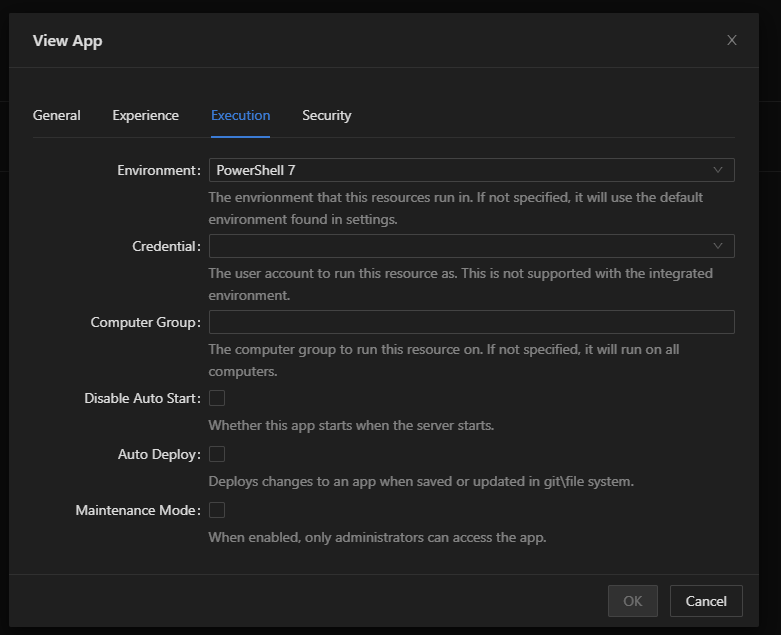
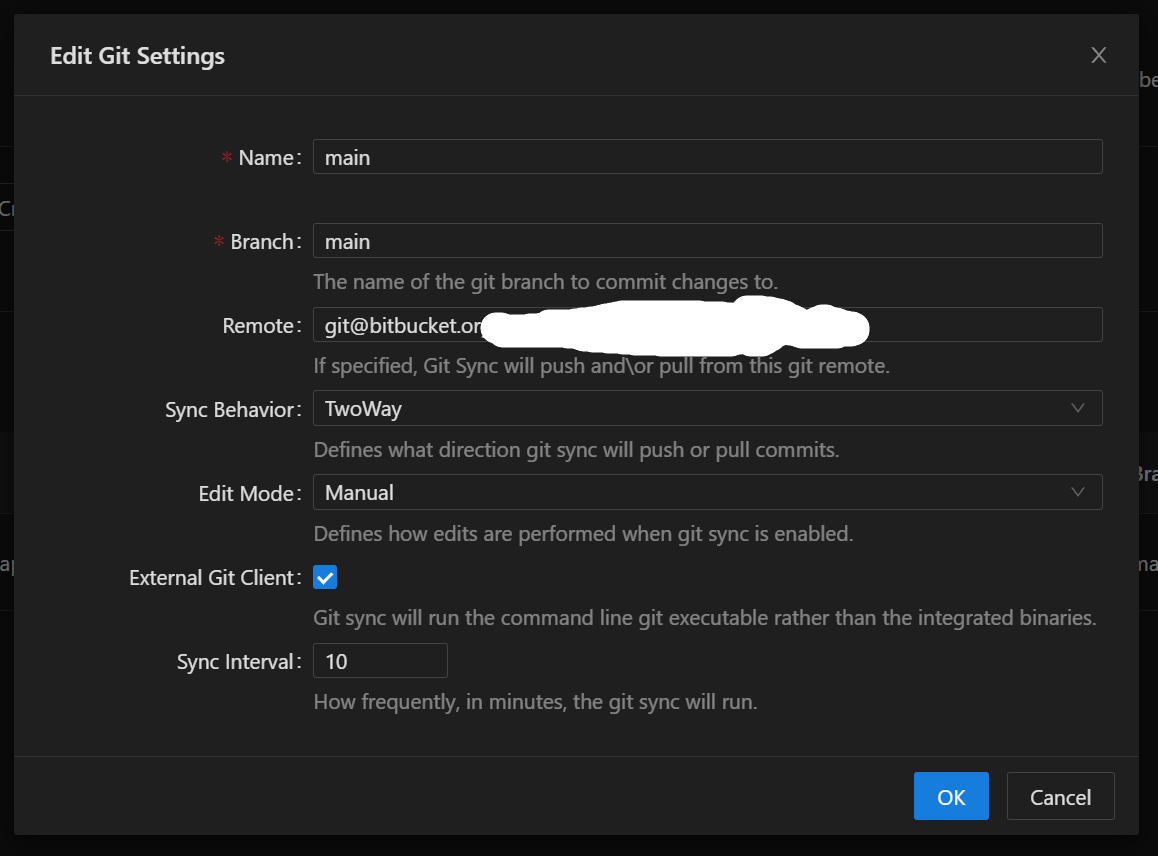
I have git sync enabled, TwoWay, using the external client.
This works well to keep the main server up to date, but I find that my apps often restart when there is a git sync, even when the app files are not updated, and the app has the Auto Deploy disabled. The apps restart even if there are no changes to pull from git.
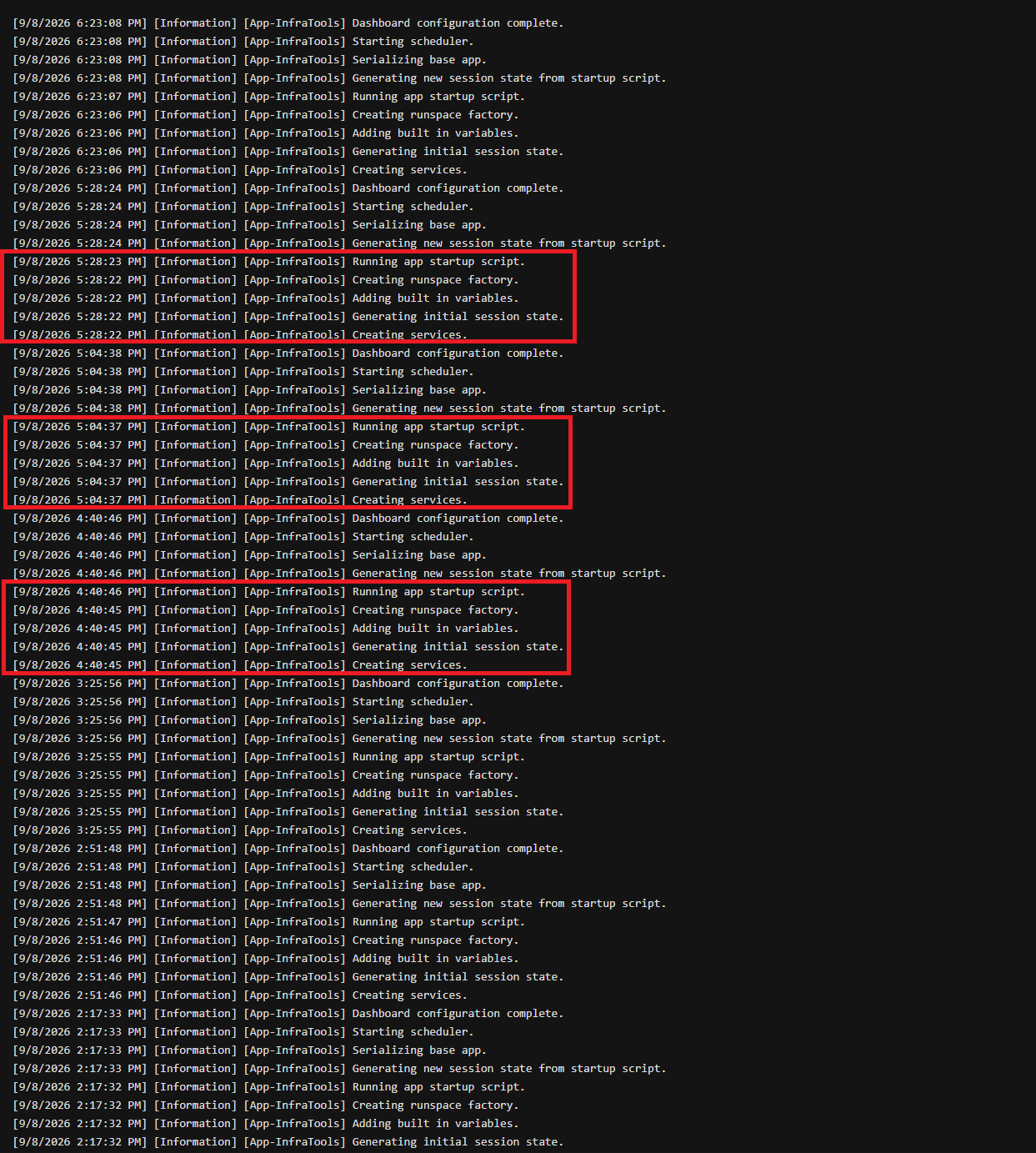
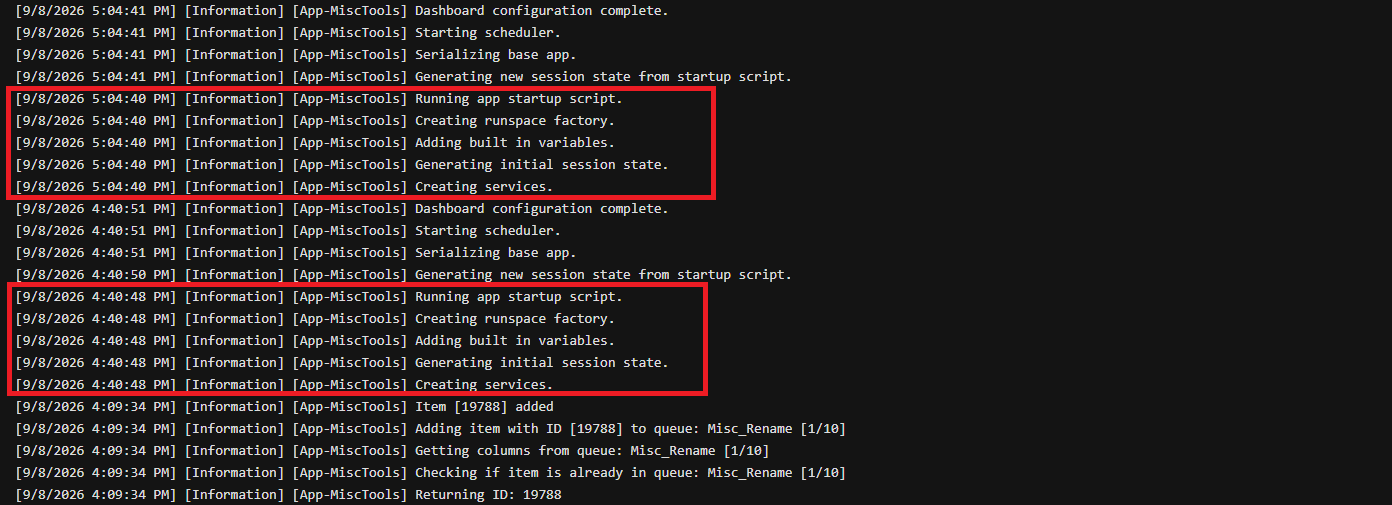
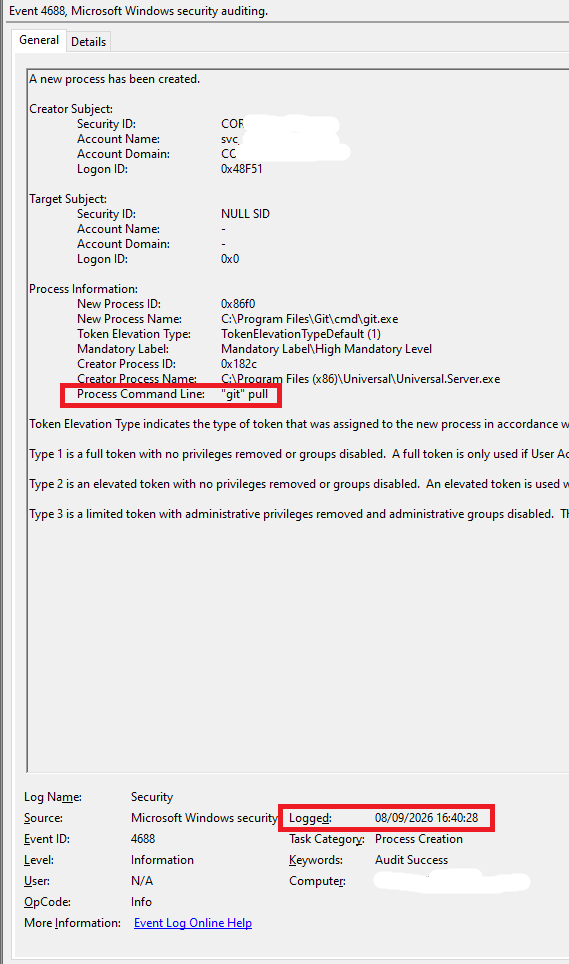
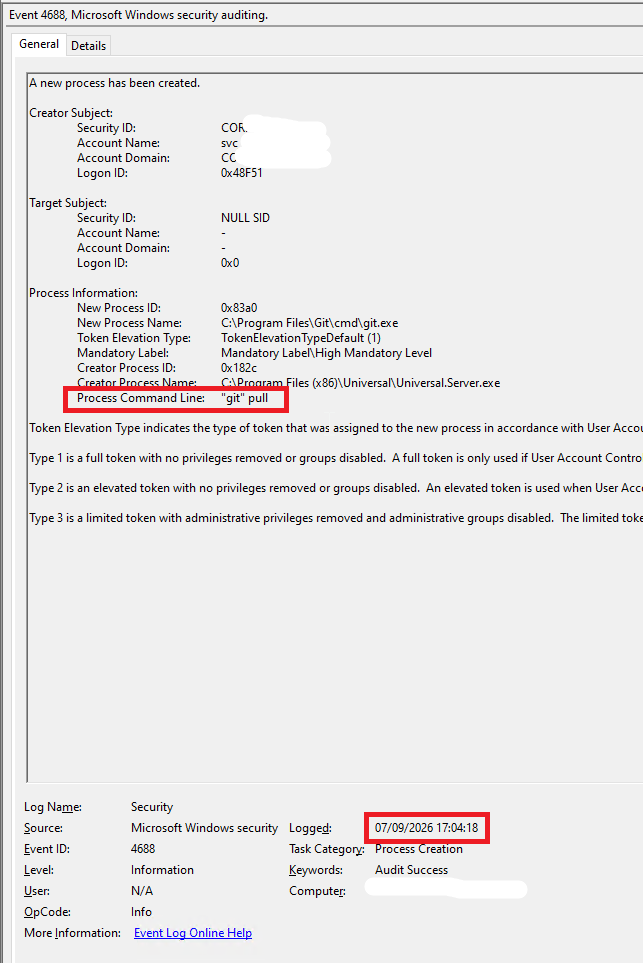
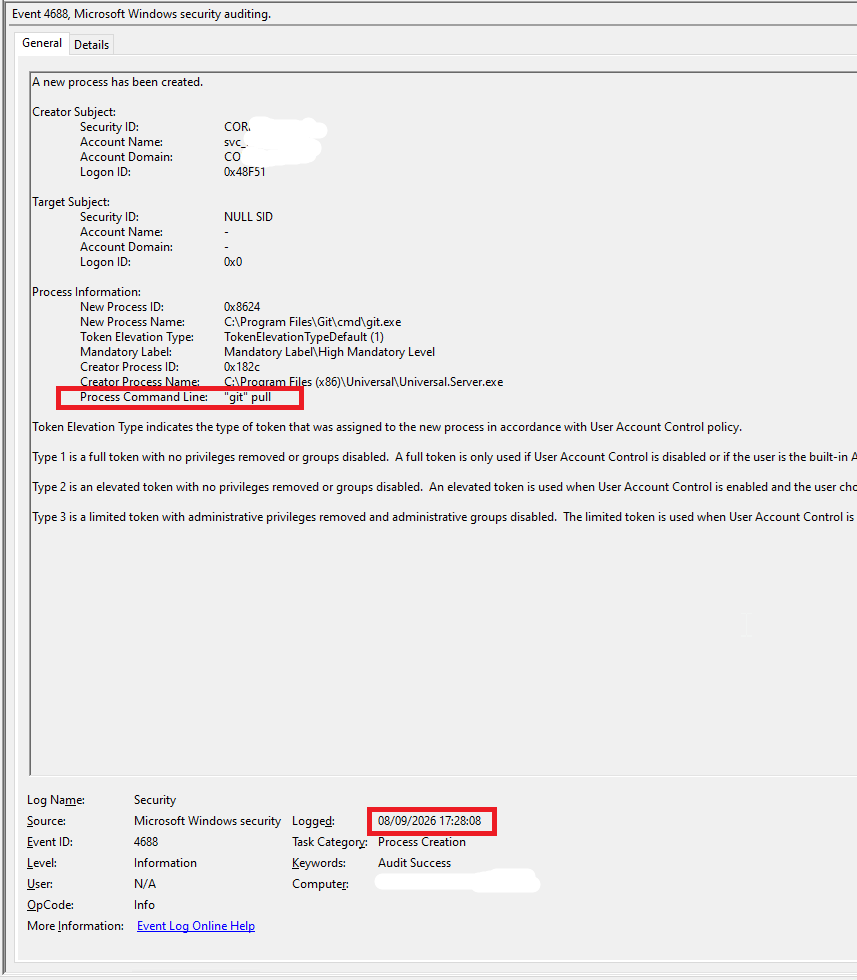
Here are some screenshots showing the app details, as well as the restart times related to the git pull. There are a number of other git commands at the same time, so possibly it's one of those, but I just used the git pull as the reference event to correlate times. Dates are in UK format.
The git sync is set to every 10 mins, but the restart of the apps doesn't happen that often - sometimes every 25 mins, sometimes there is an hour between restarts.
Is there a way to disable the app restart when git runs? Or is there a way to disable the automatic git sync and then I can trigger it manually at a time that the server is unused?
Logging When the local PU admin account logs in
Oh wow, I did not know about triggers!
My instance is licensed and I tested it with a regular AD user login and the admin login and it works fine to capture both.
So this will be perfect for what I need.
Thanks so much for the quick response.
Logging When the local PU admin account logs in
Product: PowerShell Universal
Version: 5.5.2
I am trying to find a way to log when the local PU “admin” user logs in. This is an industry requirement to be able to show when the “admin” user logs in.
I have Form authentication enabled and have a working authentication.ps1 file which I use for Active Directory integration. I am able to validate AD users and I log any failures and successes to a file.
When I log in with the “admin” user and the correct password (as set in Identities), then the authentication.ps1 file is not run at all.
If the “admin” password is incorrect, or the username is anything other than “admin”, then the authentication.ps1 file does run and I am able to capture the login or failure.
I have also tried modifying the Adminstrator role code to add logging when someone gets the role assigned, but again if I log in with “admin” and the correct password then this file also does not get run. If I log in as an AD user with the Administrator role though, the code does run and I am able to capture the login.
From what I can see, a successful login of this user seems to bypass all the script files. And I can’t find anywhere in PU that it logs this.
Is there anything else I can do to somehow capture when the “admin” user successfully logs in?