Groom Jobs Do Not Complete and Scheduler stops processing until restarted
Groom Jobs Do Not Complete and Scheduler stops processing until restarted

PowerShell Universal Version: 5.5.2
I have an issue on my Development server, where the Groom Jobs do not complete and this causes the scheduler to stop processing any new jobs. Restarting the PowerShell Universal service fixes it, but this is not a great solution. The same issue does not occur on my production server (thankfully).
After a restart, everything works normally, but it takes around 2 hours before the scheduler stops processing new jobs. Any new jobs started manually just stay in the "queued" status forever. Any scheduled jobs simply don't get queued at all.
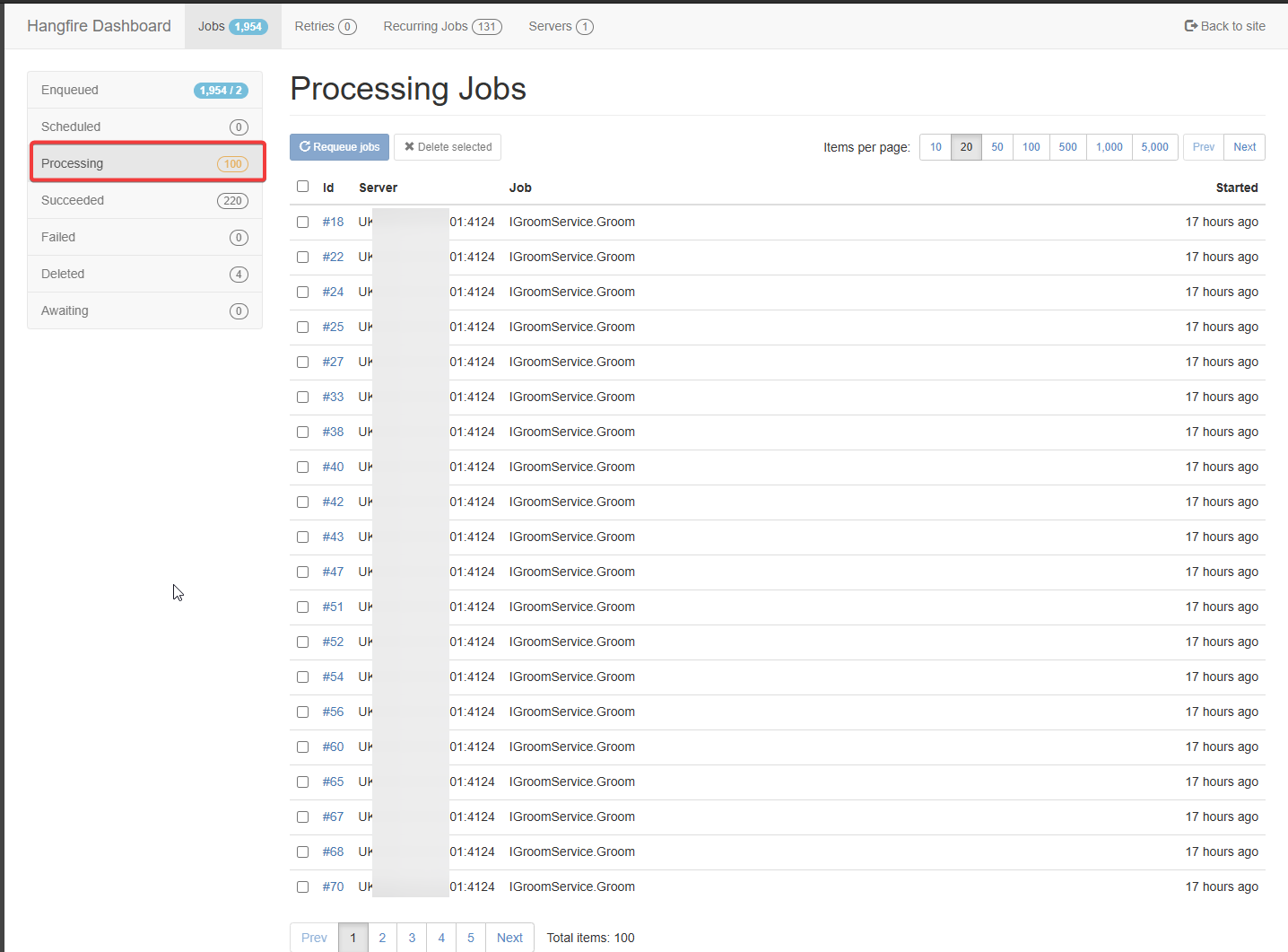
I looked in Hangfire, and the groom schedule runs every minute or so, but the jobs never complete. Other scheduled or manual jobs do appear in the hangfire queue and do complete normally, but once the hangfire queue gets to 100 processing jobs, then everything just stops. All 100 jobs are for the Groom Service. It always stops once the processing jobs gets to 100 entries.
I restarted the service yesterday and then left it overnight so you can see the issue more clearly via the screenshots. There are exactly 100 jobs in the processing queue. And they are all the same IGroomService.Groom job. There are almost 2000 queued up jobs. 17 hours ago was when I restarted the service. The enqueued jobs are both Groom ones and the ones from the PSU scheduler.
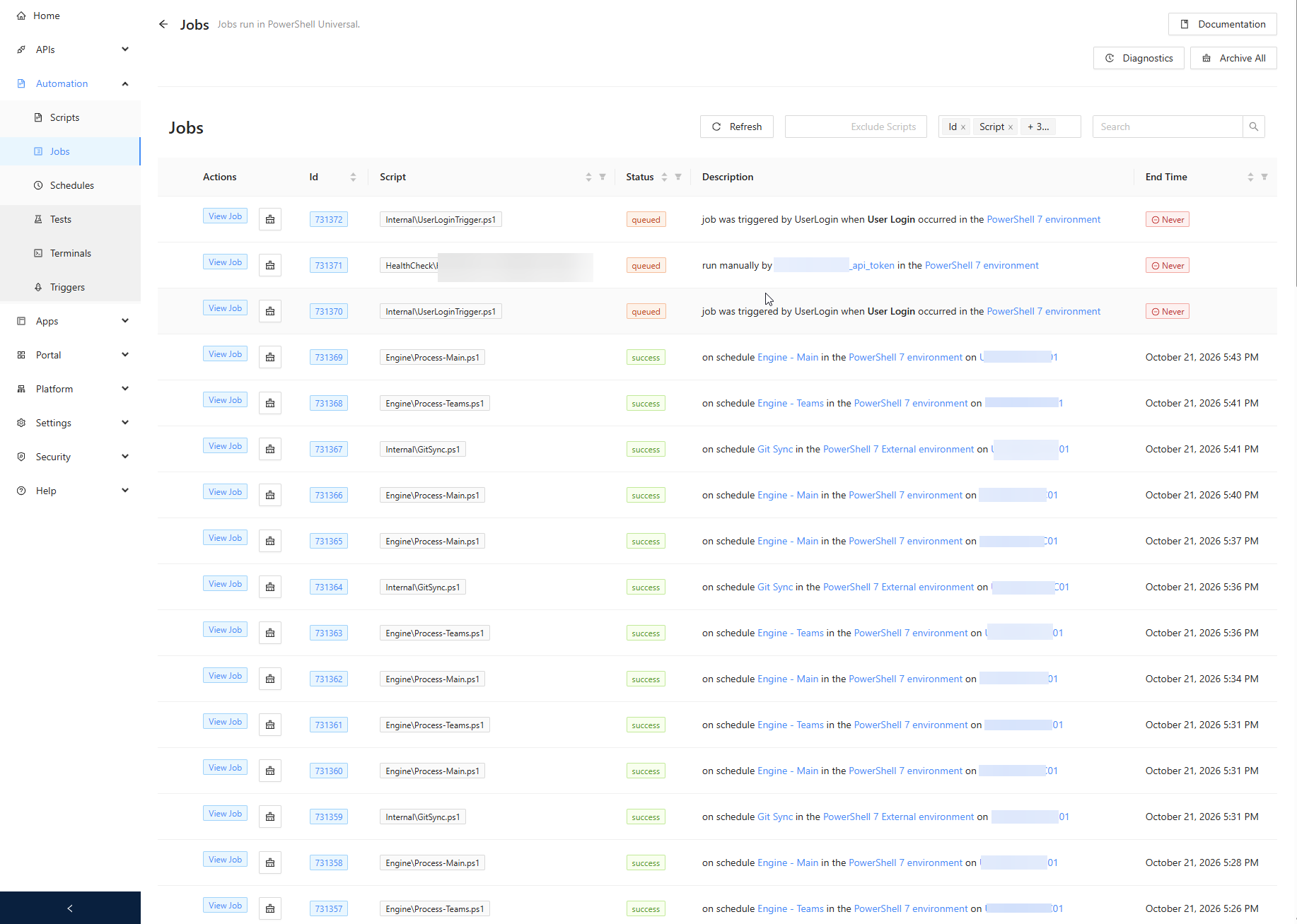
In PSU, the jobs page shows all the jobs being successful up until the hangfire processing queue filled up, and then just the login trigger script when I logged in, and one job that gets launched via an api trigger. The scheduled jobs just never get queued in this view. They are visible in hangfire though (enqueued jobs).
I enabled debug logging and after the restart of the service, I see these errors in the system log. They repeat multiple times per second.
2026-10-21 16:06:21.226 +01:00 [WRN][UniversalAutomation.GroomService] Failed to clear job queue.
Microsoft.EntityFrameworkCore.DbUpdateConcurrencyException: The database operation was expected to affect 1 row(s), but actually affected 0 row(s); data may have been modified or deleted since entities were loaded. See https://go.microsoft.com/fwlink/?LinkId=527962 for information on understanding and handling optimistic concurrency exceptions.
   at Microsoft.EntityFrameworkCore.Update.AffectedCountModificationCommandBatch.ThrowAggregateUpdateConcurrencyExceptionAsync(RelationalDataReader reader, Int32 commandIndex, Int32 expectedRowsAffected, Int32 rowsAffected, CancellationToken cancellationToken)
   at Microsoft.EntityFrameworkCore.Update.AffectedCountModificationCommandBatch.ConsumeResultSetWithRowsAffectedOnlyAsync(Int32 commandIndex, RelationalDataReader reader, CancellationToken cancellationToken)
   at Microsoft.EntityFrameworkCore.Update.AffectedCountModificationCommandBatch.ConsumeAsync(RelationalDataReader reader, CancellationToken cancellationToken)
   at Microsoft.EntityFrameworkCore.Update.ReaderModificationCommandBatch.ExecuteAsync(IRelationalConnection connection, CancellationToken cancellationToken)
   at Microsoft.EntityFrameworkCore.Update.ReaderModificationCommandBatch.ExecuteAsync(IRelationalConnection connection, CancellationToken cancellationToken)
   at Microsoft.EntityFrameworkCore.Update.Internal.BatchExecutor.ExecuteAsync(IEnumerable`1 commandBatches, IRelationalConnection connection, CancellationToken cancellationToken)
   at Microsoft.EntityFrameworkCore.Update.Internal.BatchExecutor.ExecuteAsync(IEnumerable`1 commandBatches, IRelationalConnection connection, CancellationToken cancellationToken)
   at Microsoft.EntityFrameworkCore.Update.Internal.BatchExecutor.ExecuteAsync(IEnumerable`1 commandBatches, IRelationalConnection connection, CancellationToken cancellationToken)
   at Microsoft.EntityFrameworkCore.Storage.RelationalDatabase.SaveChangesAsync(IList`1 entries, CancellationToken cancellationToken)
   at Microsoft.EntityFrameworkCore.ChangeTracking.Internal.StateManager.SaveChangesAsync(IList`1 entriesToSave, CancellationToken cancellationToken)
   at Microsoft.EntityFrameworkCore.ChangeTracking.Internal.StateManager.SaveChangesAsync(StateManager stateManager, Boolean acceptAllChangesOnSuccess, CancellationToken cancellationToken)
   at Microsoft.EntityFrameworkCore.DbContext.SaveChangesAsync(Boolean acceptAllChangesOnSuccess, CancellationToken cancellationToken)
   at PowerShellUniversal.Extensibility.EFTable`2.SaveWithRetryAsync(DbContext context) in D:\a\universal\universal\src\PowerShellUniversal.Extensibility\Persistence\EFTable.cs:line 720
   at PowerShellUniversal.Extensibility.EFTable`2.SaveWithRetryAsync(DbContext context) in D:\a\universal\universal\src\PowerShellUniversal.Extensibility\Persistence\EFTable.cs:line 726
   at PowerShellUniversal.Extensibility.EFTable`2.DeleteAsync(T item) in D:\a\universal\universal\src\PowerShellUniversal.Extensibility\Persistence\EFTable.cs:line 158
   at PowerShellUniversal.Extensibility.EFTable`2.DeleteAsync(T item) in D:\a\universal\universal\src\PowerShellUniversal.Extensibility\Persistence\EFTable.cs:line 158
at UniversalAutomation.GroomService.GroomJobQueue(Int32 groomDays) in D:\a\universal\universal\src\Universal.Server\Services\GroomService.cs:line 29All Comments (2)
Hello,
Thank you for the detailed report.
The screenshots and the debug log line up with a known issue in PowerShell Universal 5.5.x.
The groom job locks the job queue table while it cleans it up.
When one groom run has not finished before the next one starts a minute later, the locks pile up and the runs never complete.
Each stuck groom run holds one Hangfire worker, and once all 100 workers are held, no other job can start.
Your screenshots match this pattern closely.
The restart was logged at 16:06, and the last scheduled job finished at 5:43 PM, about 100 minutes later.
That is one stuck groom run per minute until all 100 workers were taken.
The fix was released in PowerShell Universal 5.5.4, under the Platform fixes in its release notes.
We recommend upgrading the development server to the current PowerShell Universal release rather than stopping at 5.5.4.
Later releases also stop overlapping groom runs from logging misleading concurrency warnings.
Before you upgrade, back up the database and appsettings.json as described in the upgrade guide.
Until you upgrade, restarting the service remains the way to clear the stuck groom jobs.
Could you also tell us which version and database type, SQLite, SQL Server or PostgreSQL, your production server uses?
If production already runs 5.5.4 or later, that would explain why it is not affected.
After the upgrade, if "Failed to clear job queue" still appears in the system log, please send us the latest system log and we will look further.
5.5.4 release notes: https://forum.devolutions.net/topics/54570/powershell-universal--554
Upgrade guide: https://docs.devolutions.net/powershell-universal/getting-started/upgrading
Release notes: https://devolutions.net/powershell-universal/release-notes/
Best regards,
Patrick Ouimet
Hi there. I was not able to find v5.5.4, so I just upgraded to the latest version - 2026.3.4.0.
This does seem to have fixed the problem - jobs are no longer getting stuck. I will give it another 2 weeks in Dev while I test all our scripts and apps, then will update our prod server to the same version.
Prod is still on v5.5.2, but doesn't have the job issue, which is why I found it weird.
Thanks for the assistance.